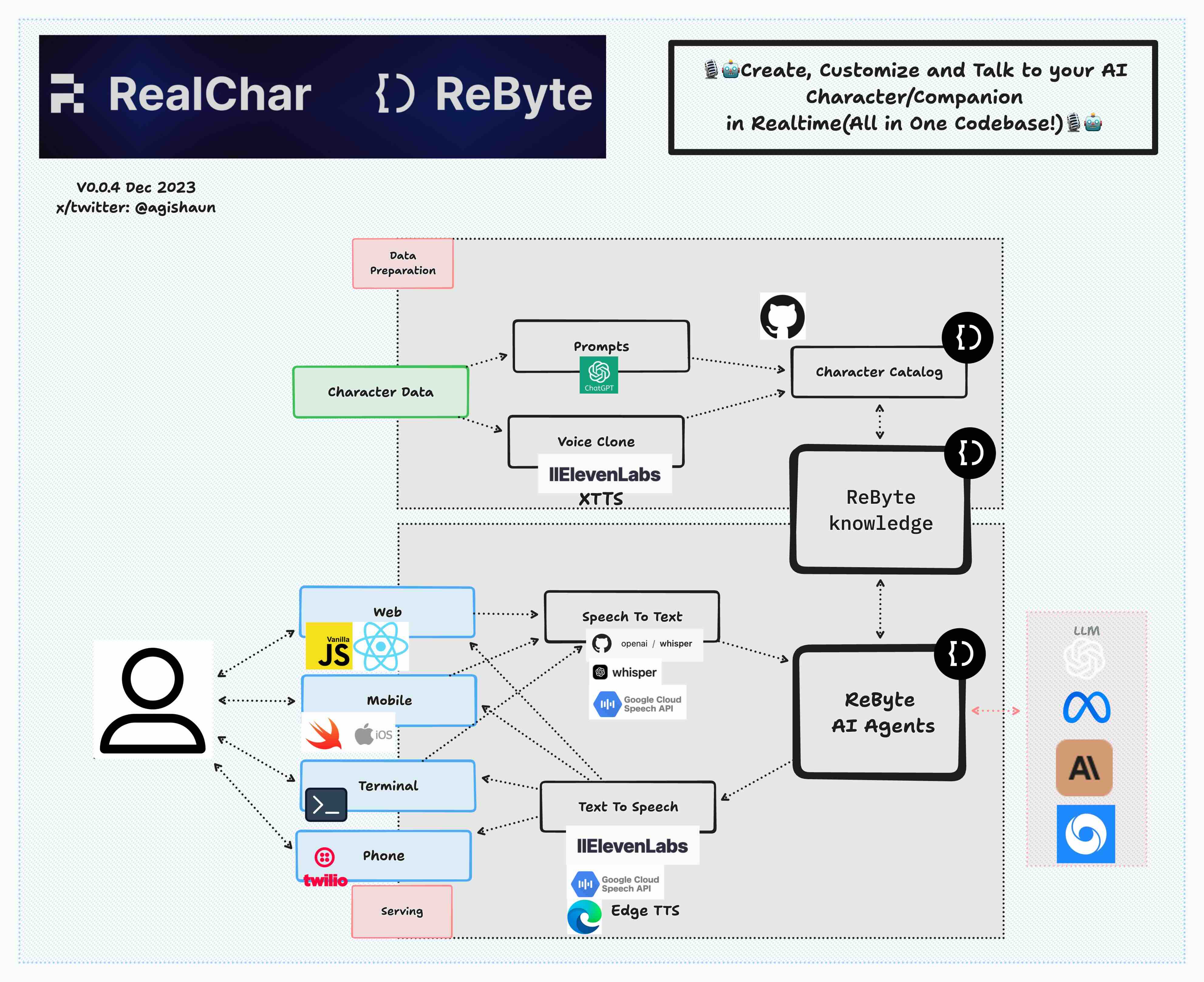
Shaunwei/RealChar is a JavaScript project with 6.2k stars. 🎙️🤖Create, Customize and Talk to your AI Character/Companion in Realtime (All in One Codebase!). Have a natural seamless conversation with AI everywhere (mobile, web and terminal) using LLM OpenAI GPT3.5/4, Anthropic Claude2, Chroma Vector DB, Whisper Speech2Text, ElevenLabs Text2Speech🎙️🤖
Snapshot summary built from the project's own GitHub metadata — there's no written TopGit review yet. The page will update automatically when a full review is published.
WHY NO REVIEW YET
TopGit writes full reviews for the most-starred, most-requested repositories. This page is a snapshot until then — see the READ ME tab for the original README in full.
Demo settings: Web, GPT4, ElevenLabs with voice clone, Chroma, Google Speech to Text
🎯 Key Features
Easy to use: No coding required to create your own AI character.
Customizable: You can customize your AI character's personality, background, and even voice
Realtime: Talk to or message your AI character in realtime
Multi-Platform: You can talk to your AI character on web, terminal and mobile(Yes. we open source our mobile app)
Most up-to-date AI: We use the most up-to-date AI technology to power your AI character, including OpenAI, Anthropic Claude 2, Chroma, Whisper, ElevenLabs, etc.
Modular: You can easily swap out different modules to customize your flow. Less opinionated, more flexible. Great project to start your AI Engineering journey.
🔬 Tech stack
✅Web: React JS, Vanilla JS, WebSockets
✅Mobile: Swift, WebSockets
✅Backend: FastAPI, SQLite, Docker
✅Data Ingestion: LlamaIndex, Chroma
✅LLM Orchestration: LangChain, Chroma
✅LLM: ReByte, OpenAI GPT3.5/4, Anthropic Claude 2, Anyscale Llama2
✅Speech to Text: Local WhisperX, Local Whisper, OpenAI Whisper API, Google Speech to Text
✅Text to Speech: ElevenLabs, Edge TTS, Google Text to Speech
✅Voice Clone: ElevenLabs
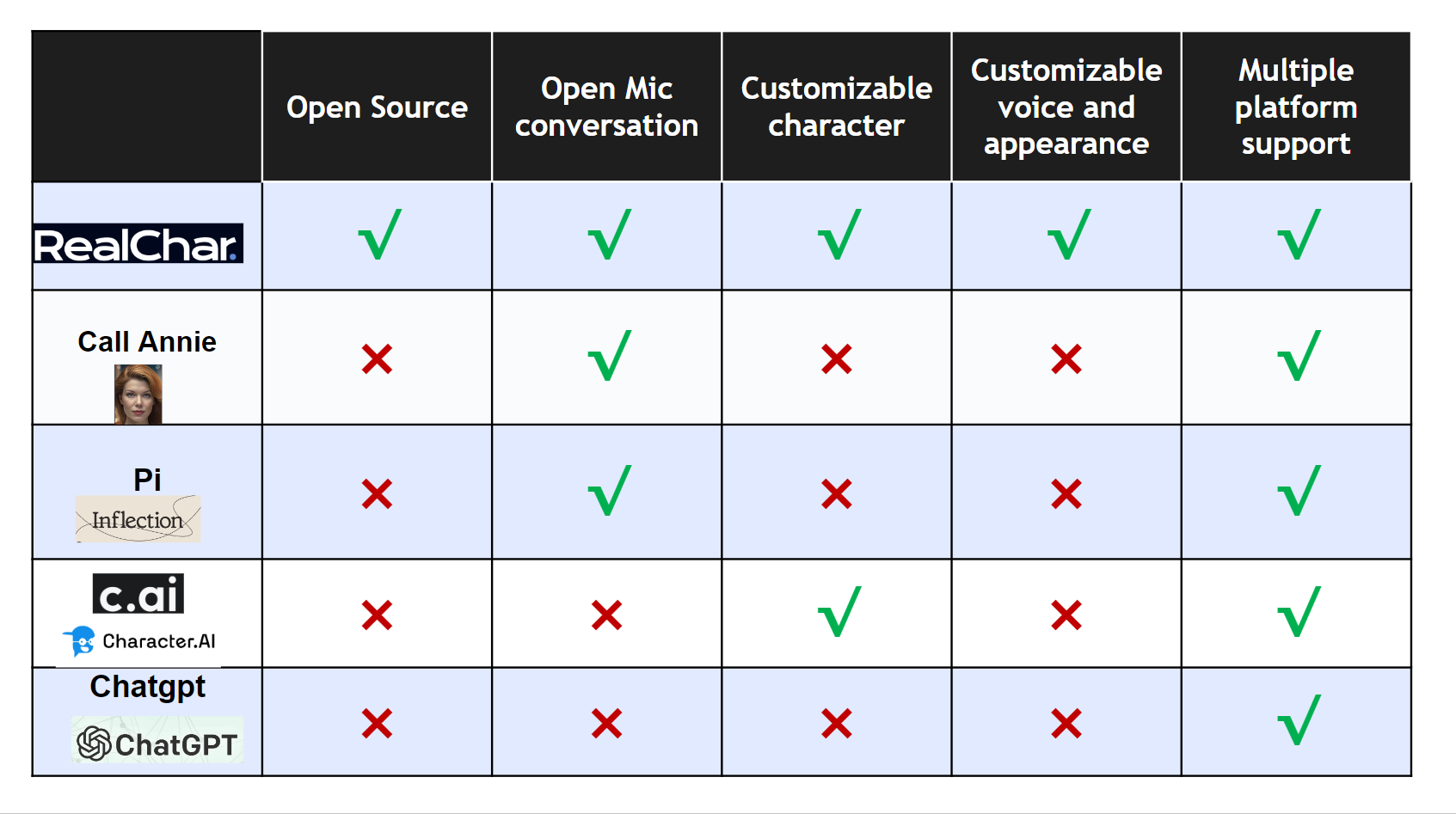
📚 Comparison with existing products
📀 Quick Start - Installation via Docker
Create a new .env file
cp .env.example .env
Paste your API keys in .env file. A single ReByte or OpenAI API key is enough to get started.
You can also configure other API keys if you have them.
Start the app with docker-compose.yaml
docker compose up
If you have issues with docker (especially on a non-Linux machine), please refer to https://docs.docker.com/get-docker/ (installation) and https://docs.docker.com/desktop/troubleshoot/overview/ (troubleshooting).
Open http://localhost:3000 and enjoy the app!
💿 Developers - Installation via Python
Step 1. Clone the repo
git clone https://github.com/Shaunwei/RealChar.git && cd RealChar
Step 2. Install requirements
Install portaudio and ffmpeg for audio
# for mac
brew install portaudio
brew install ffmpeg
Step 3. Create an empty sqlite database if you have not done so before
sqlite3 test.db "VACUUM;"
Step 4. Run db upgrade
alembic upgrade head
This ensures your database schema is up to date. Please run this after every time you pull the main branch.
Step 5. Setup .env:
cp .env.example .env
Update API keys and configs following the instructions in the .env file.
Note that some features require a working login system. You can get your own OAuth2 login for free with Firebase if needed. To enable, set USE_AUTH to true and fill in the FIREBASE_CONFIG_PATH field. Also fill in Firebase configs in client/next-web/.env.
Step 6. Run backend server with cli.py or use uvicorn directly
python cli.py run-uvicorn
# or
uvicorn realtime_ai_character.main:app
Adjust .env according to the instruction in client/next-web/README.md.
Start the frontend server:
python cli.py next-web-dev
# or
cd client/next-web && npm run dev
# or
cd client/next-web && npm run build && npm run start
After running these commands, a local development server will start, and your default web browser will open a new tab/window pointing to this server (usually http://localhost:3000).
(Optional) Terminal client:
Run the following command in your terminal
python client/cli.py
(Optional) mobile client:
open client/mobile/ios/rac/rac.xcodeproj/project.pbxproj in Xcode and run the app
Step 8. Select one character to talk to, then start talking. Use GPT4 for better conversation and Wear headphone for best audio(avoid echo)
Note if you want to remotely connect to a RealChar server, SSL set up is required to establish the audio connection.
👨🚀 API Keys and Configurations
1. LLMs
1.1 ReByte API Key
To get your ReByte API key, follow these steps:
Go to the ReByte website and sign up for an account if you haven't already.
Once you're logged in, go to Settings > API Keys.
Generate a new API key by clicking on the "Generate" button.
1.2 (Optional) OpenAI API Token
👇click me
This application utilizes the OpenAI API to access its powerful language model capabilities. In order to use the OpenAI API, you will need to obtain an API token.
To get your OpenAI API token, follow these steps:
Go to the OpenAI website and sign up for an account if you haven't already.
Once you're logged in, navigate to the API keys page.
Generate a new API key by clicking on the "Create API Key" button.
(Optional) To use Azure OpenAI API instead, refer to the following section:
Set API type in your .env file:
OPENAI_API_TYPE=azure
If you want to use the earlier version 2023-03-15-preview:
OPENAI_API_VERSION=2023-03-15-preview
To set the base URL for your Azure OpenAI resource.
You can find this in the Azure portal under your Azure OpenAI resource.
You'll also need to install torch and torchaudio to use Twilio.
Now, you can receive phone calls from your characters by typing /call YOURNUMBER in the text box when chatting with your character.
Note: only US phone numbers and Elevenlabs voiced characters are supported at the moment.
🆕! Anyscale and LangSmith integration
👇click me
Anyscale
You can now use Anyscale Endpoint to serve Llama-2 models in your RealChar easily! Simply register an account with Anyscale Endpoint. Once you get the API key, set this environment variable in your .env file:
ANYSCALE_ENDPOINT_API_KEY=<your API Key>
By default, we show the largest servable Llama-2 model (70B) in the Web UI. You can change the model name (meta-llama/Llama-2-70b-chat-hf) to other models, e.g. 13b or 7b versions.
LangSmith
If you have access to LangSmith, you can edit these environment variables to enable:
LANGCHAIN_TRACING_V2=false # default off
LANGCHAIN_ENDPOINT=https://api.smith.langchain.com
LANGCHAIN_API_KEY=YOUR_LANGCHAIN_API_KEY
LANGCHAIN_PROJECT=YOUR_LANGCHAIN_PROJECT
And it should work out of the box.
📍 Roadmap
Launch v0.0.4
Create a new character via web UI
Lower conversation latency
Support Twilio
Support ReByte
Persistent conversation*
Session management*
Support RAG*
Support Agents/GPTs*
Add additional TTS service*
$*$ These features are powered by ReByte platform.
TopGit's last sync did not record any GitHub topics for Shaunwei/RealChar. GitHub topics appear in the right sidebar of a repository page; that's the authoritative place to check.
How active is development on Shaunwei/RealChar?
The most recent commit recorded on Shaunwei/RealChar was 9 months ago, based on the GitHub push timestamp. The repository has 770 forks — one of the better signals of community interest.
Is Shaunwei/RealChar open source?
Yes — Shaunwei/RealChar ships under the MIT license, which makes its source code freely readable (and, depending on license terms, forkable and reusable). Source: github.com/Shaunwei/RealChar.
What license does Shaunwei/RealChar use?
Shaunwei/RealChar is released under the MIT license. Always verify the LICENSE file directly on GitHub for the authoritative terms — license strings can be edited out of sync with a project's actual stance.
Where can I see Shaunwei/RealChar in action?
The project maintains a homepage at https://RealChar.ai/. The README tab on this page also usually contains screenshots and a quickstart.
Where do I read more about Shaunwei/RealChar?
This TopGit page is a snapshot — the READ ME tab shows the project's own README content (links stripped, images preserved). The GitHub repository at github.com/Shaunwei/RealChar is the definitive source.
Read full README in the tab above.
Curious whether RealChar is right for you?
Let ChatGPT, Claude, or Perplexity look into it — click below and see what AI actually says about RealChar.

 /RealChar
 RealChar. - Your Realtime AI Character