Được TopGit lập chỉ mục từ metadata GitHub: Shougo/unite.vim có 2.8k sao, viết chủ yếu bằng Vim Script. :dragon: Unite and create user interfaces
Tóm tắt dựng từ metadata GitHub của chính dự án — chưa có bài review TopGit. Trang sẽ tự động cập nhật khi bài review đầy đủ được xuất bản.
VÌ SAO CHƯA CÓ REVIEW
TopGit viết bài đầy đủ cho repo có nhiều sao nhất và được yêu cầu nhiều nhất. Trang này là snapshot trong thời gian chờ — xem README gốc ở tab READ ME.
Note: Active development on denite.nvim has stopped. The only future
changes will be bug fixes.
Please see ddu.vim.
The unite or unite.vim plug-in can search and display information from
arbitrary sources like files, buffers, recently used files or registers. You
can run several pre-defined actions on a target displayed in the unite window.
The difference between unite and similar plug-ins like fuzzyfinder,
ctrl-p or ku is that unite provides an integration interface for several
sources and you can create new interfaces using unite.
Usage
Run unite to display files and buffers as sources to pick from.
:Unite file buffer
Run unite with an initial filter value (foo) to narrow down files.
:Unite -input=foo file
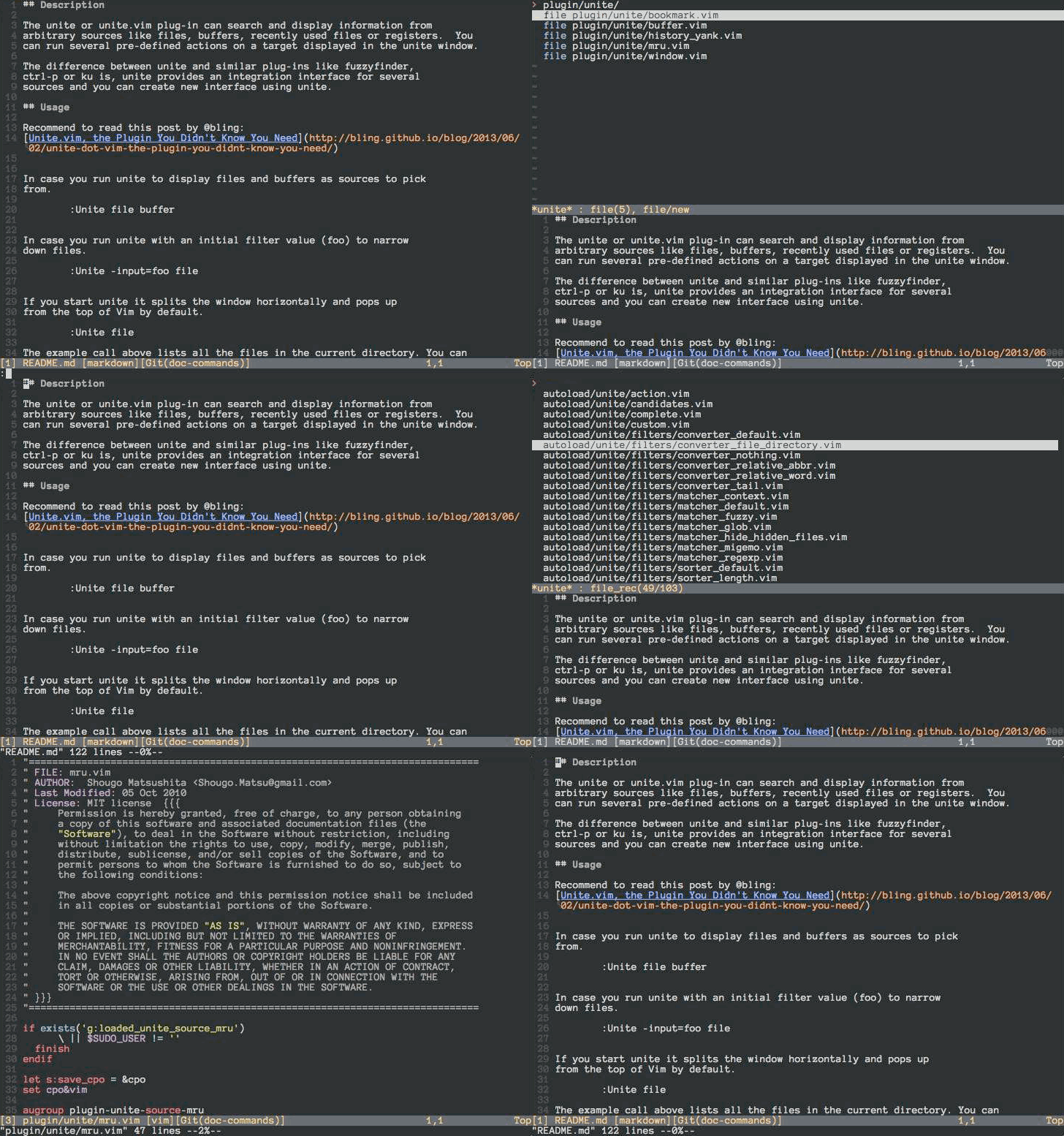
If you start unite it splits the window horizontally and pops up
from the top of Vim by default.
:Unite file
The example call above lists all the files in the current directory. You can
choose one of them in the unite window by moving the cursor up and down
as usual with j and k. If you type Enter on an active candidate it will open
it in a new buffer. Enter triggers the default action for a candidate which is
"open" for candidates of the kind "file". You can also select an alternative
action for a candidate with . See also unite-action to read on about
actions.
You can also narrow down the list of candidates by a keyword. If you change
into the insert mode inside of a unite window, the cursor drops you behind the
">" in the second line from above. There you can start typing to filter the
candidates. You can also use the wild card * as an arbitrary character
sequence. For example,
*hisa
matches hisa, ujihisa, or ujihisahisa. Furthermore, two consecutive wild cards
match a directory recursively.
**/foo
So the example above matches bar/foo or buzz/bar/foo.
Note: The unite action file_rec does a recursive file matching by default
without the need to set wildcards.
You can also specify multiple keywords to narrow down the candidates. Multiple
keywords need to be separated either by a space " " or a dash "|". The
examples below match for candidates that meet both conditions "foo" and "bar".
foo bar
foo|bar
You can also specify negative conditions with an exclamation mark "!". This
matches candidates that meet "foo" but do not meet "bar".
foo !bar
Wild cards are added automatically if you add a "/" in the filter and you have
specified "files" as the buffer name with the option "-buffer-name". That's
handy in case you select files with unite.
:Unite -buffer-name=files file
See also unite_default_key_mappings for other actions.
Install
Install the distributed files into your Vim script directory which is usually
~/.vim/, or $HOME/vimfiles on Windows. You should consider using one of the
famous package managers for Vim like vundle or neobundle to install the
plugin.
After installation you can run unite with the :Unite command and append the
sources to the command you wish to select from as parameters. However, it's a
pain in the ass to run the command explicitly every time, so I recommend you
to set a key mapping for the command. See :h unite.
Note: MRU sources are splitted. To use mru sources, you must install neomru.
https://github.com/Shougo/neomru.vim
Resources
Unite plugins (in Japanese)
Unite.vim, the Plugin You Didn't Know You Need
Replacing All The Things with Unite.vim — Codeography
Trang TopGit này là một snapshot — tab "Readme" hiển thị nguyên văn README của repo (đã bỏ link, giữ ảnh). Repo GitHub ở github.com/Shougo/unite.vim là nguồn chính thức.
Shougo/unite.vim có bao nhiêu sao?
Shougo/unite.vim có 2.8k sao GitHub — tải lại trang để xem số mới nhất, hoặc xem trực tiếp github.com/Shougo/unite.vim. TopGit phản chiếu số sao của GitHub nhưng không cam kết đến từng phút.
Shougo/unite.vim có phải mã nguồn mở không?
TopGit chưa ghi nhận license cho Shougo/unite.vim. Phần lớn repo public trên GitHub là mã nguồn mở, nhưng điều khoản khác nhau từng repo — mở file LICENSE để xác nhận.
Shougo/unite.vim còn đang phát triển không?
Commit gần nhất trên Shougo/unite.vim là 3.5 năm trước (theo timestamp GitHub). Repo có 219 fork — một chỉ báo về mức độ quan tâm của cộng đồng.
Shougo/unite.vim là gì?
Shougo/unite.vim (Shougo/unite.vim) là dự án Vim Script trên GitHub. Theo mô tả gốc: :dragon: Unite and create user interfaces
Shougo/unite.vim viết bằng ngôn ngữ gì?
Shougo/unite.vim chủ yếu viết bằng Vim Script. Trường "language" của GitHub dựa trên phần lớn byte ở nhánh mặc định.
Đọc đầy đủ README ở tab phía trên.
Muốn nghe thêm một ý kiến về unite.vim?
Hỏi một AI đọc được trang này — một cú bấm là có ngay nhận định về unite.vim.

 /unite.vim