Một mục hướng lập trình viên trong kho dữ liệu GitHub của TopGit: shufo/vscode-blade-formatter, 5.3k sao, nhóm Developer Tools, TypeScript. An opinionated Blade file formatter for VSCode
Tóm tắt dựng từ metadata GitHub của chính dự án — chưa có bài review TopGit. Trang sẽ tự động cập nhật khi bài review đầy đủ được xuất bản.
VÌ SAO CHƯA CÓ REVIEW
TopGit viết bài đầy đủ cho repo có nhiều sao nhất và được yêu cầu nhiều nhất. Trang này là snapshot trong thời gian chờ — xem README gốc ở tab READ ME.
An opinionated Blade file formatter for VSCode. Marketplace page is here.
You can also format programmatically with the same syntax using the blade-formatter that this extension relies on.
Features
Automatically indent markup inside directives
Automatically add spacing to blade template markers
PHP 8 support (null safe operator, named arguments) 🐘
PSR-2 support (format inside directives)
Automatically sort Tailwind CSS classes with respect of tailwind.config.js
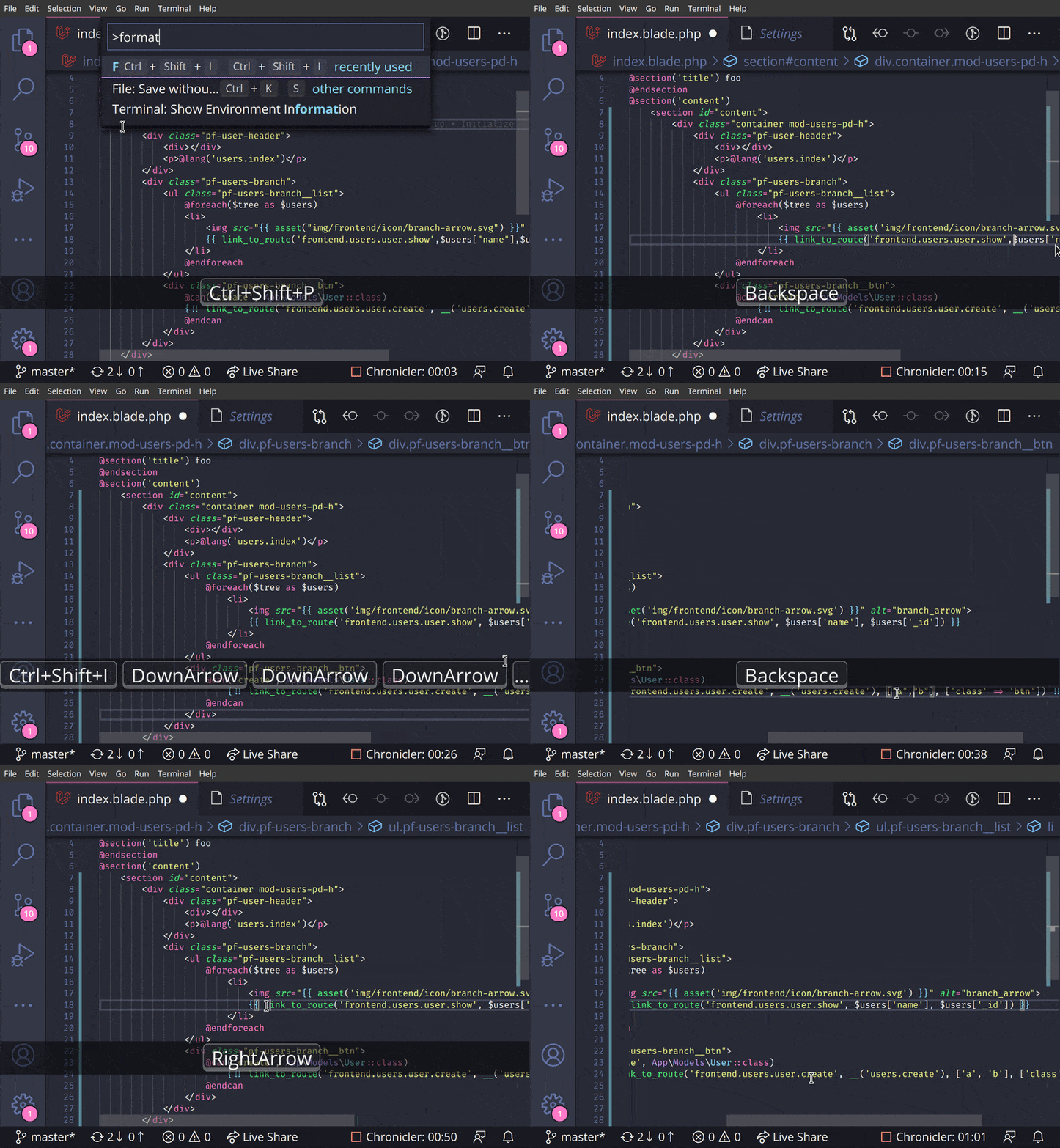
Screencast
Extension Settings
setting
description
default
Blade Formatter: format Enabled
Whether it enables or not
true
Blade Formatter: format Indent Size
An indent size
4
Blade Formatter: format Wrap Line Length
The length of line wrap size
120
Blade Formatter: format Wrap Attributes
The way to wrap attributes. [auto|force|force-aligned|force-expand-multiline|aligned-multiple|preserve|preserve-aligned]
auto
Blade Formatter: format Wrap Attributes Min Attrs
Minimum number of html tag attributes for force wrap attribute options. Wrap the first attribute only if force-expand-multiline is specified in wrap attributes
2
Blade Formatter: format Sort Tailwind Css Classes
Sort Tailwind CSS classes automatically
false
Blade Formatter: format Sort HTML Attributes
Sort HTML Attributes in the specified order. [none | alphabetical | code-guide | idiomatic | vuejs]
none
Blade Formatter: format Indent Inner Html
Indent <head> and <body> sections in html.
false
Blade Formatter: format use Tabs
Use tab as indentation character
false
Blade Formatter: format Custom Html Attributes Order
Comma separated custom HTML attributes order. e.g. id, data-.+, class, name. To enable this you must specify sort html attributes option as custom. You can use regex for attribute names.
none
Blade Formatter: format No Multiple Empty Lines
Collapses multiple blank lines into a single blank line.
false
Blade Formatter: format No PHP Syntax Check
Disable PHP Syntax check. Enabling this will suppress syntax error reporing.
""
Blade Formatter: format No Single Quote
Use double quotes instead of single quotes for php expression.
false
Blade Formatter: format No Trailing Comma Php
If set to true, no trailing commas are printed for php expression.
false
Blade Formatter: format Component Prefix
Specify custom prefixes for component names separated by comma. e.g. x-,livewire. This changes the format rules applied to custom components e.g. preserve style in attributes.
x-,livewire
Blade Formatter: format PHP Version
A php version using for syntax compatibility.
8.4
Blade Formatter: Dont Show New Version Message
If set to 'true', the new version message won't be shown anymore.
false
Configuration file: .bladeformatterrc.json or .bladeformatterrc
To configure settings per project, put .bladeformatterrc.json or .bladeformatterrc to your project root will vscode-blade-formatter treat it as setting files.
To disable formatting for an entire file, put a {{-- blade-formatter-disable --}} comment at the beginning of the file:
{{-- blade-formatter-disable --}}

{{ $foo }}
TODO
Add more option for HTML formatting rules
Add option for PHP formatting rules
Automate package publishing flow
Integration test
Release Notes
see CHANGELOG.md
Related Projects
blade-formatter - CLI blade formatter this extension relies on
prettier-plugin-blade - Prettier plugin for Blade
coc-blade - coc.nvim Extension by @yaegassy
Contributing
Fork it
Create your feature branch (git checkout -b my-new-feature)
Commit your changes (git commit -am 'Add some feature')
Push to the branch (git push origin my-new-feature)
Create new Pull Request
Development
$ npm install
$ cp .env.example .env # set your app insight key
$ npm run watch # watch changes
Testing
$ npm install
$ cp .env.example .env # set your app insight key
$ npm run compile
$ npm run test
$ npm run test:e2e
Sponsors
Contributors
Shuhei Hayashibara
Lovro Papež
Snyk Bot
Yaegassy
dianfishekqi
Isaac Emmanuel
Julio J. Foulquie
LICENSE
MIT
Data and telemetry
This extension collects usage data and sends it to Azure Application Insight to improve extension. This extension respects the telemetry.enableTelemetry setting.
To opt out, please set the telemetry.enableTelemetry setting to false. Learn more in FAQ.
Trang TopGit này là một snapshot — tab "Readme" hiển thị nguyên văn README của repo (đã bỏ link, giữ ảnh). Repo GitHub ở github.com/shufo/vscode-blade-formatter là nguồn chính thức.
shufo/vscode-blade-formatter có bao nhiêu sao?
shufo/vscode-blade-formatter có 5.3k sao GitHub — tải lại trang để xem số mới nhất, hoặc xem trực tiếp github.com/shufo/vscode-blade-formatter. TopGit phản chiếu số sao của GitHub nhưng không cam kết đến từng phút.
shufo/vscode-blade-formatter có phải mã nguồn mở không?
Có — shufo/vscode-blade-formatter phát hành theo license MIT, nghĩa là mã nguồn mở để đọc, fork và (tùy license) tái sử dụng. Mã: github.com/shufo/vscode-blade-formatter.
shufo/vscode-blade-formatter còn đang phát triển không?
Commit gần nhất trên shufo/vscode-blade-formatter là 26 ngày trước (theo timestamp GitHub). Repo có 43 fork — một chỉ báo về mức độ quan tâm của cộng đồng.
shufo/vscode-blade-formatter là gì?
shufo/vscode-blade-formatter (shufo/vscode-blade-formatter) là dự án TypeScript trên GitHub. Theo mô tả gốc: An opinionated Blade file formatter for VSCode
shufo/vscode-blade-formatter so với các dự án Developer Tools khác thế nào?
shufo/vscode-blade-formatter được TopGit xếp vào nhóm Developer Tools, với 5.3k sao GitHub và viết bằng TypeScript. Xem trang chủ đề Developer Tools trên TopGit để so sánh với các dự án tương tự theo số sao và mức độ hoạt động.
Đọc đầy đủ README ở tab phía trên.
vscode-blade-formatter có đáng để bạn bỏ thời gian?
ChatGPT, Claude và Perplexity đều đọc được trang này. Hỏi thử xem họ nghĩ gì về vscode-blade-formatter.

 /vscode-blade-formatter