sirupsen/zk được TopGit xếp vào nhóm dự án mã nguồn mở, với 617 sao trên GitHub, viết chủ yếu bằng Ruby. Zettelkasten on the command-line 📚 🔍
Tóm tắt dựng từ metadata GitHub của chính dự án — chưa có bài review TopGit. Trang sẽ tự động cập nhật khi bài review đầy đủ được xuất bản.
VÌ SAO CHƯA CÓ REVIEW
TopGit viết bài đầy đủ cho repo có nhiều sao nhất và được yêu cầu nhiều nhất. Trang này là snapshot trong thời gian chờ — xem README gốc ở tab READ ME.
Stupid-fast plain-text Zettelkasten (zk) built for (terminal) nerds. Heavily
featuring fzf, ripgrep, bat, and sqlite.
The goal of the zk repository is to collect scripts and configurations for
other plain-text Zettelkasten users.
Note: This is an on-going extraction from my local environment, but has the
utilities I use by far the most often. I can almost guarantee you you're going
to run into a stacktrace somewhere because of some utility that isn't installed,
etc. Please open PRs/issues if it's not working, or you have questions,
concerns, comments. I'd also love contributions of scripts to bin/, such as
showing related notes, polish to search, Vim configs, etc.
If you are looking for something slightly more complete that retains the
Markdown-nature, you should take a look at Obsidian. After switching
note-taking system every year for years, I am no longer interested in custom
software and will stick to time-tested utilities.
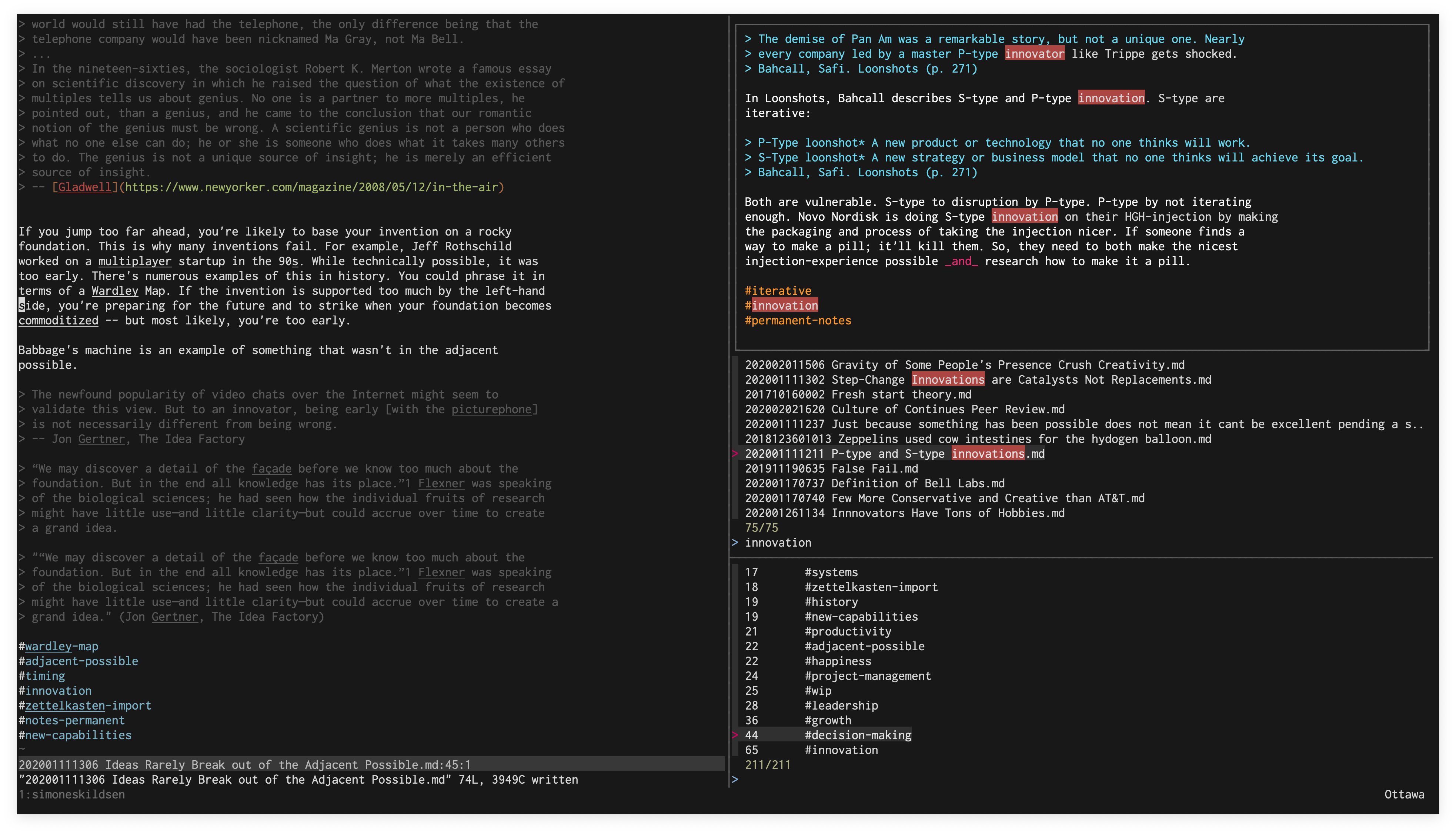
In this screenshot, we have zks running in the top-right, zkt in the
bottom-right, and vim in the left pane. zk can be used without tmux, but
it's recommended to use tmux.
Usage
The scripts assumes $ZK_PATH is set to your Zettelkasten directory. Your
Zettelkasten are markdown files in this directory. Nesting is presently not
supported. Each note must have a 12-number prefix (date note was created), e.g.
202005050837 Monkey Ladder.md. It's recommended to do some kind of backup,
e.g. Dropbox/iCloud/...
Your zk Zettelkasten is designed to be edited with your favourite editor.
Currently zk only supports Vim natively. zk augments your editor with
various scripts to help extract further value.
zk. Open vim in the left pane, and zks in the right pane. Your
launch-point!
zks. fzf-enabled full-text search (top-right pane in screenshot above) over
all your notes, using sqlite. The index updates automatically based on file
modification. See the FZF_DEFAULT_OPTS below for various key-bindings you can
use to open splits in Vim, copy to clipboard, etc. directly from here. Alt-S
will find similar notes with zksim.
zksim. Finds similar notes to the note passed as an argument. See #1 for
more.
zkt. fzf-enabled tag browser. Pressing enter on a tag will show you notes
with that tag. notes, using sqlite. See the FZF_DEFAULT_OPTS below for
various key-bindings you can use to open splits, copy to clipboard, etc.
directly from here.
zkt-raw. Raw list of tags sorted by totals. Useful for other analysis. Used by
zkt.
zkn. Create a new note, with an appropriate prefix.
zk-assets-localize. Given a file, downloads/copies the markdown images to media/.
zk-backlinks. Adds back-links to each note. I.e., if A links to B, but B
doesn't link to A, then it'll append Backlink: [[A]] to B.
zkrt/zk-related-tags. Finds tags related to the ones in the passed file. You can
pass -t to see a tree of tags.
For Vim, browse through my Vim config
this to add a
:Note, shortcut for tags, auto-completing other notes after typing [[, etc.
Another function to look at is :GPT, which will take your range and send it to
GPT3 for completion. Very cool for a perspective! One day this'll be a plugin
that's easier to install.
If you're using fzf with vim, it's recommended to add this to your bash
configuration. It adds super useful key-bindings to open files in splits
(Ctrl-X/Ctrl-V) from zkt and zks directly. It also adds Ctrl-O to
insert the file-name of whatever you're hovering into Vim, which is handy for
links!:
I recommend storing the notes in iCloud/Google Drive/Dropbox or whatever you use
to normally sync files. Nice and simple. Some people store them in Git.
Trang TopGit này là một snapshot — tab "Readme" hiển thị nguyên văn README của repo (đã bỏ link, giữ ảnh). Repo GitHub ở github.com/sirupsen/zk là nguồn chính thức.
sirupsen/zk có bao nhiêu sao?
sirupsen/zk có 617 sao GitHub — tải lại trang để xem số mới nhất, hoặc xem trực tiếp github.com/sirupsen/zk. TopGit phản chiếu số sao của GitHub nhưng không cam kết đến từng phút.
sirupsen/zk có phải mã nguồn mở không?
TopGit chưa ghi nhận license cho sirupsen/zk. Phần lớn repo public trên GitHub là mã nguồn mở, nhưng điều khoản khác nhau từng repo — mở file LICENSE để xác nhận.
sirupsen/zk có tag gì không?
Bản đồng bộ chưa ghi nhận topic GitHub nào cho sirupsen/zk. GitHub topics hiển thị ở thanh bên phải trang repo — đó là nơi đáng kiểm tra nhất.
sirupsen/zk có website riêng không?
TopGit chưa ghi nhận URL trang chủ cho sirupsen/zk. Phần README ở tab phía trên thường có link demo, hoặc xem mô tả GitHub của repo.
sirupsen/zk còn đang phát triển không?
Commit gần nhất trên sirupsen/zk là 4.6 năm trước (theo timestamp GitHub). Repo có 25 fork — một chỉ báo về mức độ quan tâm của cộng đồng.
Đọc đầy đủ README ở tab phía trên.
Chưa chắc zk có hợp với bạn?
Để ChatGPT, Claude hoặc Perplexity tìm hiểu giúp — bấm bên dưới và xem AI nói gì về zk.

 /zk