A look at sirupsen/zk: 617 stars on GitHub, written primarily in Ruby. Zettelkasten on the command-line 📚 🔍
Snapshot summary built from the project's own GitHub metadata — there's no written TopGit review yet. The page will update automatically when a full review is published.
WHY NO REVIEW YET
TopGit writes full reviews for the most-starred, most-requested repositories. This page is a snapshot until then — see the READ ME tab for the original README in full.
Stupid-fast plain-text Zettelkasten (zk) built for (terminal) nerds. Heavily
featuring fzf, ripgrep, bat, and sqlite.
The goal of the zk repository is to collect scripts and configurations for
other plain-text Zettelkasten users.
Note: This is an on-going extraction from my local environment, but has the
utilities I use by far the most often. I can almost guarantee you you're going
to run into a stacktrace somewhere because of some utility that isn't installed,
etc. Please open PRs/issues if it's not working, or you have questions,
concerns, comments. I'd also love contributions of scripts to bin/, such as
showing related notes, polish to search, Vim configs, etc.
If you are looking for something slightly more complete that retains the
Markdown-nature, you should take a look at Obsidian. After switching
note-taking system every year for years, I am no longer interested in custom
software and will stick to time-tested utilities.
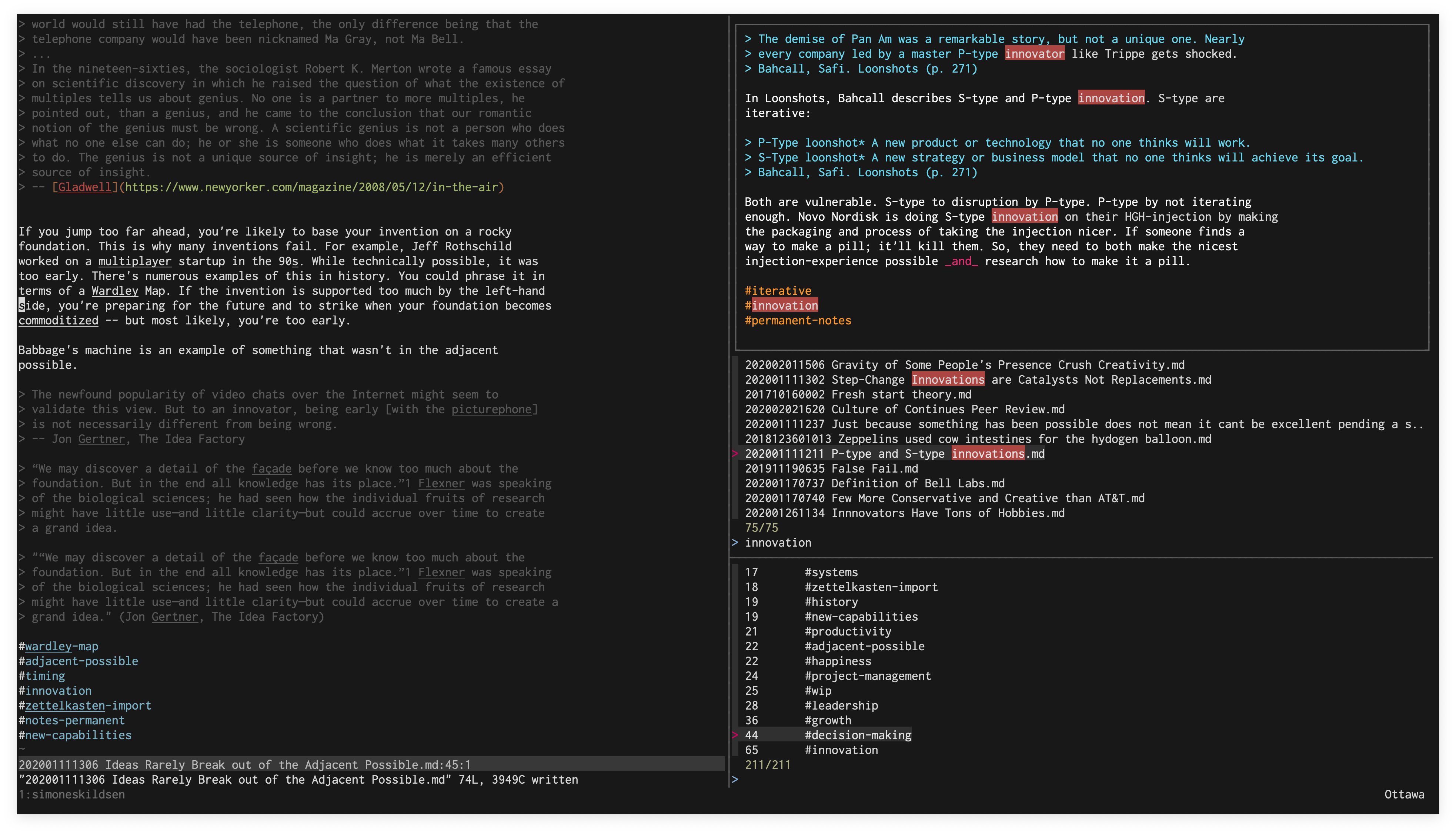
In this screenshot, we have zks running in the top-right, zkt in the
bottom-right, and vim in the left pane. zk can be used without tmux, but
it's recommended to use tmux.
Usage
The scripts assumes $ZK_PATH is set to your Zettelkasten directory. Your
Zettelkasten are markdown files in this directory. Nesting is presently not
supported. Each note must have a 12-number prefix (date note was created), e.g.
202005050837 Monkey Ladder.md. It's recommended to do some kind of backup,
e.g. Dropbox/iCloud/...
Your zk Zettelkasten is designed to be edited with your favourite editor.
Currently zk only supports Vim natively. zk augments your editor with
various scripts to help extract further value.
zk. Open vim in the left pane, and zks in the right pane. Your
launch-point!
zks. fzf-enabled full-text search (top-right pane in screenshot above) over
all your notes, using sqlite. The index updates automatically based on file
modification. See the FZF_DEFAULT_OPTS below for various key-bindings you can
use to open splits in Vim, copy to clipboard, etc. directly from here. Alt-S
will find similar notes with zksim.
zksim. Finds similar notes to the note passed as an argument. See #1 for
more.
zkt. fzf-enabled tag browser. Pressing enter on a tag will show you notes
with that tag. notes, using sqlite. See the FZF_DEFAULT_OPTS below for
various key-bindings you can use to open splits, copy to clipboard, etc.
directly from here.
zkt-raw. Raw list of tags sorted by totals. Useful for other analysis. Used by
zkt.
zkn. Create a new note, with an appropriate prefix.
zk-assets-localize. Given a file, downloads/copies the markdown images to media/.
zk-backlinks. Adds back-links to each note. I.e., if A links to B, but B
doesn't link to A, then it'll append Backlink: [[A]] to B.
zkrt/zk-related-tags. Finds tags related to the ones in the passed file. You can
pass -t to see a tree of tags.
For Vim, browse through my Vim config
this to add a
:Note, shortcut for tags, auto-completing other notes after typing [[, etc.
Another function to look at is :GPT, which will take your range and send it to
GPT3 for completion. Very cool for a perspective! One day this'll be a plugin
that's easier to install.
If you're using fzf with vim, it's recommended to add this to your bash
configuration. It adds super useful key-bindings to open files in splits
(Ctrl-X/Ctrl-V) from zkt and zks directly. It also adds Ctrl-O to
insert the file-name of whatever you're hovering into Vim, which is handy for
links!:
I recommend storing the notes in iCloud/Google Drive/Dropbox or whatever you use
to normally sync files. Nice and simple. Some people store them in Git.
No homepage URL was recorded for sirupsen/zk in TopGit's last sync. The README tab above frequently contains screenshots and demo links, or check the repository description on GitHub.
Does sirupsen/zk have any tags?
TopGit's last sync did not record any GitHub topics for sirupsen/zk. GitHub topics appear in the right sidebar of a repository page; that's the authoritative place to check.
How active is development on sirupsen/zk?
The most recent commit recorded on sirupsen/zk was 4.6 years ago, based on the GitHub push timestamp. The repository has 25 forks — one of the better signals of community interest.
How many stars does sirupsen/zk have?
sirupsen/zk has 617 GitHub stars — refresh the page for the live number, or check github.com/sirupsen/zk. TopGit mirrors GitHub's count but does not claim minute-by-minute accuracy.
Is sirupsen/zk open source?
TopGit's metadata for sirupsen/zk does not record a license. Most public repositories on GitHub ARE open source, but the exact terms vary — verify by opening the LICENSE file directly.
Where do I read more about sirupsen/zk?
This TopGit page is a snapshot — the READ ME tab shows the project's own README content (links stripped, images preserved). The GitHub repository at github.com/sirupsen/zk is the definitive source.
Read full README in the tab above.
Still deciding about zk?
One click hands the question to an AI along with this page — see what it says about zk.

 /zk