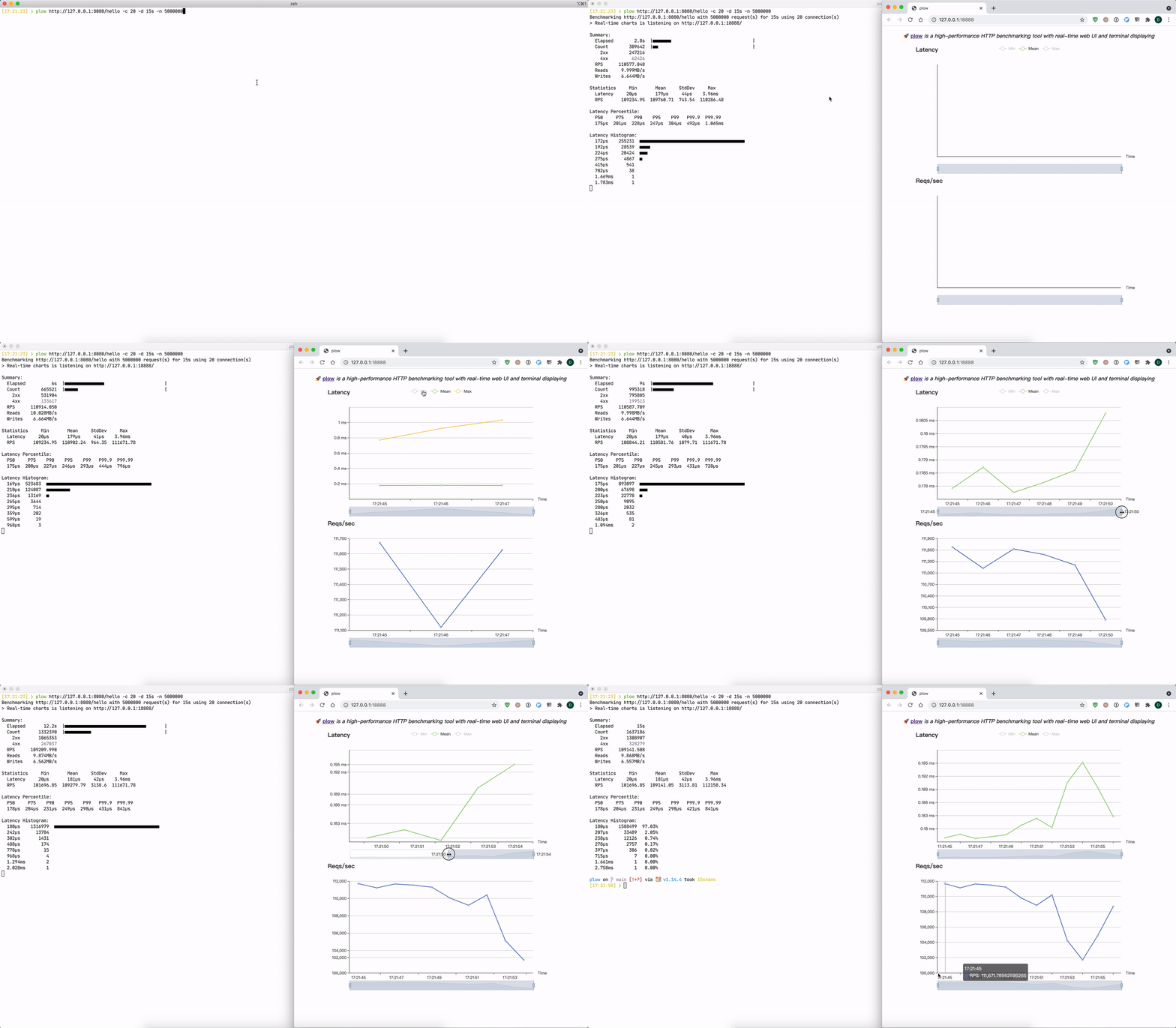
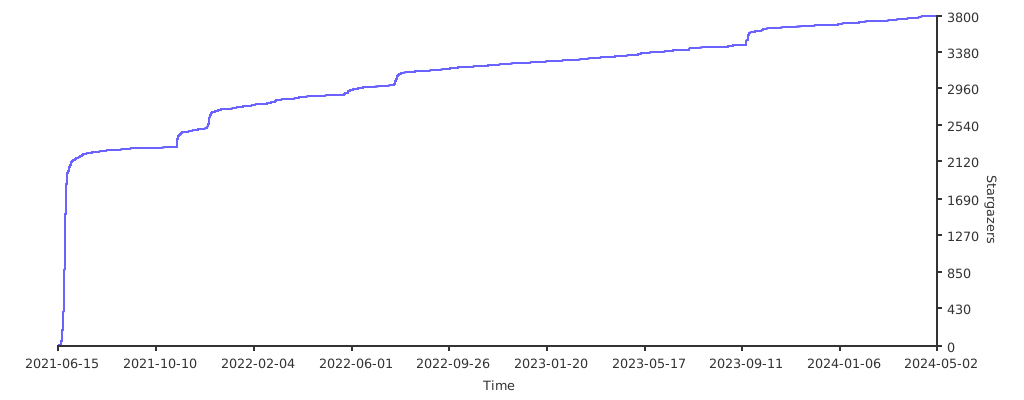
4.5k sao GitHub và vẫn tăng — six-ddc/plow là dự án Go mà TopGit đang theo dõi trên nền tảng. A high-performance HTTP benchmarking tool that includes a real-time web UI and terminal display
Tóm tắt dựng từ metadata GitHub của chính dự án — chưa có bài review TopGit. Trang sẽ tự động cập nhật khi bài review đầy đủ được xuất bản.
VÌ SAO CHƯA CÓ REVIEW
TopGit viết bài đầy đủ cho repo có nhiều sao nhất và được yêu cầu nhiều nhất. Trang này là snapshot trong thời gian chờ — xem README gốc ở tab READ ME.
Plow is an HTTP(S) benchmarking tool, written in Golang. It uses
excellent fasthttp instead of Go's default
net/http due to its lightning fast performance.
Plow runs at a specified connections(option -c) concurrently and real-time records a summary statistics, histogram
of execution time and calculates percentiles to display on Web UI and terminal. It can run for a set duration(
option -d), for a fixed number of requests(option -n), or until Ctrl-C interrupted.
The implementation of real-time computing Histograms and Quantiles using stream-based algorithms inspired
by prometheus with low memory and CPU bounds. so it's almost no
additional performance overhead for benchmarking.
Binary and image distributions are available through the releases
assets page.
Via Go
go install github.com/six-ddc/plow@latest
Via Homebrew
# brew update
brew install plow
Via Docker
docker run --rm --net=host ghcr.io/six-ddc/plow
# docker run --rm -p 18888:18888 ghcr.io/six-ddc/plow
Usage
Options
usage: plow [<flags>] <url>

A high-performance HTTP benchmarking tool with real-time web UI and terminal displaying

Examples:

  plow http://127.0.0.1:8080/ -c 20 -n 100000
  plow https://httpbin.org/post -c 20 -d 5m --body @file.json -T 'application/json' -m POST

Flags:
      --help                     Show context-sensitive help.
  -c, --concurrency=1            Number of connections to run concurrently
      --rate=infinity            Number of requests per time unit, examples: --rate 50 --rate 10/ms
      --ramp-up=-1               Concurrently will increase pre seconds
  -n, --requests=-1              Number of requests to run
  -d, --duration=DURATION        Duration of test, examples: -d 10s -d 3m
  -i, --interval=200ms           Print snapshot result every interval, use 0 to print once at the end
      --seconds                  Use seconds as time unit to print
      --json                     Print snapshot result as JSON
  -b, --body=BODY                HTTP request body, if body starts with '@' the rest will be considered a file's path from which to read the actual body content
      --stream                   Specify whether to stream file specified by '--body @file' using chunked encoding or to read into memory
  -m, --method="GET"             HTTP method
  -H, --header=K:V ...           Custom HTTP headers
      --host=HOST                Host header
  -T, --content=CONTENT          Content-Type header
      --cert=CERT                Path to the client's TLS Certificate
      --key=KEY                  Path to the client's TLS Certificate Private Key
  -k, --insecure                 Controls whether a client verifies the server's certificate chain and host name
      --listen=":18888"          Listen addr to serve Web UI
      --timeout=DURATION         Timeout for each http request
      --dial-timeout=DURATION    Timeout for dial addr
      --req-timeout=DURATION     Timeout for full request writing
      --resp-timeout=DURATION    Timeout for full response reading
      --socks5=ip:port           Socks5 proxy
      --http-proxy=username:password@ip:port
                                 Set HTTP proxy
      --auto-open-browser        Specify whether auto open browser to show web charts
      --[no-]clean               Clean the histogram bar once its finished. Default is true
      --output-errors=OUTPUT-ERRORS
                                 Output errors to file
      --summary                  Only print the summary without realtime reports
      --unix-socket=UNIX-SOCKET  Unix domain socket path to use for connection
      --version                  Show application version.

  Flags default values also read from env PLOW_SOME_FLAG, such as PLOW_TIMEOUT=5s equals to --timeout=5s

Args:
  <url>  Request url
Examples
Basic usage:
plow http://127.0.0.1:8080/ -c 20 -n 10000 -d 10s
POST a json file:
plow https://httpbin.org/post -c 20 --body @file.json -T 'application/json' -m POST
Bash/ZSH Shell Completion
# Add the statement to their bash_profile (or equivalent):
eval "$(plow --completion-script-bash)"
# Or for ZSH
eval "$(plow --completion-script-zsh)"
Trang TopGit này là một snapshot — tab "Readme" hiển thị nguyên văn README của repo (đã bỏ link, giữ ảnh). Repo GitHub ở github.com/six-ddc/plow là nguồn chính thức.
six-ddc/plow có những chủ đề gì?
GitHub topics của six-ddc/plow: "apachebench", "cli", "http", "load", "load-testing", "performance", "realtime", "visualization", "wrk". TopGit xếp repo vào nhóm Developer Tools.
six-ddc/plow có phải mã nguồn mở không?
Có — six-ddc/plow phát hành theo license Apache-2.0, nghĩa là mã nguồn mở để đọc, fork và (tùy license) tái sử dụng. Mã: github.com/six-ddc/plow.
six-ddc/plow có trang demo không?
Dự án có trang chủ ở https://deepwiki.com/six-ddc/plow. Tab "Readme" ở trang này thường có ảnh chụp và hướng dẫn bắt đầu nhanh.
six-ddc/plow còn đang phát triển không?
Commit gần nhất trên six-ddc/plow là 3 tháng trước (theo timestamp GitHub). Repo có 151 fork — một chỉ báo về mức độ quan tâm của cộng đồng.
six-ddc/plow dùng license gì?
six-ddc/plow phát hành theo license Apache-2.0. Nên mở file LICENSE trên GitHub để xác nhận — license metadata đôi khi lệch với thực tế dự án.
Đọc đầy đủ README ở tab phía trên.
Vẫn đang phân vân về plow?
Một cú bấm sẽ gửi câu hỏi kèm trang này cho AI — xem AI nói gì về plow.
 /plow
/plow