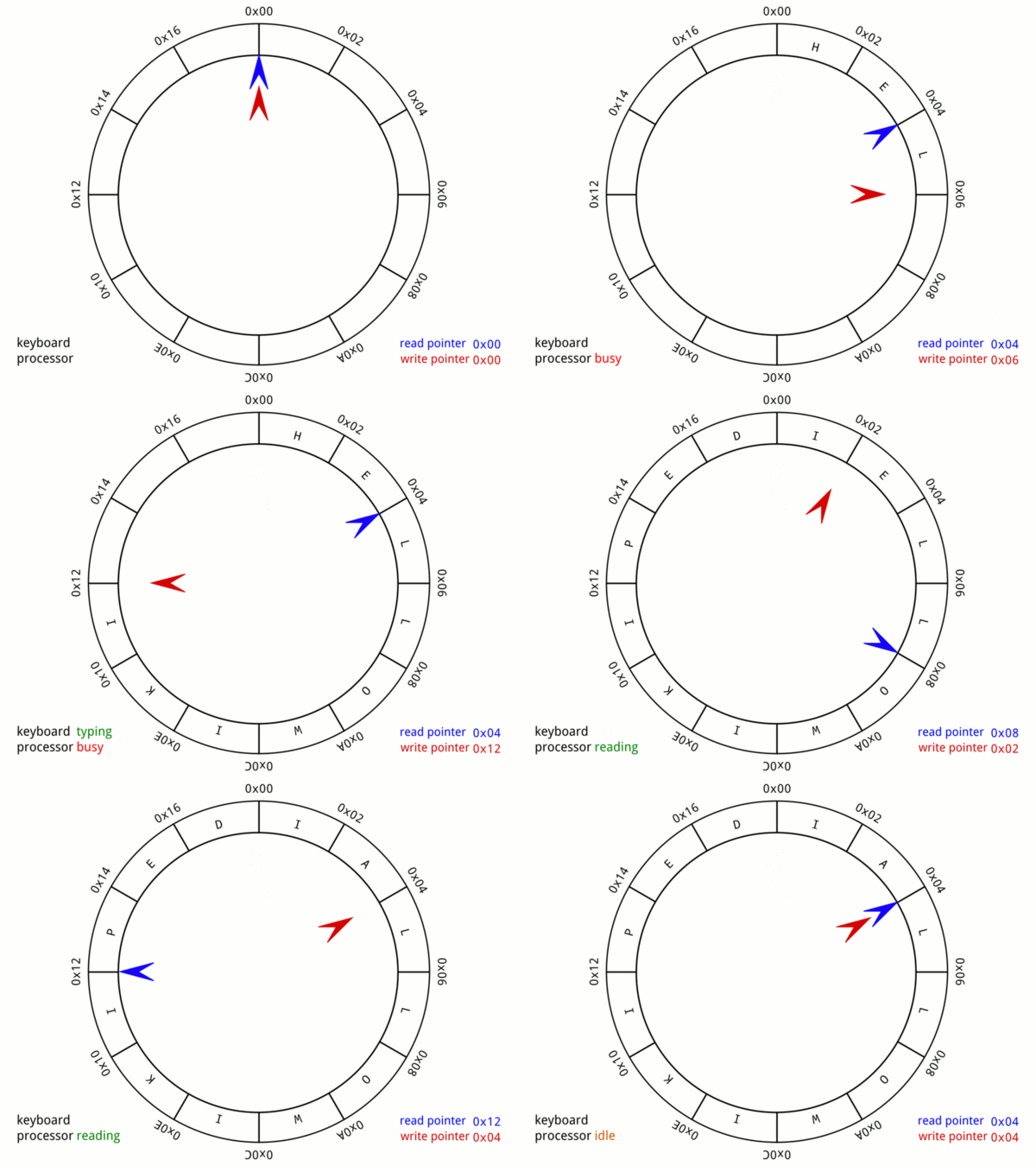
smallnest/ringbuffer — 650★ trên GitHub (Go). a thread-safe circular buffer (ring buffer) in Go, implemented io.ReaderWriter interface
Tóm tắt dựng từ metadata GitHub của chính dự án — chưa có bài review TopGit. Trang sẽ tự động cập nhật khi bài review đầy đủ được xuất bản.
VÌ SAO CHƯA CÓ REVIEW
TopGit viết bài đầy đủ cho repo có nhiều sao nhất và được yêu cầu nhiều nhất. Trang này là snapshot trong thời gian chờ — xem README gốc ở tab READ ME.
It is possible to use an existing buffer with by replacing New with NewBuffer.
Blocking vs Non-blocking
The default behavior of the ring buffer is non-blocking,
meaning that reads and writes will return immediately with an error if the operation cannot be completed.
If you want to block when reading or writing, you must enable it:
rb := ringbuffer.New(1024).SetBlocking(true)
Enabling blocking will cause the ring buffer to behave like a buffered io.Pipe.
Regular Reads will block until data is available, but not wait for a full buffer.
Writes will block until there is space available and writes bigger than the buffer will wait for reads to make space.
TryRead and TryWrite are still available for non-blocking reads and writes.
To signify the end of the stream, close the ring buffer from the writer side with rb.CloseWriter()
Either side can use rb.CloseWithError(err error) to signal an error and close the ring buffer.
Any reads or writes will return the error on next call.
In blocking mode errors are stateful and the same error will be returned until rb.Reset() is called.
It is possible to set a deadline for blocking Read/Write operations using rb.WithDeadline(time.Duration).
Waiting without blocking: Notify
A consumer that must wait on several things at once — new data, a shutdown
signal, a deadline — cannot block in Read. Neither can a consumer that wants
to look at buffered data without taking it, since Peek is non-blocking by
design. Notify gives those consumers a channel to wait on:
for {
	select {
	case <-rb.Notify():
	case <-ctx.Done():
		return ctx.Err()
	}

	// A wakeup means "look", not "there is data".
	n, err := rb.Peek(scratch)
	// inspect scratch[:n] and consume only what is confirmed
}
The channel is signalled when data is written, and when the buffer is closed or
reset. It has capacity 1 and signals coalesce, so a wakeup reports only that
something changed — never how much or how often — and spurious signals are
permitted. Notify is not a broadcast: one signal wakes one waiter, so use a
single waiting consumer per buffer.
io.Copy replacement
The ring buffer can replace io.Copy and io.CopyBuffer to do async copying through the ring buffer.
The copy operation will happen directly on the buffer, so between reads and writes there is no memory copy.
Here is a simple example where the copy operation is replaced by a ring buffer:
func saveWebsite(url, file string) {
    in, _ := http.Get(url)
    out, _ := os.Create(file)

    // Copy with regular buffered copy
    // n, err := io.Copy(out, in.Body)

    // Copy with ring buffer
    n, err := ringbuffer.New(1024).Copy(out, in.Body)
    fmt.Println(n, err)
}
The ring buffer implements io.ReaderFrom and io.WriterTo interfaces, which allows to fill either or both
the write and read side respectively.
This will provide an async method for writing or reading directly into the ring buffer.
These functions require that "blocking" is set on the pipe.
Example:
func readWebsite(url string) io.ReadCloser {
	in, _ := http.Get(url)

	// Create blocking ring buffer
	ring := ringbuffer.New(1024).SetBlocking(true)

	// Read from the input in a goroutine into the ring buffer
	go func() {
		ring.ReadFrom(in.Body)
		ring.CloseWriter()
	}()
	return ring.ReadCloser()
}
io.Pipe replacement
The ring buffer can be used as a compatible, but asynchronous replacement of io.Pipe.
That means that Reads and Writes will go to the ring buffer.
Writes will complete as long as the data fits within the ring buffer.
Reads will attempt to satisfy reads with data from the ring buffer.
The read will only block if the ring buffer is empty.
In the common case, where the Read and Write side can run concurrently,
it is safe to replace io.Pipe() with (*Ringbuffer).Pipe().
Compare the following to the io.Pipe example:
func main() {
	// Create pipe from a 4KB ring buffer.
	r, w := ringbuffer.New(4 << 10).Pipe()

	go func() {
		fmt.Fprint(w, "some io.Reader stream to be read\n")
		w.Close()
	}()

	if _, err := io.Copy(os.Stdout, r); err != nil {
		log.Fatal(err)
	}
}
When creating the pipe, the ring buffer is internally switched to blocking mode.
Error reporting on Close and CloseWithError functions is similar to io.Pipe.
It is possible to use the original ring buffer alongside the pipe functions.
So for example it is possible to "seed" the ring buffer with data,
so reads can complete at once.
Trang TopGit này là một snapshot — tab "Readme" hiển thị nguyên văn README của repo (đã bỏ link, giữ ảnh). Repo GitHub ở github.com/smallnest/ringbuffer là nguồn chính thức.
smallnest/ringbuffer có bao nhiêu sao?
smallnest/ringbuffer có 650 sao GitHub — tải lại trang để xem số mới nhất, hoặc xem trực tiếp github.com/smallnest/ringbuffer. TopGit phản chiếu số sao của GitHub nhưng không cam kết đến từng phút.
smallnest/ringbuffer có phải mã nguồn mở không?
Có — smallnest/ringbuffer phát hành theo license MIT, nghĩa là mã nguồn mở để đọc, fork và (tùy license) tái sử dụng. Mã: github.com/smallnest/ringbuffer.
smallnest/ringbuffer còn đang phát triển không?
Commit gần nhất trên smallnest/ringbuffer là 23 ngày trước (theo timestamp GitHub). Repo có 72 fork — một chỉ báo về mức độ quan tâm của cộng đồng.
smallnest/ringbuffer là gì?
smallnest/ringbuffer (smallnest/ringbuffer) là dự án Go trên GitHub. Theo mô tả gốc: a thread-safe circular buffer (ring buffer) in Go, implemented io.ReaderWriter interface
Đọc đầy đủ README ở tab phía trên.
ringbuffer có đáng để bạn bỏ thời gian?
ChatGPT, Claude và Perplexity đều đọc được trang này. Hỏi thử xem họ nghĩ gì về ringbuffer.

 /ringbuffer