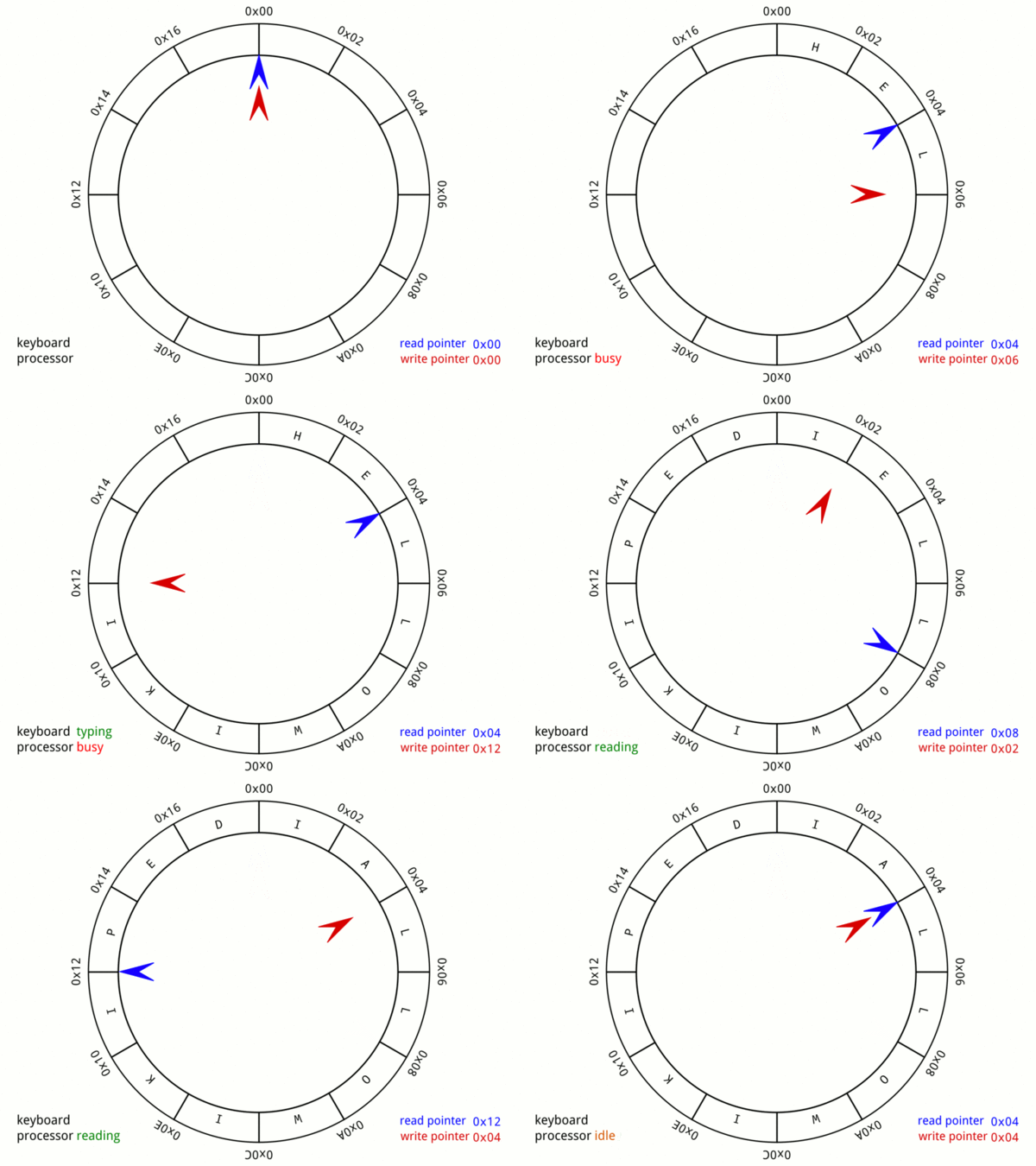
As an open-source project, smallnest/ringbuffer has picked up 650 stars on GitHub (Go). a thread-safe circular buffer (ring buffer) in Go, implemented io.ReaderWriter interface
Snapshot summary built from the project's own GitHub metadata — there's no written TopGit review yet. The page will update automatically when a full review is published.
WHY NO REVIEW YET
TopGit writes full reviews for the most-starred, most-requested repositories. This page is a snapshot until then — see the READ ME tab for the original README in full.
It is possible to use an existing buffer with by replacing New with NewBuffer.
Blocking vs Non-blocking
The default behavior of the ring buffer is non-blocking,
meaning that reads and writes will return immediately with an error if the operation cannot be completed.
If you want to block when reading or writing, you must enable it:
rb := ringbuffer.New(1024).SetBlocking(true)
Enabling blocking will cause the ring buffer to behave like a buffered io.Pipe.
Regular Reads will block until data is available, but not wait for a full buffer.
Writes will block until there is space available and writes bigger than the buffer will wait for reads to make space.
TryRead and TryWrite are still available for non-blocking reads and writes.
To signify the end of the stream, close the ring buffer from the writer side with rb.CloseWriter()
Either side can use rb.CloseWithError(err error) to signal an error and close the ring buffer.
Any reads or writes will return the error on next call.
In blocking mode errors are stateful and the same error will be returned until rb.Reset() is called.
It is possible to set a deadline for blocking Read/Write operations using rb.WithDeadline(time.Duration).
Waiting without blocking: Notify
A consumer that must wait on several things at once — new data, a shutdown
signal, a deadline — cannot block in Read. Neither can a consumer that wants
to look at buffered data without taking it, since Peek is non-blocking by
design. Notify gives those consumers a channel to wait on:
for {
	select {
	case <-rb.Notify():
	case <-ctx.Done():
		return ctx.Err()
	}

	// A wakeup means "look", not "there is data".
	n, err := rb.Peek(scratch)
	// inspect scratch[:n] and consume only what is confirmed
}
The channel is signalled when data is written, and when the buffer is closed or
reset. It has capacity 1 and signals coalesce, so a wakeup reports only that
something changed — never how much or how often — and spurious signals are
permitted. Notify is not a broadcast: one signal wakes one waiter, so use a
single waiting consumer per buffer.
io.Copy replacement
The ring buffer can replace io.Copy and io.CopyBuffer to do async copying through the ring buffer.
The copy operation will happen directly on the buffer, so between reads and writes there is no memory copy.
Here is a simple example where the copy operation is replaced by a ring buffer:
func saveWebsite(url, file string) {
    in, _ := http.Get(url)
    out, _ := os.Create(file)

    // Copy with regular buffered copy
    // n, err := io.Copy(out, in.Body)

    // Copy with ring buffer
    n, err := ringbuffer.New(1024).Copy(out, in.Body)
    fmt.Println(n, err)
}
The ring buffer implements io.ReaderFrom and io.WriterTo interfaces, which allows to fill either or both
the write and read side respectively.
This will provide an async method for writing or reading directly into the ring buffer.
These functions require that "blocking" is set on the pipe.
Example:
func readWebsite(url string) io.ReadCloser {
	in, _ := http.Get(url)

	// Create blocking ring buffer
	ring := ringbuffer.New(1024).SetBlocking(true)

	// Read from the input in a goroutine into the ring buffer
	go func() {
		ring.ReadFrom(in.Body)
		ring.CloseWriter()
	}()
	return ring.ReadCloser()
}
io.Pipe replacement
The ring buffer can be used as a compatible, but asynchronous replacement of io.Pipe.
That means that Reads and Writes will go to the ring buffer.
Writes will complete as long as the data fits within the ring buffer.
Reads will attempt to satisfy reads with data from the ring buffer.
The read will only block if the ring buffer is empty.
In the common case, where the Read and Write side can run concurrently,
it is safe to replace io.Pipe() with (*Ringbuffer).Pipe().
Compare the following to the io.Pipe example:
func main() {
	// Create pipe from a 4KB ring buffer.
	r, w := ringbuffer.New(4 << 10).Pipe()

	go func() {
		fmt.Fprint(w, "some io.Reader stream to be read\n")
		w.Close()
	}()

	if _, err := io.Copy(os.Stdout, r); err != nil {
		log.Fatal(err)
	}
}
When creating the pipe, the ring buffer is internally switched to blocking mode.
Error reporting on Close and CloseWithError functions is similar to io.Pipe.
It is possible to use the original ring buffer alongside the pipe functions.
So for example it is possible to "seed" the ring buffer with data,
so reads can complete at once.
How active is development on smallnest/ringbuffer?
The most recent commit recorded on smallnest/ringbuffer was 11 days ago, based on the GitHub push timestamp. The repository has 72 forks — one of the better signals of community interest.
How many stars does smallnest/ringbuffer have?
smallnest/ringbuffer has 650 GitHub stars — refresh the page for the live number, or check github.com/smallnest/ringbuffer. TopGit mirrors GitHub's count but does not claim minute-by-minute accuracy.
Is smallnest/ringbuffer open source?
Yes — smallnest/ringbuffer ships under the MIT license, which makes its source code freely readable (and, depending on license terms, forkable and reusable). Source: github.com/smallnest/ringbuffer.
What is smallnest/ringbuffer?
smallnest/ringbuffer (smallnest/ringbuffer) is a Go project on GitHub. From the project's own README: a thread-safe circular buffer (ring buffer) in Go, implemented io.ReaderWriter interface
Where do I read more about smallnest/ringbuffer?
This TopGit page is a snapshot — the READ ME tab shows the project's own README content (links stripped, images preserved). The GitHub repository at github.com/smallnest/ringbuffer is the definitive source.
Read full README in the tab above.
Want a second opinion on ringbuffer?
Ask an AI that can read this page — one click and you get its take on ringbuffer.

 /ringbuffer