Trên GitHub, svenstaro/rofi-calc đã đạt 1.2k sao, ngôn ngữ C. 🖩 Do live calculations in rofi!
Tóm tắt dựng từ metadata GitHub của chính dự án — chưa có bài review TopGit. Trang sẽ tự động cập nhật khi bài review đầy đủ được xuất bản.
VÌ SAO CHƯA CÓ REVIEW
TopGit viết bài đầy đủ cho repo có nhiều sao nhất và được yêu cầu nhiều nhất. Trang này là snapshot trong thời gian chờ — xem README gốc ở tab READ ME.
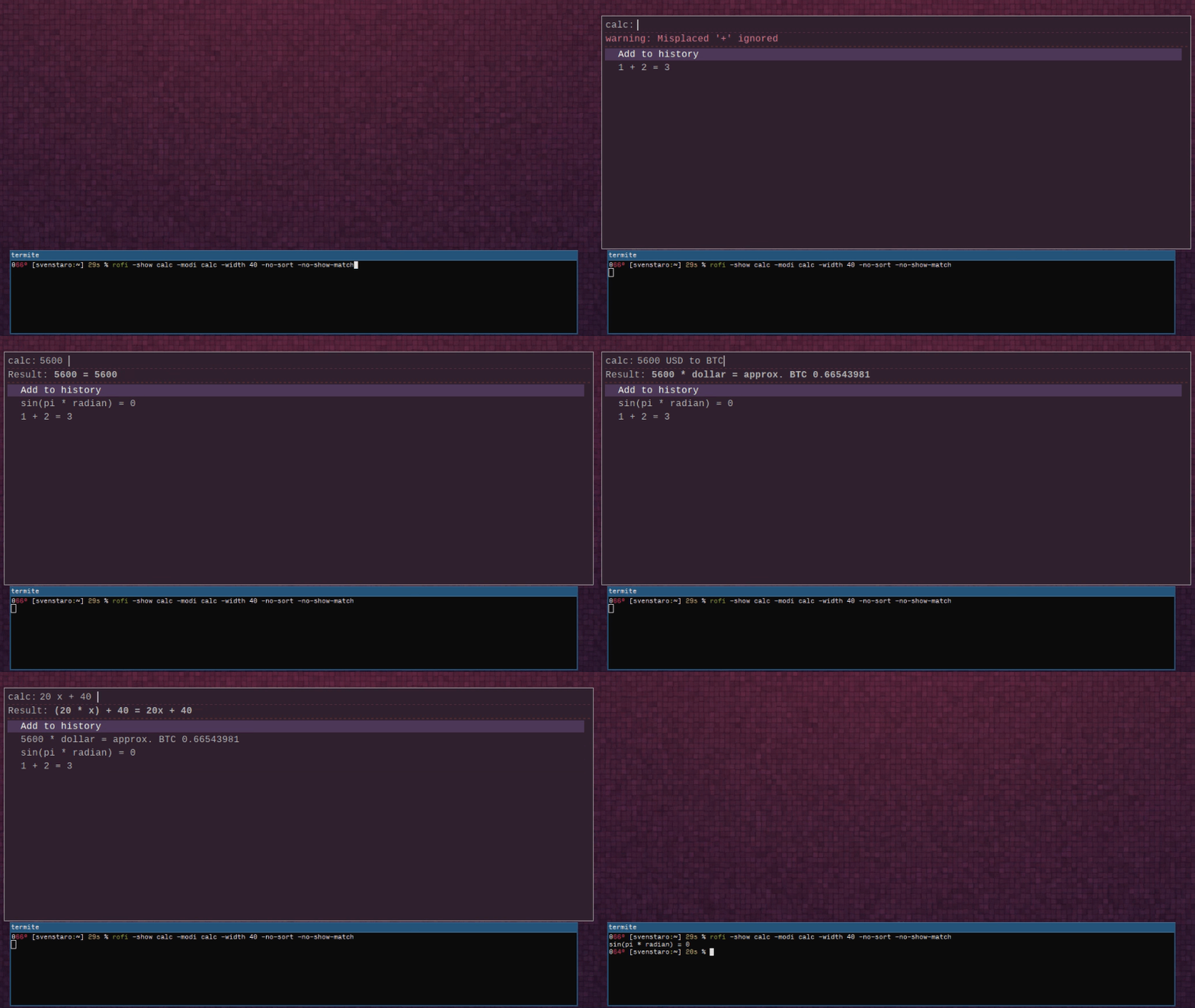
A rofi plugin that uses qalculate's qalc to parse natural language input and provide results.
Since this uses qalculate's amazing qalc you can try natural language queries such 500 + 25% or 5000 EUR to USD or 150 to hex. It can also solve linear equations on the fly. Try 60x + 30 = 50, for instance.
The result of the current input can be selected with Ctrl+Return, and history entries can be selected with Return. By default this will just output the equation/result.
The history file by default sits at $HOME/.local/share/rofi/rofi_calc_history in case you ever need to delete it or change it manually.
You can disable persistent history if you don't like that.
Installation
Via package manager
Arch Linux
FreeBSD
Gentoo
openSUSE
VoidLinux
From source
You need a C compilation toolchain (a cc, meson, pkg-config, ...), rofi (version >= 1.7.6) as well as qalculate (version > 2.0).
You will also need development headers for rofi. Depending on your distribution these may be included in different packages:
Arch Linux, Gentoo: included with rofi, libqalculate, meson
OpenSUSE: zypper in rofi rofi-devel qalculate meson
Use the -qalc-binary option to specify the name or location of qalculate's qalc binary. Defaults to qalc.
Use the -terse option to reduce the output of qalc to just the result of the input expression.
Use the -no-unicode option to disable qalc's Unicode mode.
Use the -calc-command option to specify a shell command to execute which will be interpolated with the following keys:
{expression}: the left-side of the equation (currently not available when using -terse)
{result}: the right of the equation
The following example copies the result to the clipboard upon pressing the key combination defined by -kb-accept-custom
(by default Control+Return).
NOTE: {result} should be quoted since it may contain characters that your shell would otherwise interpret:
Alternatively, this example would immediately type out the result (using xdotool) wherever your cursor currently is
(upon pressing Control+Return/-kb-accept-custom):
rofi -modi calc -show calc -calc-command 'xdotool type --clearmodifiers "{result}"'
The -calc-command-history option will additionally add the output of qalc to history when the -calc-command is run.
This will have no effect if -no-history is enabled.
It's convenient to bind it to a key combination in i3. For instance, you could use:
The benefit of this is that you can simply enter a term and press Return and that'll already
act on the result by printing it to stdout or via -calc-command if configured.
To automatically save last calculation to the history on rofi close, use -automatic-save-to-history.:
This will have no effect if -no-history is enabled.
To enable thousand separators in the output (e.g. 5 * 12 = 6,000, rather than 6000) add the following to ~/.config/qalculate/qalc.cfg
For , separator:
digit_grouping=2
For space separator:
digit_grouping=1
To use a different output format for numeric representations (for instance, some locales use , instead of . as a decimal separator),
set LC_NUMERIC to a different value like this:
Make sure the locale is actually available on your system!
Use the -hint-result option to specify the text of the hint before result.
Use the -hint-welcome option to specify the welcome text.
Using rofi config
Configuration options can also be set in the rofi config file. To do so, use the below format. Note that commandline options will override the config file.
If you are using a custom theme with rofi (e.g. rofi -show drun -theme ~/.config/rofi/mytheme.rasi) and don't see the result of the calculation, that's because the rofi-calc mode relies on the message widget that might be hidden by some themes.
In your mytheme.rasi file or any file, it might @import, look for the following
Reference Rofi docs: Layout, Base Widgets, Children
Changing the color of the error message
The error message is rendered in the same textbox as the result. By default, it uses the color PaleVioletRed, which can be changed by supplying the -calc-error-color '$COLOR' option, where $COLOR can be in one of the following formats:
#{HEX}{3} (rgb)
#{HEX}{4} (rgba)
#{HEX}{6} (rrggbb)
#{HEX}{8} (rrggbbaa)
{named-color}
Reference Rofi docs: Color
NOTE: Other color formats mentioned there (like rgb[a](), hsl[a](), etc.) can not be used and will throw a Pango-WARNING.
Development
If you're developing this, it might be helpful to start rofi directly with a locally compiled plugin like this:
cd rofi-calc
just run
Releasing
This is mostly a note for me on how to release this thing:
Trang TopGit này là một snapshot — tab "Readme" hiển thị nguyên văn README của repo (đã bỏ link, giữ ảnh). Repo GitHub ở github.com/svenstaro/rofi-calc là nguồn chính thức.
svenstaro/rofi-calc có bao nhiêu sao?
svenstaro/rofi-calc có 1.2k sao GitHub — tải lại trang để xem số mới nhất, hoặc xem trực tiếp github.com/svenstaro/rofi-calc. TopGit phản chiếu số sao của GitHub nhưng không cam kết đến từng phút.
svenstaro/rofi-calc có phải mã nguồn mở không?
Có — svenstaro/rofi-calc phát hành theo license MIT, nghĩa là mã nguồn mở để đọc, fork và (tùy license) tái sử dụng. Mã: github.com/svenstaro/rofi-calc.
svenstaro/rofi-calc còn đang phát triển không?
Commit gần nhất trên svenstaro/rofi-calc là 9 tháng trước (theo timestamp GitHub). Repo có 41 fork — một chỉ báo về mức độ quan tâm của cộng đồng.
svenstaro/rofi-calc là gì?
svenstaro/rofi-calc (svenstaro/rofi-calc) là dự án C trên GitHub. Theo mô tả gốc: 🖩 Do live calculations in rofi!
Đọc đầy đủ README ở tab phía trên.
rofi-calc có đáng để bạn bỏ thời gian?
ChatGPT, Claude và Perplexity đều đọc được trang này. Hỏi thử xem họ nghĩ gì về rofi-calc.

 /rofi-calc