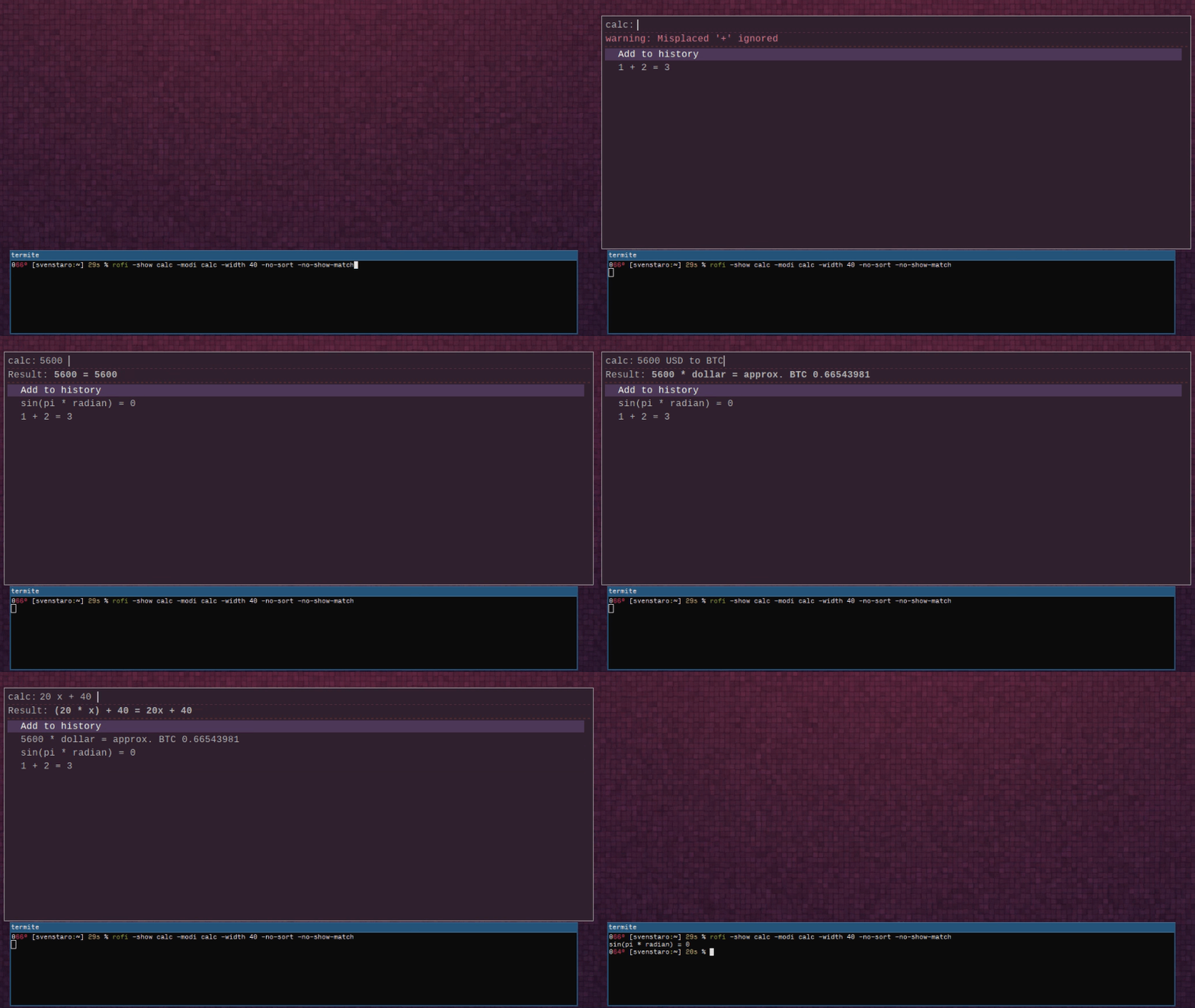
svenstaro/rofi-calc — an open-source project — sits at 1.2k GitHub stars. 🖩 Do live calculations in rofi!
Snapshot summary built from the project's own GitHub metadata — there's no written TopGit review yet. The page will update automatically when a full review is published.
WHY NO REVIEW YET
TopGit writes full reviews for the most-starred, most-requested repositories. This page is a snapshot until then — see the READ ME tab for the original README in full.
A rofi plugin that uses qalculate's qalc to parse natural language input and provide results.
Since this uses qalculate's amazing qalc you can try natural language queries such 500 + 25% or 5000 EUR to USD or 150 to hex. It can also solve linear equations on the fly. Try 60x + 30 = 50, for instance.
The result of the current input can be selected with Ctrl+Return, and history entries can be selected with Return. By default this will just output the equation/result.
The history file by default sits at $HOME/.local/share/rofi/rofi_calc_history in case you ever need to delete it or change it manually.
You can disable persistent history if you don't like that.
Installation
Via package manager
Arch Linux
FreeBSD
Gentoo
openSUSE
VoidLinux
From source
You need a C compilation toolchain (a cc, meson, pkg-config, ...), rofi (version >= 1.7.6) as well as qalculate (version > 2.0).
You will also need development headers for rofi. Depending on your distribution these may be included in different packages:
Arch Linux, Gentoo: included with rofi, libqalculate, meson
OpenSUSE: zypper in rofi rofi-devel qalculate meson
Use the -qalc-binary option to specify the name or location of qalculate's qalc binary. Defaults to qalc.
Use the -terse option to reduce the output of qalc to just the result of the input expression.
Use the -no-unicode option to disable qalc's Unicode mode.
Use the -calc-command option to specify a shell command to execute which will be interpolated with the following keys:
{expression}: the left-side of the equation (currently not available when using -terse)
{result}: the right of the equation
The following example copies the result to the clipboard upon pressing the key combination defined by -kb-accept-custom
(by default Control+Return).
NOTE: {result} should be quoted since it may contain characters that your shell would otherwise interpret:
Alternatively, this example would immediately type out the result (using xdotool) wherever your cursor currently is
(upon pressing Control+Return/-kb-accept-custom):
rofi -modi calc -show calc -calc-command 'xdotool type --clearmodifiers "{result}"'
The -calc-command-history option will additionally add the output of qalc to history when the -calc-command is run.
This will have no effect if -no-history is enabled.
It's convenient to bind it to a key combination in i3. For instance, you could use:
The benefit of this is that you can simply enter a term and press Return and that'll already
act on the result by printing it to stdout or via -calc-command if configured.
To automatically save last calculation to the history on rofi close, use -automatic-save-to-history.:
This will have no effect if -no-history is enabled.
To enable thousand separators in the output (e.g. 5 * 12 = 6,000, rather than 6000) add the following to ~/.config/qalculate/qalc.cfg
For , separator:
digit_grouping=2
For space separator:
digit_grouping=1
To use a different output format for numeric representations (for instance, some locales use , instead of . as a decimal separator),
set LC_NUMERIC to a different value like this:
Make sure the locale is actually available on your system!
Use the -hint-result option to specify the text of the hint before result.
Use the -hint-welcome option to specify the welcome text.
Using rofi config
Configuration options can also be set in the rofi config file. To do so, use the below format. Note that commandline options will override the config file.
If you are using a custom theme with rofi (e.g. rofi -show drun -theme ~/.config/rofi/mytheme.rasi) and don't see the result of the calculation, that's because the rofi-calc mode relies on the message widget that might be hidden by some themes.
In your mytheme.rasi file or any file, it might @import, look for the following
Reference Rofi docs: Layout, Base Widgets, Children
Changing the color of the error message
The error message is rendered in the same textbox as the result. By default, it uses the color PaleVioletRed, which can be changed by supplying the -calc-error-color '$COLOR' option, where $COLOR can be in one of the following formats:
#{HEX}{3} (rgb)
#{HEX}{4} (rgba)
#{HEX}{6} (rrggbb)
#{HEX}{8} (rrggbbaa)
{named-color}
Reference Rofi docs: Color
NOTE: Other color formats mentioned there (like rgb[a](), hsl[a](), etc.) can not be used and will throw a Pango-WARNING.
Development
If you're developing this, it might be helpful to start rofi directly with a locally compiled plugin like this:
cd rofi-calc
just run
Releasing
This is mostly a note for me on how to release this thing:
The most recent commit recorded on svenstaro/rofi-calc was 9 months ago, based on the GitHub push timestamp. The repository has 41 forks — one of the better signals of community interest.
How many stars does svenstaro/rofi-calc have?
svenstaro/rofi-calc has 1.2k GitHub stars — refresh the page for the live number, or check github.com/svenstaro/rofi-calc. TopGit mirrors GitHub's count but does not claim minute-by-minute accuracy.
Is svenstaro/rofi-calc open source?
Yes — svenstaro/rofi-calc ships under the MIT license, which makes its source code freely readable (and, depending on license terms, forkable and reusable). Source: github.com/svenstaro/rofi-calc.
What is svenstaro/rofi-calc?
svenstaro/rofi-calc (svenstaro/rofi-calc) is a C project on GitHub. From the project's own README: 🖩 Do live calculations in rofi!
Where do I read more about svenstaro/rofi-calc?
This TopGit page is a snapshot — the READ ME tab shows the project's own README content (links stripped, images preserved). The GitHub repository at github.com/svenstaro/rofi-calc is the definitive source.
Read full README in the tab above.
Want a second opinion on rofi-calc?
Ask an AI that can read this page — one click and you get its take on rofi-calc.

 /rofi-calc