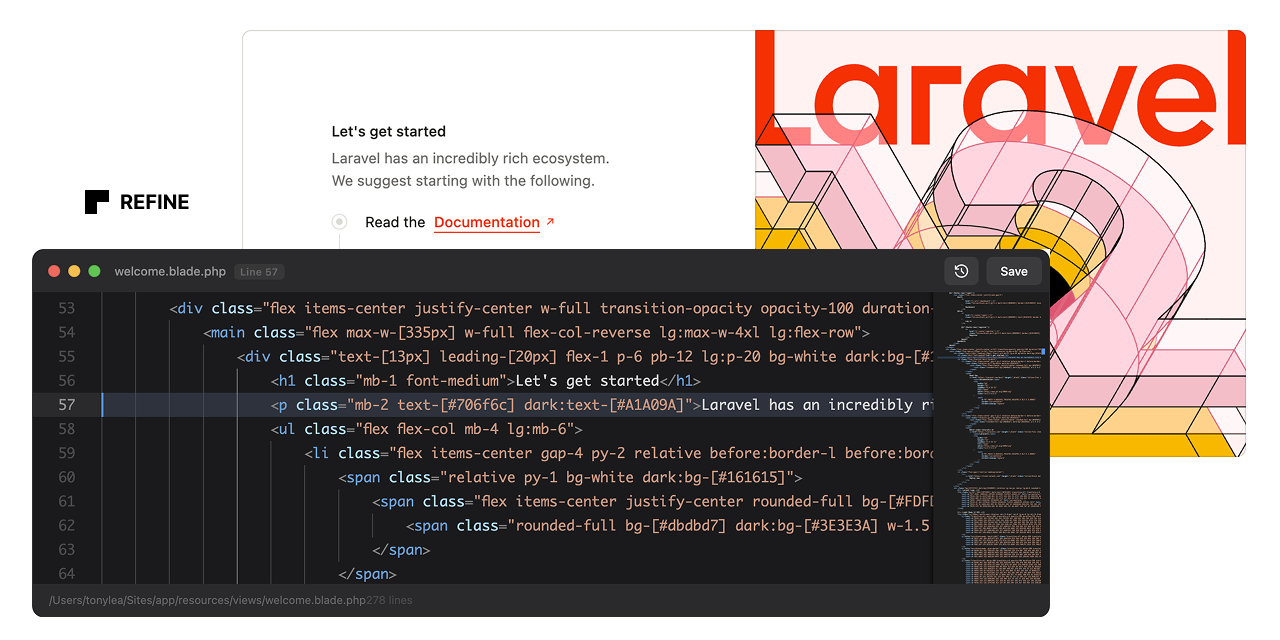
111 sao GitHub và vẫn tăng — thedevdojo/refine là dự án PHP mà TopGit đang theo dõi trên nền tảng. A developer Chrome extension and Laravel package for live-editing Blade templates directly in the browser
Tóm tắt dựng từ metadata GitHub của chính dự án — chưa có bài review TopGit. Trang sẽ tự động cập nhật khi bài review đầy đủ được xuất bản.
VÌ SAO CHƯA CÓ REVIEW
TopGit viết bài đầy đủ cho repo có nhiều sao nhất và được yêu cầu nhiều nhất. Trang này là snapshot trong thời gian chờ — xem README gốc ở tab READ ME.
Refine is a live Blade editor. It enables instant, in-browser editing of Blade templates. Right-click any element, click "Edit Code", and modify the source code directly.
[!WARNING]
This is still actively being developed so there may be a few issues. I have tested this with Blade Includes and Components; however, more testing is needed for Livewire and Volt.
Features
One-Click Editing: Right-click any element and edit its Blade source instantly
Automatic Source Tracking: Automatically instruments Blade views with source metadata
Zero Configuration: Works out of the box after installation
Smart DOM Traversal: Finds the originating Blade file even in nested components
Instant Saves: Write changes directly to disk and hot-reload affected regions
Backup System: Automatically backs up files before making changes
Dev-Only: This package should not be installed in production.
Installation
Step 1: Install the Laravel Package
composer require devdojo/refine --dev
The package will auto-register via Laravel's package discovery.
Step 2: Load the Chrome Extension
Download the code from this repo and put the extension folder somewhere permanent on your computer. This could be your Documents folder or a folder in your home directory.
Open Chrome and navigate to chrome://extensions/
Enable "Developer mode" (toggle in top-right corner)
Click "Load unpacked"
Navigate to the extension** folder you saved to your computer
Select the folder and click "Open"
Step 3: Verify Installation
Start your Laravel development server (php artisan serve or Valet/Herd)
Visit any page in your application
Open the browser console - you should see: "Refine: Content script loaded and ready"
Visit http://your-app.test/refine/status - you should see a JSON response confirming Refine is enabled
Usage
Right-click any element on your page
Click "Edit Code" from the context menu
Edit the Blade source code in the floating editor
Press Cmd/Ctrl+S or click Save to write changes
Page auto-reloads to show your changes
Keyboard Shortcuts
Cmd/Ctrl + S - Save changes
Escape - Minimize editor
Tab - Insert 4 spaces (proper indentation)
How It Works
Backend (Laravel)
Blade Instrumentation: A Blade compiler hook automatically injects data-source attributes into rendered HTML elements containing the view path and line number
API Endpoints: Two endpoints handle fetching source code and saving changes
File Resolution: Automatically resolves view paths to absolute file paths
Cache Clearing: Runs php artisan view:clear after saves to ensure changes are reflected
Frontend (Chrome Extension)
Context Menu: Registers a "Edit Code" option in the right-click menu
DOM Traversal: Finds the nearest parent element with a data-source attribute
API Communication: Fetches source code from Laravel and sends updates back
Floating UI: Renders a dark-themed code editor overlay with save/cancel actions
Configuration
Publish the configuration file:
php artisan vendor:publish --tag=refine-config
This creates config/refine.php where you can customize:
Enabled State: Force enable/disable Refine
Route Prefix: Change the API route prefix (default: /refine)
Middleware: Add additional middleware to Refine routes
Instrumentation: Customize which HTML tags get source attributes
Backups: Configure automatic backup behavior
Security
Refine is strictly for local development. It includes multiple safety layers:
Only activates when APP_ENV=local
Middleware blocks all requests in non-local environments
Routes only register when enabled
Extension only works on localhost/.test domains
Never deploy Refine to production. Install it as a dev dependency only.
Trang TopGit này là một snapshot — tab "Readme" hiển thị nguyên văn README của repo (đã bỏ link, giữ ảnh). Repo GitHub ở github.com/thedevdojo/refine là nguồn chính thức.
thedevdojo/refine có bao nhiêu sao?
thedevdojo/refine có 111 sao GitHub — tải lại trang để xem số mới nhất, hoặc xem trực tiếp github.com/thedevdojo/refine. TopGit phản chiếu số sao của GitHub nhưng không cam kết đến từng phút.
thedevdojo/refine có phải mã nguồn mở không?
Có — thedevdojo/refine phát hành theo license MIT, nghĩa là mã nguồn mở để đọc, fork và (tùy license) tái sử dụng. Mã: github.com/thedevdojo/refine.
thedevdojo/refine có website riêng không?
TopGit chưa ghi nhận URL trang chủ cho thedevdojo/refine. Phần README ở tab phía trên thường có link demo, hoặc xem mô tả GitHub của repo.
thedevdojo/refine là gì?
thedevdojo/refine (thedevdojo/refine) là dự án PHP trên GitHub. Theo mô tả gốc: A developer Chrome extension and Laravel package for live-editing Blade templates directly in the browser
Đọc đầy đủ README ở tab phía trên.
refine có đáng để bạn bỏ thời gian?
ChatGPT, Claude và Perplexity đều đọc được trang này. Hỏi thử xem họ nghĩ gì về refine.
 /refine