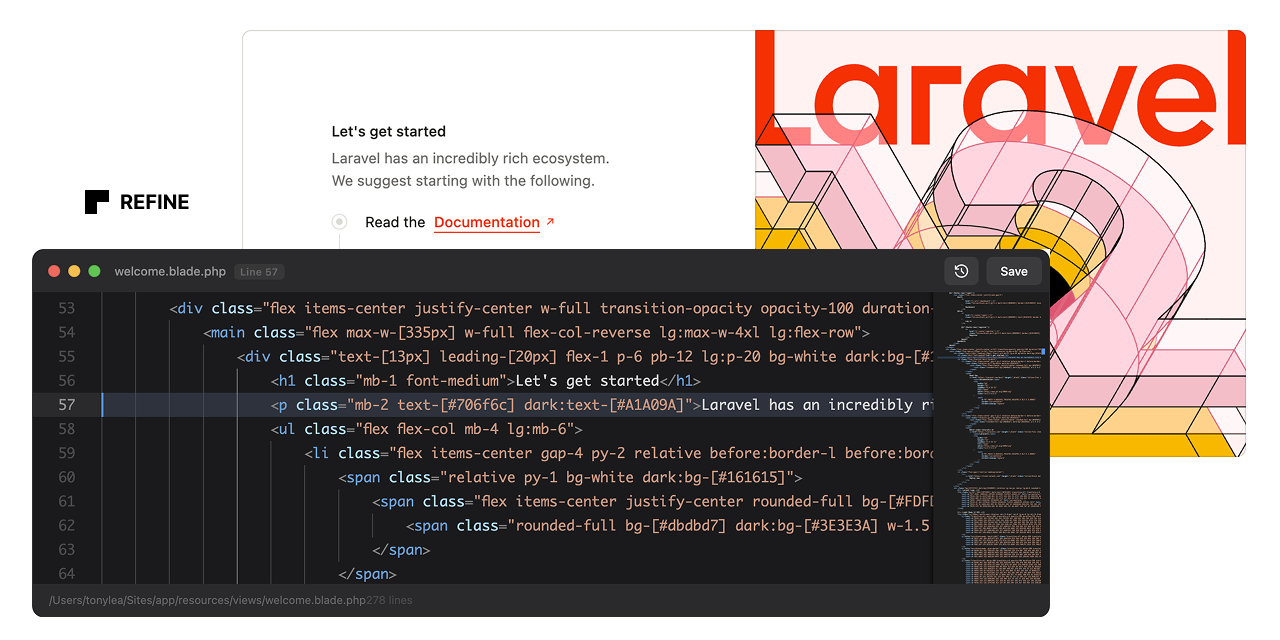
Indexed by TopGit from live GitHub metadata: thedevdojo/refine has 110 stars, written primarily in PHP. A developer Chrome extension and Laravel package for live-editing Blade templates directly in the browser
Snapshot summary built from the project's own GitHub metadata — there's no written TopGit review yet. The page will update automatically when a full review is published.
WHY NO REVIEW YET
TopGit writes full reviews for the most-starred, most-requested repositories. This page is a snapshot until then — see the READ ME tab for the original README in full.
Refine is a live Blade editor. It enables instant, in-browser editing of Blade templates. Right-click any element, click "Edit Code", and modify the source code directly.
[!WARNING]
This is still actively being developed so there may be a few issues. I have tested this with Blade Includes and Components; however, more testing is needed for Livewire and Volt.
Features
One-Click Editing: Right-click any element and edit its Blade source instantly
Automatic Source Tracking: Automatically instruments Blade views with source metadata
Zero Configuration: Works out of the box after installation
Smart DOM Traversal: Finds the originating Blade file even in nested components
Instant Saves: Write changes directly to disk and hot-reload affected regions
Backup System: Automatically backs up files before making changes
Dev-Only: This package should not be installed in production.
Installation
Step 1: Install the Laravel Package
composer require devdojo/refine --dev
The package will auto-register via Laravel's package discovery.
Step 2: Load the Chrome Extension
Download the code from this repo and put the extension folder somewhere permanent on your computer. This could be your Documents folder or a folder in your home directory.
Open Chrome and navigate to chrome://extensions/
Enable "Developer mode" (toggle in top-right corner)
Click "Load unpacked"
Navigate to the extension** folder you saved to your computer
Select the folder and click "Open"
Step 3: Verify Installation
Start your Laravel development server (php artisan serve or Valet/Herd)
Visit any page in your application
Open the browser console - you should see: "Refine: Content script loaded and ready"
Visit http://your-app.test/refine/status - you should see a JSON response confirming Refine is enabled
Usage
Right-click any element on your page
Click "Edit Code" from the context menu
Edit the Blade source code in the floating editor
Press Cmd/Ctrl+S or click Save to write changes
Page auto-reloads to show your changes
Keyboard Shortcuts
Cmd/Ctrl + S - Save changes
Escape - Minimize editor
Tab - Insert 4 spaces (proper indentation)
How It Works
Backend (Laravel)
Blade Instrumentation: A Blade compiler hook automatically injects data-source attributes into rendered HTML elements containing the view path and line number
API Endpoints: Two endpoints handle fetching source code and saving changes
File Resolution: Automatically resolves view paths to absolute file paths
Cache Clearing: Runs php artisan view:clear after saves to ensure changes are reflected
Frontend (Chrome Extension)
Context Menu: Registers a "Edit Code" option in the right-click menu
DOM Traversal: Finds the nearest parent element with a data-source attribute
API Communication: Fetches source code from Laravel and sends updates back
Floating UI: Renders a dark-themed code editor overlay with save/cancel actions
Configuration
Publish the configuration file:
php artisan vendor:publish --tag=refine-config
This creates config/refine.php where you can customize:
Enabled State: Force enable/disable Refine
Route Prefix: Change the API route prefix (default: /refine)
Middleware: Add additional middleware to Refine routes
Instrumentation: Customize which HTML tags get source attributes
Backups: Configure automatic backup behavior
Security
Refine is strictly for local development. It includes multiple safety layers:
Only activates when APP_ENV=local
Middleware blocks all requests in non-local environments
Routes only register when enabled
Extension only works on localhost/.test domains
Never deploy Refine to production. Install it as a dev dependency only.
No homepage URL was recorded for thedevdojo/refine in TopGit's last sync. The README tab above frequently contains screenshots and demo links, or check the repository description on GitHub.
How many stars does thedevdojo/refine have?
thedevdojo/refine has 110 GitHub stars — refresh the page for the live number, or check github.com/thedevdojo/refine. TopGit mirrors GitHub's count but does not claim minute-by-minute accuracy.
Is thedevdojo/refine open source?
Yes — thedevdojo/refine ships under the MIT license, which makes its source code freely readable (and, depending on license terms, forkable and reusable). Source: github.com/thedevdojo/refine.
What is thedevdojo/refine?
thedevdojo/refine (thedevdojo/refine) is a PHP project on GitHub. From the project's own README: A developer Chrome extension and Laravel package for live-editing Blade templates directly in the browser
Where do I read more about thedevdojo/refine?
This TopGit page is a snapshot — the READ ME tab shows the project's own README content (links stripped, images preserved). The GitHub repository at github.com/thedevdojo/refine is the definitive source.
Read full README in the tab above.
Curious whether refine is right for you?
Let ChatGPT, Claude, or Perplexity look into it — click below and see what AI actually says about refine.
 /refine