tobi/AudioPriorityBar là dự án Swift với 695 sao. A native macOS menu bar app for managing audio device priorities
Tóm tắt dựng từ metadata GitHub của chính dự án — chưa có bài review TopGit. Trang sẽ tự động cập nhật khi bài review đầy đủ được xuất bản.
VÌ SAO CHƯA CÓ REVIEW
TopGit viết bài đầy đủ cho repo có nhiều sao nhất và được yêu cầu nhiều nhất. Trang này là snapshot trong thời gian chờ — xem README gốc ở tab READ ME.
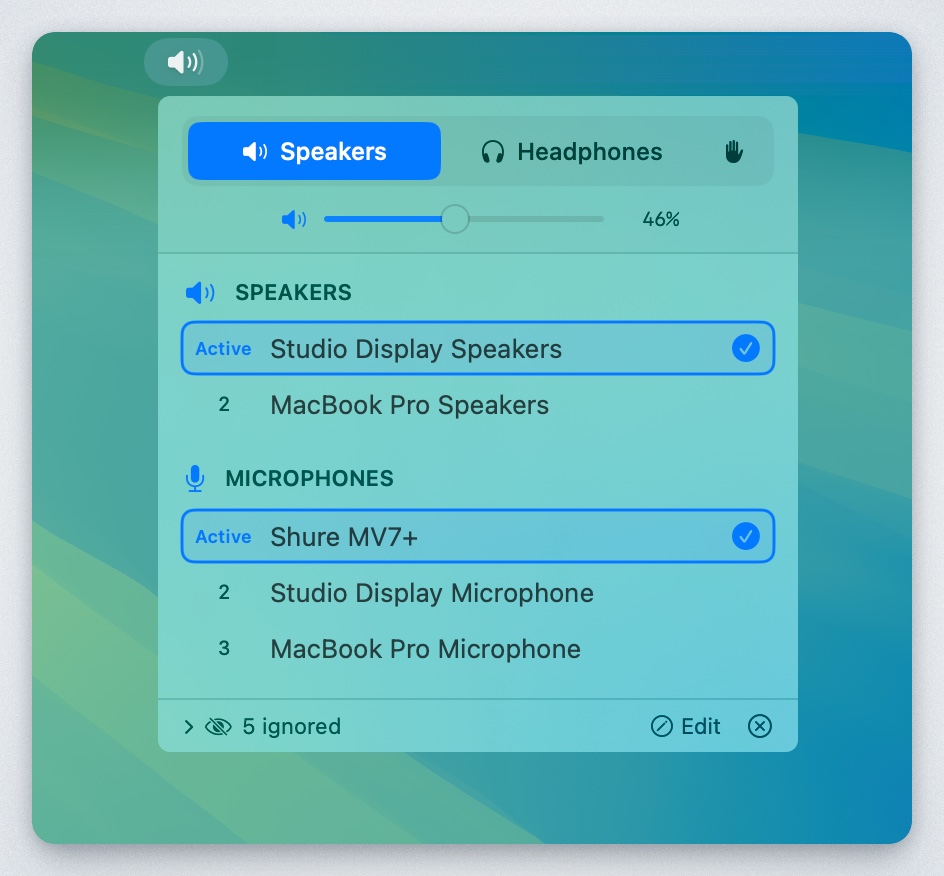
A native macOS menu bar app that automatically manages audio device priorities. Set your preferred order for speakers, headphones, and microphones - the app automatically switches to the highest-priority connected device.
Features
Priority-based auto-switching: Devices are ranked by priority. When a higher-priority device connects, it automatically becomes active.
Separate speaker/headphone modes: Output devices are categorized as either speakers or headphones, each with their own priority list.
Manual override: Enable "Custom" mode (hand icon) to disable auto-switching and select devices freely.
Device memory: Remembers all devices you've ever connected, even when disconnected. Edit mode shows disconnected devices with "last seen" timestamps.
Per-category ignore: Hide devices from specific categories without affecting others.
Drag-to-reorder: Reorder devices by dragging or using up/down arrows.
Volume control: Adjust volume with slider or scroll wheel.
Menu bar integration: Shows current mode icon and volume percentage.
Installation
Requirements
macOS 13.0 (Ventura) or later
Build from Source
Clone the repository:
git clone https://github.com/tobi/AudioPriorityBar.git
cd AudioPriorityBar
Build using the build script:
./build.sh
The app will be at dist/AudioPriorityBar.app
Or open AudioPriorityBar.xcodeproj in Xcode and build with ⌘R.
Download Release
Check the Releases page for pre-built binaries.
Usage
Modes
Mode
Icon
Behavior
Speakers
🔊
Shows speaker devices, auto-switches to highest priority
Headphones
🎧
Shows headphone devices, auto-switches to highest priority
Custom
✋
Shows all devices, no auto-switching
Managing Priorities
Click a device: Moves it to #1 priority (in normal mode) or just selects it (in custom mode)
Drag devices: Reorder by dragging the handle
Up/Down arrows: Fine-tune order on hover
Device Actions (hover menu)
Move to Speakers/Headphones: Change device category
Ignore as [category]: Hide from current category only
Ignore entirely: Hide from both speaker and headphone lists
Forget Device: Remove disconnected device from memory
Edit Mode
Click "Edit" in the footer to:
See all devices ever connected (disconnected ones grayed out)
Reorder disconnected devices in the priority list
View "last seen" timestamps
Forget old devices you no longer use
How It Works
Device Discovery: Uses CoreAudio to enumerate audio devices and listen for changes.
Priority Storage: Device priorities are stored in UserDefaults, keyed by device UID (stable across reconnects).
Auto-Switching: When devices connect/disconnect, the app automatically selects the highest-priority available device for the current mode.
Categories: Each output device is assigned to either "speaker" or "headphone" category, with separate priority lists.
Trang TopGit này là một snapshot — tab "Readme" hiển thị nguyên văn README của repo (đã bỏ link, giữ ảnh). Repo GitHub ở github.com/tobi/AudioPriorityBar là nguồn chính thức.
tobi/AudioPriorityBar có phải mã nguồn mở không?
Có — tobi/AudioPriorityBar phát hành theo license MIT, nghĩa là mã nguồn mở để đọc, fork và (tùy license) tái sử dụng. Mã: github.com/tobi/AudioPriorityBar.
tobi/AudioPriorityBar là gì?
tobi/AudioPriorityBar (tobi/AudioPriorityBar) là dự án Swift trên GitHub. Theo mô tả gốc: A native macOS menu bar app for managing audio device priorities
Đọc đầy đủ README ở tab phía trên.
Vẫn đang phân vân về AudioPriorityBar?
Một cú bấm sẽ gửi câu hỏi kèm trang này cho AI — xem AI nói gì về AudioPriorityBar.
 /AudioPriorityBar