tobi/AudioPriorityBar is an open-source project on GitHub with 695 stars, written primarily in Swift. A native macOS menu bar app for managing audio device priorities
Snapshot summary built from the project's own GitHub metadata — there's no written TopGit review yet. The page will update automatically when a full review is published.
WHY NO REVIEW YET
TopGit writes full reviews for the most-starred, most-requested repositories. This page is a snapshot until then — see the READ ME tab for the original README in full.
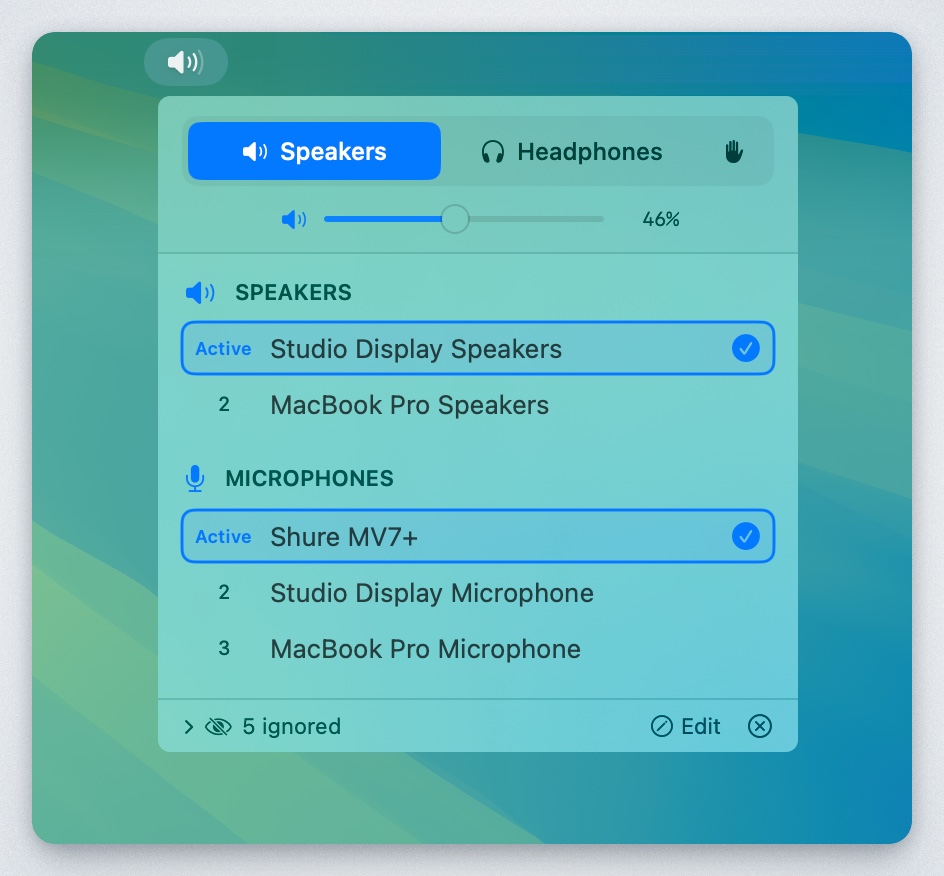
A native macOS menu bar app that automatically manages audio device priorities. Set your preferred order for speakers, headphones, and microphones - the app automatically switches to the highest-priority connected device.
Features
Priority-based auto-switching: Devices are ranked by priority. When a higher-priority device connects, it automatically becomes active.
Separate speaker/headphone modes: Output devices are categorized as either speakers or headphones, each with their own priority list.
Manual override: Enable "Custom" mode (hand icon) to disable auto-switching and select devices freely.
Device memory: Remembers all devices you've ever connected, even when disconnected. Edit mode shows disconnected devices with "last seen" timestamps.
Per-category ignore: Hide devices from specific categories without affecting others.
Drag-to-reorder: Reorder devices by dragging or using up/down arrows.
Volume control: Adjust volume with slider or scroll wheel.
Menu bar integration: Shows current mode icon and volume percentage.
Installation
Requirements
macOS 13.0 (Ventura) or later
Build from Source
Clone the repository:
git clone https://github.com/tobi/AudioPriorityBar.git
cd AudioPriorityBar
Build using the build script:
./build.sh
The app will be at dist/AudioPriorityBar.app
Or open AudioPriorityBar.xcodeproj in Xcode and build with ⌘R.
Download Release
Check the Releases page for pre-built binaries.
Usage
Modes
Mode
Icon
Behavior
Speakers
🔊
Shows speaker devices, auto-switches to highest priority
Headphones
🎧
Shows headphone devices, auto-switches to highest priority
Custom
✋
Shows all devices, no auto-switching
Managing Priorities
Click a device: Moves it to #1 priority (in normal mode) or just selects it (in custom mode)
Drag devices: Reorder by dragging the handle
Up/Down arrows: Fine-tune order on hover
Device Actions (hover menu)
Move to Speakers/Headphones: Change device category
Ignore as [category]: Hide from current category only
Ignore entirely: Hide from both speaker and headphone lists
Forget Device: Remove disconnected device from memory
Edit Mode
Click "Edit" in the footer to:
See all devices ever connected (disconnected ones grayed out)
Reorder disconnected devices in the priority list
View "last seen" timestamps
Forget old devices you no longer use
How It Works
Device Discovery: Uses CoreAudio to enumerate audio devices and listen for changes.
Priority Storage: Device priorities are stored in UserDefaults, keyed by device UID (stable across reconnects).
Auto-Switching: When devices connect/disconnect, the app automatically selects the highest-priority available device for the current mode.
Categories: Each output device is assigned to either "speaker" or "headphone" category, with separate priority lists.
Yes — tobi/AudioPriorityBar ships under the MIT license, which makes its source code freely readable (and, depending on license terms, forkable and reusable). Source: github.com/tobi/AudioPriorityBar.
What is tobi/AudioPriorityBar?
tobi/AudioPriorityBar (tobi/AudioPriorityBar) is a Swift project on GitHub. From the project's own README: A native macOS menu bar app for managing audio device priorities
Where do I read more about tobi/AudioPriorityBar?
This TopGit page is a snapshot — the READ ME tab shows the project's own README content (links stripped, images preserved). The GitHub repository at github.com/tobi/AudioPriorityBar is the definitive source.
Read full README in the tab above.
Still deciding about AudioPriorityBar?
One click hands the question to an AI along with this page — see what it says about AudioPriorityBar.
 /AudioPriorityBar