vikmeup/SCLAlertView-Swift hiện có 5.3k sao trên GitHub, viết chủ yếu bằng Swift. Beautiful animated Alert View. Written in Swift
Tóm tắt dựng từ metadata GitHub của chính dự án — chưa có bài review TopGit. Trang sẽ tự động cập nhật khi bài review đầy đủ được xuất bản.
VÌ SAO CHƯA CÓ REVIEW
TopGit viết bài đầy đủ cho repo có nhiều sao nhất và được yêu cầu nhiều nhất. Trang này là snapshot trong thời gian chờ — xem README gốc ở tab READ ME.
Animated Alert View written in Swift, which can be used as a UIAlertView or UIAlertController replacement with nice customization features.
_
Easy to use
Get Started
// Get started
SCLAlertView().showInfo("Important info", subTitle: "You are great")
Updating the alert view
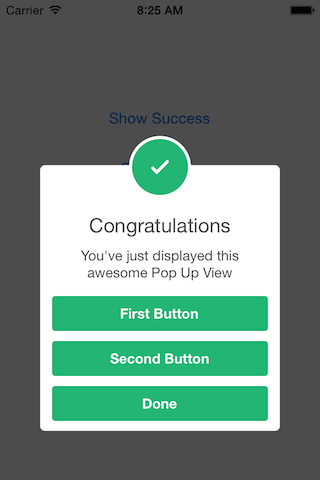
let alertViewResponder: SCLAlertViewResponder = SCLAlertView().showSuccess("Hello World", subTitle: "This is a more descriptive text.")

// Upon displaying, change/close view
alertViewResponder.setTitle("New Title") // Rename title
alertViewResponder.setSubTitle("New description") // Rename subtitle
alertViewResponder.close() // Close view
Alternative alert types
SCLAlertView().showError("Hello Error", subTitle: "This is a more descriptive error text.") // Error
SCLAlertView().showNotice("Hello Notice", subTitle: "This is a more descriptive notice text.") // Notice
SCLAlertView().showWarning("Hello Warning", subTitle: "This is a more descriptive warning text.") // Warning
SCLAlertView().showInfo("Hello Info", subTitle: "This is a more descriptive info text.") // Info
SCLAlertView().showEdit("Hello Edit", subTitle: "This is a more descriptive info text.") // Edit
Raw call to showTitle()
SCLAlertView().showTitle(
    "Congratulations", // Title of view
    subTitle: "Operation successfully completed.", // String of view
    duration: 2.0, // Duration to show before closing automatically, default: 0.0
    completeText: "Done", // Optional button value, default: ""
    style: .success, // Styles - see below.
    colorStyle: UIColorFromRGB(0xA429FF),
    colorTextButton: .white
)
Controls
Custom Appearance
// SCLAlertView.SCLAppearanc has more than 15 different properties to customize. See below.

let appearance = SCLAlertView.SCLAppearance(
    kTitleFont: UIFont(name: "HelveticaNeue", size: 20)!,
    kTextFont: UIFont(name: "HelveticaNeue", size: 14)!,
    kButtonFont: UIFont(name: "HelveticaNeue-Bold", size: 14)!,
    showCloseButton: false
)

let alert = SCLAlertView(appearance: appearance)
let appearance = SCLAlertView.SCLAppearance(
    showCloseButton: false
)
let alertView = SCLAlertView(appearance: appearance)
alertView.showSuccess("No button", subTitle: "You will have hard times trying to close me")
Hide default close button & a duration to close the alert
let appearance = SCLAlertView.SCLAppearance(
    showCloseButton: false
)
let alertView = SCLAlertView(appearance: appearance)
alertView.showWarning("No button", subTitle: "Just wait for 3 seconds and I will disappear", duration: 3)
Hide alert icon
let appearance = SCLAlertView.SCLAppearance(
    showCircularIcon: false
)
let alertView = SCLAlertView(appearance: appearance)
alertView.showSuccess("No icon", subTitle: "This is a clean alert without Icon!")
Use a custom icon
let appearance = SCLAlertView.SCLAppearance(
    showCircularIcon: true
)
let alertView = SCLAlertView(appearance: appearance)
let alertViewIcon = UIImage(named: "IconImage") //Replace the IconImage text with the image name
alertView.showInfo("Custom icon", subTitle: "This is a nice alert with a custom icon you choose", circleIconImage: alertViewIcon)
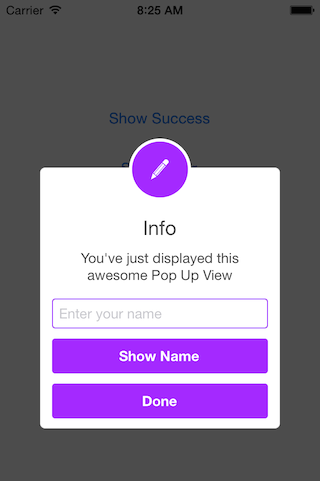
Add Text fields
// Add a text field
let alert = SCLAlertView()
let txt = alert.addTextField("Enter your name")
alert.addButton("Show Name") {
    print("Text value: \(txt.text)")
}
alert.showEdit("Edit View", subTitle: "This alert view shows a text box")
Use a custom subview instead of a subtitle
// Example of using the view to add two text fields to the alert
// Create custom Appearance Configuration
let appearance = SCLAlertView.SCLAppearance(
    kTitleFont: UIFont(name: "HelveticaNeue", size: 20)!,
    kTextFont: UIFont(name: "HelveticaNeue", size: 14)!,
    kButtonFont: UIFont(name: "HelveticaNeue-Bold", size: 14)!,
    showCloseButton: false,
    dynamicAnimatorActive: true
)

// Initialize SCLAlertView using custom Appearance
let alert = SCLAlertView(appearance: appearance)

// Creat the subview
let subview = UIView(frame: CGRect(x: 0,y: 0,width: 216,height: 70))
let x = (subview.frame.width - 180) / 2

// Add textfield 1
let textfield1 = UITextField(frame: CGRect(x: x,y: 10,width: 180,height: 25))
textfield1.layer.borderColor = UIColor.green.cgColor
textfield1.layer.borderWidth = 1.5
textfield1.layer.cornerRadius = 5
textfield1.placeholder = "Username"
textfield1.textAlignment = NSTextAlignment.center
subview.addSubview(textfield1)

// Add textfield 2
let textfield2 = UITextField(frame: CGRect(x: x,y: textfield1.frame.maxY + 10,width: 180,height: 25))
textfield2.isSecureTextEntry = true
textfield2.layer.borderColor = UIColor.blue.cgColor
textfield2.layer.borderWidth = 1.5
textfield2.layer.cornerRadius = 5
textfield1.layer.borderColor = UIColor.blue.cgColor
textfield2.placeholder = "Password"
textfield2.textAlignment = NSTextAlignment.center
subview.addSubview(textfield2)

// Add the subview to the alert's UI property
alert.customSubview = subview
_ = alert.addButton("Login") {
    print("Logged in")
}

// Add Button with visible timeout and custom Colors
let showTimeout = SCLButton.ShowTimeoutConfiguration(prefix: "(", suffix: " s)")
_ = alert.addButton("Timeout Button", backgroundColor: UIColor.brown, textColor: UIColor.yellow, showTimeout: showTimeout) {
    print("Timeout Button tapped")
}

let timeoutValue: TimeInterval = 10.0
let timeoutAction: SCLAlertView.SCLTimeoutConfiguration.ActionType = {
    print("Timeout occurred")
}

_ = alert.showInfo("Login", subTitle: "", timeout: SCLAlertView.SCLTimeoutConfiguration(timeoutValue: timeoutValue, timeoutAction: timeoutAction))
List of properties to customize
// Button
kButtonFont: UIFont
buttonCornerRadius : CGFloat
showCloseButton: Bool
kButtonHeight: CGFloat

// Circle Image
showCircularIcon: Bool
kCircleTopPosition: CGFloat
kCircleBackgroundTopPosition: CGFloat
kCircleHeight: CGFloat
kCircleIconHeight: CGFloat

// Text
kTitleFont: UIFont
kTitleTop:CGFloat
kTitleHeight:CGFloat
kTextFont: UIFont
kTextHeight: CGFloat
kTextFieldHeight: CGFloat
kTextViewdHeight: CGFloat

// View
kDefaultShadowOpacity: CGFloat
kWindowWidth: CGFloat
kWindowHeight: CGFloat
shouldAutoDismiss: Bool // Set this false to 'Disable' Auto hideView when SCLButton is tapped
fieldCornerRadius : CGFloat
contentViewCornerRadius : CGFloat
disableTapGesture: Bool // set this to true if adding tableview to subView
Alert View Styles
enum SCLAlertViewStyle: Int {
    case success, error, notice, warning, info, edit, wait, question
}
Alert show animation Styles
// Animation Styles
public enum SCLAnimationStyle {
    case noAnimation, topToBottom, bottomToTop, leftToRight, rightToLeft
}
Installation
SCLAlertView is available through
CocoaPods
To install add the following line to your Podfile:
pod 'SCLAlertView'
Carthage
To install add the following line to your Cartfile:
github "vikmeup/SCLAlertView-Swift" "master"
Collaboration
I tried to build an easy to use API, while beeing flexible enough for multiple variations, but I'm sure there are ways of improving and adding more features, so feel free to collaborate with ideas, issues and/or pull requests.
Incoming improvements
More animations
Performance tests
Has been developed initially for the Scroll Feed app
Design @SherzodMx Sherzod Max
Development @vikmeup Viktor Radchenko
Improvements by @bih Bilawal Hameed, @rizjoj Riz Joj
Trang TopGit này là một snapshot — tab "Readme" hiển thị nguyên văn README của repo (đã bỏ link, giữ ảnh). Repo GitHub ở github.com/vikmeup/SCLAlertView-Swift là nguồn chính thức.
vikmeup/SCLAlertView-Swift có phải mã nguồn mở không?
Có — vikmeup/SCLAlertView-Swift phát hành theo license MIT, nghĩa là mã nguồn mở để đọc, fork và (tùy license) tái sử dụng. Mã: github.com/vikmeup/SCLAlertView-Swift.
vikmeup/SCLAlertView-Swift có tag gì không?
Bản đồng bộ chưa ghi nhận topic GitHub nào cho vikmeup/SCLAlertView-Swift. GitHub topics hiển thị ở thanh bên phải trang repo — đó là nơi đáng kiểm tra nhất.
vikmeup/SCLAlertView-Swift có website riêng không?
TopGit chưa ghi nhận URL trang chủ cho vikmeup/SCLAlertView-Swift. Phần README ở tab phía trên thường có link demo, hoặc xem mô tả GitHub của repo.
vikmeup/SCLAlertView-Swift còn đang phát triển không?
Commit gần nhất trên vikmeup/SCLAlertView-Swift là 2.9 năm trước (theo timestamp GitHub). Repo có 747 fork — một chỉ báo về mức độ quan tâm của cộng đồng.
vikmeup/SCLAlertView-Swift dùng license gì?
vikmeup/SCLAlertView-Swift phát hành theo license MIT. Nên mở file LICENSE trên GitHub để xác nhận — license metadata đôi khi lệch với thực tế dự án.
Đọc đầy đủ README ở tab phía trên.
Chưa chắc SCLAlertView-Swift có hợp với bạn?
Để ChatGPT, Claude hoặc Perplexity tìm hiểu giúp — bấm bên dưới và xem AI nói gì về SCLAlertView-Swift.

 /SCLAlertView-Swift


 _