vmware-archive/kubewatch được TopGit xếp vào nhóm dự án backend, với 2.4k sao trên GitHub, viết chủ yếu bằng Go. Watch k8s events and trigger Handlers
Tóm tắt dựng từ metadata GitHub của chính dự án — chưa có bài review TopGit. Trang sẽ tự động cập nhật khi bài review đầy đủ được xuất bản.
VÌ SAO CHƯA CÓ REVIEW
TopGit viết bài đầy đủ cho repo có nhiều sao nhất và được yêu cầu nhiều nhất. Trang này là snapshot trong thời gian chờ — xem README gốc ở tab READ ME.
WARNING: Kubewatch is no longer actively maintained by VMware.
VMware has made the difficult decision to stop driving this project and therefore we will no longer actively respond to issues or pull requests. The project will be externally maintained in the following fork: https://github.com/robusta-dev/kubewatch
Thank You.
kubewatch is a Kubernetes watcher that currently publishes notification to available collaboration hubs/notification channels. Run it in your k8s cluster, and you will get event notifications through webhooks.
Usage
$ kubewatch -h

Kubewatch: A watcher for Kubernetes

kubewatch is a Kubernetes watcher that publishes notifications
to Slack/hipchat/mattermost/flock channels. It watches the cluster
for resource changes and notifies them through webhooks.

supported webhooks:
 - slack
 - hipchat
 - mattermost
 - flock
 - webhook
 - smtp

Usage:
  kubewatch [flags]
  kubewatch [command]

Available Commands:
  config      modify kubewatch configuration
  resource    manage resources to be watched
  version     print version

Flags:
  -h, --help   help for kubewatch

Use "kubewatch [command] --help" for more information about a command.
Install
Cluster Installation
Using helm:
When you have helm installed in your cluster, use the following setup:
In order to run kubewatch in a Kubernetes cluster quickly, the easiest way is for you to create a ConfigMap to hold kubewatch configuration.
An example is provided at kubewatch-configmap.yaml, do not forget to update your own slack channel and token parameters. Alternatively, you could use secrets.
Create k8s configmap:
$ kubectl create -f kubewatch-configmap.yaml
Create the Pod directly, or create your own deployment:
$ kubectl create -f kubewatch.yaml
A kubewatch container will be created along with kubectl sidecar container in order to reach the API server.
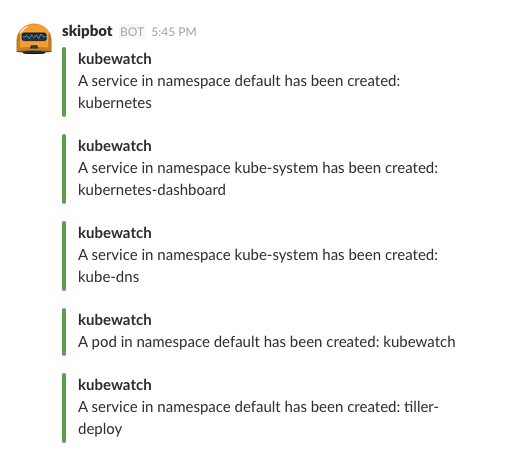
Once the Pod is running, you will start seeing Kubernetes events in your configured Slack channel. Here is a screenshot:
To modify what notifications you get, update the kubewatch ConfigMap and turn on and off (true/false) resources:
Kubernetes Engine clusters running versions 1.6 or higher introduced Role-Based Access Control (RBAC). We can create ServiceAccount for it to work with RBAC.
Kubewatch supports config command for configuration. Config file will be saved at $HOME/.kubewatch.yaml
$ kubewatch config -h

config command allows admin setup his own configuration for running kubewatch

Usage:
  kubewatch config [flags]
  kubewatch config [command]

Available Commands:
  add         add webhook config to .kubewatch.yaml
  test        test handler config present in .kubewatch.yaml
  view        view .kubewatch.yaml

Flags:
  -h, --help   help for config

Use "kubewatch config [command] --help" for more information about a command.
Example:
slack:
Create a slack Bot
Edit the Bot to customize its name, icon and retrieve the API token (it starts with xoxb-).
Invite the Bot into your channel by typing: /invite @name_of_your_bot in the Slack message area.
Add Api token to kubewatch config using the following steps
To test the handler config by send test messages use the following command.
$ kubewatch config test -h

Tests handler configs present in .kubewatch.yaml by sending test messages

Usage:
  kubewatch config test [flags]

Flags:
  -h, --help   help for test
Example:
$ kubewatch config test

Testing Handler configs from .kubewatch.yaml
2019/06/03 12:29:23 Message successfully sent to channel ABCD at 1559545162.000100
Viewing config
To view the entire config file $HOME/.kubewatch.yaml use the following command.
To manage the resources being watched, use the following command, changes will be saved to $HOME/.kubewatch.yaml.
$ kubewatch resource -h

manage resources to be watched

Usage:
  kubewatch resource [flags]
  kubewatch resource [command]

Available Commands:
  add         adds specific resources to be watched
  remove      remove specific resources being watched

Flags:
      --clusterrole   watch for cluster roles
      --cm            watch for plain configmaps
      --deploy        watch for deployments
      --ds            watch for daemonsets
  -h, --help          help for resource
      --ing           watch for ingresses
      --job           watch for jobs
      --node          watch for Nodes
      --ns            watch for namespaces
      --po            watch for pods
      --pv            watch for persistent volumes
      --rc            watch for replication controllers
      --rs            watch for replicasets
      --sa            watch for service accounts
      --secret        watch for plain secrets
      --svc           watch for services

Use "kubewatch resource [command] --help" for more information about a command.
Add/Remove resource:
$ kubewatch resource add -h

adds specific resources to be watched

Usage:
  kubewatch resource add [flags]

Flags:
  -h, --help   help for add

Global Flags:
      --clusterrole   watch for cluster roles
      --cm            watch for plain configmaps
      --deploy        watch for deployments
      --ds            watch for daemonsets
      --ing           watch for ingresses
      --job           watch for jobs
      --node          watch for Nodes
      --ns            watch for namespaces
      --po            watch for pods
      --pv            watch for persistent volumes
      --rc            watch for replication controllers
      --rs            watch for replicasets
      --sa            watch for service accounts
      --secret        watch for plain secrets
      --svc           watch for services
Example:
# rc, po and svc will be watched
$ kubewatch resource add --rc --po --svc

# rc, po and svc will be stopped from being watched
$ kubewatch resource remove --rc --po --svc
Build
Using go
Clone the repository anywhere:
$ git clone https://github.com/bitnami-labs/kubewatch.git
$ cd kubewatch
$ go build
or
You can also use the Makefile directly:
$ make build
Prerequisites
You need to have Go (v1.5 or later) installed. Make sure to set $GOPATH
Using Docker
$ make docker-image
$ docker images
REPOSITORY          TAG                 IMAGE ID            CREATED              SIZE
kubewatch           latest              919896d3cd90        3 minutes ago       27.9MB
Prerequisites
you need to have docker installed.
Contribution
Refer to the contribution guidelines to get started.
Trang TopGit này là một snapshot — tab "Readme" hiển thị nguyên văn README của repo (đã bỏ link, giữ ảnh). Repo GitHub ở github.com/vmware-archive/kubewatch là nguồn chính thức.
vmware-archive/kubewatch có bao nhiêu sao?
vmware-archive/kubewatch có 2.4k sao GitHub — tải lại trang để xem số mới nhất, hoặc xem trực tiếp github.com/vmware-archive/kubewatch. TopGit phản chiếu số sao của GitHub nhưng không cam kết đến từng phút.
vmware-archive/kubewatch có phải mã nguồn mở không?
Có — vmware-archive/kubewatch phát hành theo license Apache-2.0, nghĩa là mã nguồn mở để đọc, fork và (tùy license) tái sử dụng. Mã: github.com/vmware-archive/kubewatch.
vmware-archive/kubewatch còn đang phát triển không?
Commit gần nhất trên vmware-archive/kubewatch là 3.9 năm trước (theo timestamp GitHub). Repo có 433 fork — một chỉ báo về mức độ quan tâm của cộng đồng.
vmware-archive/kubewatch là gì?
vmware-archive/kubewatch (vmware-archive/kubewatch) là dự án Go trên GitHub. Theo mô tả gốc: Watch k8s events and trigger Handlers
vmware-archive/kubewatch so với các dự án Backend khác thế nào?
vmware-archive/kubewatch được TopGit xếp vào nhóm Backend, với 2.4k sao GitHub và viết bằng Go. Xem trang chủ đề Backend trên TopGit để so sánh với các dự án tương tự theo số sao và mức độ hoạt động.
Đọc đầy đủ README ở tab phía trên.
Vẫn đang phân vân về kubewatch?
Một cú bấm sẽ gửi câu hỏi kèm trang này cho AI — xem AI nói gì về kubewatch.
 /kubewatch