vmware-archive/octant là dự án Go với 6.2k sao trong nhóm Backend. Highly extensible platform for developers to better understand the complexity of Kubernetes clusters.
Tóm tắt dựng từ metadata GitHub của chính dự án — chưa có bài review TopGit. Trang sẽ tự động cập nhật khi bài review đầy đủ được xuất bản.
VÌ SAO CHƯA CÓ REVIEW
TopGit viết bài đầy đủ cho repo có nhiều sao nhất và được yêu cầu nhiều nhất. Trang này là snapshot trong thời gian chờ — xem README gốc ở tab READ ME.
VMware has ended active development of this project, this repository will no longer be updated.
A highly extensible platform for developers to better understand the complexity of Kubernetes clusters.
Octant is a tool for developers to understand how applications run on a Kubernetes cluster. It aims to be part of the developer's toolkit for gaining insight and approaching complexity found in Kubernetes. Octant offers a combination of introspective tooling, cluster navigation, and object management along with a plugin system to further extend its capabilities.
Features
Resource Viewer
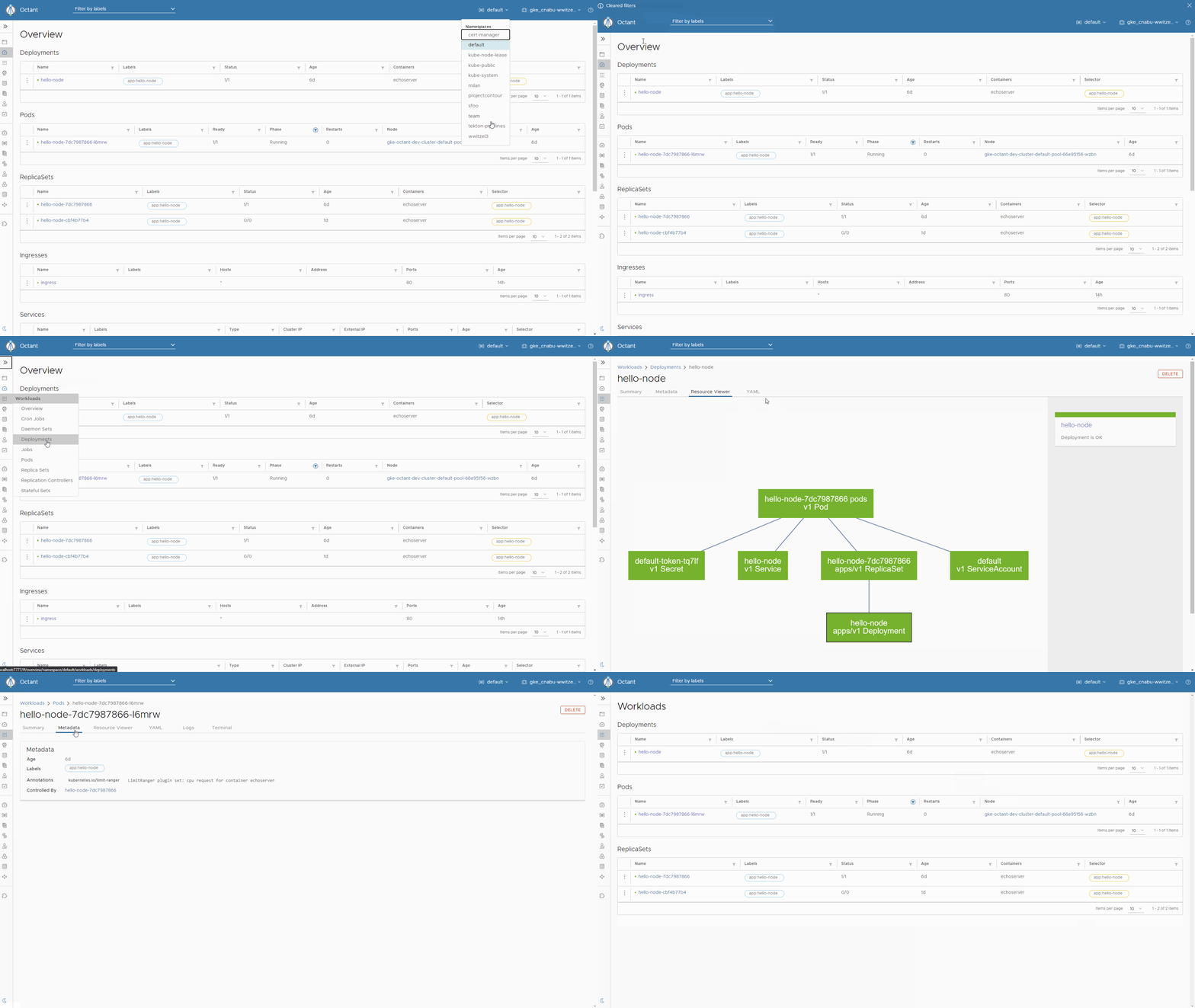
Graphically visualize relationships between objects in a Kubernetes cluster. The status of individual objects are represented by color to show workload performance.
Summary View
Consolidated status and configuration information in a single page aggregated from output typically found using multiple kubectl commands.
Port Forward
Forward a local port to a running pod with a single button for debugging applications and even port forward multiple pods across namespaces.
Log Stream
View log streams of pod and container activity for troubleshooting or monitoring without holding multiple terminals open.
Label Filter
Organize workloads with label filtering for inspecting clusters with a high volume of objects in a namespace.
Cluster Navigation
Easily change between namespaces or contexts across different clusters. Multiple kubeconfig files are also supported.
Plugin System
Highly extensible plugin system for users to provide additional functionality through gRPC. Plugin authors can add components on top of existing views.
Usage
Installation
Package (Linux only)
Download the .deb or .rpm from the releases page.
Install with either dpkg -i or rpm -i respectively.
Windows
Chocolatey
Install using chocolatey with the following one-liner:
choco install octant --confirm
Scoop
Add the extras bucket.
scoop bucket add extras
Install using scoop.
scoop install octant
macOS
Homebrew
Install using Homebrew with the following one-liner:
brew install octant
Download a Pre-built Binary (Linux, macOS, Windows)
Open the releases page from a browser and download the latest tarball or zip file.
Extract the tarball or zip where X.Y is the release version:
$ tar -xzvf ~/Downloads/octant_0.X.Y_Linux-64bit.tar.gz
octant_0.X.Y_Linux-64bit/README.md
octant_0.X.Y_Linux-64bit/octant
Verify it runs:
$ ./octant_0.X.Y_Linux-64bit/octant version
Nightly Builds
Nightly builds of Octant are available for download.
Please note that nightly builds maybe less stable than our tagged releases and are intended to allow early access to
preview upcoming features and for plugin authors who want access to the latest plugin APIs.
Browse nightly builds
Getting Started
Before starting Octant, make sure you have access to a healthy cluster. If kubectl is installed, test using kubectl cluster-info.
Start running Octant:
$ octant
Octant should immediately launch your default web browser on 127.0.0.1:7777.
Octant uses the default web browser on the system to act as the UI client. In the future Octant will ship with a UI.
For setting extra configuration such as what kubeconfig or context to use at startup, refer to the documentation.
Supported Versions
Octant versions follow Semantic Versioning where a given version number represents MAJOR.MINOR.PATCH.
Patch releases address bug fixes, regressions, and small enhancements.
Minor releases contain security fixes, API changes, and significant enhancements such as UI changes or new components.
Major releases contain breaking changes that are not guaranteed to be backwards compatible. Octant versions before 1.0 should not be considered stable and API may change between minor releases.
Supported Version Skew
Version of Octant are compiled against a version of client-go.
Octant follows an n±1 policy for versions of Kubernetes similar to kubectl. For example, Octant 0.16.0 uses the Kubernetes 1.19 client. So version 0.16.0 can be used with Kubernetes 1.18, 1.19, and 1.20.
Plugins
Plugins are a core part of Octant in the Kubernetes ecosystem. A plugin can read objects and allows users to add components to Octant's views.
An example plugin can be found in cmd/octant-sample-plugin and installed to the default plugin path with go run build.go install-test-plugin.
Some plugins can be found on GitHub in the #octant-plugin topic (tag).
Documentation for plugin components can be found in the Plugins section of the documentation.
Discussion
Feature requests, bug reports, and enhancements are welcome. Contributors, maintainers, and users are encouraged to collaborate through these communication channels:
Kubernetes Slack in the #octant channel
Twitter
Google group
GitHub issues
Contributing
Contributors will need to sign a DCO (Developer Certificate of Origin) with all changes. We also ask that a changelog entry is included with your pull request. Details are described in our contributing documentation.
See our hacking guide for getting your development environment setup.
See our roadmap for tentative features in a 1.0 release.
License
Octant is available under the Apache License, Version 2.0
Trang TopGit này là một snapshot — tab "Readme" hiển thị nguyên văn README của repo (đã bỏ link, giữ ảnh). Repo GitHub ở github.com/vmware-archive/octant là nguồn chính thức.
vmware-archive/octant có những chủ đề gì?
GitHub topics của vmware-archive/octant: "go", "golang", "kubernetes", "kubernetes-clusters", "octant". TopGit xếp repo vào nhóm Backend.
vmware-archive/octant có phải mã nguồn mở không?
Có — vmware-archive/octant phát hành theo license Apache-2.0, nghĩa là mã nguồn mở để đọc, fork và (tùy license) tái sử dụng. Mã: github.com/vmware-archive/octant.
vmware-archive/octant có trang demo không?
Dự án có trang chủ ở https://octant.dev. Tab "Readme" ở trang này thường có ảnh chụp và hướng dẫn bắt đầu nhanh.
vmware-archive/octant còn đang phát triển không?
Commit gần nhất trên vmware-archive/octant là 3.6 năm trước (theo timestamp GitHub). Repo có 484 fork — một chỉ báo về mức độ quan tâm của cộng đồng.
vmware-archive/octant dùng license gì?
vmware-archive/octant phát hành theo license Apache-2.0. Nên mở file LICENSE trên GitHub để xác nhận — license metadata đôi khi lệch với thực tế dự án.
Đọc đầy đủ README ở tab phía trên.
Chưa chắc octant có hợp với bạn?
Để ChatGPT, Claude hoặc Perplexity tìm hiểu giúp — bấm bên dưới và xem AI nói gì về octant.
 /octant