
williamfiset/FastJavaIO

Điểm qua williamfiset/FastJavaIO: 123 sao trên GitHub, viết chủ yếu bằng Java. Very fast Java input reader.
Tóm tắt dựng từ metadata GitHub của chính dự án — chưa có bài review TopGit. Trang sẽ tự động cập nhật khi bài review đầy đủ được xuất bản.
TopGit viết bài đầy đủ cho repo có nhiều sao nhất và được yêu cầu nhiều nhất. Trang này là snapshot trong thời gian chờ — xem README gốc ở tab READ ME.
Snapshot
Cộng tác viên hàng đầu
Xem cộng tác viên hàng đầu
FastJavaIO
FastJavaIO is a lightweight, dependency-free Java library for reading input fast. Its core is the InputReader class, a fast alternative to java.util.Scanner and BufferedReader that parses bytes directly off the stream to read integers, longs, doubles, strings, lines, arrays, and matrices. Reading numbers from standard input is typically 3–5x faster than the usual BufferedReader + split approach (see the benchmark below).
What problem does it solve?
Java's built-in I/O classes are convenient but slow. java.util.Scanner relies on regular expressions and is notoriously sluggish on large inputs, and even a hand-rolled BufferedReader still pays the cost of allocating Strings and tokenizing them before you can parse a number. When a program needs to read tens of thousands — or millions — of values, this overhead dominates the runtime.
This becomes painfully obvious in competitive programming (Codeforces, Kattis, ICPC, Google Code Jam, etc.), where solutions are judged against strict time limits and a correct algorithm can still time out purely because of slow input parsing. FastJavaIO was built to make that bottleneck disappear so you can spend your time budget on the actual problem.
How it achieves this
Instead of reading characters, building String tokens, and then parsing them, InputReader works on a raw byte buffer:
- Bytes are pulled from the underlying
InputStreamin large chunks (a 64 KB buffer by default) to minimize system calls. - Numbers are parsed digit-by-digit straight from the buffer, avoiding intermediate
Stringallocation and regex matching entirely. - Doubles are parsed straight from the buffer with an exact fast path (falling back to
Double.parseDoubleonly for unusual inputs), sonextDouble()is both exact and fast. - Helpers read whole arrays and matrices in a single call, with both 0-based and 1-based variants.
Benchmark
The graph below shows the read-speed difference between InputReader and a BufferedReader (java.util.Scanner was too slow to even make it onto the chart). Check out the examples below to get started reading various types of data from an input stream.
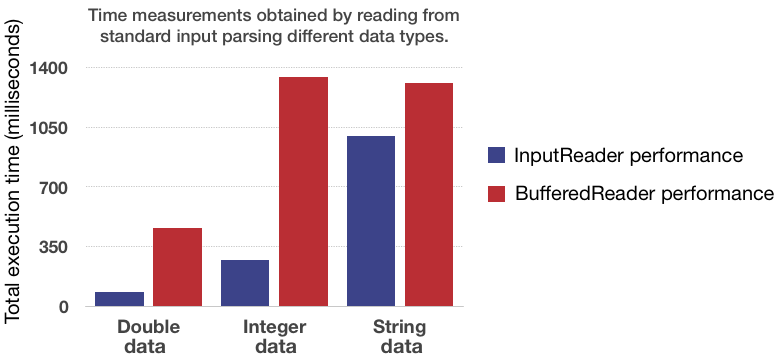
Each bar is the median of 7 runs, each in a fresh JVM, with the test data piped through standard input (Apple M4 Max, JDK 26). BufferedReader reads numbers with readLine + split + Integer.parseInt / Double.parseDouble; "String data" compares InputReader.nextLine with BufferedReader.readLine.
Reading from an input stream
Input data can come from a variety of sources. Sometimes it comes from standard input in the form of System.in, other times it may come from a file we are trying to read as a FileInputStream object or even through a Web Socket. For this reason, anything that extends the InputStream class can be read with our InputReader. The default stream is set to be the standard input stream, but this can be changed when constructing an InputReader object:
// Reading from standard input
InputReader stdinReader = new InputReader(); // Defaults to reading from System.in
String line = stdinReader.nextLine();

// Reading from a file
FileInputStream fileStream = new FileInputStream("/path/to/the/file");
InputReader fileReader = new InputReader(fileStream);
String line = fileReader.nextLine();

// Reading from Web Socket
Socket socket = new Socket("Some Machine", port);
InputReader socketReader = new InputReader(socket.getInputStream());
String data = socketReader.nextString(); // Read first string
Getting started
The first step to getting started with the InputReader is to include the fastjavaio.jar to your project. If you're running your application on the command-line this can easily be done by adding the jar file to your CLASSPATH.
If you're using a Unix like system try:
javac -cp .:fastjavaio.jar MyProgram.java  # Compile
java -cp .:fastjavaio.jar MyProgram        # Run
If you're using Windows try:
javac -cp .;fastjavaio.jar MyProgram.java # Compile
java -cp .;fastjavaio.jar MyProgram       # Run
To actually use the InputReader class within your application you need to import it from within the fastjavaio package:
// Import the InputReader class
import com.williamfiset.fastjavaio.InputReader;

public class InputReaderUsageExample {
  public static void main (String[] args) throws java.io.IOException {

    // Create an InputReader object that reads data from standard input by default
    InputReader in = new InputReader();

    // read input here...

  }
}
InputReader methods
ALL methods in the InputReader class must be caught or thrown because they throw an java.io.IOException when something bad happens such as trying to read a byte value from an empty stream. See here for detailed examples of how to use the methods outlined below.
Input assumptions. For speed, InputReader does no input validation and expects ASCII input:
- Numbers are not checked. A malformed or out-of-range number silently produces a wrong value instead of an exception (see the overflow examples below).
- Non-ASCII bytes are not decoded as UTF-8.
nextString()treats them as separators, so"café"is read as"caf", andnextLine()maps each byte to one character, so"café"is read as"café". - Windows line endings are not stripped: on
\r\ninput,nextLine()returns the line with a trailing\r.
.nextByte()
Reads a signed 8 bit integer from the input stream.
InputReader in = new InputReader();
byte byteValue = in.nextByte();
.nextInt()
Reads a signed 32 bit integer from the input stream.
InputReader in = new InputReader();
int intValue = in.nextInt();
.nextLong()
Reads a signed 64 bit integer from the input stream.
InputReader in = new InputReader();
long longValue = in.nextLong();
.nextDouble()
Reads a signed double from the input stream. The result is always identical to Double.parseDouble; common inputs (at most ~15 significant digits and a small exponent) are parsed directly from the byte buffer without creating a String.
InputReader in = new InputReader();
double doubleValue = in.nextDouble();
.nextDoubleFast()
For values with at most ~15 significant digits (most input) this is identical to .nextDouble(): same exact result, same speed. For values with 16 or more significant digits, such as the full precision output of Double.toString, .nextDouble() falls back to Double.parseDouble to stay exact, while .nextDoubleFast() stays on its fast path: about 2x faster, but the result may be off by 1 ulp.
InputReader in = new InputReader();
double doubleValue = in.nextDoubleFast();
.nextString()
Reads a string of characters from the input stream. Strings are separated by any byte with an ASCII value <= 32 (spaces, tabs, new lines, carriage returns and other control characters), or by any non-ASCII byte; separators are never part of the string. Returns null when no more strings are left in the input stream.
InputReader in = new InputReader();
String str = in.nextString();
.nextLine()
Reads a line of characters from the input stream until a new line character (\n) is reached. The new line itself is not included, but spaces and any \r before it are. Returns null when no more lines are left in the input stream.
InputReader in = new InputReader();
String line = in.nextLine();
.nextByteArray(int n)
Reads n byte values into a byte array. If the specified value of n is too large and not enough bytes are found an exception is thrown.
InputReader in = new InputReader();
int bytesToRead = 16;
byte[] bytes = in.nextByteArray(bytesToRead);
.nextIntArray(int n)
Reads n signed 32bit integer values into an array. If the specified value of n is too large and not enough integers are found an exception is thrown.
InputReader in = new InputReader();
int integersToRead = 16;
int[] integers = in.nextIntArray(integersToRead);
.nextLongArray(int n)
Reads n signed 64bit long values into an array. If the specified value of n is too large and not enough longs are found an exception is thrown.
InputReader in = new InputReader();
int longsToRead = 16;
long[] longs = in.nextLongArray(longsToRead);
.nextDoubleArray(int n)
Reads n double values into an array. If the specified value of n is too large and not enough doubles are found an exception is thrown.
InputReader in = new InputReader();
int doublesToRead = 16;
double[] doubles = in.nextDoubleArray(doublesToRead);
.nextDoubleArrayFast(int n)
Quickly reads n double values into an array using the .nextDoubleFast() method. If the specified value of n is too large and not enough doubles are found an exception is thrown.
InputReader in = new InputReader();
int doublesToRead = 16;
double[] doubles = in.nextDoubleArrayFast(doublesToRead);
.nextStringArray(int n)
Reads n space separated strings into an array. If the specified value of n is too large and not enough strings are found in the input stream an exception is thrown.
InputReader in = new InputReader();
int stringsToRead = 16;
String[] strings = in.nextStringArray(stringsToRead);
NOTE: If you want to read data into a 1-based array (of size n+1, with index 0 left unused) instead of a 0-based array, use the following methods:
- nextByteArray1(int n)
- nextIntArray1(int n)
- nextLongArray1(int n)
- nextDoubleArray1(int n)
- nextDoubleArrayFast1(int n)
- nextStringArray1(int n)
Unlike nextStringArray, nextStringArray1 does not throw when the input runs out: the remaining entries are left null.
.nextIntMatrix(int rows, int cols)
Reads rows x cols signed 32 bit integers into a two dimensional array, row by row. If there are not enough integers in the input stream an exception is thrown.
InputReader in = new InputReader();
int[][] grid = in.nextIntMatrix(3, 4); // 3 rows, 4 columns
The same exists for the other types, each with a 1-based variant (of size (rows+1) x (cols+1), with row and column 0 left unused) ending in 1:
- nextByteMatrix(int rows, int cols), nextByteMatrix1(int rows, int cols)
- nextIntMatrix(int rows, int cols), nextIntMatrix1(int rows, int cols)
- nextLongMatrix(int rows, int cols), nextLongMatrix1(int rows, int cols)
- nextDoubleMatrix(int rows, int cols), nextDoubleMatrix1(int rows, int cols)
- nextDoubleMatrixFast(int rows, int cols), nextDoubleMatrixFast1(int rows, int cols)
- nextStringMatrix(int rows, int cols), nextStringMatrix1(int rows, int cols)
The string matrix methods do not throw when the input runs out: the remaining entries are left null.
.close()
Closes the underlying input stream.
InputReader in = new InputReader(new FileInputStream("/path/to/the/file"));
// read input here...
in.close();
Examples
General case
// Suppose standard input stream contains the following string we want to read:
"  123 3.141592    abcdef    the quick brown fox\n jumps \nover\n\n the lazy dog"

InputReader in = new InputReader();
int intvalue = in.nextInt();       // '123'
double dblvalue = in.nextDouble(); // '3.141592'
String str = in.nextString();         // 'abcdef'
String str2 = in.nextString();        // 'the'
String line = in.nextLine();       // 'quick brown fox'
String line1 = in.nextLine();      // ' jumps '
String line2 = in.nextLine();      // 'over'
String line3 = in.nextLine();      // ''
String line4 = in.nextLine();      // ' the lazy dog'
String line5 = in.nextLine();      // null
.nextByte() examples
// Suppose standard input stream contains the following byte values we want to read:
"-128 127 -1 -0 0 1 3454"
//                     ^ NOTE: This does NOT fit in a signed byte!

InputReader in = new InputReader();
byte b1 = in.nextByte(); // -128
byte b2 = in.nextByte(); // 127
byte b3 = in.nextByte(); // -1
byte b4 = in.nextByte(); // 0
byte b5 = in.nextByte(); // 0
byte b6 = in.nextByte(); // 1
byte b7 = in.nextByte(); // 126, this byte value overflowed! No safety check
                         // gets done for this. It is assumed the user knows
                         // the range of the values they're reading from the stream.
byte b8 = in.nextByte(); // Nothing left in stream so an exception is thrown
.nextInt() examples
// Suppose standard input stream contains the following int values we want to read:
"2147483647 -2147483648 34545 -1 -0 0 1 999999999999"
//                                          ^ NOTE: This does NOT fit in a signed int!

InputReader in = new InputReader();
int integer1 = in.nextInt(); // 2147483647
int integer2 = in.nextInt(); // -2147483648
int integer3 = in.nextInt(); // 34545
int integer4 = in.nextInt(); // -1
int integer5 = in.nextInt(); // 0
int integer6 = in.nextInt(); // 0
int integer7 = in.nextInt(); // 1
int integer8 = in.nextInt(); // -727379969, this int value overflowed! No safety check
                             // gets done for this. It is assumed the user knows the
                             // range of the values they're reading from the stream
int integer9 = in.nextInt(); // Nothing left in stream so an exception is thrown
.nextString() example
// Suppose standard input stream contains the following string and we want
// to read the individual fruits names contained inside this sentence. We
// Can easily do this by using the .nextString()
"Apple banana orange\n\n KiWi dragonFRuIt \n   \n  WatERmeOn  \n\n\nPEARS\n\n   "

InputReader in = new InputReader();
String s1 = in.nextString(); // "Apple"
String s2 = in.nextString(); // "banana"
String s3 = in.nextString(); // "orange"
String s4 = in.nextString(); // "KiWi"
String s5 = in.nextString(); // "dragonFRuIt"
String s6 = in.nextString(); // "WatERmeOn"
String s7 = in.nextString(); // "PEARS"
String s8 = in.nextString(); // null - Returns null when no more strings are found in the input stream
.nextLine() example
// Suppose standard input stream contains the following string and we want
// to read it line by line. We can do this using the .nextLine() method
"Apple banana orange\n\n KiWi dragonFRuIt \n   \n  WatERmelOn  \n\n\nPEARS\n\n   "

InputReader in = new InputReader();
String s1  = in.nextLine(); // "Apple banana orange"
String s2  = in.nextLine(); // ""
String s3  = in.nextLine(); // " KiWi dragonFRuIt "
String s4  = in.nextLine(); // "   "
String s5  = in.nextLine(); // "  WatERmelOn  "
String s6  = in.nextLine(); // ""
String s7  = in.nextLine(); // ""
String s8  = in.nextLine(); // "PEARS"
String s9  = in.nextLine(); // ""
String s10 = in.nextLine(); // "   "
String s11 = in.nextLine(); // null - No more lines left so null is returned
Repo liên quan
Master programming by recreating your favorite technologies from scratch.
A curated meta-list of curated lists organized by technology domain. The repository acts as a directory pointing to hundreds of specialized awesome lists covering programming languages, platforms, frameworks, and tooling. All content is community-contributed under the CC0 public domain dedication.
Public APIs is a community-curated GitHub repository listing free, publicly accessible APIs across a wide range of categories, with auth type, HTTPS, and CORS noted for each entry. It's a browsable reference, not a library to install.
REA is an MCP server and CLI that gives AI coding agents the ability to reverse engineer binaries, JavaScript apps, .NET assemblies, and websites. It hooks into Hopper, Ghidra, or IDA Pro for native binary work, or runs static JavaScript analysis with just Node.js. Every investigation returns an Evidence bundle that includes what was found, what was not, and the reasoning path. Setup registers REA with supported agents and walks you through connecting an analysis engine. The CLI also works standalone for terminal-first workflows.
Trả lời nhanh
Đọc thêm về williamfiset/FastJavaIO ở đâu?
Trang TopGit này là một snapshot — tab "Readme" hiển thị nguyên văn README của repo (đã bỏ link, giữ ảnh). Repo GitHub ở github.com/williamfiset/FastJavaIO là nguồn chính thức.
williamfiset/FastJavaIO có bao nhiêu sao?
williamfiset/FastJavaIO có 123 sao GitHub — tải lại trang để xem số mới nhất, hoặc xem trực tiếp github.com/williamfiset/FastJavaIO. TopGit phản chiếu số sao của GitHub nhưng không cam kết đến từng phút.
williamfiset/FastJavaIO có những chủ đề gì?
GitHub topics của williamfiset/FastJavaIO: "inputreader", "io", "stream". TopGit xếp repo vào nhóm mã nguồn mở.
williamfiset/FastJavaIO có website riêng không?
TopGit chưa ghi nhận URL trang chủ cho williamfiset/FastJavaIO. Phần README ở tab phía trên thường có link demo, hoặc xem mô tả GitHub của repo.
williamfiset/FastJavaIO còn đang phát triển không?
Commit gần nhất trên williamfiset/FastJavaIO là 15 ngày trước (theo timestamp GitHub). Repo có 40 fork — một chỉ báo về mức độ quan tâm của cộng đồng.
williamfiset/FastJavaIO dùng license gì?
williamfiset/FastJavaIO phát hành theo license GPL-3.0. Nên mở file LICENSE trên GitHub để xác nhận — license metadata đôi khi lệch với thực tế dự án.
williamfiset/FastJavaIO viết bằng ngôn ngữ gì?
williamfiset/FastJavaIO chủ yếu viết bằng Java. Trường "language" của GitHub dựa trên phần lớn byte ở nhánh mặc định.
Đọc đầy đủ README ở tab phía trên.
Muốn nghe thêm một ý kiến về FastJavaIO?
Hỏi một AI đọc được trang này — một cú bấm là có ngay nhận định về FastJavaIO.