Indexed by TopGit from live GitHub metadata: williamfiset/FastJavaIO has 119 stars, written primarily in Java. Very fast Java input reader.
Snapshot summary built from the project's own GitHub metadata — there's no written TopGit review yet. The page will update automatically when a full review is published.
WHY NO REVIEW YET
TopGit writes full reviews for the most-starred, most-requested repositories. This page is a snapshot until then — see the READ ME tab for the original README in full.
FastJavaIO is a lightweight, dependency-free Java library for reading input fast. Its core is the InputReader class, a drop-in alternative to java.util.Scanner and BufferedReader that parses bytes directly off the stream to read integers, longs, doubles, strings, lines, arrays, and matrices many orders of magnitude faster.
What problem does it solve?
Java's built-in I/O classes are convenient but slow. java.util.Scanner relies on regular expressions and is notoriously sluggish on large inputs, and even a hand-rolled BufferedReader still pays the cost of allocating Strings and tokenizing them before you can parse a number. When a program needs to read tens of thousands — or millions — of values, this overhead dominates the runtime.
This becomes painfully obvious in competitive programming (Codeforces, Kattis, ICPC, Google Code Jam, etc.), where solutions are judged against strict time limits and a correct algorithm can still time out purely because of slow input parsing. FastJavaIO was built to make that bottleneck disappear so you can spend your time budget on the actual problem.
How it achieves this
Instead of reading characters, building String tokens, and then parsing them, InputReader works on a raw byte buffer:
Bytes are pulled from the underlying InputStream in large chunks (a 64 KB buffer by default) to minimize system calls.
Numbers are parsed digit-by-digit straight from the buffer, avoiding intermediate String allocation and regex matching entirely.
An optional nextDoubleFast() trades a tiny amount of precision for roughly 3x faster double parsing.
Helpers read whole arrays and matrices in a single call, with both 0-based and 1-based variants.
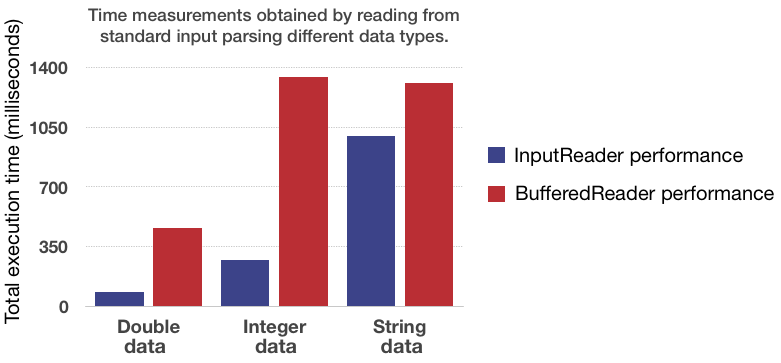
Benchmark
The graph below shows the read-speed difference between InputReader and a BufferedReader (java.util.Scanner was too slow to even make it onto the chart). Check out the examples below to get started reading various types of data from an input stream.
Reading from an input stream
Input data can come from a variety of sources. Sometimes it comes from standard input in the form of System.in, other times it may come from a file we are trying to read as a FileInputStream object or even through a Web Socket. For this reason, anything that extends the InputStream class can be read with our InputReader. The default stream is set to be the standard input stream, but this can be changed when constructing an InputReader object:
// Reading from standard input
InputReader stdinReader = new InputReader(); // Defaults to reading from System.in
String line = stdinReader.nextLine();

// Reading from a file
FileInputStream fileStream = new FileInputStream("/path/to/the/file");
InputReader fileReader = new InputReader(fileStream);
String line = fileReader.nextLine();

// Reading from Web Socket
Socket socket = new Socket("Some Machine", port);
InputReader socketReader = new InputReader(socket.getInputStream());
String data = socketReader.nextString(); // Read first string
Getting started
The first step to getting started with the InputReader is to include the fastjavaio.jar to your project. If you're running your application on the command-line this can easily be done by adding the jar file to your CLASSPATH.
To actually use the InputReader class within your application you need to import it from within the fastjavaio package:
// Import the InputReader class
import com.williamfiset.fastjavaio.InputReader;

public class InputReaderUsageExample {
  public static void main (String[] args) throws java.io.IOException {

    // Create an InputReader object that reads data from standard input by default
    InputReader in = new InputReader();

    // read input here...

  }
}
InputReader methods
ALL methods in the InputReader class must be caught or thrown because they throw an java.io.IOException when something bad happens such as trying to read a byte value from an empty stream. See here for detailed examples of how to use the methods outlined below.
.nextByte()
Reads a signed 8 bit integer from the input stream.
InputReader in = new InputReader();
byte byteValue = in.nextByte();
.nextInt()
Reads a signed 32 bit integer from the input stream.
InputReader in = new InputReader();
int intValue = in.nextInt();
.nextLong()
Reads a signed 64 bit integer from the input stream.
InputReader in = new InputReader();
long longValue = in.nextLong();
.nextDouble()
Reads a signed double from the input stream.
InputReader in = new InputReader();
double doubleValue = in.nextDouble();
.nextDoubleFast()
Reads a double value ~3x times faster from the input stream than the .nextDouble() method, but at the cost of accuracy. This method can only read doubles with at most 21 digits after the decimal point. Furthermore, the value being read may have an error of at most ~5*10^-16 (obtained from empirical tests) from its true value due to finite floating point number arithmetic (adding, multiplication) used to perform the quick read.
InputReader in = new InputReader();
double doubleValue = in.nextDoubleFast();
.nextString()
Reads a string of characters from the input stream. The delimiter separating a string of characters is set to be any ASCII value <= 32, meaning any spaces, new lines, EOF characters, tabs... all of which do not count as being part of the string. If the input stream is empty null is returned.
InputReader in = new InputReader();
String str = in.nextString();
.nextLine()
Reads a line of characters from the input stream until a new line character is reached. The .nextLine() method includes spaces found in the input stream. If the input stream is empty a null value is returned to indicate so.
InputReader in = new InputReader();
String line = in.nextLine();
.nextByteArray(int n)
Reads n byte values into a byte array. If the specified value of n is too large and not enough bytes are found an exception is thrown.
InputReader in = new InputReader();
int bytesToRead = 16;
byte[] bytes = in.nextByteArray(bytesToRead);
.nextIntArray(int n)
Reads n signed 32bit integer values into an array. If the specified value of n is too large and not enough integers are found an exception is thrown.
InputReader in = new InputReader();
int integersToRead = 16;
int[] integers = in.nextIntArray(integersToRead);
.nextLongArray(int n)
Reads n signed 64bit long values into an array. If the specified value of n is too large and not enough longs are found an exception is thrown.
InputReader in = new InputReader();
int longsToRead = 16;
long[] longs = in.nextLongArray(longsToRead);
.nextDoubleArray(int n)
Reads n double values into an array. If the specified value of n is too large and not enough doubles are found an exception is thrown.
InputReader in = new InputReader();
int doublesToRead = 16;
double[] doubles = in.nextDoubleArray(doublesToRead);
.nextDoubleArrayFast(int n)
Quickly reads n double values into an array using the .nextDoubleFast() method. If the specified value of n is too large and not enough doubles are found an exception is thrown.
InputReader in = new InputReader();
int doublesToRead = 16;
double[] doubles = in.nextDoubleArrayFast(doublesToRead);
.nextStringArray(int n)
Reads n space separated strings into an array. If the specified value of n is too large and not enough strings are found in the input stream an exception is thrown.
InputReader in = new InputReader();
int stringsToRead = 16;
String[] strings = in.nextStringArray(stringsToRead);
NOTE: If you want to read data into a 1-based array instead of a 0-based array you can use the following methods exist for such a purpose:
nextByteArray1(int n)
nextIntArray1(int n)
nextLongArray1(int n)
nextDoubleArray1(int n)
nextDoubleArrayFast1(int n)
nextStringArray1(int n)
Examples
General case
// Suppose standard input stream contains the following string we want to read:
"  123 3.141592    abcdef    the quick brown fox\n jumps \nover\n\n the lazy dog"

InputReader in = new InputReader();
int intvalue = in.nextInt();       // '123'
double dblvalue = in.nextDouble(); // '3.141592'
String str = in.nextString();         // 'abcdef'
String str2 = in.nextString();        // 'the'
String line = in.nextLine();       // 'quick brown fox'
String line1 = in.nextLine();      // ' jumps '
String line2 = in.nextLine();      // 'over'
String line3 = in.nextLine();      // ''
String line4 = in.nextLine();      // ' the lazy dog'
String line5 = in.nextLine();      // null
.nextByte() examples
// Suppose standard input stream contains the following byte values we want to read:
"-128 127 -1 -0 0 1 3454"
//                     ^ NOTE: This does NOT fit in a signed byte!

InputReader in = new InputReader();
byte b1 = in.nextByte(); // -128
byte b2 = in.nextByte(); // 127
byte b3 = in.nextByte(); // -1
byte b4 = in.nextByte(); // 0
byte b5 = in.nextByte(); // 0
byte b6 = in.nextByte(); // 1
byte b7 = in.nextByte(); // 126, this byte value overflowed! No safety check
                         // gets done for this. It is assumed the user knows
                         // the range of the values they're reading from the stream.
byte b8 = in.nextByte(); // Nothing left in stream so an exception is thrown
.nextInt() examples
// Suppose standard input stream contains the following byte values we want to read:
"2147483647 -2147483648 34545 -1 -0 0 1 999999999999"
//                                          ^ NOTE: This does NOT fit in a signed int!

InputReader in = new InputReader();
int integer1 = in.nextInt(); // 2147483647
int integer2 = in.nextInt(); // -2147483648
int integer3 = in.nextInt(); // 34545
int integer4 = in.nextInt(); // -1
int integer5 = in.nextInt(); // 0
int integer6 = in.nextInt(); // 0
int integer7 = in.nextInt(); // 1
int integer8 = in.nextInt(); // -727379969, this int value overflowed! No safety check
                             // gets done for this. It is assumed the user knows the
                             // range of the values they're reading from the stream
int integer9 = in.nextInt(); // Nothing left in stream so an exception is thrown
.nextString() example
// Suppose standard input stream contains the following string and we want
// to read the individual fruits names contained inside this sentence. We
// Can easily do this by using the .nextString()
"Apple banana orange\n\n KiWi dragonFRuIt \n   \n  WatERmeOn  \n\n\nPEARS\n\n   "

InputReader in = new InputReader();
String s1 = in.nextString(); // "Apple"
String s2 = in.nextString(); // "banana"
String s3 = in.nextString(); // "orange"
String s4 = in.nextString(); // "KiWi"
String s5 = in.nextString(); // "dragonFRuIt"
String s6 = in.nextString(); // "WatERmeOn"
String s7 = in.nextString(); // "PEARS"
String s8 = in.nextString(); // null - Returns null when no more strings are found in the input stream
.nextLine() example
// Suppose standard input stream contains the following string and we want
// to read it line by line. We can do this using the .nextLine() method
"Apple banana orange\n\n KiWi dragonFRuIt \n   \n  WatERmelOn  \n\n\nPEARS\n\n   "

InputReader in = new InputReader();
String s1  = in.nextLine(); // "Apple banana orange"
String s2  = in.nextLine(); // ""
String s3  = in.nextLine(); // " KiWi dragonFRuIt "
String s4  = in.nextLine(); // "   "
String s5  = in.nextLine(); // "  WatERmelOn  "
String s6  = in.nextLine(); // ""
String s7  = in.nextLine(); // ""
String s8  = in.nextLine(); // "PEARS"
String s9  = in.nextLine(); // ""
String s10 = in.nextLine(); // "   "
String s11 = in.nextLine(); // null - No more lines left so null is returned
Does williamfiset/FastJavaIO have a project website?
No homepage URL was recorded for williamfiset/FastJavaIO in TopGit's last sync. The README tab above frequently contains screenshots and demo links, or check the repository description on GitHub.
How active is development on williamfiset/FastJavaIO?
The most recent commit recorded on williamfiset/FastJavaIO was 2 months ago, based on the GitHub push timestamp. The repository has 40 forks — one of the better signals of community interest.
How many stars does williamfiset/FastJavaIO have?
williamfiset/FastJavaIO has 119 GitHub stars — refresh the page for the live number, or check github.com/williamfiset/FastJavaIO. TopGit mirrors GitHub's count but does not claim minute-by-minute accuracy.
What language is williamfiset/FastJavaIO written in?
williamfiset/FastJavaIO is written primarily in Java. GitHub's language field is based on the largest share of bytes in the default branch.
What license does williamfiset/FastJavaIO use?
williamfiset/FastJavaIO is released under the GPL-3.0 license. Always verify the LICENSE file directly on GitHub for the authoritative terms — license strings can be edited out of sync with a project's actual stance.
What topics is williamfiset/FastJavaIO associated with?
GitHub's repository topics for williamfiset/FastJavaIO: "inputreader", "io", "stream". TopGit's editorial category is open-source.
Where do I read more about williamfiset/FastJavaIO?
This TopGit page is a snapshot — the READ ME tab shows the project's own README content (links stripped, images preserved). The GitHub repository at github.com/williamfiset/FastJavaIO is the definitive source.
Read full README in the tab above.
Curious whether FastJavaIO is right for you?
Let ChatGPT, Claude, or Perplexity look into it — click below and see what AI actually says about FastJavaIO.
 /FastJavaIO