
Y2Z/monolith


Y2Z/monolith là dự án mã nguồn mở trên GitHub với 15.6k sao, viết chủ yếu bằng Rust. ⬛️ GUI/CLI tool and library for saving complete web pages as a single HTML file
Tóm tắt dựng từ metadata GitHub của chính dự án — chưa có bài review TopGit. Trang sẽ tự động cập nhật khi bài review đầy đủ được xuất bản.
TopGit viết bài đầy đủ cho repo có nhiều sao nhất và được yêu cầu nhiều nhất. Trang này là snapshot trong thời gian chờ — xem README gốc ở tab READ ME.
Snapshot
Cộng tác viên hàng đầu
Xem cộng tác viên hàng đầu


 _____    _____________   __________     ___________________    ___
|     \  /             \ |          |   |                   |  |   |
|      \/       __      \|    __    |   |    ___     ___    |__|   |
|              |  |          |  |   |   |   |   |   |   |          |
|   |\    /|   |__|          |__|   |___|   |   |   |   |    __    |
|   | \__/ |          |\                    |   |   |   |   |  |   |
|___|      |__________| \___________________|   |___|   |___|  |___|
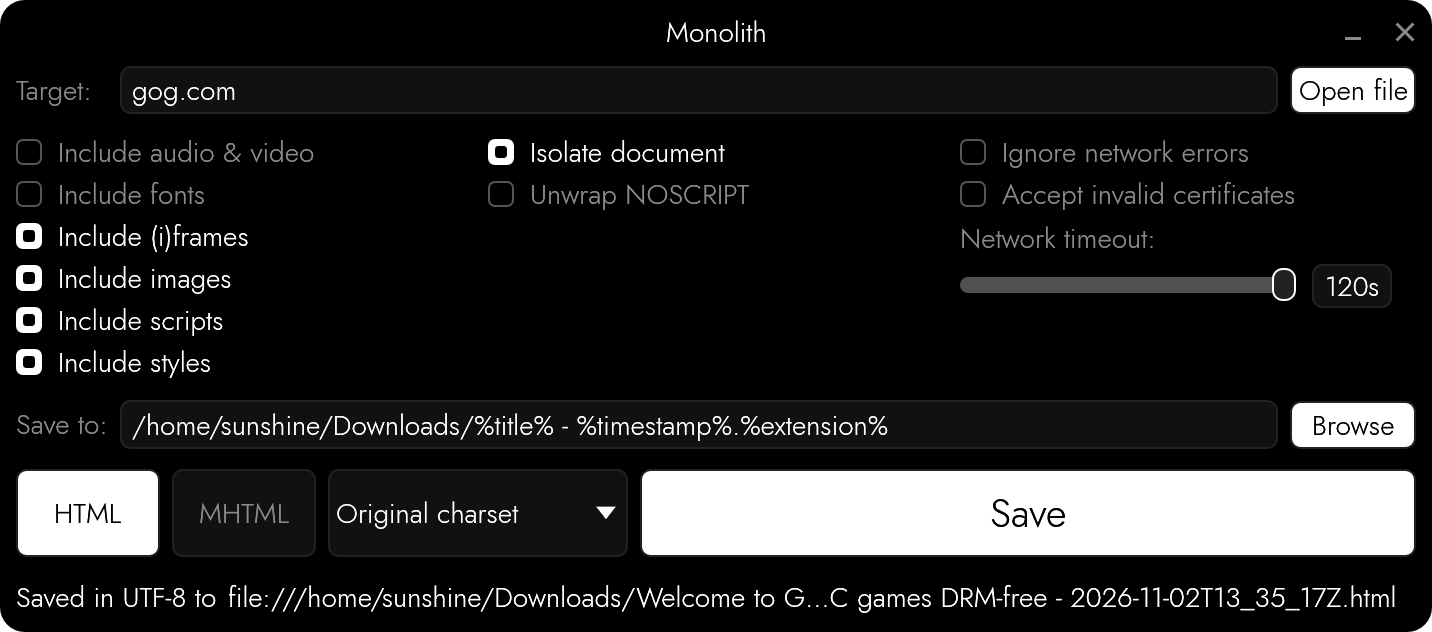
A data hoarder’s dream come true: bundle any web page into a single HTML file. You can finally replace that gazillion of open tabs with a gazillion of .html files stored somewhere on your precious little drive.
Unlike the conventional “Save page as”, monolith not only saves the target document, it embeds CSS, image, and JavaScript assets all at once, producing a single HTML5 document that is a joy to store and share.
If compared to saving websites with wget -mpk, this tool embeds all assets as data URLs and therefore lets browsers render the saved page exactly the way it was on the Internet, even when no network connection is available.
Installation
| OS | Method | Instructions |
|---|---|---|
| cross-platform | Cargo | cargo install monolith |
| macOS, Linux | Homebrew | brew install monolith |
| Windows | Chocolatey | choco install monolith |
| Windows | Scoop | scoop install main/monolith |
| Windows | Winget | winget install --id=Y2Z.Monolith -e |
| macOS | MacPorts | sudo port install monolith |
| Linux | Snapcraft | snap install monolith |
| Linux | Guix | guix install monolith |
| Linux | NixPkgs | nix-env -iA nixpkgs.monolith |
| Linux | Flox | flox install monolith |
| macOS | X-CMD | x install monolith |
| Arch Linux | Pacman | pacman -S monolith |
| Alpine Linux | aports | apk add monolith |
| Debian Linux | pkg.haus APT archive | Set up the archive per the instructions on pkg.haus, then: sudo apt install monolith |
| Void Linux | XBPS Package Manager | xbps-install -S monolith |
| FreeBSD | FreeBSD packages | pkg install monolith |
| FreeBSD | FreeBSD ports | cd /usr/ports/www/monolith/ && make install clean |
| NetBSD, OpenBSD, Haiku | pkgsrc | cd /usr/pkgsrc/www/monolith && make install clean |
| cross-platform | Docker | docker build -t y2z/monolith . && sudo install -b dist/run-in-container.sh /usr/local/bin/monolith |
| cross-platform | Release artifacts | Every release contains pre-built binaries for Windows, GNU/Linux, as well as platforms with non-standard CPU architecture. |
From source
Dependencies: cargo
Install cargo (GNU/Linux)
Check if cargo is installedcargo -v
If cargo is not already installed, install and add it to your existing $PATH (paraphrasing the official installation instructions):
curl https://sh.rustup.rs -sSf | sh
. "$HOME/.cargo/env"
Proceed with installing from source:
git clone https://github.com/Y2Z/monolith.git
cd monolith
make install
Rendering pages in browsers (-B) comes as a feature that's on by default, builds that don't need it can be made smaller without it:
cargo install monolith --no-default-features --features cli
Usage
monolith https://lyrics.github.io/db/P/Portishead/Dummy/Roads/
monolith https://lyrics.github.io/db/P/Portishead/Dummy/Roads/ -o %title%.%timestamp%.html
monolith https://some.site/ https://some.site/about https://some.site/contact
monolith -F WARC https://some.site/ https://some.site/about -o some-site.warc
cat some-site-page.html | monolith -Iifs -r audio,video -w frame,iframe -b https://some.site/ - -o - > some-site-page-with-assets.html
monolith page-saved-by-browser.mhtml -o page.html
monolith -a crawl.warc.gz https://some.site/ https://some.site/page
monolith https://username:[email protected] -o example-basic-auth.html
chromium \
 --headless \
 --window-size=1920,1080 \
 --run-all-compositor-stages-before-draw \
 --virtual-time-budget=9000 \
 --incognito \
 --dump-dom \
 https://github.com | monolith - -I -b https://github.com -o github.html
Results get saved into files named after the pages' titles. Several targets can be given at once: each one gets a file of its own, and links between them lead to those files, so that they can be browsed without going online. With -F WARC (or WARCGZ), all of them go into a single archive.
Options
-a: Take everything fromarchive(WARC, HAR, MHTML, WebArchive) without going online, targets are URLs of pages in it-b: Usecustom base URL-B: Let a browser render the page first (requires Firefox, or anything based on it or Chromium)-C: Read cookies fromfile-d: Forbid retrieving assets from specifieddomain-e: Ignore network errors-E: Save document usingcustom encoding-f: Exclude web fonts-F: Specify outputformat:HTML(default),MHTML,WARC, orWARCGZ-h: Print usage information-i: Remove all images-I: Isolate the document-j: Remove all scripts-k: Accept invalid X.509 (TLS) certificates-n: Extract contents of NOSCRIPT elements-o: Write output tofile(use “-” for STDOUT)-q: Be quiet-r: Completely removeelement(s)from the document-s: Exclude styles-S: Save a simplified version of the page, like the reader mode of a web browser-t: Adjustnetwork request timeout-u: Usecustom User-Agent-w: Wipeelement(s)from the document, emptying their contents or sources, but preserving the node-W: Only retrieve assets from domains specified with-d(whitelist)-V: Print version number
Content Security Policies
Pages get saved the way browsers show them: what a page's Content Security Policy (from its response headers or its META elements) doesn't allow to be loaded or run gets left out. The policy goes along with the saved document, rewritten to allow what the document has been made of and nothing else, and what -I, -j, -s, -f, and -i keep the document from doing goes into it too.
Blacklisting and whitelisting domains
Option -d forbids retrieving assets from the specified domains, and adding -W flips it to allow only those domains, e.g.:
monolith -I -d .googleusercontent.com -d googleanalytics.com -d .google.com https://example.com -o example-no-ads.html
monolith -I -W -d example.com -d www.example.com https://example.com -o example-only.html
Dynamic content
Monolith doesn't feature a JavaScript engine, but it can make use of the one inside of a browser that's already installed: option -B opens the page in a browser, waits for it to finish rendering, and saves what the page has become, e.g.:
monolith -B https://example.com -o example.html
The browser runs without a window, from a clean temporary profile which gets deleted afterwards. It never gets access to your own profile, cookies, or history, gets only those cookies that were passed in using -C, and sticks to the same rules as the rest of Monolith: domains forbidden with -d and whatever got excluded with -i, -f, or -s don't get requested by the browser either. It identifies itself as what it is, unless told otherwise with -u. Firefox gets used if it's installed. Set MONOLITH_BROWSER to the browser's path to choose another one: anything based on Firefox or Chromium works, such as LibreWolf, GNU IceCat, Chrome, Brave, or Edge.
The browser follows your system's light or dark mode, so pages that adapt to it get saved the way you'd see them. Set MONOLITH_BROWSER_COLOR_SCHEME to dark, light, or auto to choose for yourself.
The browser pretends to have a 1920x1080 viewport, set MONOLITH_BROWSER_VIEWPORT to change that, e.g. to 1280x720. Pages only load what they think can be seen, and those that adapt to the size of the window get saved the way they look at that size.
Pages get scrolled through before being saved, since a lot of them only load things as they come into view. Set MONOLITH_BROWSER_SCROLL_LIMIT to the number of screens to go through (30 by default, 0 turns it off), pages that never end stop there.
Set MONOLITH_BROWSER_DISABLE_JS to 1 to keep the browser from running the page's JavaScript, frames included, so the page gets saved the way it was sent, before any scripts got to change it. That's separate from -j, which removes JavaScript from the saved document.
If Monolith gets interrupted, it takes the browser and its temporary files down with it.
Should the page turn out to be a challenge which doesn't solve itself, such as the ones used to tell people from bots, the browser reopens in a window and waits for you to solve it.
The saved page keeps its JavaScript, along with the responses it has received, which get replayed to it without any network access: buttons, menus, and other things that only rely on the page's own code keep working, but anything that needs a server doesn't. A saved page only contains what it has loaded while being saved, so parts of web apps that were never opened won't be there. Scripts of the saved page get modified to make that work: they're told the page's original URL, and imports get pointed at what's stored inside of the document. Frames that get added by scripts show what they had without running anything, frames from other websites stay empty. They can't reach out to anything, their content security policy doesn't allow it, and -b doesn't apply to them. Add -j to save a frozen copy of what the browser had on screen instead; that's also what MHTML output and -S always do.
The same is available to the GUI (“Render in browser”) and to programs using Monolith as a library, by setting browser in MonolithOptions. Apps that have a web view of their own, such as mobile ones, can use create_monolithic_document_from_capture() to save what it has loaded.
Proxies
Please set https_proxy, http_proxy, and no_proxy environment variables.
Apify Actor Usage
You can run Monolith in the cloud without installation using the Monolith Actor on Apify free of charge.
echo '{"urls": ["https://news.ycombinator.com/"]}' | apify call -so snshn/monolith
[{
  "url": "https://news.ycombinator.com/",
  "status": "0",
  "kvsUrl": "https://api.apify.com/v2/key-value-stores/of9xNgvpon4elPLbc/records/https___news.ycombinator.com_"
}]
Read more about the Monolith Actor, including how to use it via the Apify UI, API and CLI without installation.
Contributing
Please open an issue if something is wrong, that helps make this project better.
Archives
Besides documents, Monolith takes archives as targets, and never goes online to complete them: whatever isn't in there stays missing.
- WARC (
.warc,.warc.gz) and HAR (.har) hold the responses a page has received. It gets saved along with its JavaScript and those responses, which get replayed to it the same way-Bdoes it, unless scripts get removed with-j. They may hold many pages: the first one is what gets saved, unless the archive comes with-a, and URLs of pages in it are targets. HAR files have to be exported with contents. - MHTML (
.mhtml,.mht) and WebArchive (.webarchive) hold a document with what it's made of. Its assets get embedded into it.
With -a, archives are all there is to work with: targets are URLs of pages in them (each one gets a file of its own, linked to the others), and nothing comes from anywhere else. WARC archives given with -a more than once work as one, pages in one of them may have their assets in another.
Testing
cargo test runs unit tests first, then real browsers: one of each kind found, or whatever's listed in MONOLITH_TEST_BROWSERS. Tests that need them have nothing to do if there are none, set MONOLITH_TEST_REQUIRE_BROWSERS to make that a failure.
License
Monolith is free to use, copy, modify, and distribute, for any purpose, without even having to give credit: it comes under the Zero-Clause BSD license (0BSD). This software is distributed without any warranty.
Repo liên quan
Master programming by recreating your favorite technologies from scratch.
A curated meta-list of curated lists organized by technology domain. The repository acts as a directory pointing to hundreds of specialized awesome lists covering programming languages, platforms, frameworks, and tooling. All content is community-contributed under the CC0 public domain dedication.
Public APIs is a community-curated GitHub repository listing free, publicly accessible APIs across a wide range of categories, with auth type, HTTPS, and CORS noted for each entry. It's a browsable reference, not a library to install.
REA is an MCP server and CLI that gives AI coding agents the ability to reverse engineer binaries, JavaScript apps, .NET assemblies, and websites. It hooks into Hopper, Ghidra, or IDA Pro for native binary work, or runs static JavaScript analysis with just Node.js. Every investigation returns an Evidence bundle that includes what was found, what was not, and the reasoning path. Setup registers REA with supported agents and walks you through connecting an analysis engine. The CLI also works standalone for terminal-first workflows.
Trả lời nhanh
Đọc thêm về Y2Z/monolith ở đâu?
Trang TopGit này là một snapshot — tab "Readme" hiển thị nguyên văn README của repo (đã bỏ link, giữ ảnh). Repo GitHub ở github.com/Y2Z/monolith là nguồn chính thức.
Y2Z/monolith có bao nhiêu sao?
Y2Z/monolith có 15.6k sao GitHub — tải lại trang để xem số mới nhất, hoặc xem trực tiếp github.com/Y2Z/monolith. TopGit phản chiếu số sao của GitHub nhưng không cam kết đến từng phút.
Y2Z/monolith có phải mã nguồn mở không?
Có — Y2Z/monolith phát hành theo license 0BSD, nghĩa là mã nguồn mở để đọc, fork và (tùy license) tái sử dụng. Mã: github.com/Y2Z/monolith.
Y2Z/monolith có trang demo không?
Dự án có trang chủ ở https://crates.io/crates/monolith. Tab "Readme" ở trang này thường có ảnh chụp và hướng dẫn bắt đầu nhanh.
Y2Z/monolith là gì?
Y2Z/monolith (Y2Z/monolith) là dự án Rust trên GitHub. Theo mô tả gốc: ⬛️ GUI/CLI tool and library for saving complete web pages as a single HTML file
Đọc đầy đủ README ở tab phía trên.
Vẫn đang phân vân về monolith?
Một cú bấm sẽ gửi câu hỏi kèm trang này cho AI — xem AI nói gì về monolith.