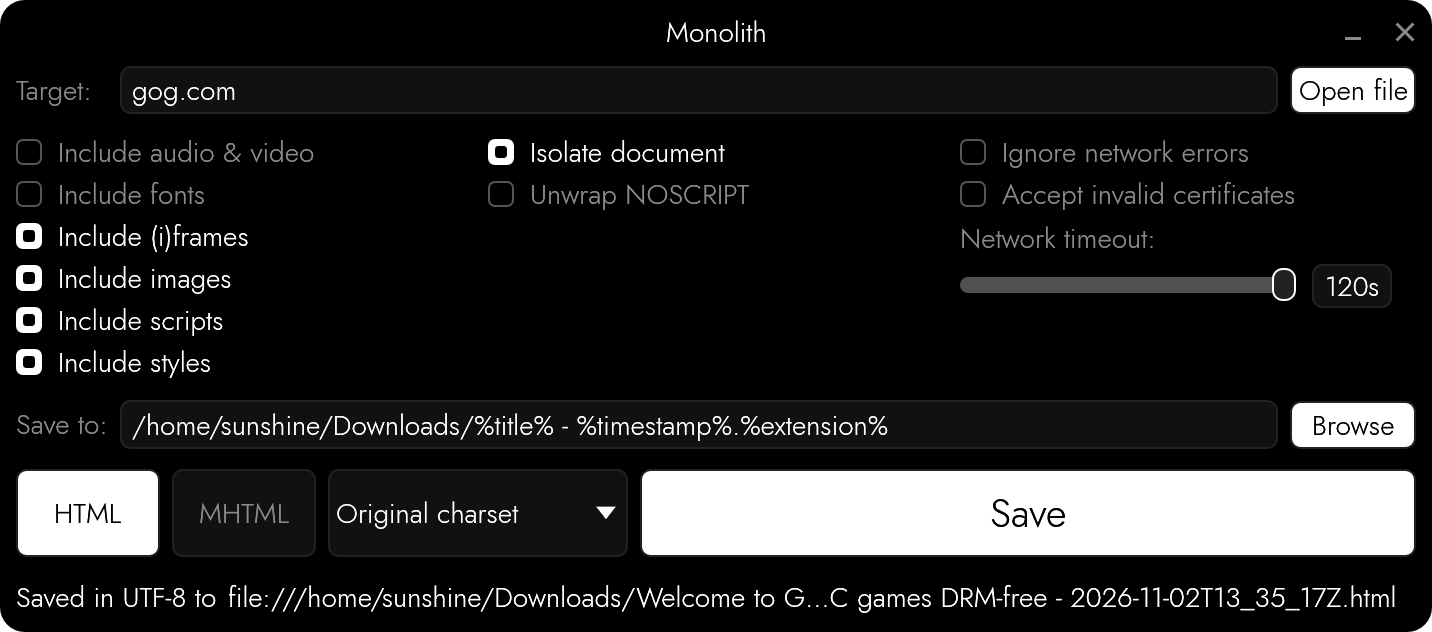
15.6k GitHub stars and counting — Y2Z/monolith is a Rust project TopGit is tracking across repositories on the platform. ⬛️ GUI/CLI tool and library for saving complete web pages as a single HTML file
Snapshot summary built from the project's own GitHub metadata — there's no written TopGit review yet. The page will update automatically when a full review is published.
WHY NO REVIEW YET
TopGit writes full reviews for the most-starred, most-requested repositories. This page is a snapshot until then — see the READ ME tab for the original README in full.
A data hoarder’s dream come true: bundle any web page into a single HTML file. You can finally replace that gazillion of open tabs with a gazillion of .html files stored somewhere on your precious little drive.
Unlike the conventional “Save page as”, monolith not only saves the target document, it embeds CSS, image, and JavaScript assets all at once, producing a single HTML5 document that is a joy to store and share.
If compared to saving websites with wget -mpk, this tool embeds all assets as data URLs and therefore lets browsers render the saved page exactly the way it was on the Internet, even when no network connection is available.
Installation
OS
Method
Instructions
cross-platform
Cargo
cargo install monolith
macOS, Linux
Homebrew
brew install monolith
Windows
Chocolatey
choco install monolith
Windows
Scoop
scoop install main/monolith
Windows
Winget
winget install --id=Y2Z.Monolith -e
macOS
MacPorts
sudo port install monolith
Linux
Snapcraft
snap install monolith
Linux
Guix
guix install monolith
Linux
NixPkgs
nix-env -iA nixpkgs.monolith
Linux
Flox
flox install monolith
macOS
X-CMD
x install monolith
Arch Linux
Pacman
pacman -S monolith
Alpine Linux
aports
apk add monolith
Debian Linux
pkg.haus APT archive
Set up the archive per the instructions on pkg.haus, then: sudo apt install monolith
Results get saved into files named after the pages' titles. Several targets can be given at once: each one gets a file of its own, and links between them lead to those files, so that they can be browsed without going online. With -F WARC (or WARCGZ), all of them go into a single archive.
Options
-a: Take everything from archive (WARC, HAR, MHTML, WebArchive) without going online, targets are URLs of pages in it
-b: Use custom base URL
-B: Let a browser render the page first (requires Firefox, or anything based on it or Chromium)
-C: Read cookies from file
-d: Forbid retrieving assets from specified domain
-e: Ignore network errors
-E: Save document using custom encoding
-f: Exclude web fonts
-F: Specify output format: HTML (default), MHTML, WARC, or WARCGZ
-h: Print usage information
-i: Remove all images
-I: Isolate the document
-j: Remove all scripts
-k: Accept invalid X.509 (TLS) certificates
-n: Extract contents of NOSCRIPT elements
-o: Write output to file (use “-” for STDOUT)
-q: Be quiet
-r: Completely remove element(s) from the document
-s: Exclude styles
-S: Save a simplified version of the page, like the reader mode of a web browser
-t: Adjust network request timeout
-u: Use custom User-Agent
-w: Wipe element(s) from the document, emptying their contents or sources, but preserving the node
-W: Only retrieve assets from domains specified with -d (whitelist)
-V: Print version number
Content Security Policies
Pages get saved the way browsers show them: what a page's Content Security Policy (from its response headers or its META elements) doesn't allow to be loaded or run gets left out. The policy goes along with the saved document, rewritten to allow what the document has been made of and nothing else, and what -I, -j, -s, -f, and -i keep the document from doing goes into it too.
Blacklisting and whitelisting domains
Option -d forbids retrieving assets from the specified domains, and adding -W flips it to allow only those domains, e.g.:
Monolith doesn't feature a JavaScript engine, but it can make use of the one inside of a browser that's already installed: option -B opens the page in a browser, waits for it to finish rendering, and saves what the page has become, e.g.:
monolith -B https://example.com -o example.html
The browser runs without a window, from a clean temporary profile which gets deleted afterwards. It never gets access to your own profile, cookies, or history, gets only those cookies that were passed in using -C, and sticks to the same rules as the rest of Monolith: domains forbidden with -d and whatever got excluded with -i, -f, or -s don't get requested by the browser either. It identifies itself as what it is, unless told otherwise with -u. Firefox gets used if it's installed. Set MONOLITH_BROWSER to the browser's path to choose another one: anything based on Firefox or Chromium works, such as LibreWolf, GNU IceCat, Chrome, Brave, or Edge.
The browser follows your system's light or dark mode, so pages that adapt to it get saved the way you'd see them. Set MONOLITH_BROWSER_COLOR_SCHEME to dark, light, or auto to choose for yourself.
The browser pretends to have a 1920x1080 viewport, set MONOLITH_BROWSER_VIEWPORT to change that, e.g. to 1280x720. Pages only load what they think can be seen, and those that adapt to the size of the window get saved the way they look at that size.
Pages get scrolled through before being saved, since a lot of them only load things as they come into view. Set MONOLITH_BROWSER_SCROLL_LIMIT to the number of screens to go through (30 by default, 0 turns it off), pages that never end stop there.
Set MONOLITH_BROWSER_DISABLE_JS to 1 to keep the browser from running the page's JavaScript, frames included, so the page gets saved the way it was sent, before any scripts got to change it. That's separate from -j, which removes JavaScript from the saved document.
If Monolith gets interrupted, it takes the browser and its temporary files down with it.
Should the page turn out to be a challenge which doesn't solve itself, such as the ones used to tell people from bots, the browser reopens in a window and waits for you to solve it.
The saved page keeps its JavaScript, along with the responses it has received, which get replayed to it without any network access: buttons, menus, and other things that only rely on the page's own code keep working, but anything that needs a server doesn't. A saved page only contains what it has loaded while being saved, so parts of web apps that were never opened won't be there. Scripts of the saved page get modified to make that work: they're told the page's original URL, and imports get pointed at what's stored inside of the document. Frames that get added by scripts show what they had without running anything, frames from other websites stay empty. They can't reach out to anything, their content security policy doesn't allow it, and -b doesn't apply to them. Add -j to save a frozen copy of what the browser had on screen instead; that's also what MHTML output and -S always do.
The same is available to the GUI (“Render in browser”) and to programs using Monolith as a library, by setting browser in MonolithOptions. Apps that have a web view of their own, such as mobile ones, can use create_monolithic_document_from_capture() to save what it has loaded.
Proxies
Please set https_proxy, http_proxy, and no_proxy environment variables.
Apify Actor Usage
You can run Monolith in the cloud without installation using the Monolith Actor on Apify free of charge.
Read more about the Monolith Actor, including how to use it via the Apify UI, API and CLI without installation.
Contributing
Please open an issue if something is wrong, that helps make this project better.
Archives
Besides documents, Monolith takes archives as targets, and never goes online to complete them: whatever isn't in there stays missing.
WARC (.warc, .warc.gz) and HAR (.har) hold the responses a page has received. It gets saved along with its JavaScript and those responses, which get replayed to it the same way -B does it, unless scripts get removed with -j. They may hold many pages: the first one is what gets saved, unless the archive comes with -a, and URLs of pages in it are targets. HAR files have to be exported with contents.
MHTML (.mhtml, .mht) and WebArchive (.webarchive) hold a document with what it's made of. Its assets get embedded into it.
With -a, archives are all there is to work with: targets are URLs of pages in them (each one gets a file of its own, linked to the others), and nothing comes from anywhere else. WARC archives given with -a more than once work as one, pages in one of them may have their assets in another.
Testing
cargo test runs unit tests first, then real browsers: one of each kind found, or whatever's listed in MONOLITH_TEST_BROWSERS. Tests that need them have nothing to do if there are none, set MONOLITH_TEST_REQUIRE_BROWSERS to make that a failure.
License
Monolith is free to use, copy, modify, and distribute, for any purpose, without even having to give credit: it comes under the Zero-Clause BSD license (0BSD).
This software is distributed without any warranty.
Y2Z/monolith has 15.6k GitHub stars — refresh the page for the live number, or check github.com/Y2Z/monolith. TopGit mirrors GitHub's count but does not claim minute-by-minute accuracy.
Is Y2Z/monolith open source?
Yes — Y2Z/monolith ships under the 0BSD license, which makes its source code freely readable (and, depending on license terms, forkable and reusable). Source: github.com/Y2Z/monolith.
What is Y2Z/monolith?
Y2Z/monolith (Y2Z/monolith) is a Rust project on GitHub. From the project's own README: ⬛️ GUI/CLI tool and library for saving complete web pages as a single HTML file
Where can I see Y2Z/monolith in action?
The project maintains a homepage at https://crates.io/crates/monolith. The README tab on this page also usually contains screenshots and a quickstart.
Where do I read more about Y2Z/monolith?
This TopGit page is a snapshot — the READ ME tab shows the project's own README content (links stripped, images preserved). The GitHub repository at github.com/Y2Z/monolith is the definitive source.
Read full README in the tab above.
Want a second opinion on monolith?
Ask an AI that can read this page — one click and you get its take on monolith.

 /monolith