Snapshot của yoav-lavi/melody: 4.7k★ · Rust · Backend. Melody is a language that compiles to regular expressions and aims to be more readable and maintainable
Tóm tắt dựng từ metadata GitHub của chính dự án — chưa có bài review TopGit. Trang sẽ tự động cập nhật khi bài review đầy đủ được xuất bản.
VÌ SAO CHƯA CÓ REVIEW
TopGit viết bài đầy đủ cho repo có nhiều sao nhất và được yêu cầu nhiều nhất. Trang này là snapshot trong thời gian chờ — xem README gốc ở tab READ ME.
Melody is a language that compiles to ECMAScript regular expressions, while aiming to be more readable and maintainable.
Examples
Note: these are for the currently supported syntax and may change
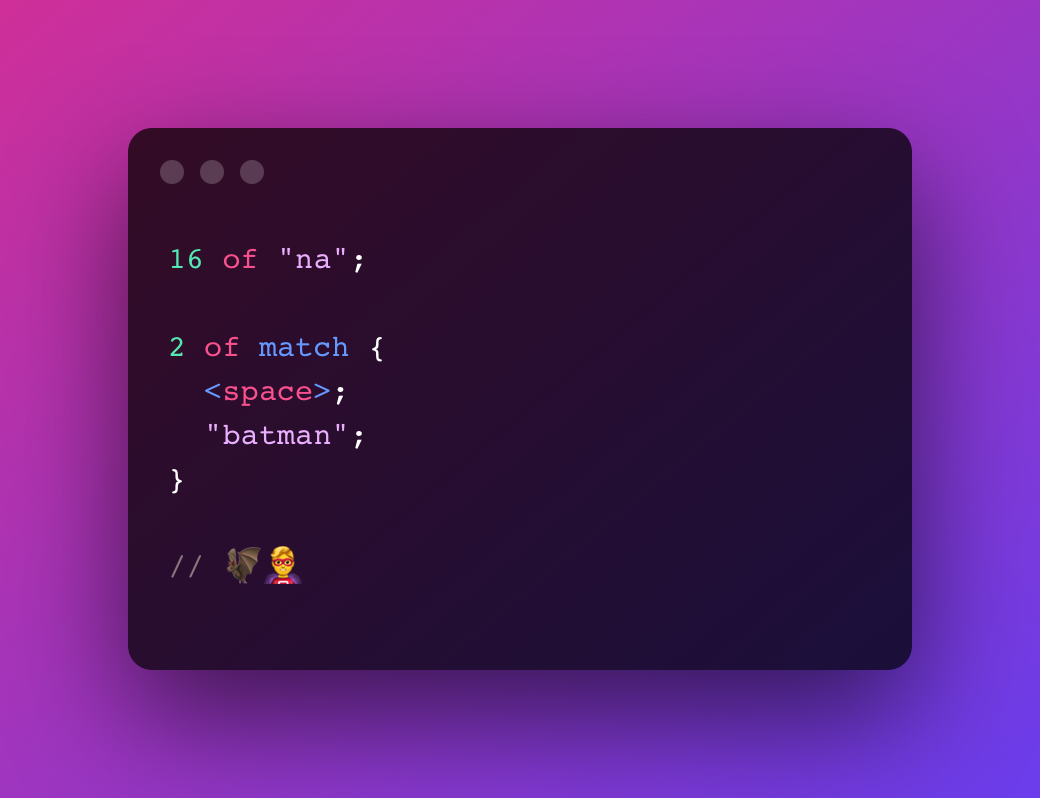
Batman Theme try in playground
16 of "na";
2 of match {
<space>;
"batman";
}
// 🦇🦸♂️
Turns into
(?:na){16}(?: batman){2}
Twitter Hashtag try in playground
"#";
some of <word>;

// #melody
Turns into
#\w+
Introductory Courses try in playground
some of <alphabetic>;
<space>;
"1";
2 of <digit>;

// classname 1xx
Turns into
[a-zA-Z]+ 1\d{2}
Indented Code (2 spaces) try in playground
some of match {
  2 of <space>;
}

some of <char>;
";";

// let value = 5;
Turns into
(?: {2})+.+;
Semantic Versions try in playground
<start>;

option of "v";

capture major {
  some of <digit>;
}

".";

capture minor {
  some of <digit>;
}

".";

capture patch {
  some of <digit>;
}

<end>;

// v1.0.0
Turns into
^v?(?<major>\d+)\.(?<minor>\d+)\.(?<patch>\d+)$
Playground
You can try Melody in your browser using the playground
Book
Read the book here
Install
Cargo
cargo install melody_cli
From Source
git clone https://github.com/yoav-lavi/melody.git
cd melody
cargo install --path crates/melody_cli
Binary
macOS binaries (aarch64 and x86_64) can be downloaded from the release page
Community
Brew (macOS and Linux)
Installation instructions
brew install melody
Arch Linux (maintained by @ilai-deutel)
Installation instructions
Installation with an AUR helper, for instance using paru:
paru -Syu melody
Install manually with makepkg:
git clone https://aur.archlinux.org/melody.git
cd melody
makepkg -si
NixOS (maintained by @jyooru)
Installation instructions
Declarative installation using /etc/nixos/configuration.nix:
USAGE:
    melody [OPTIONS] [INPUT_FILE_PATH]

ARGS:
    <INPUT_FILE_PATH>    Read from a file
                         Use '-' and or pipe input to read from stdin

OPTIONS:
    -f, --test-file <TEST_FILE>
            Test the compiled regex against the contents of a file

        --generate-completions <COMPLETIONS>
            Outputs completions for the selected shell
            To use, write the output to the appropriate location for your shell

    -h, --help
            Print help information

    -n, --no-color
            Print output with no color

    -o, --output <OUTPUT_FILE_PATH>
            Write to a file

    -r, --repl
            Start the Melody REPL

    -t, --test <TEST>
            Test the compiled regex against a string

    -V, --version
            Print version information
Changelog
See the changelog here or in the release page
Syntax
Quantifiers
... of - used to express a specific amount of a pattern. equivalent to regex {5} (assuming 5 of ...)
... to ... of - used to express an amount within a range of a pattern. equivalent to regex {5,9} (assuming 5 to 9 of ...)
over ... of - used to express more than an amount of a pattern. equivalent to regex {6,} (assuming over 5 of ...)
some of - used to express 1 or more of a pattern. equivalent to regex +
any of - used to express 0 or more of a pattern. equivalent to regex *
option of - used to express 0 or 1 of a pattern. equivalent to regex ?
All quantifiers can be preceded by lazy to match the least amount of characters rather than the most characters (greedy). Equivalent to regex +?, *?, etc.
Symbols
<char> - matches any single character. equivalent to regex .
<space> - matches a space character. equivalent to regex
<whitespace> - matches any kind of whitespace character. equivalent to regex \s or [ \t\n\v\f\r]
<newline> - matches a newline character. equivalent to regex \n
<tab> - matches a tab character. equivalent to regex \t
<return> - matches a carriage return character. equivalent to regex \r
<feed> - matches a form feed character. equivalent to regex \f
<null> - matches a null characther. equivalent to regex \0
<digit> - matches any single digit. equivalent to regex \d or [0-9]
<vertical> - matches a vertical tab character. equivalent to regex \v
<word> - matches a word character (any latin letter, any digit or an underscore). equivalent to regex \w or [a-zA-Z0-9_]
<alphabetic> - matches any single latin letter. equivalent to regex [a-zA-Z]
<alphanumeric> - matches any single latin letter or any single digit. equivalent to regex [a-zA-Z0-9]
<boundary> - Matches a character between a character matched by <word> and a character not matched by <word> without consuming the character. equivalent to regex \b
<backspace> - matches a backspace control character. equivalent to regex [\b]
All symbols can be preceeded with not to match any character other than the symbol
Special Symbols
<start> - matches the start of the string. equivalent to regex ^
<end> - matches the end of the string. equivalent to regex $
Unicode Categories
Note: these are not supported when testing in the CLI (-t or -f) as the regex engine used does not support unicode categories. These require using the u flag.
<category::letter> - any kind of letter from any language
<category::lowercase_letter> - a lowercase letter that has an uppercase variant
<category::uppercase_letter> - an uppercase letter that has a lowercase variant.
<category::titlecase_letter> - a letter that appears at the start of a word when only the first letter of the word is capitalized
<category::cased_letter> - a letter that exists in lowercase and uppercase variants
<category::modifier_letter> - a special character that is used like a letter
<category::other_letter> - a letter or ideograph that does not have lowercase and uppercase variants
<category::mark> - a character intended to be combined with another character (e.g. accents, umlauts, enclosing boxes, etc.)
<category::non_spacing_mark> - a character intended to be combined with another character without taking up extra space (e.g. accents, umlauts, etc.)
<category::spacing_combining_mark> - a character intended to be combined with another character that takes up extra space (vowel signs in many Eastern languages)
<category::enclosing_mark> - a character that encloses the character it is combined with (circle, square, keycap, etc.)
<category::separator> - any kind of whitespace or invisible separator
<category::space_separator> - a whitespace character that is invisible, but does take up space
<category::line_separator> - line separator character U+2028
<category::paragraph_separator> - paragraph separator character U+2029
<category::symbol> - math symbols, currency signs, dingbats, box-drawing characters, etc
<category::math_symbol> - any mathematical symbol
<category::currency_symbol> - any currency sign
<category::modifier_symbol> - a combining character (mark) as a full character on its own
<category::other_symbol> - various symbols that are not math symbols, currency signs, or combining characters
<category::number> - any kind of numeric character in any script
<category::decimal_digit_number> - a digit zero through nine in any script except ideographic scripts
<category::letter_number> - a number that looks like a letter, such as a Roman numeral
<category::other_number> - a superscript or subscript digit, or a number that is not a digit 0–9 (excluding numbers from ideographic scripts)
<category::punctuation> - any kind of punctuation character
<category::dash_punctuation> - any kind of hyphen or dash
<category::open_punctuation> - any kind of opening bracket
<category::close_punctuation> - any kind of closing bracket
<category::initial_punctuation> - any kind of opening quote
<category::final_punctuation> - any kind of closing quote
<category::connector_punctuation> - a punctuation character such as an underscore that connects words
<category::other_punctuation> - any kind of punctuation character that is not a dash, bracket, quote or connectors
<category::other> - invisible control characters and unused code points
<category::control> - an ASCII or Latin-1 control character: 0x00–0x1F and 0x7F–0x9F
<category::private_use> - any code point reserved for private use
<category::surrogate> - one half of a surrogate pair in UTF-16 encoding
<category::unassigned> - any code point to which no character has been assigned
These descriptions are from regular-expressions.info
Character Ranges
... to ... - used with digits or alphabetic characters to express a character range. equivalent to regex [5-9] (assuming 5 to 9) or [a-z] (assuming a to z)
Literals
"..." or '...' - used to mark a literal part of the match. Melody will automatically escape characters as needed. Quotes (of the same kind surrounding the literal) should be escaped
Raw
`...` - added directly to the output without any escaping
Groups
capture - used to open a capture or named capture block. capture patterns are later available in the list of matches (either positional or named). equivalent to regex (...)
match - used to open a match block, matches the contents without capturing. equivalent to regex (?:...)
either - used to open an either block, matches one of the statements within the block. equivalent to regex (?:...|...)
Assertions
ahead - used to open an ahead block. equivalent to regex (?=...). use after an expression
behind - used to open an behind block. equivalent to regex (?<=...). use before an expression
Assertions can be preceeded by not to create a negative assertion (equivalent to regex (?!...), (?<!...))
Variables
let .variable_name = { ... } - defines a variable from a block of statements. can later be used with .variable_name. Variables must be declared before being used. Variable invocations cannot be quantified directly, use a group if you want to quantify a variable invocation
compiler/long input (1M lines)
                          time:   [470.04 ms 472.35 ms 474.78 ms]
mean   [470.04 ms 474.78 ms] std. dev.      [2.0458 ms 5.3453 ms]
median [469.54 ms 475.24 ms] med. abs. dev. [734.10 µs 6.8144 ms]
Trang TopGit này là một snapshot — tab "Readme" hiển thị nguyên văn README của repo (đã bỏ link, giữ ảnh). Repo GitHub ở github.com/yoav-lavi/melody là nguồn chính thức.
yoav-lavi/melody có những chủ đề gì?
GitHub topics của yoav-lavi/melody: "compiler", "language", "melody", "melodylang", "regex", "regexp", "regular-expression", "rust". TopGit xếp repo vào nhóm Backend.
yoav-lavi/melody có phải mã nguồn mở không?
Có — yoav-lavi/melody phát hành theo license Apache-2.0, nghĩa là mã nguồn mở để đọc, fork và (tùy license) tái sử dụng. Mã: github.com/yoav-lavi/melody.
yoav-lavi/melody có trang demo không?
Dự án có trang chủ ở https://yoav-lavi.github.io/melody/book/. Tab "Readme" ở trang này thường có ảnh chụp và hướng dẫn bắt đầu nhanh.
yoav-lavi/melody còn đang phát triển không?
Commit gần nhất trên yoav-lavi/melody là 2.0 năm trước (theo timestamp GitHub). Repo có 62 fork — một chỉ báo về mức độ quan tâm của cộng đồng.
yoav-lavi/melody dùng license gì?
yoav-lavi/melody phát hành theo license Apache-2.0. Nên mở file LICENSE trên GitHub để xác nhận — license metadata đôi khi lệch với thực tế dự án.
Đọc đầy đủ README ở tab phía trên.
Muốn nghe thêm một ý kiến về melody?
Hỏi một AI đọc được trang này — một cú bấm là có ngay nhận định về melody.

 /melody