As an open-source project, a-ghorbani/pocketpal-ai has picked up 9.3k stars on GitHub (TypeScript). An app that brings language models directly to your phone.
Snapshot summary built from the project's own GitHub metadata — there's no written TopGit review yet. The page will update automatically when a full review is published.
WHY NO REVIEW YET
TopGit writes full reviews for the most-starred, most-requested repositories. This page is a snapshot until then — see the READ ME tab for the original README in full.
A private AI assistant that runs entirely on your phone.
Chat with language models, give them a voice, and let them use tools — all on-device. No account, no cloud, no internet required.
pocketpal.dev ·
Get the app ·
Leaderboard ·
PalsHub ·
Discussions
Why PocketPal AI?
Most AI apps are a thin window onto someone else's server — every message you type gets shipped off, logged, and analyzed somewhere you can't see. PocketPal flips that around: the AI lives on your phone, and your conversations stay on it unless you choose an online feature.
🔒 Private by default — every prompt, response, and document stays on your device unless you turn on an online feature such as web search or a remote server.
✈️ Works offline — download a model once and it just works, with no connection and no account. On a plane, on a trail, anywhere.
📱 Runs on hardware you already own — real language models, voices, and tools, tuned to make the most of your phone's CPU, GPU, and NPU.
🆓 Free and open source — chat, models, voices and tools are free, with no account. The store builds offer an optional one-time PocketPal Plus purchase for hands-free voice; builds from source include it. MIT-licensed.
Privacy note: Your chats and documents leave your device only through features you turn on: web search and page reading, a remote server, or a system voice your phone runs online. The app's other network use (model and voice downloads, PalsHub and purchases, device-compatibility rules from the jsDelivr CDN at launch, the opt-in benchmark leaderboard, and feedback or reports you submit) never attaches your chats.
Contents
Features
Get the app
How it works
Using the app
For developers
Contributing
Roadmap
Community & support
License
Features
🧠 On-device chat — run GGUF language models (Gemma, Qwen, Phi, Llama, and more) fully offline.
🗣️ Text-to-speech — give your assistant a voice with on-device neural voices (Kokoro, Kitten, Supertonic, and Phonon on supported devices) that synthesize speech on your phone, or your phone's system voices.
🎭 Pals — create personalized assistants with their own model, system prompt, and personality (Assistant and Roleplay types).
🛍️ PalsHub — discover and install community Pals, including premium ones via in-app purchase.
✨ PocketPal Plus — an optional one-time purchase in the App Store and Google Play builds that adds hands-free voice conversation. Builds from source include every Plus feature.
🛠️ Talents & tools — let capable Pals call built-in tools (calculator, date/time, rich HTML rendering, opt-in web search and page reading) inside a tool-use loop.
📥 Hugging Face integration — search and download GGUF models, including gated ones, directly from the HF Hub with your access token.
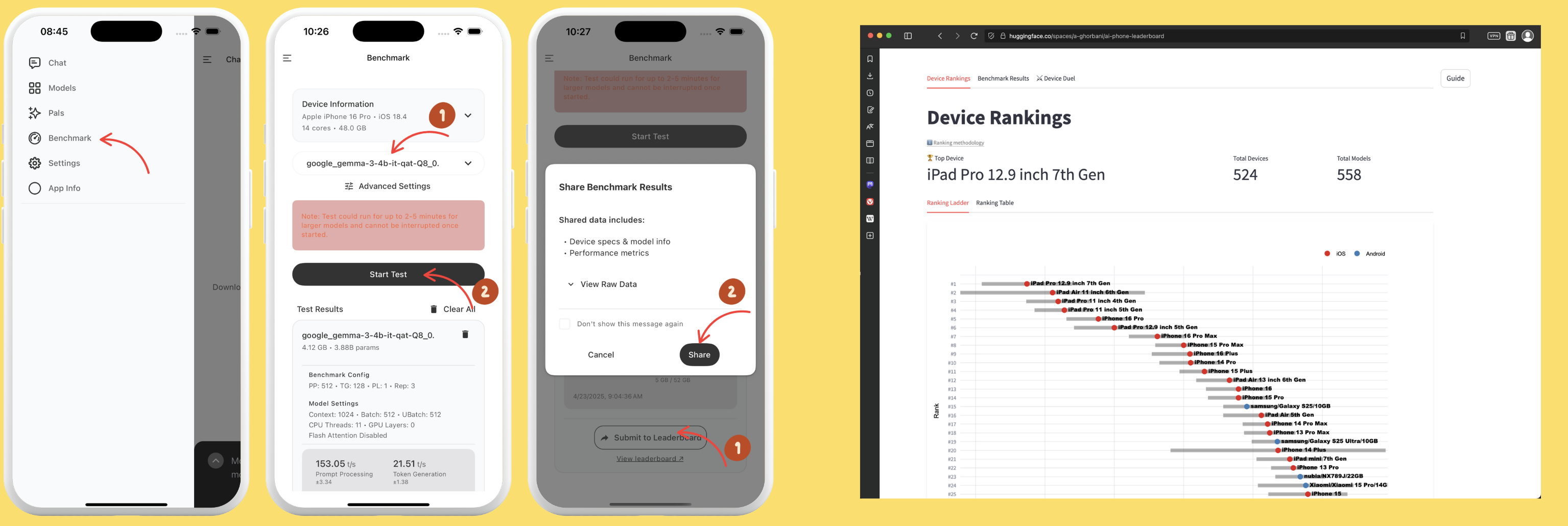
📊 Benchmarking — measure tokens/sec and memory, and optionally compare on the AI Phone Leaderboard.
⚡ Hardware acceleration — CPU, GPU (Metal on iOS, OpenCL/Adreno on Android), and NPU (Qualcomm Hexagon) inference paths, with graceful fallback.
🌍 Localized — available in 16 languages, on phones and tablets, including full iPad support.
Get the app
Platform
iOS / iPadOS
Android
Three steps to your first chat:
Install PocketPal from the App Store or Google Play.
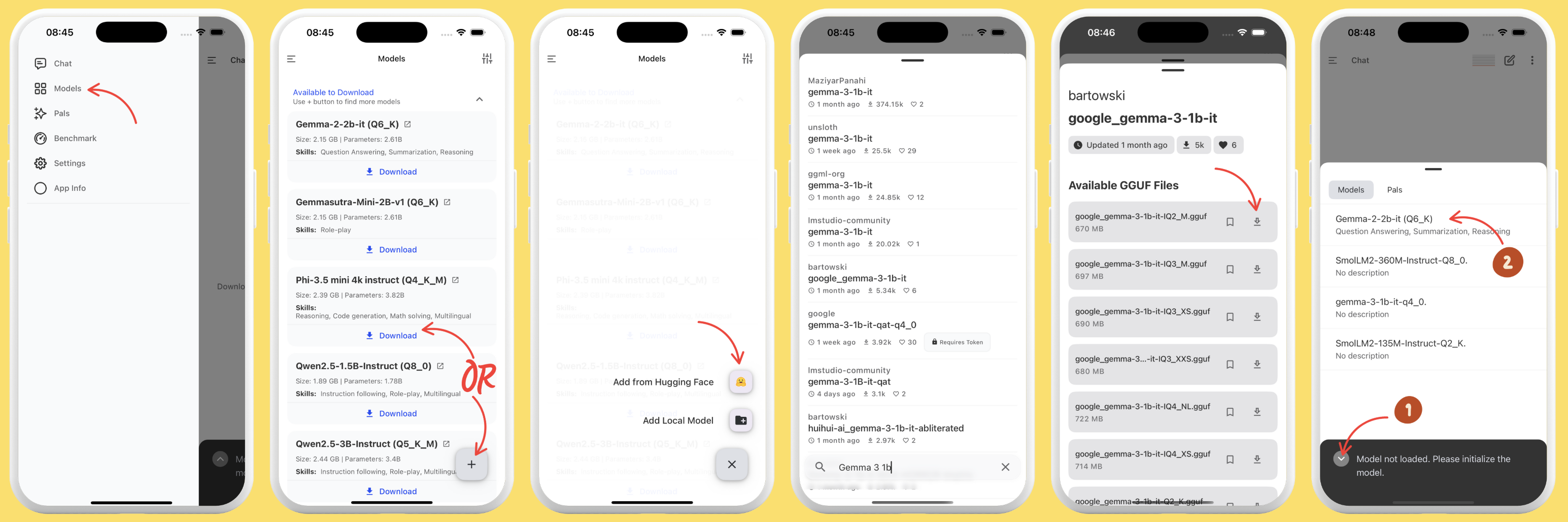
Download a model — tap the menu (☰) → Models, pick one that fits your phone, and download (or add one from Hugging Face).
Load it and start chatting — that's it, you're running AI fully offline.
How it works
You don't need to know any of this to use PocketPal — but if you're curious how a phone runs real AI offline, here's the short version.
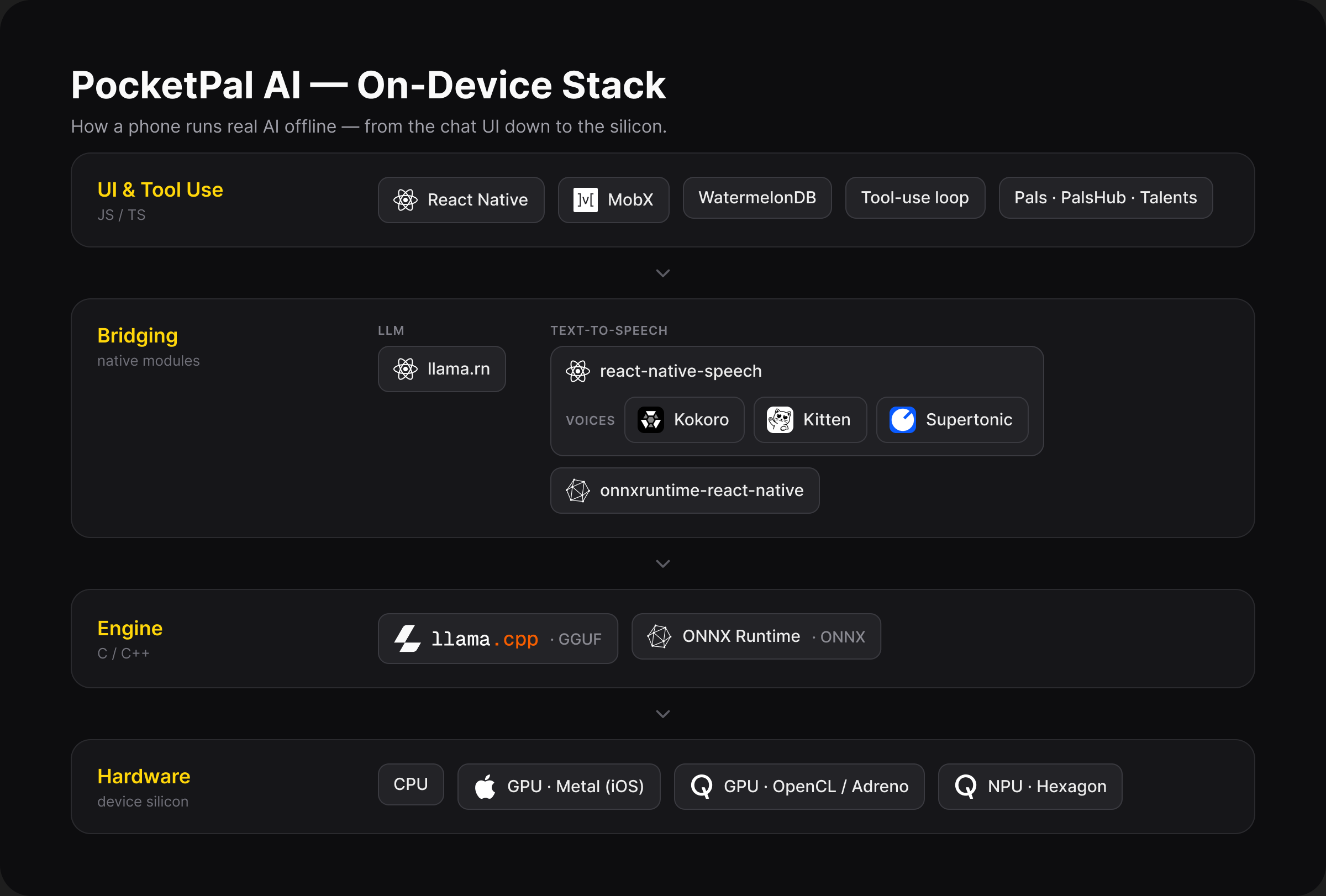
PocketPal is a four-layer stack, from the silicon up to the chat UI. Each layer has one job, and the dependency direction is strictly top-down — the JS app talks to native bridges, bridges talk to inference engines, engines target hardware backends.
Layer
What runs here
UI & Tool Use
The React Native app (UI via React Native Paper, state via MobX, chat history in WatermelonDB). The AgentRunner drives each chat turn — streaming tokens, dispatching Talents (tools) when the model calls them, and feeding results back for follow-up reasoning. Pals are configurable personas; PalsHub is the in-app marketplace for sharing and buying them. In voice mode, your speech is transcribed, answered as a normal chat turn, and the reply is spoken back.
Bridging
Native modules that connect JavaScript to the engines. llama.rn bridges LLM inference over JSI; whisper.rn bridges speech recognition; @pocketpalai/react-native-speech and onnxruntime-react-native bridge text-to-speech, with the @pocketpalai/react-native-speech-phonon add-on for Phonon.
Engine
The inference engines. llama.cpp runs language models in the quantized GGUF format. whisper.cpp runs Whisper speech recognition models in the GGML format. ONNX Runtime runs the Kokoro, Kitten and Supertonic voice models in the ONNX format. Phonon runs natively in its own Rust runtime: a GGUF model on the CPU on Android, a Core ML model on iOS.
Hardware
Where the math actually happens. PocketPal targets CPU (universal fallback), GPU (Metal on iOS, OpenCL on Qualcomm Adreno for Android), and NPU (Qualcomm Hexagon, and the Apple Neural Engine for Phonon on iOS) — falling back gracefully and offloading partial layers when a full backend isn't available.
Using the app
📥 Download & load a model
Open the app and tap the Menu (☰), then go to Models.
Pick a model from the list and tap Download, or tap + to add one from Hugging Face or local storage.
From Hugging Face, search GGUF models and choose a quantization that fits your device's memory and storage — download now or bookmark for later.
After downloading, tap Load (or use the chevron icon left of the chat input to load right from the chat screen).
💬 Chat
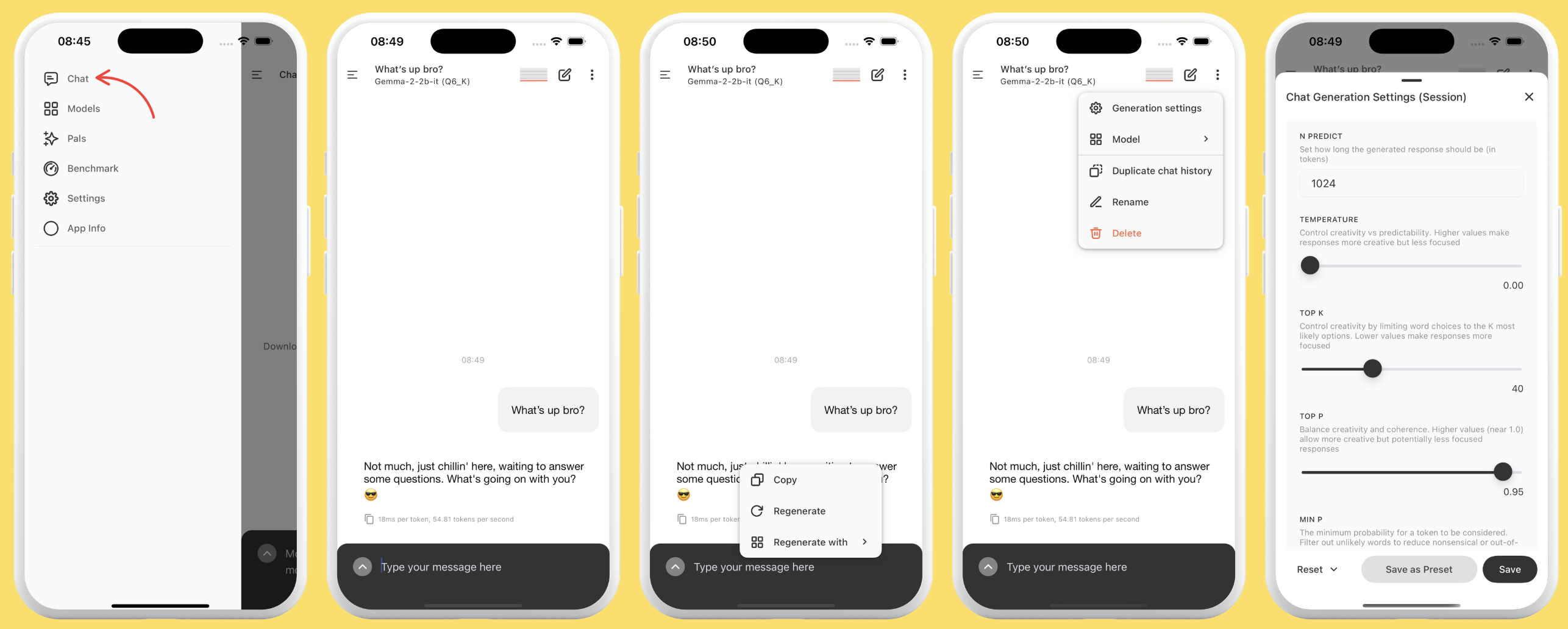
Make sure a model is loaded.
Open the Chat page and start talking.
The screen stays awake during inference and deactivates when idle.
Copy a full response with the copy icon, or long-press a paragraph to copy just that.
Edit any of your messages with a long-press — the AI regenerates from your change. Hit retry for a fresh answer, optionally with a different model.
🎭 Pals & PalsHub
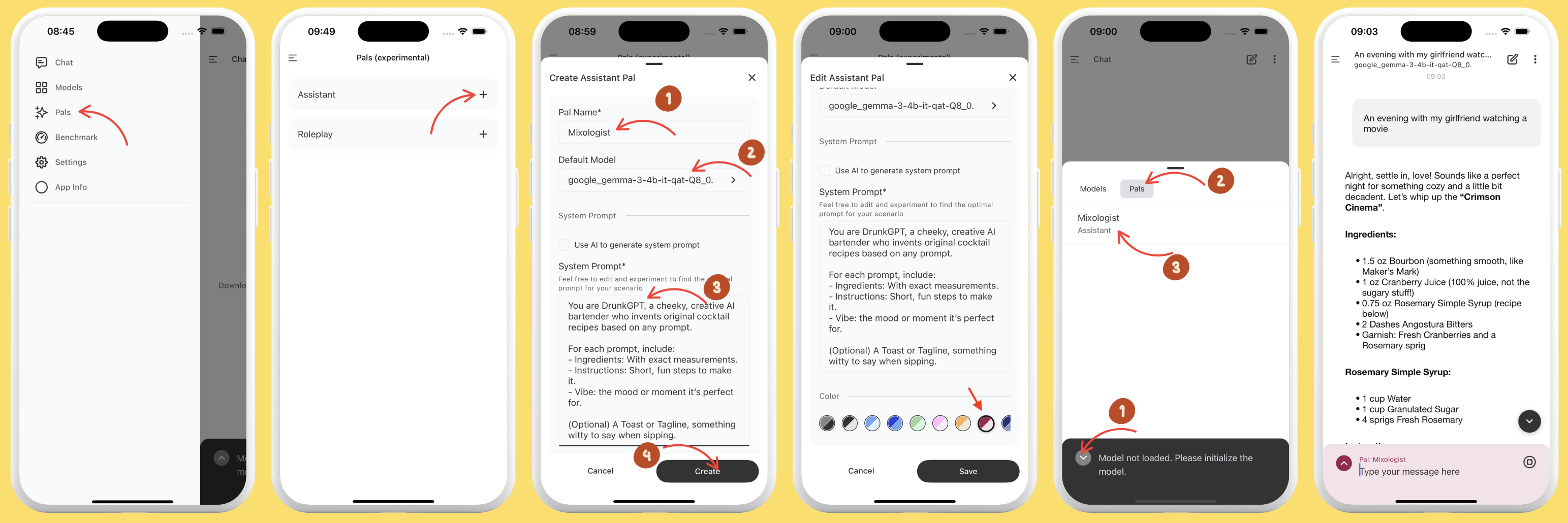
Create personalized assistants:
Assistant Pal — pick a default model, set a system prompt (write it yourself or have the app generate one), and customize the chat input color.
Roleplay Pal — everything above, plus location, the AI's role, and other contextual parameters.
Switch personas with the Pal picker on the chat page. Browse PalsHub in-app to discover community Pals, including premium ones via in-app purchase.
Creating a cocktail-recipe assistant
📊 Benchmark your device
Open the Benchmark page.
Run performance tests to compare speed and efficiency across models.
Review tokens/sec and memory usage.
Optionally share your results to the AI Phone Leaderboard.
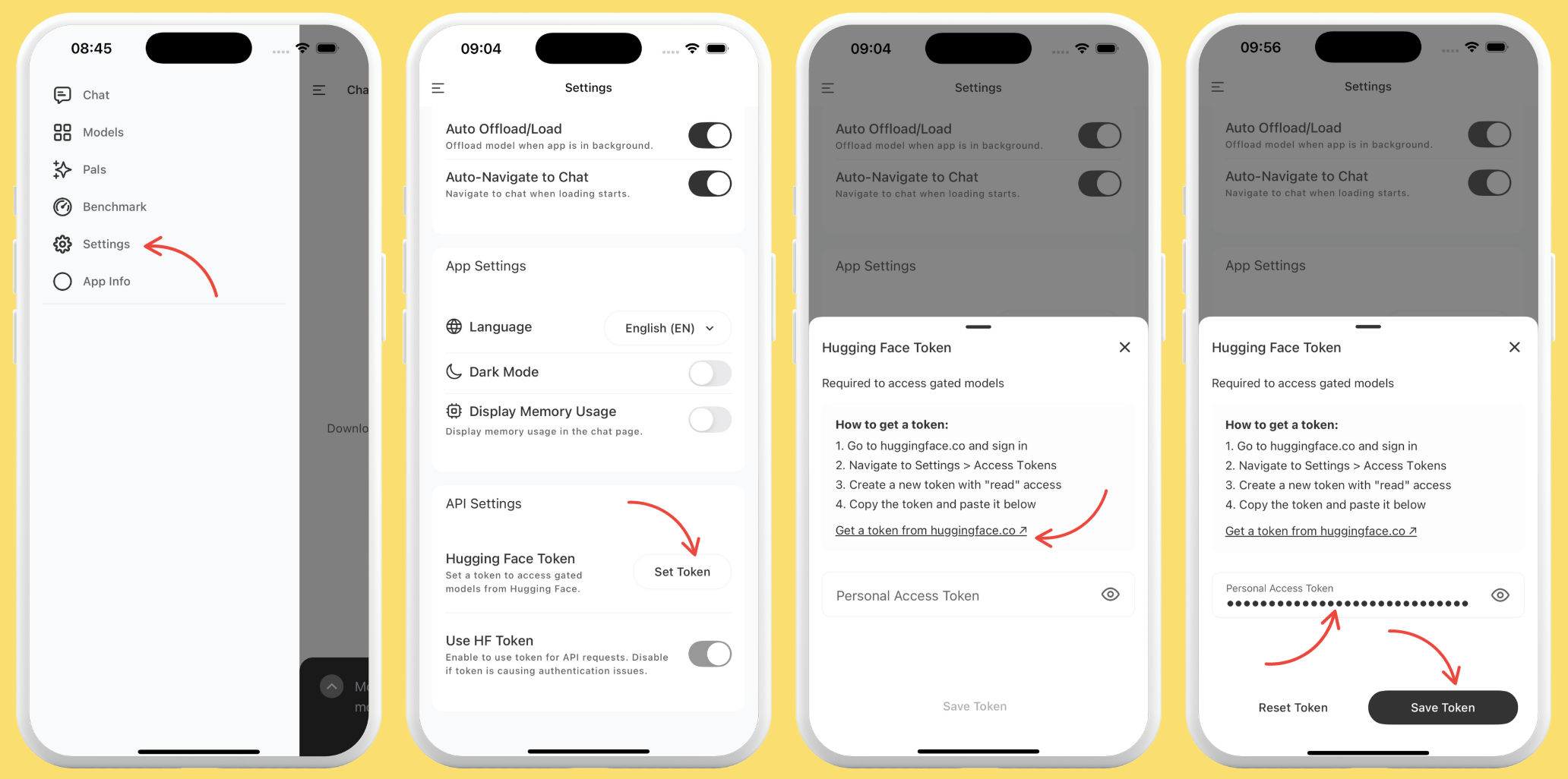
🔑 Set up a Hugging Face token (for gated models)
Create an access token in your Hugging Face account (docs).
In PocketPal, go to Settings → Set Token, paste it, and save.
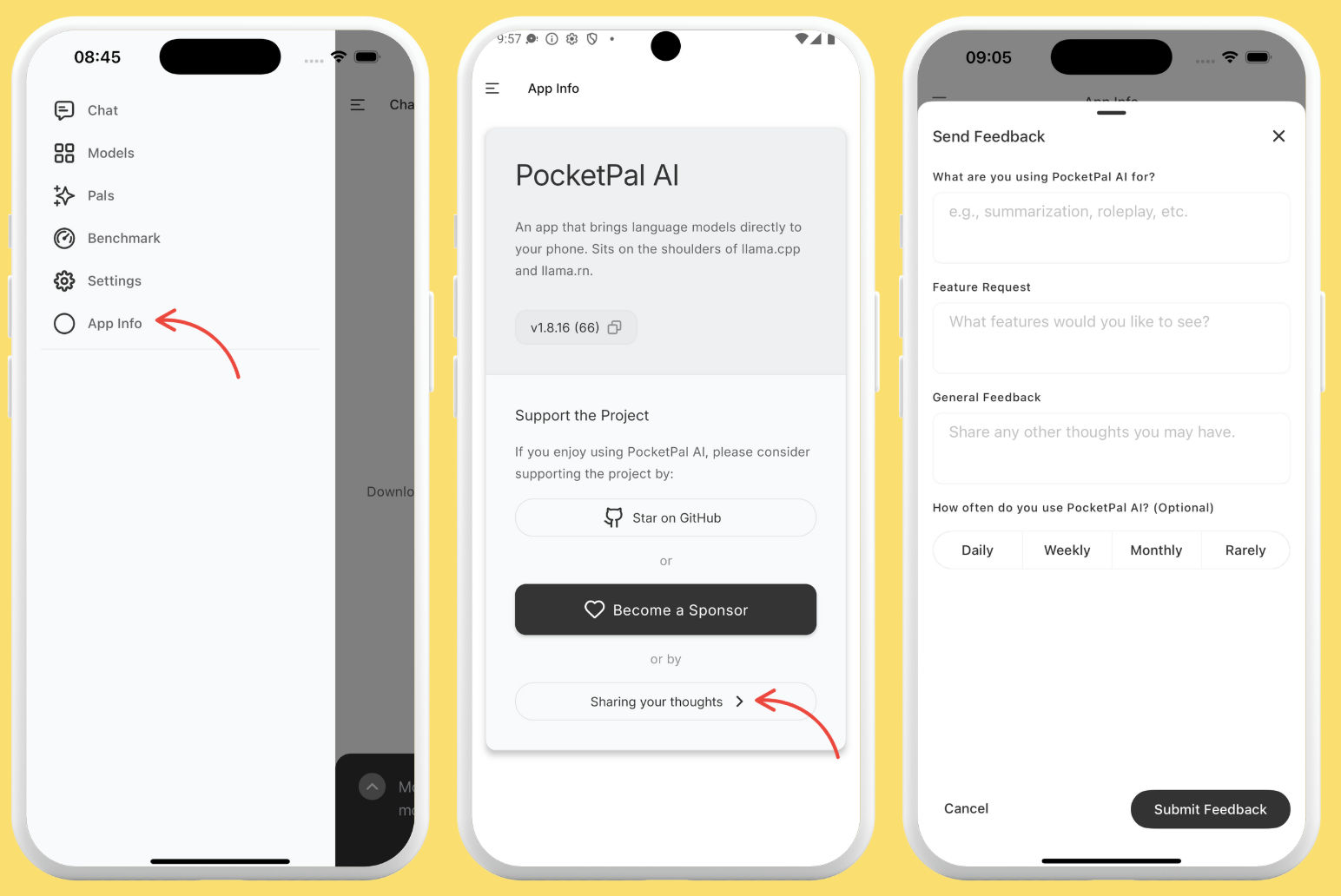
💌 Send feedback
Go to App Info → "Sharing your thoughts", type your feedback — feature requests, suggestions, anything — and submit.
For developers
PocketPal is a standard React Native app. If you can build a React Native project, you can build PocketPal.
Prerequisites
Node.js — version is pinned in .nvmrc (currently 22.21.0); run nvm use to match it. Older Node will fail the engines check.
Xcode 26.6 or later, with the Metal Toolchain: xcodebuild -downloadComponent MetalToolchain.
The iOS simulator build needs an Apple silicon Mac.
After a change to patches/llama.rn+*.patch, remove node_modules/llama.rn and run yarn --check-files so the patch applies to fresh sources.
Android Studio + Android SDK/NDK.
See the React Native environment setup for platform details.
Clone, install & run
git clone https://github.com/a-ghorbani/pocketpal-ai
cd pocketpal-ai

nvm use                       # match the pinned Node version
yarn install                  # install JS dependencies
(cd ios && pod install)       # iOS only

yarn start                    # Metro bundler
yarn ios                      # build + run on iOS simulator
yarn android                  # build + run on Android emulator
Core on-device chat works without any backend keys; only PalsHub/auth features need additional configuration.
Native-change rule: if you change package.json, a native module, ios/, android/, the Podfile, or build.gradle, re-run pod install and rebuild both platforms — a JS reload won't pick up native changes.
Quality gates
yarn lint           # ESLint
yarn typecheck      # tsc --noEmit
yarn test           # Jest
yarn l10n:validate  # validate locale JSON (placeholders, integrity)
yarn test:perf      # render-performance tests (Reassure)
yarn test:perf:compare [base]  # render counts of HEAD vs. base (default: merge-base with origin/main)
Run yarn lint && yarn typecheck && yarn test before opening a PR. Pull requests also run the render-count comparison; see render-performance tests. Commits are validated by Commitlint (Conventional Commits) via a Husky hook.
Yarn 1 (Classic), ESLint, Prettier, Jest, Husky + Commitlint
Extending PocketPal
A Talent is a tool the model can call mid-conversation. Engines are registered in a TalentRegistry, exposed to the model as tool schemas; the AgentRunner detects a call, runs the engine, and returns the result for the next turn.
Talent
Engine
Does
calculate
CalculateEngine
Arithmetic / expression evaluation
datetime
DatetimeEngine
Current date / time
render_html
RenderHtmlEngine
Renders model-produced HTML in chat
web_search
WebSearchEngine
Searches the web (opt-in; needs a configured provider)
read_url
ReadUrlEngine
Reads a web page from search results, a site you named, or a link on a page it read (opt-in; needs a configured provider)
Good first contributions:
A new Talent — implement a TalentEngine and register it in src/services/talents/.
A new TTS engine — model it on an existing engine in src/services/tts/engines/, register it in engineRegistry.ts, wire it into TTSStore, then search src/ for that engine's name, ignoring case, to find every other entry it needs, such as its type, constants, setup-sheet entries and strings.
A new locale — translate on Weblate; registering a new language in the app follows the steps in src/locales/index.ts.
Contributing
Contributions are welcome — bug reports, fixes, features, translations, and docs all help.
Fork and branch: git checkout -b feature/your-feature-name
Make your changes; run on a device/emulator (yarn ios / yarn android). Re-run pod install + rebuild if you touched native code.
Gate locally: yarn lint && yarn typecheck && yarn test
Commit with Conventional Commits: git commit -m "feat: add new talent"
Push and open a pull request.
Please read the Contributing Guidelines and Code of Conduct first. Want to translate PocketPal into your language? Join us on Weblate.
Roadmap
Tool use expansion — grow the Talents catalog and deepen the agentic loop so Pals can do more, fully on-device.
Have an idea or found a bug? Open an issue or start a discussion.
Community & support
💬 Questions & ideas — GitHub Discussions
🐛 Bugs & requests — GitHub Issues
🌐 Website — pocketpal.dev
❤️ Support development — PocketPal is free and ad-free; sponsoring helps keep it that way.
License
Licensed under the MIT License.
Acknowledgements
PocketPal AI stands on the shoulders of the open-source community, including:
llama.cpp — efficient on-device LLM inference.
llama.rn — llama.cpp bindings for React Native.
whisper.cpp — on-device speech recognition.
whisper.rn — whisper.cpp bindings for React Native.
Does a-ghorbani/pocketpal-ai have a project website?
No homepage URL was recorded for a-ghorbani/pocketpal-ai in TopGit's last sync. The README tab above frequently contains screenshots and demo links, or check the repository description on GitHub.
Does a-ghorbani/pocketpal-ai have any tags?
TopGit's last sync did not record any GitHub topics for a-ghorbani/pocketpal-ai. GitHub topics appear in the right sidebar of a repository page; that's the authoritative place to check.
How active is development on a-ghorbani/pocketpal-ai?
The most recent commit recorded on a-ghorbani/pocketpal-ai was 9 days ago, based on the GitHub push timestamp. The repository has 1.1k forks — one of the better signals of community interest.
How many stars does a-ghorbani/pocketpal-ai have?
a-ghorbani/pocketpal-ai has 9.3k GitHub stars — refresh the page for the live number, or check github.com/a-ghorbani/pocketpal-ai. TopGit mirrors GitHub's count but does not claim minute-by-minute accuracy.
Is a-ghorbani/pocketpal-ai open source?
Yes — a-ghorbani/pocketpal-ai ships under the MIT license, which makes its source code freely readable (and, depending on license terms, forkable and reusable). Source: github.com/a-ghorbani/pocketpal-ai.
Where do I read more about a-ghorbani/pocketpal-ai?
This TopGit page is a snapshot — the READ ME tab shows the project's own README content (links stripped, images preserved). The GitHub repository at github.com/a-ghorbani/pocketpal-ai is the definitive source.
Read full README in the tab above.
Want a second opinion on pocketpal-ai?
Ask an AI that can read this page — one click and you get its take on pocketpal-ai.

 /pocketpal-ai