Indexed by TopGit from live GitHub metadata: ageitgey/amplify has 1.8k stars, written primarily in CSS. A Jekyll html theme in the vague style of Medium.com built using Google AMP
Snapshot summary built from the project's own GitHub metadata — there's no written TopGit review yet. The page will update automatically when a full review is published.
WHY NO REVIEW YET
TopGit writes full reviews for the most-starred, most-requested repositories. This page is a snapshot until then — see the READ ME tab for the original README in full.
A Jekyll html theme in the vague style of Medium.com built using Google AMP
Google's Accelerated Mobile Pages Project
(a.k.a. "Google AMP" or Google ⚡) is an open-source project that defines rules
for creating websites that load nearly instantly even on mobile devices with
slow connections.
Check out a live example of this theme at
http://ageitgey.github.io/amplify/
or
via Google's CDN.
Screenshot
Why use Google AMP?
There are two reasons to use Google AMP:
First, it's really fast! An often cited claim (by Amazon, Yahoo, Walmart and
others) is that every extra 100ms improvement in page load time increases
incremental revenue by up to 1%. Your personal blog might not be selling
anything, but why settle for a slow page and risk losing readers?
Second, Google might feature your AMP page in Search Results! Google gives
preferential treatment to AMP pages on Mobile Search. When it displays your
page in the AMP search results widget, it will even serve your page through
it's own CDN to make the page load even faster. It's similar to how
Facebook Instant Articles works on the
Facebook platform.
How fast is this theme?
To get a general idea of how this theme performs, let's compare this page
hosted on Github vs. another static page hosted on Github. We can use
https://facebook.github.io/react/ as a comparison page. I've also included
https://jekyllrb.com/ as another point of comparison (it's also hosted on
Github).
Of course our page and these other pages have different
layouts. But the main point is that they are typical static sites hosted
on Github and are well-designed. So it should give us a rough idea of how
other typical pages might perform. I'm not suggesting anything
is wrong with these other pages. They are actually pretty fast!
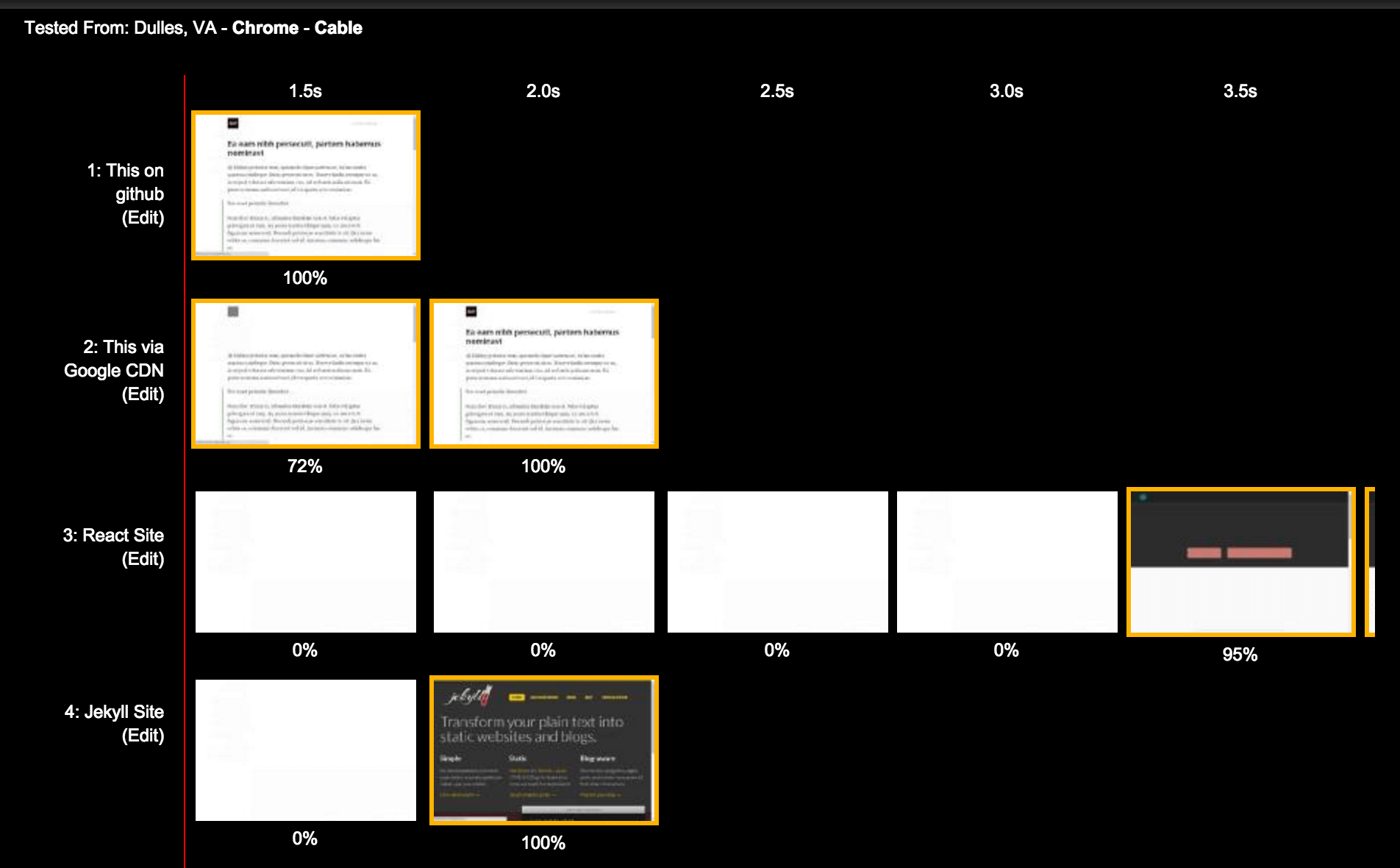
If you are on a fast connection, all these pages load about the same speed
but our page renders the main content much faster:
You'll see the main content render much faster because AMP
doesn't allow anything in your page
that would block the page from rendering after the initial HTML loads. This means no external
css, no custom js, etc.
Here's how this looks to the user (as rendered by WebPageTest):
You can get sometimes get even faster speeds when your
page is served via Google's AMP CDN.
But that's not always true depending the randomness of the internet and where
you are connecting from.
So there's some tiny benefit on a 100mbs wired connection. But optimization is much more
important on a slow, high-latency mobile connection (i.e. most actual internet users in 2016).
Let's try loading the page using the "Regular 2G (250kb/s, 300ms RT)" throttling setting in
Chrome Dev Tools:
Even a horribly slow connection with high latency, the user will still see a page render in
half a second. That's great! The difference between 385ms and 28s is the difference between
someone reading your blog is skipping your blog.
But notice that the Jekyll homepage still performs well on the second page load. Google AMP
gives you a nice set of rules for making fast pages, but of course it isn't required to make
a fast page.
Getting Started
To use this theme, it's just like using any other Jekyll template:
Step 1: Install Jekyll
On windows
If on windows you will need the ruby devkit available here: rubyinstaller.
Step 3: Run gem install bundler; bundle install inside the new /amplify/ folder that was
just created to install the required ruby dependencies.
Step 4: Tweak _config.yml.
Just fill in everything in the # Site settings section.
You'll want to set your site's title, your name, your twitter username, etc.
Step 5: Run bundle exec jekyll serve and then open
http://localhost:4000/ to see your site!
Step 6: Publish your site
just like any other Jekyll site.
Google AMP Limitations
Google AMP sets many
strict limits on what you can include in your web pages.
A few of these are worth talking about:
Limitation: All CSS must be inline (no external css files).
Because of this, the main css file for this site is in _includes/styles.scss
instead of in the normal css/ Jekyll folder. This css file is inlined
into the header of every page via the special scssify filter in _includes/head.html.
Limitation: Size all resources statically
Every image you include in your page must have a height and width. This also
applies to other things like embedding videos or other resources. Check below
for more details.
Writing Posts with Google AMP
Writing posts works
just like it does normally in Jekyll
except when you want to include extra resources likes pictures, videos,
embedded Twitter posts, etc.
Google AMP has it's own set of special html tags for including content. You
should use these instead of normal Markdown or HTML tags.
The two you are are most likely to need are <amp-img> and <amp-youtube>:
Google AMP adds built-in validation logic to make sure your pages follow all
the rules so they render as fast as possible.
To check your page, just add #development=1 to any url on your site and then
check the javascript console in your browser.
http://localhost:4000/#development=1
You will either see a success message:
Powered by AMP ⚡ HTML – Version 1457112743399
AMP validation successful.
Or you will see a list of errors to fix:
Powered by AMP ⚡ HTML – Version 1457112743399
AMP validation had errors:
The attribute 'style' may not appear in tag 'span'
The attribute 'style' may not appear in tag 'div'
Enabling Google Analytics
This theme supports simple page tracking with Google Analytics.
To enable analytics :
Set your property ID in _config.yml
Uncomment the analytics include in _layouts/default.html.
Uncomment the analytics script in _includes/head.html.
If you wish to track custom events or want to send custom data, please refer to the documentation.
Making Google serve your page
Google will cache valid AMP pages if you link to them with one of these urls:
The caches don't refresh that often. So don't view these urls until your page
is done!
Remove /s from both urls if your page isn't served over https://.
Required Schema Data
To actually get your page featured in Google search results, it needs to include
a http://schema.org NewsArticle schema. See _includes/metadata.json for the
version generated by default. You might want to tweak it.
Credits
This theme is inspired by
Mediator by Dirk Fabisch. I used some
of the css and html from that theme as a starting point. Thanks!
TopGit's last sync did not record any GitHub topics for ageitgey/amplify. GitHub topics appear in the right sidebar of a repository page; that's the authoritative place to check.
How active is development on ageitgey/amplify?
The most recent commit recorded on ageitgey/amplify was 2.7 years ago, based on the GitHub push timestamp. The repository has 161 forks — one of the better signals of community interest.
How many stars does ageitgey/amplify have?
ageitgey/amplify has 1.8k GitHub stars — refresh the page for the live number, or check github.com/ageitgey/amplify. TopGit mirrors GitHub's count but does not claim minute-by-minute accuracy.
What is ageitgey/amplify?
ageitgey/amplify (ageitgey/amplify) is a CSS project on GitHub. From the project's own README: A Jekyll html theme in the vague style of Medium.com built using Google AMP
What language is ageitgey/amplify written in?
ageitgey/amplify is written primarily in CSS. GitHub's language field is based on the largest share of bytes in the default branch.
Read full README in the tab above.
Want a second opinion on amplify?
Ask an AI that can read this page — one click and you get its take on amplify.

 /amplify