On GitHub, AlexsJones/llama-panel has picked up 56 stars, JavaScript. A MacOS llama-server command centre
Snapshot summary built from the project's own GitHub metadata — there's no written TopGit review yet. The page will update automatically when a full review is published.
WHY NO REVIEW YET
TopGit writes full reviews for the most-starred, most-requested repositories. This page is a snapshot until then — see the READ ME tab for the original README in full.
A native macOS desktop app for managing and interacting with llama-server instances. Built with Tauri.
Features
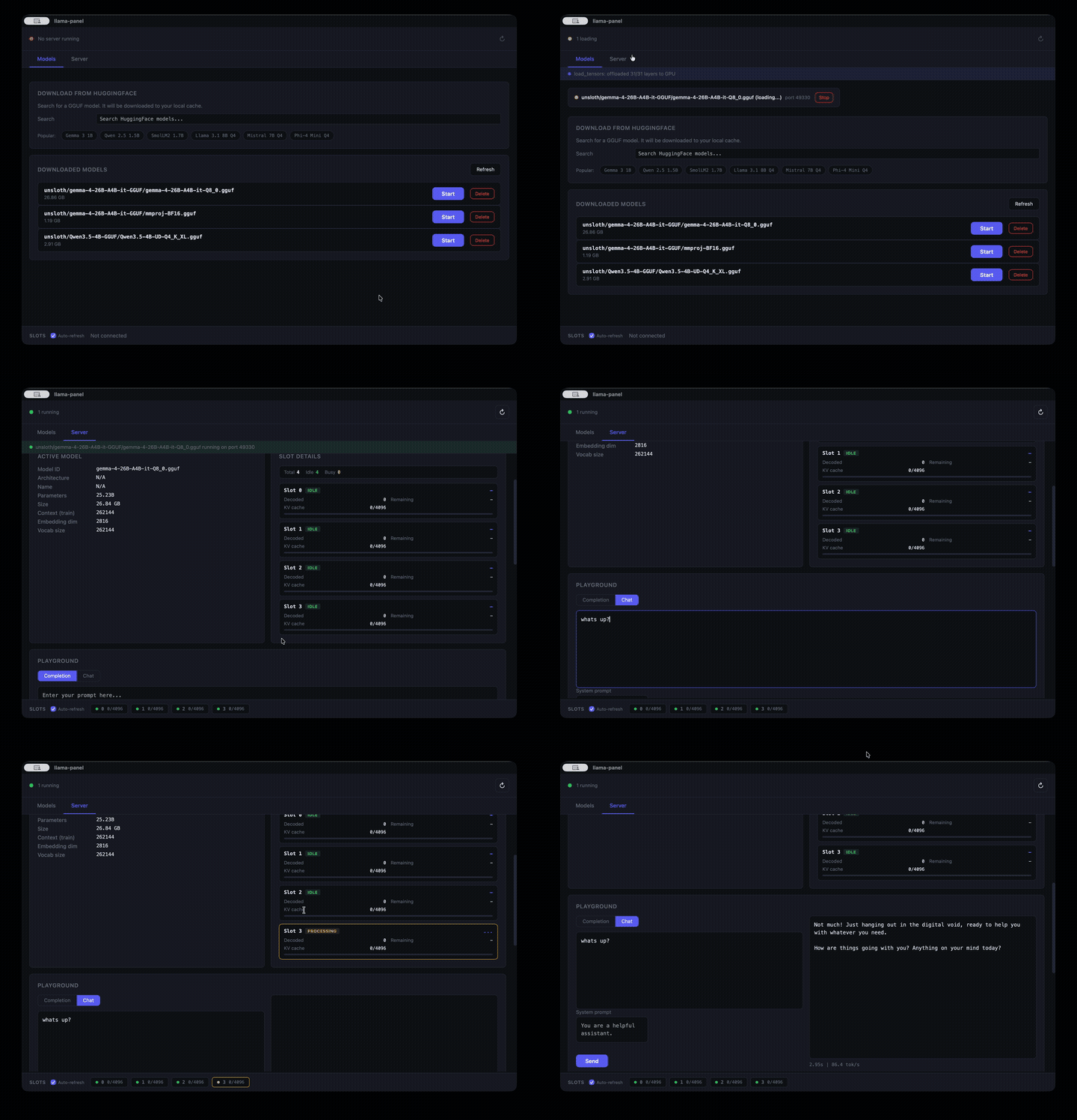
Download models from HuggingFace -- live search, automatic split-file handling, download progress with ETA
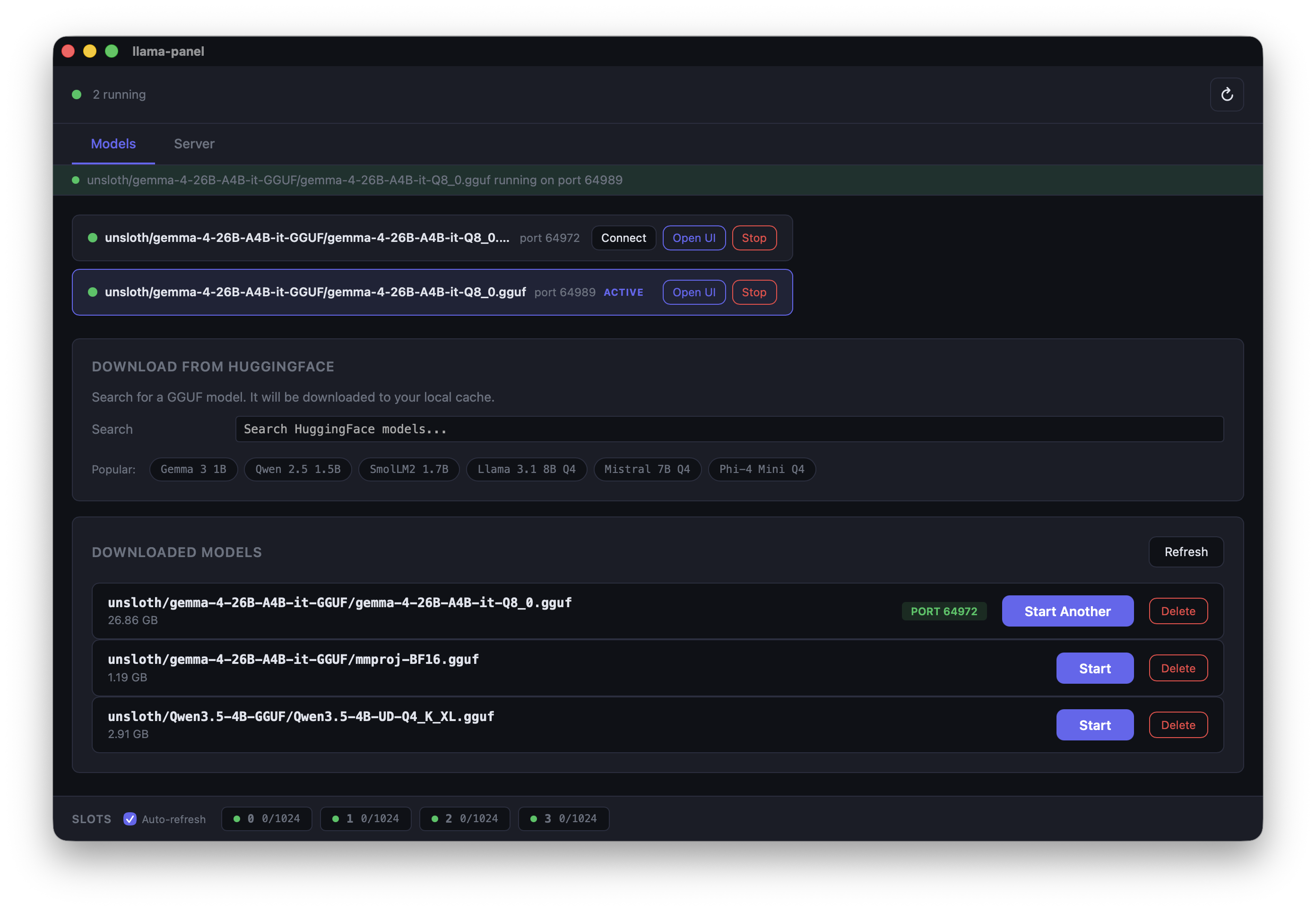
Run multiple servers simultaneously -- each model gets its own random port, manage them all from one place
Auto-detects llama-server -- finds the binary on your PATH or common install locations
Downloads to the standard HuggingFace cache (~/.cache/huggingface/hub/) -- shared with huggingface-cli, LM Studio, and other tools
Multimodal aware -- mmproj projector files are recognised as companions rather than separate models and passed to llama-server via --mmproj
Respects llama.cpp model-source env vars -- see Model locations
Open llama-server's built-in web UI in your browser with one click
Configure server options -- context size, GPU layers, flash attention, parallel slots, and more
Tune parameters with interactive sliders and presets (Creative, Balanced, Precise, Deterministic)
Playground for completions and chat with performance metrics
Live server log -- see model loading progress, layer offloading, and errors in real time
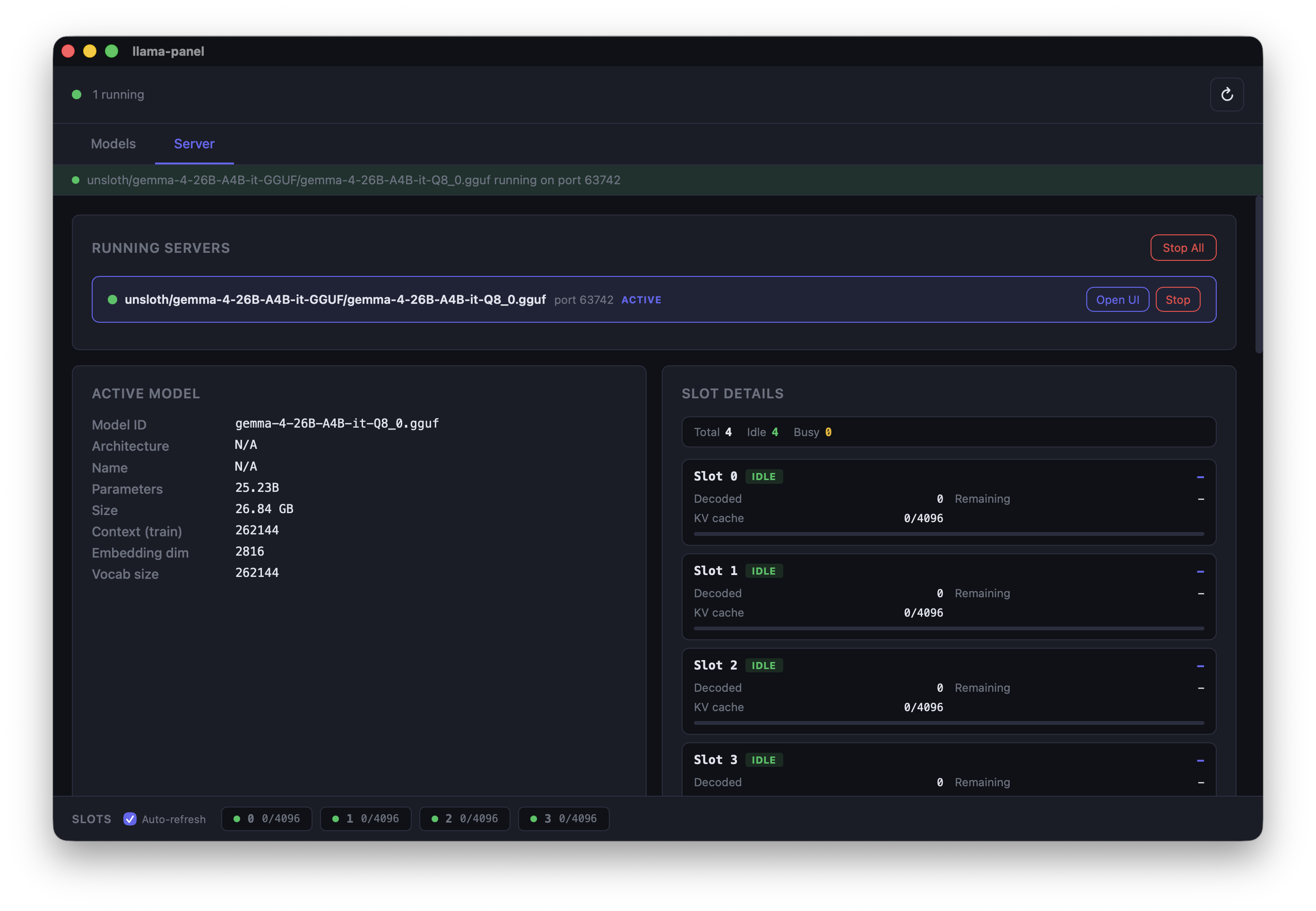
Slot monitor with real-time polling
Model Management
Search HuggingFace for GGUF models, download them, and start serving with a few clicks. Split models (multi-file GGUFs) are detected and downloaded as a bundle automatically.
Live search -- type to search HuggingFace for GGUF models, see download counts and likes
Smart file picker -- shows available quantizations with file sizes, groups split models into bundles
Download progress -- real-time progress bar with ETA, visible from any tab
Popular model suggestions -- quick-pick chips for Gemma, Qwen, Llama, Mistral, Phi, and more
Multiple servers -- run several models at once, each on its own port. Connect, open in browser, or stop individually
Model locations
By default llama-panel reads and writes the standard HuggingFace hub cache at ~/.cache/huggingface/hub/. The following environment variables (the same ones llama.cpp honours) override or extend where it looks for models:
Variable
Effect
HF_HUB_CACHE
Use this directory as the HuggingFace hub cache.
HF_HOME
Use $HF_HOME/hub as the hub cache.
LLAMA_ARG_MODELS_DIR
Also list loose .gguf files stored in this directory (llama-server's --models dir).
LLAMA_CACHE
Also list loose .gguf files stored in this directory.
Split (multi-part) GGUFs are grouped, and mmproj-*.gguf projector files are attached to their model rather than listed separately.
Server Configuration
Configure llama-server options from the Server tab. Settings apply when starting any model.
Endpoints & API -- expose properties, enable metrics, listen host
Server log -- live stderr output from the running server process
Running servers list -- see all active servers with stop/open/connect controls
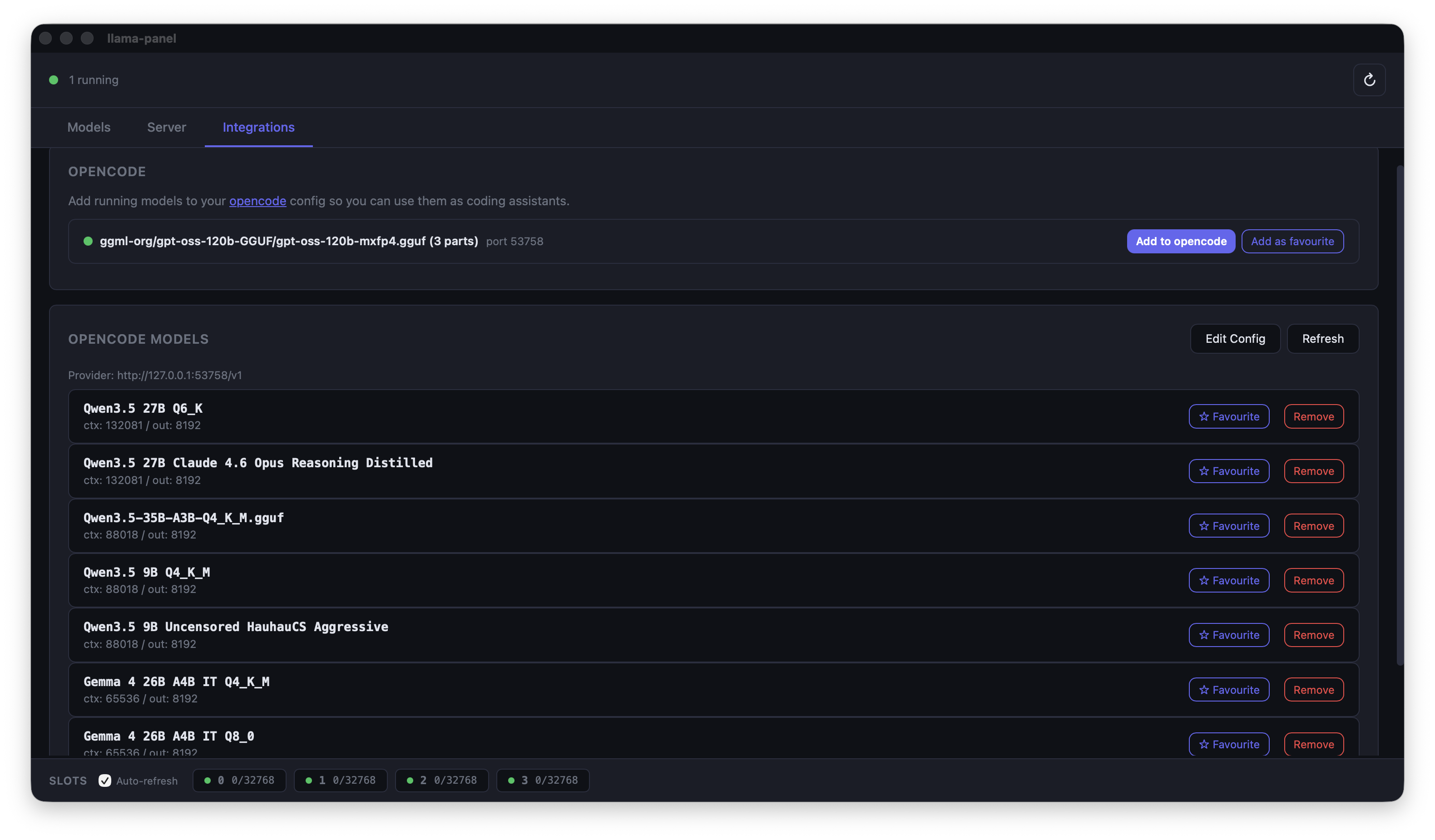
Integrations
OpenCode support – OpenCode can connect directly to your llama-server instance via the integration panel, enabling seamless model management and inference from within the OpenCode IDE.
Install
Homebrew (recommended)
brew tap AlexsJones/llama-panel
brew install llama-panel
This installs the .app bundle to /Applications and a llama-panel command on your PATH.
Download from GitHub Releases
Grab the latest .tar.gz from Releases, extract it, and drag llama-panel.app to /Applications:
tar -xzf llama-panel-v*.tar.gz
mv llama-panel.app /Applications/
From source
Requires Rust and the Tauri CLI:
cargo install tauri-cli
cargo tauri build
The .app bundle will be in target/release/bundle/macos/.
Usage
Launch from Spotlight, the Applications folder, or the command line:
llama-panel
Development
# Install Tauri CLI
cargo install tauri-cli

# Run in dev mode (hot-reload for the UI)
cargo tauri dev
The frontend is vanilla HTML/CSS/JS in ui/ -- no build step required.
TopGit's last sync did not record any GitHub topics for AlexsJones/llama-panel. GitHub topics appear in the right sidebar of a repository page; that's the authoritative place to check.
How active is development on AlexsJones/llama-panel?
The most recent commit recorded on AlexsJones/llama-panel was 1 month ago, based on the GitHub push timestamp. The repository has 5 forks — one of the better signals of community interest.
How many stars does AlexsJones/llama-panel have?
AlexsJones/llama-panel has 56 GitHub stars — refresh the page for the live number, or check github.com/AlexsJones/llama-panel. TopGit mirrors GitHub's count but does not claim minute-by-minute accuracy.
What language is AlexsJones/llama-panel written in?
AlexsJones/llama-panel is written primarily in JavaScript. GitHub's language field is based on the largest share of bytes in the default branch.
Where do I read more about AlexsJones/llama-panel?
This TopGit page is a snapshot — the READ ME tab shows the project's own README content (links stripped, images preserved). The GitHub repository at github.com/AlexsJones/llama-panel is the definitive source.
Read full README in the tab above.
Curious whether llama-panel is right for you?
Let ChatGPT, Claude, or Perplexity look into it — click below and see what AI actually says about llama-panel.
 /llama-panel