31.8k GitHub stars and counting — amix/vimrc is a Vim Script project TopGit is tracking across repositories on the platform. The ultimate Vim configuration (vimrc)
Snapshot summary built from the project's own GitHub metadata — there's no written TopGit review yet. The page will update automatically when a full review is published.
WHY NO REVIEW YET
TopGit writes full reviews for the most-starred, most-requested repositories. This page is a snapshot until then — see the READ ME tab for the original README in full.
Over the last 10 years, I have used and tweaked Vim. This configuration is the ultimate vimrc (or at least my version of it).
There are two versions:
The Basic: If you want something small just copy basic.vim into your ~/.vimrc and you will have a good basic setup
The Awesome: Includes a ton of useful plugins, color schemes, and configurations
I would, of course, recommend using the awesome version.
How to install the Awesome version?
Install for your own user only
The awesome version includes a lot of great plugins, configurations and color schemes that make Vim a lot better. To install it simply do following from your terminal:
git clone --depth=1 https://github.com/amix/vimrc.git ~/.vim_runtime
sh ~/.vim_runtime/install_awesome_vimrc.sh
Install for multiple users
To install for multiple users, the repository needs to be cloned to a location accessible for all the intended users.
git clone --depth=1 https://github.com/amix/vimrc.git /opt/vim_runtime
sh /opt/vim_runtime/install_awesome_parameterized.sh /opt/vim_runtime user0 user1 user2
# to install for all users with home directories, note that root will not be included
sh /opt/vim_runtime/install_awesome_parameterized.sh /opt/vim_runtime --all
Naturally, /opt/vim_runtime can be any directory, as long as all the users specified have read access.
Fonts
I recommend using IBM Plex Mono font (it's an open-source and awesome font that can make your code look beautiful). The Awesome vimrc is already setup to try to use it.
Some other fonts that Awesome will try to use:
Hack
Source Code Pro
How to install the Basic version?
The basic version is just one file and no plugins. Just copy basic.vim and paste it into your vimrc.
The basic version is useful to install on remote servers where you don't need many plugins, and you don't do many edits.
git clone --depth=1 https://github.com/amix/vimrc.git ~/.vim_runtime
sh ~/.vim_runtime/install_basic_vimrc.sh
How to install on Windows?
Use gitforwindows to checkout the repository and run the installation instructions above. No special instructions needed ;-)
How to install on Linux
If you have vim aliased as vi instead of vim, make sure to either alias it: alias vi=vim. Otherwise, apt-get install vim
How to update to latest version?
Just do a git rebase!
cd ~/.vim_runtime
git reset --hard
git clean -d --force
git pull --rebase
python update_plugins.py  # use python3 if python is unavailable
Some screenshots
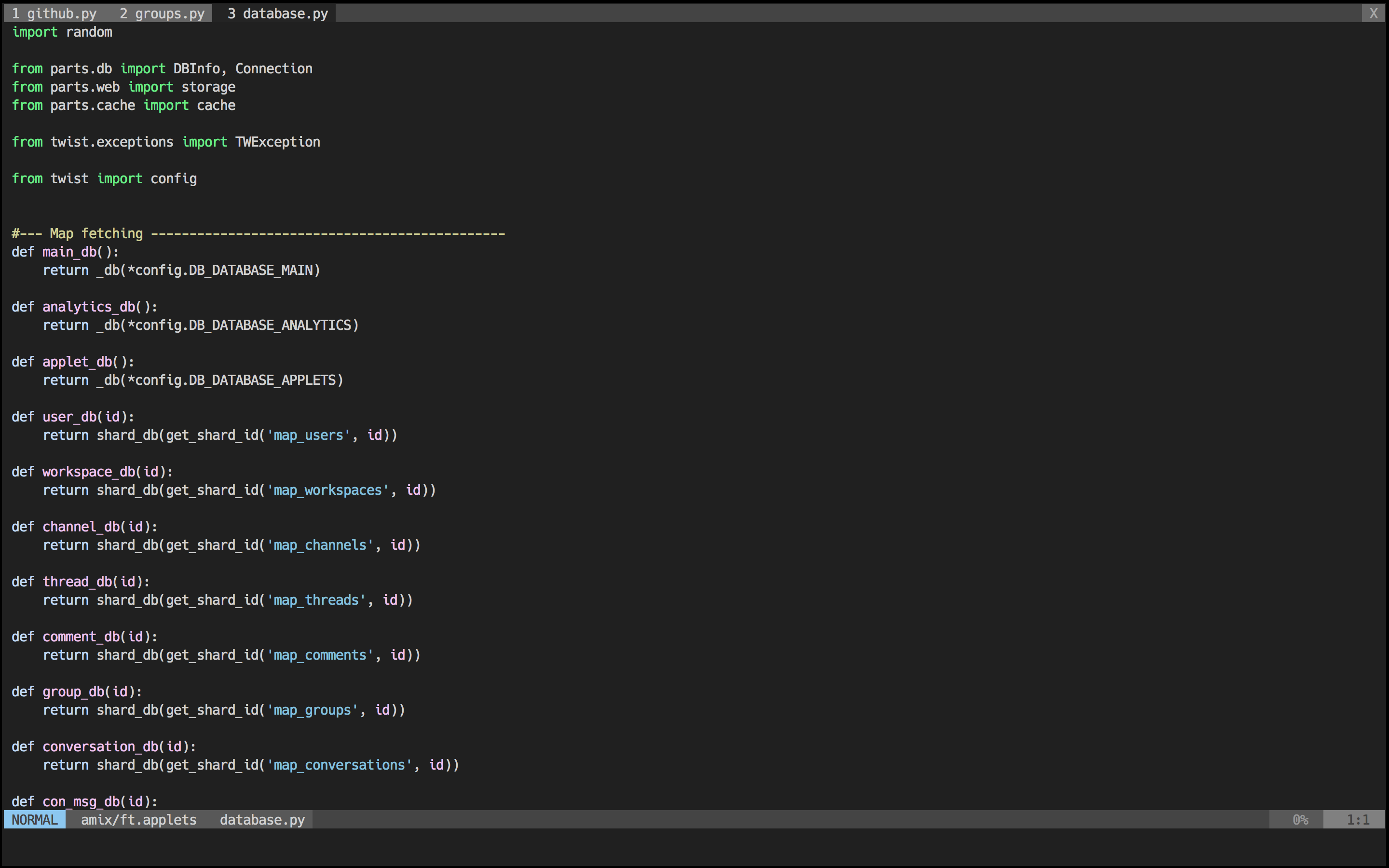
Colors when editing a Python file:
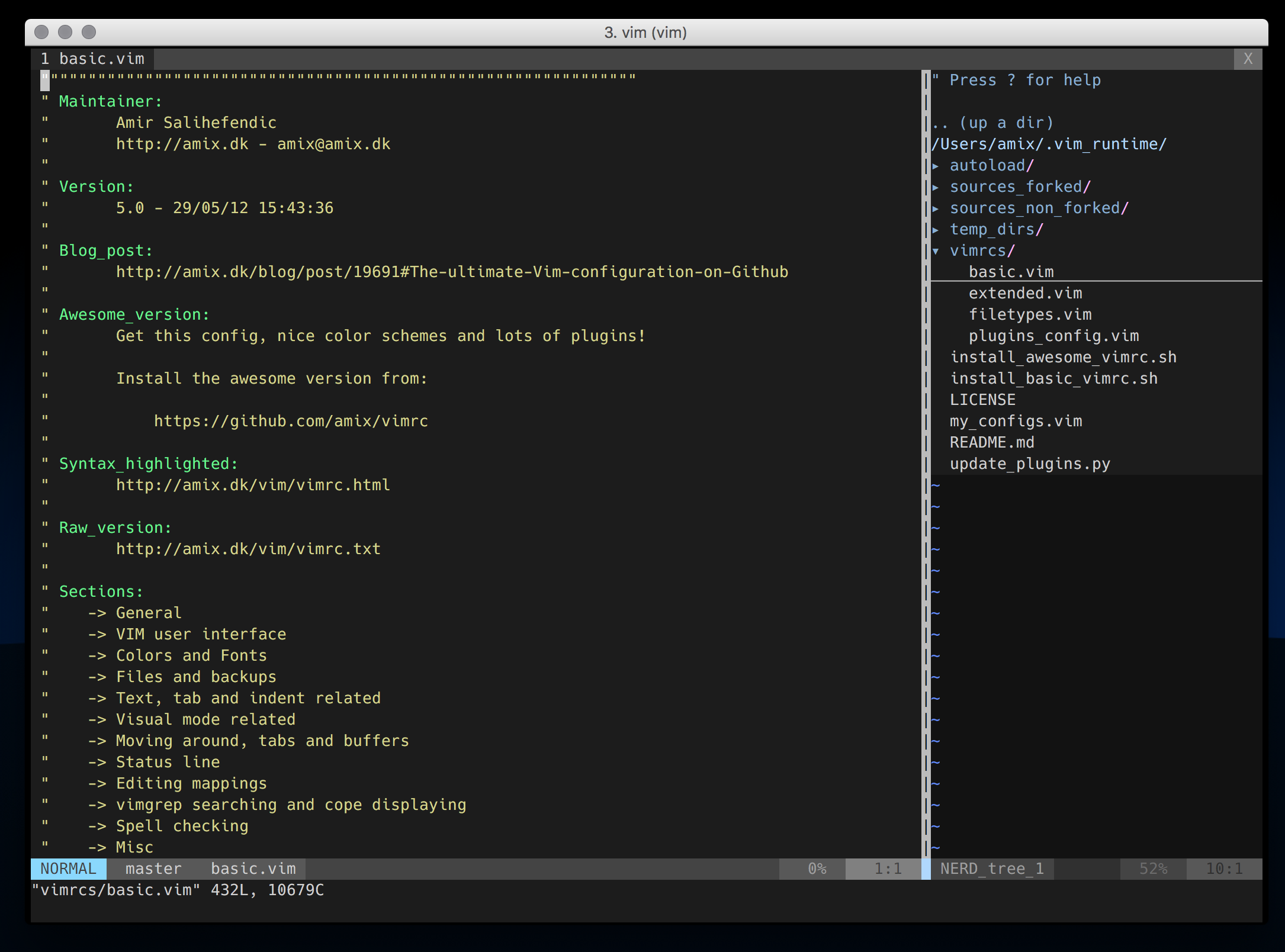
NERD Tree plugin in a terminal window:
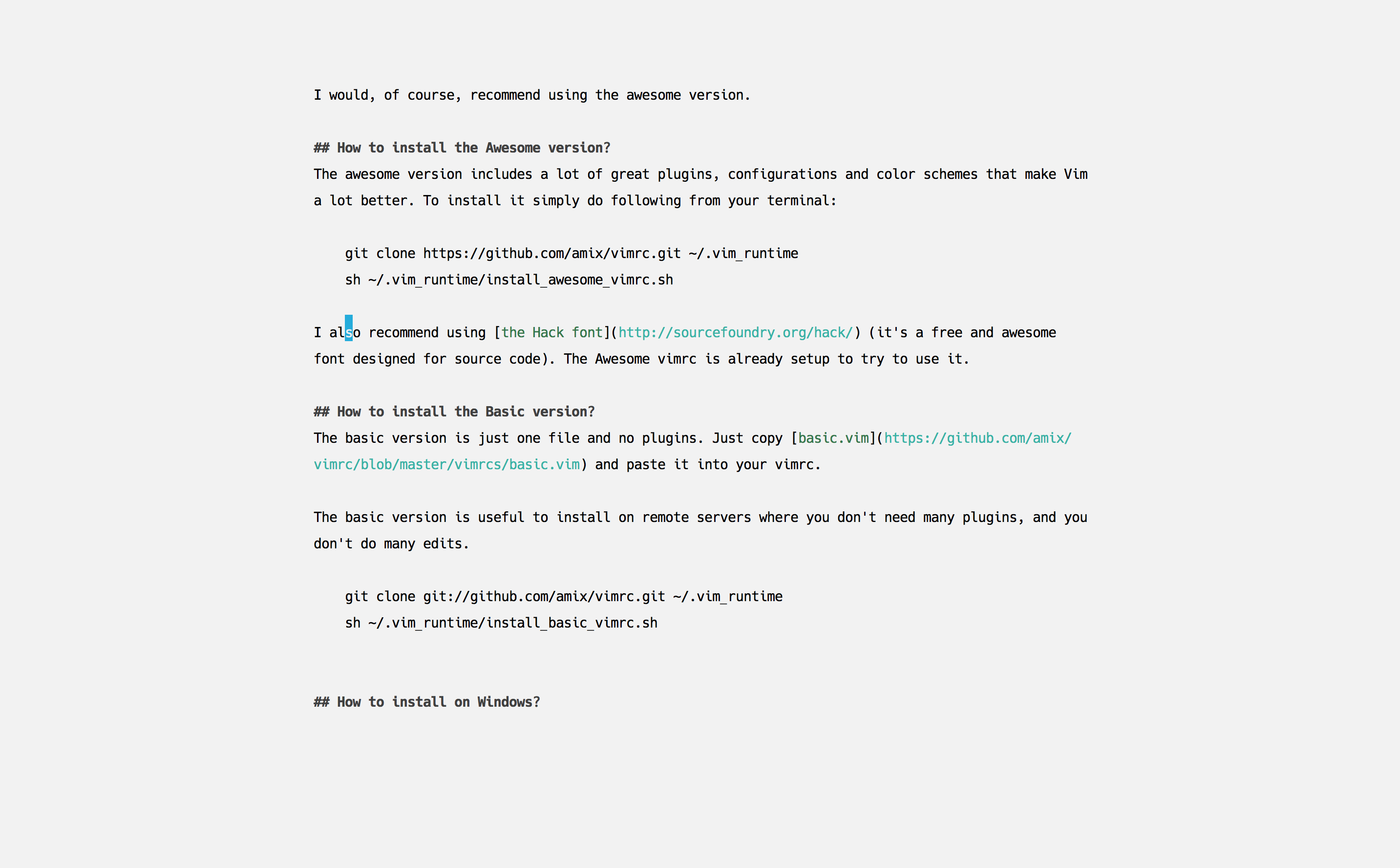
Distraction free mode using goyo.vim and vim-zenroom2:
Included Plugins
I recommend reading the docs of these plugins to understand them better. Each plugin provides a much better Vim experience!
ack.vim: Vim plugin for the_silver_searcher (ag) or ack -- a wicked fast grep
bufexplorer.zip: Quickly and easily switch between buffers. This plugin can be opened with <leader+o>
ctrlp.vim: Fuzzy file, buffer, mru and tag finder. It's mapped to <Ctrl+F>
goyo.vim and vim-zenroom2:
lightline.vim: A light and configurable statusline/tabline for Vim
NERD Tree: A tree explorer plugin for vim
open_file_under_cursor.vim: Open file under cursor when pressing gf
pathogen.vim: Manage your vim runtimepath
snipmate.vim: snipmate.vim aims to be a concise vim script that implements some of TextMate's snippets features in Vim
ale: Syntax and lint checking for vim (ALE requires NeoVim >= 0.2.0 or Vim 8 with +timers +job +channel)
vim-commentary: Comment stuff out. Use gcc to comment out a line (takes a count), gc to comment out the target of a motion. gcu uncomments a set of adjacent commented lines
vim-expand-region: Allows you to visually select increasingly larger regions of text using the same key combination
vim-fugitive: A Git wrapper so awesome, it should be illegal
vim-indent-object: Defines a new text object representing lines of code at the same indent level. Useful for python/vim scripts
vim-multiple-cursors: Sublime Text style multiple selections for Vim, CTRL+N is remapped to CTRL+S (due to YankRing)
vim-yankstack: Maintains a history of previous yanks, changes and deletes
vim-zenroom2 Remove all clutter and focus only on the essential. Similar to iA Writer or Write Room
gist-vim Easily create gists from Vim using the :Gist command
vim-indent-guides Is a plugin for visually displaying indent levels in Vim
editorconfig-vim EditorConfig helps maintain consistent coding styles for multiple developers working on the same project across various editors and IDEs
copilot.vim Plugin for GitHub Copilot (AI autocompletion FTW 😅)
Included color schemes
Type :colorscheme <Tab> to try out color schemes on the fly,
or add the command to ~/.vim_runtime/my_configs.vim (see below),
for example colorscheme pyte.
peaksea: The default
dracula
vim-colors-solarized
vim-irblack
mayansmoke
vim-pyte
Included modes
vim-coffee-script
vim-less
vim-bundle-mako
vim-markdown
nginx.vim: Highlights configuration files for nginx
rust.vim
vim-ruby
typescript-vim
vim-javascript
vim-python-pep8-indent
How to include your own stuff?
After you have installed the setup,
create an empty ~/.vim_runtime/my_configs.vim file for further customization.
This file's syntax matches vimrc syntax,
and add vimrc lines like set number as needed.
Clone the plugin that you want in that directory, for example: git clone --depth=1 git://github.com/maxmellon/vim-jsx-pretty ~/.vim_runtime/pack/plugins/start/vim-jsx-pretty
Key Mappings
The leader is ,, so whenever you see <leader> it means ,.
Normal mode mappings
Fast saving of a buffer (<leader>w):
nmap <leader>w :w!<cr>
Map <Space> to / (search) and <Ctrl>+<Space> to ? (backwards search):
Closing of the current buffer(s) (<leader>bd and (<leader>ba)):
" Close current buffer
map <leader>bd :Bclose<cr>

" Close all buffers
map <leader>ba :1,1000 bd!<cr>
Useful mappings for managing tabs:
map <leader>tn :tabnew<cr>
map <leader>to :tabonly<cr>
map <leader>tc :tabclose<cr>
map <leader>tm :tabmove

" Opens a new tab with the current buffer's path
" Super useful when editing files in the same directory
map <leader>te :tabedit <C-r>=escape(expand("%:p:h"), " ")<cr>/
Switch CWD to the directory of the open buffer:
map <leader>cd :cd %:p:h<cr>:pwd<cr>
Open ack.vim for fast search:
map <leader>g :Ack
Quickly open a buffer for scripbble:
map <leader>q :e ~/buffer<cr>
Toggle paste mode on and off:
map <leader>pp :setlocal paste!<cr>
Visual mode mappings
Visual mode pressing * or # searches for the current selection:
Write the file as sudo (works only on Unix). Super useful when you open a file and you don't have permissions to save your changes. Vim tip:
:W
Plugin related mappings
Open bufexplorer to see and manage the current buffers (<leader>o):
map <leader>o :BufExplorer<cr>
Open ctrlp.vim plugin to quickly find a file or a buffer (<leader>j or <ctrl>f):
" Quickly find and open a file in the CWD
let g:ctrlp_map = '<C-f>'

" Quickly find and open a recently opened file
map <leader>f :MRU<CR>

" Quickly find and open a buffer
map <leader>b :CtrlPBuffer<cr>
goyo.vim and vim-zenroom2 lets you only focus on one thing at a time. It removes all the distractions and centers the content. It has a special look when editing Markdown, reStructuredText and textfiles. It only has one mapping. (<leader>z)
map <leader>z :Goyo<cr>
vim-multiple-cursors mappings to manage multiple cursors at once:
let g:multi_cursor_start_word_key      = '<C-s>'
let g:multi_cursor_select_all_word_key = '<A-s>'
let g:multi_cursor_start_key           = 'g<C-s>'
let g:multi_cursor_select_all_key      = 'g<A-s>'
let g:multi_cursor_next_key            = '<C-s>'
let g:multi_cursor_prev_key            = '<C-p>'
let g:multi_cursor_skip_key            = '<C-x>'
let g:multi_cursor_quit_key            = '<Esc>'
vim-yankstack mappings to manage the kill-ring (clipboard):
To run code directly from vim, press F5. The currently open code will execute without you having to type anything.
Can be used to execute code written in C, C++, Java, Python, Go, Octave, Bash scripts and HTML. To edit how you want your code to be executed, make changes in the file ~/.vim_runtime/vimrcs/extended.vim
Cope
Query :help cope if you are unsure what cope is. It's super useful!
When you search with Ack.vim, display your results in cope by doing:
<leader>cc
To go to the next search result do:
<leader>n
To go to the previous search results do:
<leader>p
Remove any lines that reference .vim_runtime in your ~/.vimrc
Looking for a remote-first job?
Maintaining this Vim configuration isn't my day job. Daily I am the founder/CEO of Doist. You could come and help us build the workplace of the future while living a balanced life (anywhere in the world 🌍🌎🌏).
No homepage URL was recorded for amix/vimrc in TopGit's last sync. The README tab above frequently contains screenshots and demo links, or check the repository description on GitHub.
Does amix/vimrc have any tags?
TopGit's last sync did not record any GitHub topics for amix/vimrc. GitHub topics appear in the right sidebar of a repository page; that's the authoritative place to check.
How active is development on amix/vimrc?
The most recent commit recorded on amix/vimrc was 2.1 years ago, based on the GitHub push timestamp. The repository has 7.2k forks — one of the better signals of community interest.
How many stars does amix/vimrc have?
amix/vimrc has 31.8k GitHub stars — refresh the page for the live number, or check github.com/amix/vimrc. TopGit mirrors GitHub's count but does not claim minute-by-minute accuracy.
Is amix/vimrc open source?
Yes — amix/vimrc ships under the MIT license, which makes its source code freely readable (and, depending on license terms, forkable and reusable). Source: github.com/amix/vimrc.
Where do I read more about amix/vimrc?
This TopGit page is a snapshot — the READ ME tab shows the project's own README content (links stripped, images preserved). The GitHub repository at github.com/amix/vimrc is the definitive source.
Read full README in the tab above.
Is vimrc worth your time?
ChatGPT, Claude and Perplexity can all read this page. Ask one of them what it makes of vimrc.

 /vimrc