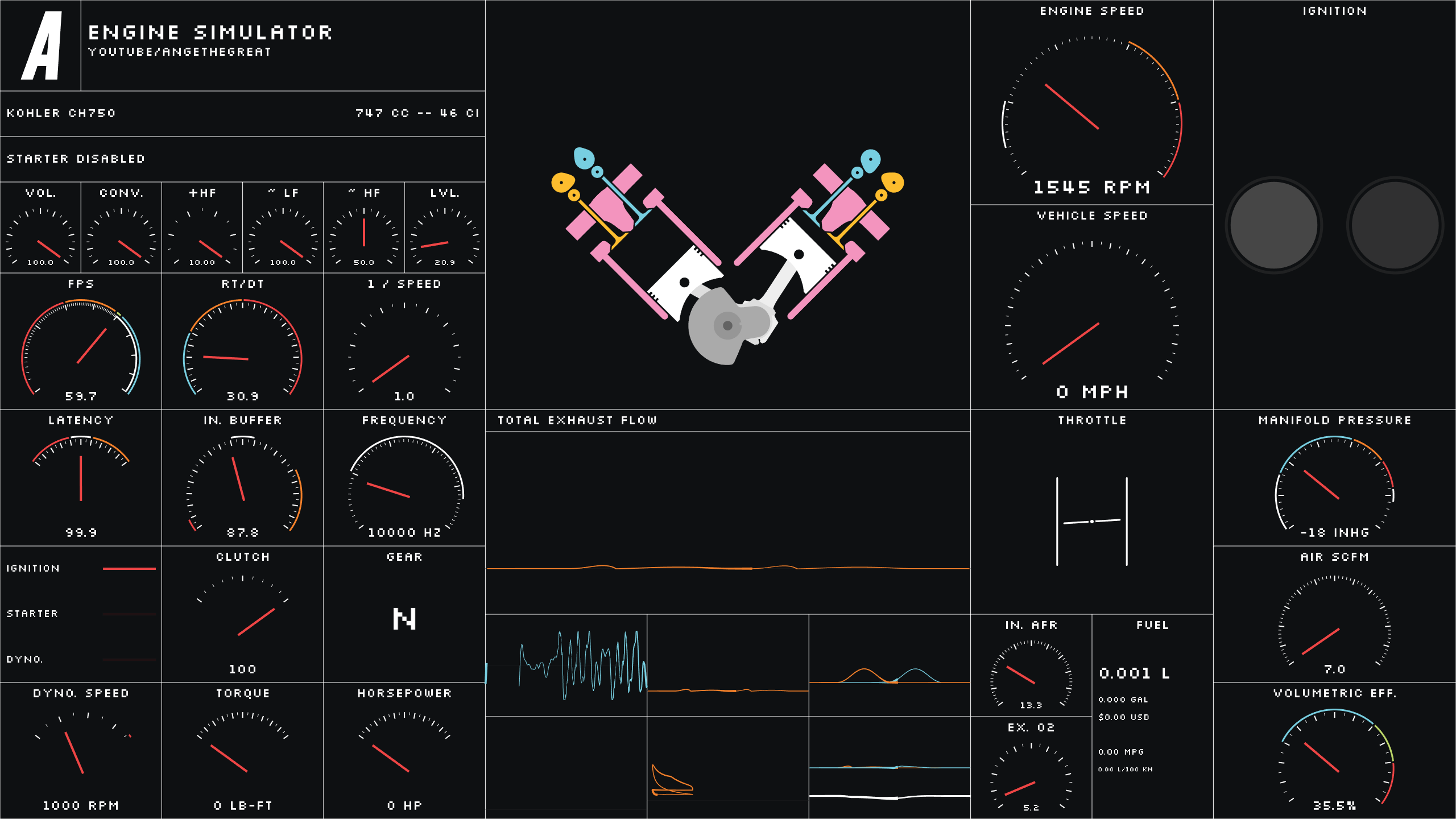
As an open-source project, ange-yaghi/engine-sim has picked up 9.5k stars on GitHub (C++). Combustion engine simulator that generates realistic audio.
Snapshot summary built from the project's own GitHub metadata — there's no written TopGit review yet. The page will update automatically when a full review is published.
WHY NO REVIEW YET
TopGit writes full reviews for the most-starred, most-requested repositories. This page is a snapshot until then — see the READ ME tab for the original README in full.
To get the newest releases of the game, click here.
What is this?
This is a real-time internal combustion engine simulation designed specifically to produce engine audio and simulate engine response characteristics. It is NOT a scientific tool and cannot be expected to provide accurate figures for the purposes of engineering or engine tuning.
How do I install it?
This is a code repository and might not look like other software that you're used to downloading and installing (if you're not familiar with programming). To download a ready-to-use version of the application, navigate to the releases page, find the most recent release (ex. v0.1.5a), click "Assets" and download the .zip file with a name that starts with engine-sim-build. Unzip this file, then run bin/engine-sim-app.exe. The simulator should then start normally.
Check out our Frequently Asked Questions if you need more details.
How do I use it?
The UI is extremely minimalistic and there are only a few controls used to interact with the engine:
Key/Input
Action
A
Toggle ignition
S
Hold for starter
D
Enable dyno
H
Enable RPM hold (see below for instructions)
G + Scroll
Change hold speed
F
Enter fullscreen mode
I
Display dyno stats in the information panel
Shift
Clutch (hold spacebar at the same time to slowly engage/disengage)
Up Arrow
Up Gear
Down Arrow
Down Gear
Z + Scroll
Volume
X + Scroll
Convolution Level
C + Scroll
High frequency gain
V + Scroll
Low frequency noise
B + Scroll
High frequency noise
N + Scroll
Simulation frequency
M
Increase view layer
,
Decrease view layer
Enter
Reload engine script
Escape
Exit the program
Q, W, E, R
Change throttle position
Space + Scroll
Fine throttle adjustment
1, 2, 3, 4, 5
Simulation time warp
Tab
Change screen
Using the RPM hold
The RPM hold feature will hold the engine at a specific RPM and also measure the engine's horsepower and torque at that RPM. You can enable RPM hold by pressing the H key. You must then enable the dynomometer (press the D key) in order for the RPM hold to take effect. To change the hold speed, hold the G key and scroll with the mouse wheel. The RPM hold will be shown on the DYNO. SPEED gauge in the lower left of the screen.
Why is the code so sloppy?
I wrote this to demo in a YouTube video, not as a real product. If you would like it to become a usable product please reach out to me or join my Discord (link can be found in the description of the aforementioned YouTube video). I use this codebase for my own purposes and so it might change frequently and without warning.
How do I build it? (Ignore this section if you're not a developer!)
Note: this project currently only builds on Windows!
Install the latest version of CMake here if it's not already installed.
Step 3 - Install Dependencies
You will need to install the following dependencies and CMake will need to be able to locate them (ie. they need to be listed on your PATH):
1. SDL2
2. SDL2_image
3. Boost (make sure to build the optional dependencies)
4. Flex and Bison
Step 4 - Build and Run
From the root directory of the project, run the following commands:
mkdir build
cd build
cmake ..
cmake --build .
If these steps are successful, a Visual Studio solution will be generated in build. You can open this project with Visual Studio and then run the engine-sim-app project. If you encounter an error telling you that you're missing DLLs, you will have to copy those DLLs to your EXE's directory.
Patreon Supporters
This project was made possible by the generous donations of the following individuals!
How active is development on ange-yaghi/engine-sim?
The most recent commit recorded on ange-yaghi/engine-sim was 2.2 years ago, based on the GitHub push timestamp. The repository has 919 forks — one of the better signals of community interest.
How many stars does ange-yaghi/engine-sim have?
ange-yaghi/engine-sim has 9.5k GitHub stars — refresh the page for the live number, or check github.com/ange-yaghi/engine-sim. TopGit mirrors GitHub's count but does not claim minute-by-minute accuracy.
Is ange-yaghi/engine-sim open source?
Yes — ange-yaghi/engine-sim ships under the MIT license, which makes its source code freely readable (and, depending on license terms, forkable and reusable). Source: github.com/ange-yaghi/engine-sim.
What is ange-yaghi/engine-sim?
ange-yaghi/engine-sim (ange-yaghi/engine-sim) is a C++ project on GitHub. From the project's own README: Combustion engine simulator that generates realistic audio.
What language is ange-yaghi/engine-sim written in?
ange-yaghi/engine-sim is written primarily in C++. GitHub's language field is based on the largest share of bytes in the default branch.
What license does ange-yaghi/engine-sim use?
ange-yaghi/engine-sim is released under the MIT license. Always verify the LICENSE file directly on GitHub for the authoritative terms — license strings can be edited out of sync with a project's actual stance.
Where do I read more about ange-yaghi/engine-sim?
This TopGit page is a snapshot — the READ ME tab shows the project's own README content (links stripped, images preserved). The GitHub repository at github.com/ange-yaghi/engine-sim is the definitive source.
Read full README in the tab above.
Still deciding about engine-sim?
One click hands the question to an AI along with this page — see what it says about engine-sim.
 /engine-sim