Snapshot of antlr/antlr4-tools: 118★, Python. Tools to run antlr4 w/o needing to install java or antlr4!
Snapshot summary built from the project's own GitHub metadata — there's no written TopGit review yet. The page will update automatically when a full review is published.
WHY NO REVIEW YET
TopGit writes full reviews for the most-starred, most-requested repositories. This page is a snapshot until then — see the READ ME tab for the original README in full.
Tools to run antlr4 w/o needing to install java or antlr4! The only requirement is Python3, which is typically installed on all developer machines on all operating systems.
Install
$ pip install antlr4-tools
That creates antlr4 and antlr4-parse executables. On Windows, of course, this doesn't just work. You need to add the ...\local-packages\python38\scripts dir to your PATH, which itself might require a fun reboot or perhaps reinstall of the OS. haha.
Windows-specific issues
On Windows, the pip command doesn't just work---you need to add the ...\local-packages\python38\scripts dir to your PATH, which itself might require a fun reboot. If you use WSL on Windows, then the pip install will also properly at the scripts directly (if you run from bash shell).
Go to the Microsoft Store
Search in Microsoft Store for Python
Select the newest version of Python (3.10).
Click the "Get" button. Store installs python and pip at "c:\Users...\AppData\Local\Microsoft\WindowsApps\python.exe" and "c:\Users...\AppData\Local\Microsoft\WindowsApps\pip.exe", respectively. And, it updates the search path immediately with the install.
Open a "cmd" terminal.
You can now type "python" and "pip", and "pip install antlr4-tools". 7. Unfortunately, it does not add that to the search path.
Update the search path to contain c:\Users...\AppData\Local\Packages\PythonSoftwareFoundation.Python.3.10_qbz5n2kfra8p8\LocalCache\local-packages\Python310\Scripts. You may need to install MSYS2, then do a find /c/ -name antlr4.exe 2> /dev/null and enter that path.
Or, you can set up an alias to antlr4.exe on that path.
The good news is that the ANTLR4 Python tool downloads the ANTLR jar in a standard location, and you don't need to do that manually. It's also possible to go in a browser, go to python.org, and download the python package. But, it's likely you will need to update the path for antlr4.exe as before.
First run will install Java and ANTLR
If needed, antlr4 will download and install Java 11 and the latest ANTLR jar:
$ antlr4
Downloading antlr4-4.11.1-complete.jar
ANTLR tool needs Java to run; install Java JRE 11 yes/no (default yes)? y
Installed Java in /Users/parrt/.jre/jdk-11.0.15+10-jre; remove that dir to uninstall
ANTLR Parser Generator  Version 4.11.1
 -o ___              specify output directory where all output is generated
 -lib ___            specify location of grammars, tokens files
...
To override the version of ANTLR jar used, you can pass a -v <version> argument or set ANTLR4_TOOLS_ANTLR_VERSION environment variable:
$ antlr4 -v 4.9.3
ANTLR Parser Generator  Version 4.9.3
 -o ___              specify output directory where all output is generated
 -lib ___            specify location of grammars, tokens files
...
$ ANTLR4_TOOLS_ANTLR_VERSION=4.10.1 antlr4
ANTLR Parser Generator  Version 4.10.1
 -o ___              specify output directory where all output is generated
 -lib ___            specify location of grammars, tokens files
...
Running ANTLR tool on grammars
The antlr4 command forwards all arguments (besides -v mentioned above) to the actual ANTLR tool command:
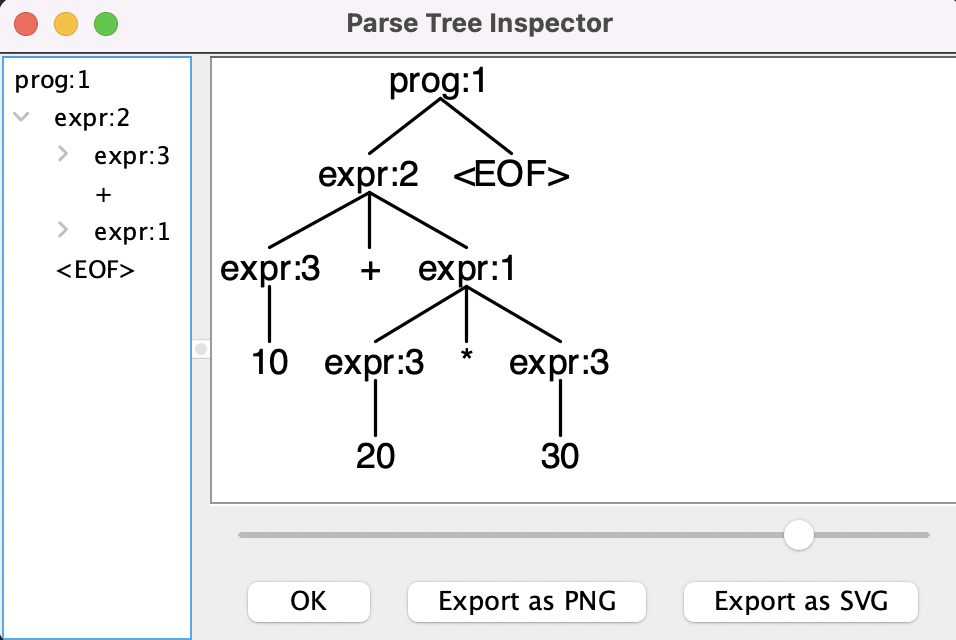
The antlr4-parse command requires ANTLR 4.11 and above (but any version of ANTLR works for the plain antlr4 command). It accepts the same -v argument or environment variable to override the ANTLR jar version used. (Note: ^D means control-D and indicates "end of input" on Unix but use ^Z on Windows.)
No homepage URL was recorded for antlr/antlr4-tools in TopGit's last sync. The README tab above frequently contains screenshots and demo links, or check the repository description on GitHub.
Does antlr/antlr4-tools have any tags?
TopGit's last sync did not record any GitHub topics for antlr/antlr4-tools. GitHub topics appear in the right sidebar of a repository page; that's the authoritative place to check.
How active is development on antlr/antlr4-tools?
The most recent commit recorded on antlr/antlr4-tools was 1.6 years ago, based on the GitHub push timestamp. The repository has 29 forks — one of the better signals of community interest.
How many stars does antlr/antlr4-tools have?
antlr/antlr4-tools has 118 GitHub stars — refresh the page for the live number, or check github.com/antlr/antlr4-tools. TopGit mirrors GitHub's count but does not claim minute-by-minute accuracy.
Is antlr/antlr4-tools open source?
Yes — antlr/antlr4-tools ships under the MIT license, which makes its source code freely readable (and, depending on license terms, forkable and reusable). Source: github.com/antlr/antlr4-tools.
Where do I read more about antlr/antlr4-tools?
This TopGit page is a snapshot — the READ ME tab shows the project's own README content (links stripped, images preserved). The GitHub repository at github.com/antlr/antlr4-tools is the definitive source.
Read full README in the tab above.
Still deciding about antlr4-tools?
One click hands the question to an AI along with this page — see what it says about antlr4-tools.

 /antlr4-tools