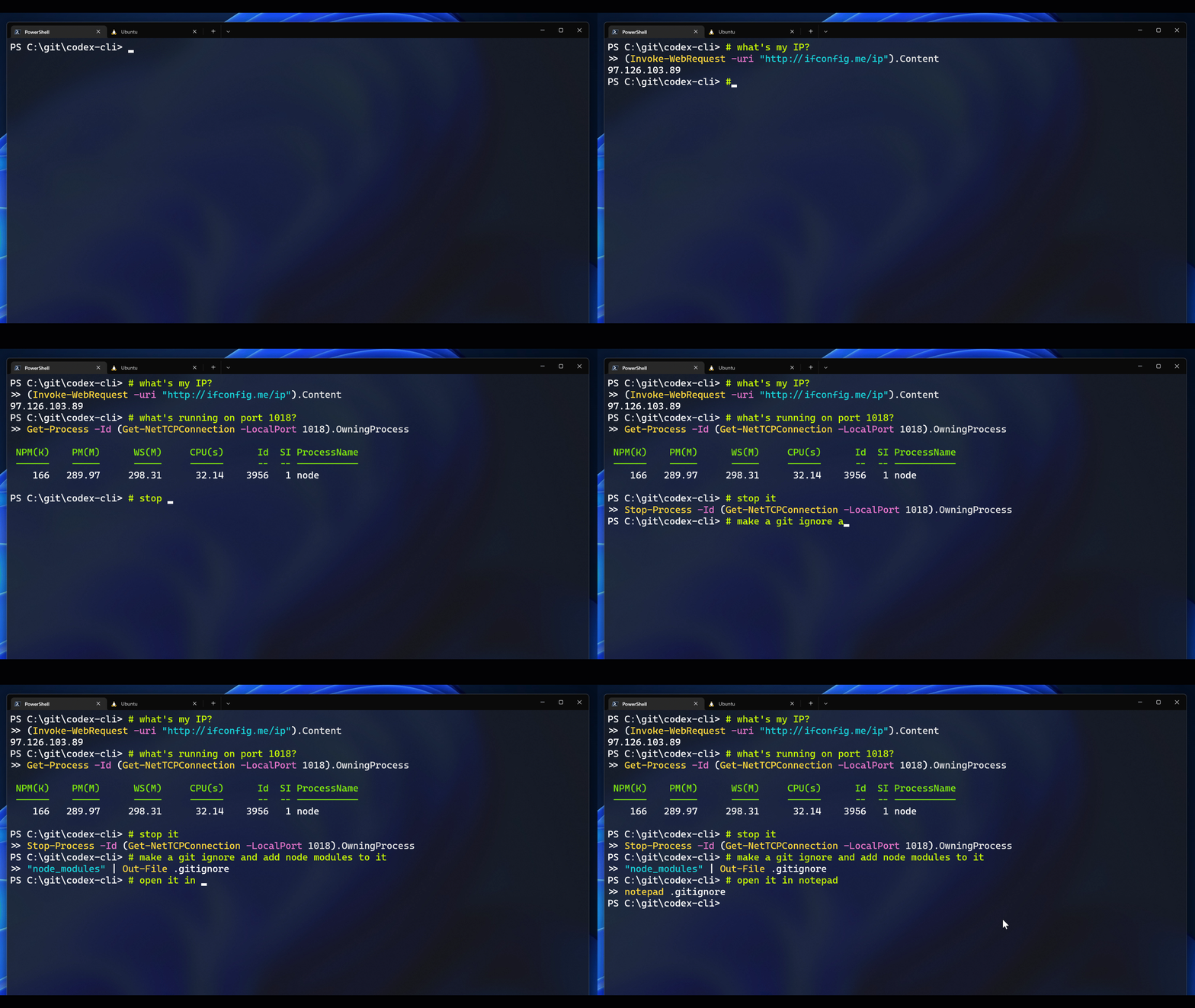
AntonOsika/CLI-Co-Pilot is tracked by TopGit as an open-source project, with 191 stars on GitHub, written primarily in Python. CLI tool that uses GPT4 to turn natural language commands into their Bash/ZShell/PowerShell equivalents
Snapshot summary built from the project's own GitHub metadata — there's no written TopGit review yet. The page will update automatically when a full review is published.
WHY NO REVIEW YET
TopGit writes full reviews for the most-starred, most-requested repositories. This page is a snapshot until then — see the READ ME tab for the original README in full.
CLI Co-Pilot - Natural Language Command Line Interface
TLDR:
Write what you want to do and press CTRL + G, and the command magically appears in your shell
flavor (bash/zsh/fish). However complicated the instruction was.
Now with added support to use OpenAI Chat models (GPT-3.5 and GPT-4)
This is a fork of the microsoft repository that stopped working after OpenAI discontinued the codex models.
When you set it up, please make sure to use one of the engines:
gpt-3.5-turbo
gpt-4
More information in the installation.md.
Installation
Please follow the installation instructions for PowerShell, bash or zsh from here.
Requirements
Python 3.7.1+
[Windows]: Python is added to PATH.
An OpenAI account
OpenAI API Key.
OpenAI Organization Id. If you have multiple organizations, please update your default organization to the one that has access to codex engines before getting the organization Id.
OpenAI Engine Id. It provides access to a model.
Usage
Once configured for your shell of preference, you can use the Codex CLI by writing a comment (starting with #) into your shell, and then hitting Ctrl + G.
The tool supports two primary modes: single-turn and multi-turn.
By default, multi-turn mode is off. It can be toggled on and off using the # start multi-turn and # stop multi-turn commands.
If the multi-turn mode is on, the tool will "remember" past interactions with the model, allowing you to refer back to previous actions and entities. If, for example, you asked the tool to change your time zone to mountain, and then said "change it back to pacific", the model would have the context from the previous interaction to know that "it" is the user's timezone:
# change my timezone to mountain
tzutil /s "Mountain Standard Time"

# change it back to pacific
tzutil /s "Pacific Standard Time"
The tool creates a current_context.txt file that keeps track of past interactions, and passes them to the model on each subsequent command.
When multi-turn mode is off, this tool will not keep track of interaction history. There are tradeoffs to using multi-turn mode - though it enables compelling context resolution, it also increases overhead. If, for example, the model produces the wrong script for the job, the user will want to remove that from the context, otherwise future conversation turns will be more likely to produce the wrong script again. With multi-turn mode off, the model will behave completely deterministically - the same command will always produce the same output.
Any time the model seems to output consistently incorrect commands, you can use the # stop multi-turn command to stop the model from remembering past interactions and load in your default context. Alternatively, the # default context command does the same while preserving the multi-turn mode as on.
Commands
Command
Description
start multi-turn
Starts a multi-turn experience
stop multi-turn
Stops a multi-turn experience and loads default context
load context <filename>
Loads the context file from contexts folder
default context
Loads default shell context
view context
Opens the context file in a text editor
save context <filename>
Saves the context file to contexts folder, if name not specified, uses current date-time
show config
Shows the current configuration of your interaction with the model
set <config-key> <config-value>
Sets the configuration of your interaction with the model
Feel free to improve your experience by changing the token limit, engine id and temperature using the set command. For example, # set engine gpt-4, # set temperature 0.5, # set max_tokens 50.
Prompt Engineering and Context Files
This project uses a discipline called prompt engineering to coax GPT to generate commands from natural language. Specifically, we pass the model a series of examples of NL->Commands, to give it a sense of the kind of code it should be writing, and also to nudge it towards generating commands idiomatic to the shell you're using. These examples live in the contexts directory. See snippet from the PowerShell context below:
# what's the weather in New York?
(Invoke-WebRequest -uri "wttr.in/NewYork").Content

# make a git ignore with node modules and src in it
"node_modules
src" | Out-File .gitignore

# open it in notepad
notepad .gitignore
Note that this project models natural language commands as comments, and provide examples of the kind of PowerShell scripts we expect the model to write. These examples include single line completions, multi-line completions, and multi-turn completions (the "open it in notepad" example refers to the .gitignore file generated on the previous turn).
When a user enters a new command (say "what's my IP address"), we simply append that command onto the context (as a comment) and ask CLI Co-Pilot to generate the code that should follow it. Having seen the examples above, CLI Co-Pilot will know that it should write a short PowerShell script that satisfies the comment.
Building your own Contexts
This project comes pre-loaded with contexts for each shell, along with some bonus contexts with other capabilities. Beyond these, you can build your own contexts to coax other behaviors out of the model. For example, if you want the CLI Co-Pilot to produce Kubernetes scripts, you can create a new context with examples of commands and the kubectl script the model might produce:
# make a K8s cluster IP called my-cs running on 5678:8080
kubectl create service clusterip my-cs --tcp=5678:8080
Add your context to the contexts folder and run load context <filename> to load it. You can also change the default context from to your context file inside src\prompt_file.py.
Note that CLI Co-Pilot will often produce correct scripts without any examples. Having been trained on a large corpus of code, it frequently knows how to produce specific commands. That said, building your own contexts helps coax the specific kind of script you're looking for - whether it's long or short, whether it declares variables or not, whether it refers back to previous commands, etc. You can also provide examples of your own CLI commands and scripts, to show CLI Co-Pilot other tools it should consider using.
One important thing to consider is that if you add a new context, keep the multi-turn mode on to avoid our automatic defaulting (which was added to keep faulty contexts from breaking your experience).
We have added a cognitive services context which uses the cognitive services API to provide text to speech type responses as an example.
Troubleshooting
Use DEBUG_MODE to use a terminal input instead of the stdin and debug the code. This is useful when adding new commands and understanding why the tool is unresponsive.
Sometimes the openai package will throws errors that aren't caught by the tool, you can add a catch block at the end of codex_query.py for that exception and print a custom error message.
FAQ
What OpenAI models/engines are available to me?
You might have access to different OpenAI engines per OpenAI organization. To check what engines are available to you, one can query the List engines API for available engines. See the following commands:
How active is development on AntonOsika/CLI-Co-Pilot?
The most recent commit recorded on AntonOsika/CLI-Co-Pilot was 3.1 years ago, based on the GitHub push timestamp. The repository has 62 forks — one of the better signals of community interest.
How many stars does AntonOsika/CLI-Co-Pilot have?
AntonOsika/CLI-Co-Pilot has 191 GitHub stars — refresh the page for the live number, or check github.com/AntonOsika/CLI-Co-Pilot. TopGit mirrors GitHub's count but does not claim minute-by-minute accuracy.
Is AntonOsika/CLI-Co-Pilot open source?
Yes — AntonOsika/CLI-Co-Pilot ships under the MIT license, which makes its source code freely readable (and, depending on license terms, forkable and reusable). Source: github.com/AntonOsika/CLI-Co-Pilot.
What is AntonOsika/CLI-Co-Pilot?
AntonOsika/CLI-Co-Pilot (AntonOsika/CLI-Co-Pilot) is a Python project on GitHub. From the project's own README: CLI tool that uses GPT4 to turn natural language commands into their Bash/ZShell/PowerShell equivalents
Where do I read more about AntonOsika/CLI-Co-Pilot?
This TopGit page is a snapshot — the READ ME tab shows the project's own README content (links stripped, images preserved). The GitHub repository at github.com/AntonOsika/CLI-Co-Pilot is the definitive source.
Read full README in the tab above.
Still deciding about CLI-Co-Pilot?
One click hands the question to an AI along with this page — see what it says about CLI-Co-Pilot.
 /CLI-Co-Pilot