arialdomartini/oh-my-git — 3.7k★ on GitHub (Shell). An opinionated git prompt for bash and zsh
Snapshot summary built from the project's own GitHub metadata — there's no written TopGit review yet. The page will update automatically when a full review is published.
WHY NO REVIEW YET
TopGit writes full reviews for the most-starred, most-requested repositories. This page is a snapshot until then — see the READ ME tab for the original README in full.
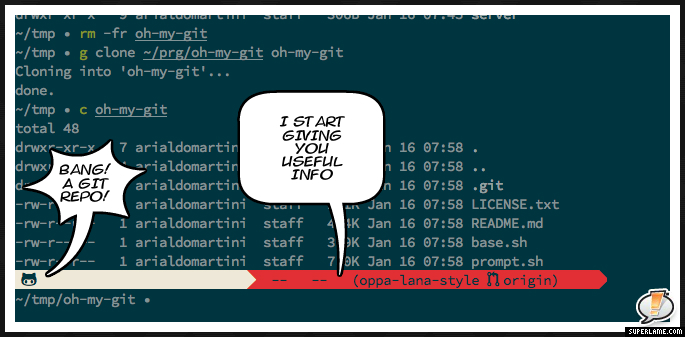
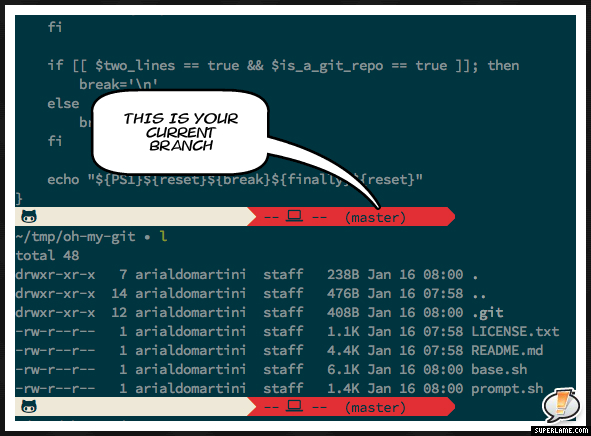
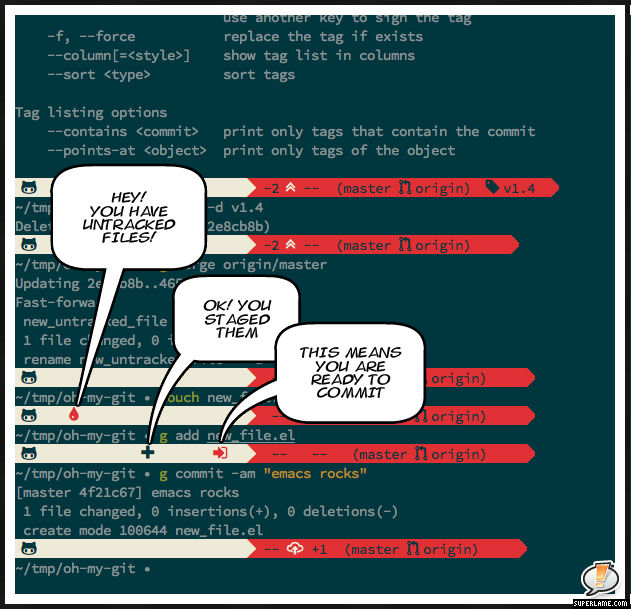
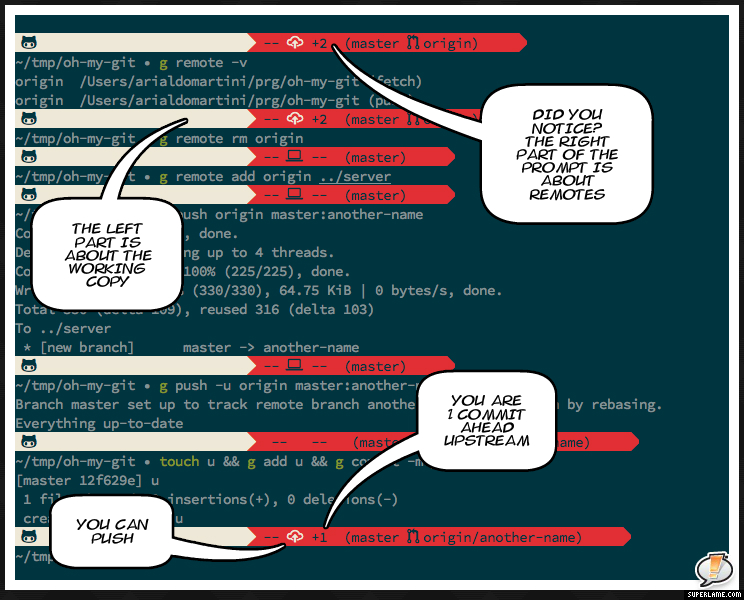
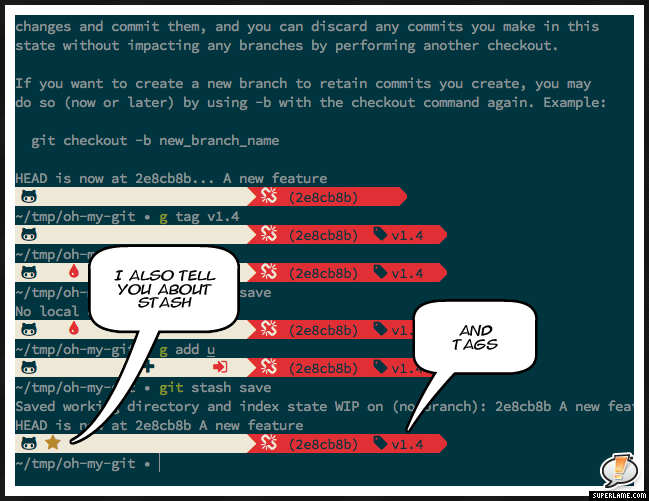
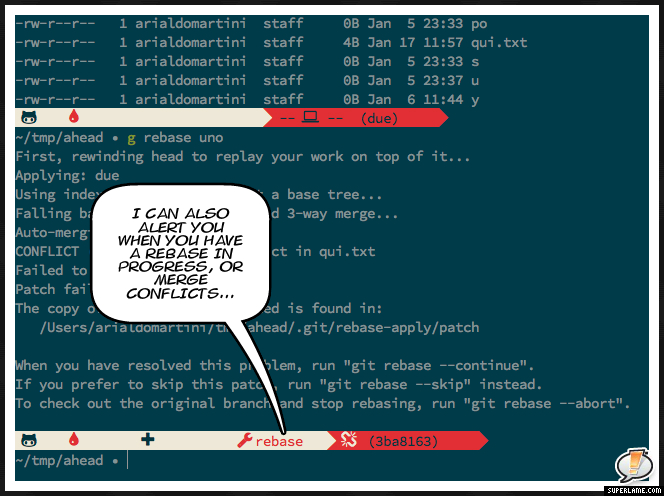
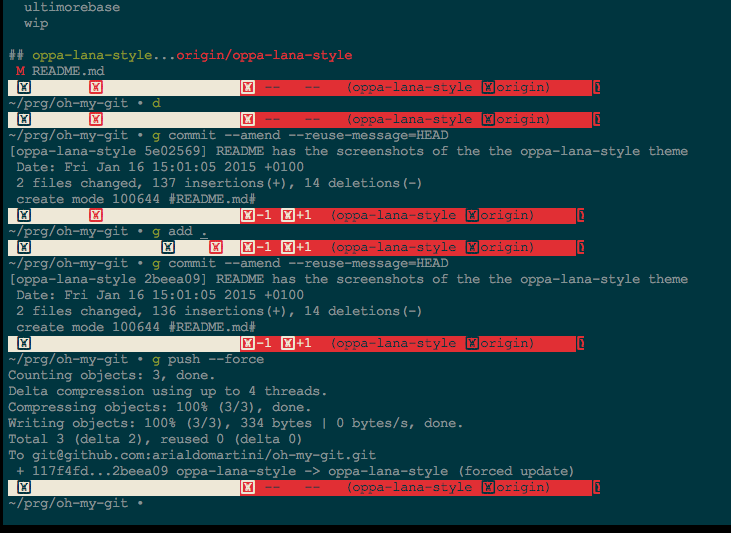
oh-my-git is shipped with 3 themes. The one showed above is called oppa-lana-style. It's based on the Awesome-Terminal-Fonts by @gabrielelana. The screenshots above use the font Source Code Pro by Adobe patched to include additional glyphs from Powerline and from Awesome-Terminal-Fonts, but you can choose any other of the Awesome-Terminal-Fonts.
You can freely download the fonts from the original repo.
To install one of the fonts, on macOS just double click on the corresponding ttf file and click on Install font. So far, I didn't find a way to make the fallback strategy work on macOS.
On Linux you can either install the patched font or you can apply the Awesome-Terminal-Fonts fallback strategy.
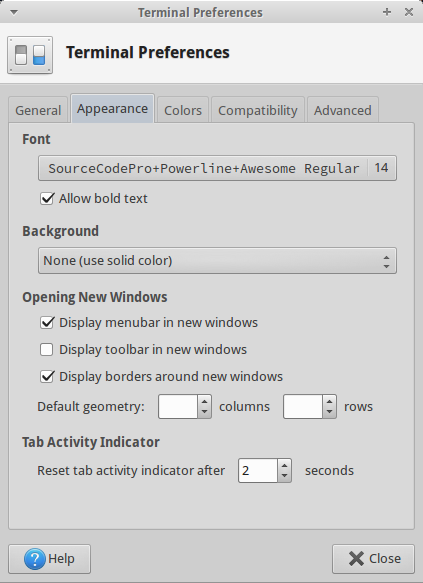
Then, configure your terminal with the desired font, and restart it.
Fork the repo and git clone it in your home directory.
Then add
source $HOME/oh-my-git/prompt.sh
to the bash startup file (~/.profile on Mac, ~/.bashrc on Linux)
If you prefer to keep oh-my-git repository in a different directory, just modify the startup file accordingly to the chosen position
source /wherever-you-want/oh-my-git/prompt.sh
zsh
With antigen installed, just add
antigen use oh-my-zsh
antigen bundle arialdomartini/oh-my-git
antigen theme arialdomartini/oh-my-git-themes oppa-lana-style
to your .zshrc file.
oh-my-git-themes still includes the old 2 themes arialdo-granzestyle (which is inspired to the great Granze theme) by @granze, and arialdo-pathinline. If you want to use them, edit accordingly your .zshrc file.
Fig
Fig adds apps, shortcuts, and autocomplete to your existing terminal.
Install oh-my-git in just one click.
How to install antigen
antigen is a plugin manager for zsh.
Installing antigen is straightforward:
cd ~ && git clone https://github.com/zsh-users/antigen.git .antigen
When you restart zsh, antigen will download and install all that's needed.
Customizing symbols
You can easily change any symbols used by the prompt. Take a look to the file prompt.sh (or to oppa-lana-style.zsh-theme if you use zsh). You will find a bunch of variables, each of them with its default value. The variables names should be auto-explanatory. Something like
You can override any of those variables in your shell startup file.
For example, just add a
omg_is_on_a_tag_symbol='#'
to your .bashrc file, and oh-my-git will use # when you are on a tag.
Disabling oh-my-git
oh-my-git can be disabled on a per-repository basis. Just add a
[oh-my-git]
enabled = false
in the .git/config file of a repo to revert to the original prompt for that particular repo. This could be handy when working with very huge repository, when the git commands invoked by oh-my-git can slow down the prompt.
Uninstall
Bash
Remove the line source ~/.oh-my-git/prompt.sh from the terminal boot script (.profile or .bash_rc)
Delete the oh-my-git repo with a rm -fr ~/.oh-my-git
zsh
Remove the lines
antigen use oh-my-zsh
antigen bundle arialdomartini/oh-my-git
antigen theme arialdomartini/oh-my-git-themes oppa-lana-style
from your .zshrc file
Troubleshooting
Help, I installed oh-my-git but this is what I see:
A: It's likely that you forgot to install the font.
I don't want to install a new font!
A: "No prob. You may select another theme, or you can customize symbols. Take a look to the prompt.sh file. It contains a list of pre-defined symbols, similar to:
Those are just default values. If you wish to use another glyph for untracked file, just define a
omg_has_untracked_files_symbol="whatever"
in your shell startup file.
With Bash the last symbol looks very bad, like this
A: Unfortunately, I haven't find a way to tell bash "print the next symbol using the background color currently used by the terminal" and as far as I know there's no way to achieve this result. Zsh is not affected by this issue, but bash is.
As a consequence, when printing the last symbol, oh-my-git has no choice but setting explicitly the foreground and background colors. Currently, the standard background color is black. This is unfortunate, because if the terminal uses a different background color than black, the result is bad, as showed in the above screenshot.
A smart solution is the one proposed by @Sgiath: in the color palette set the first color (the one in the top-left corner) same as background color, like this
This in fact sets the "black" color to the same color used as the terminal background.
If for any reasons you cannot change the palette, you can override the colors used to render the last symbol with the variable omg_last_symbol_color.
For example, if the terminal is using a gray background, you can add a
if you want a more detailed control on the colors.
Finding the right value is not trivial. Please, refer to this page for a the 256 colors code table.
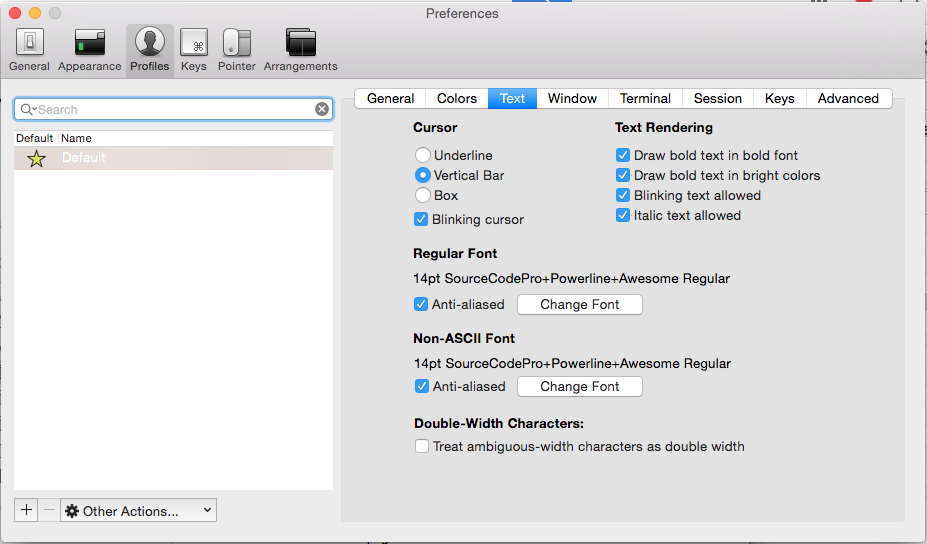
On OS X, I configured iTerm2 with the patched font, but the prompt is still broken.
A: iTerm2 preferences have 2 sections for setting the font: one for Regular Font and one for Non-ASCII Font.
The font should be set on both the sections, like showed in the following screenshot:
Help! On Linux I can't install the font!
A: You should refer to the documentation of Awesome-Terminal-Fonts. Anyway, this is how I personally setup the prompt on Ubuntu
# Copy the awesome fonts to ~/.fonts
cd /tmp
git clone http://github.com/gabrielelana/awesome-terminal-fonts
cd awesome-terminal-fonts
git checkout patching-strategy
mkdir -p ~/.fonts
cp patched/*.ttf ~/.fonts

# update the font-info cache
sudo fc-cache -fv ~/.fonts
Then, run gnome-terminal (or whatever terminal you like) and select one of the awesome-fonts
Finally, install oh-my-zsh with the one-liner (if you use Bash) or with Antigen if you love zsh, and restart the Terminal.
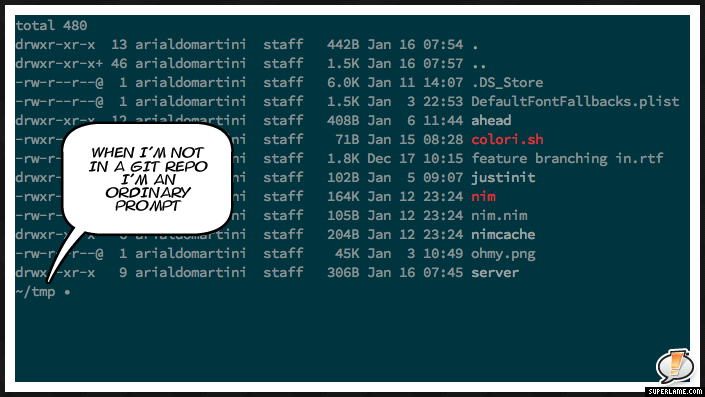
When I'm not in a git repo, I want to use my old, beloved prompt...
A: Sure! Use the variable omg_ungit_prompt. Store there your old prompt: it will be used when you are not in a git repo.
Help! I used the one-liner for OS X, but the prompt doesn't start!
A: The one-liner for OS X adds the startup command in ~/.profile, which is the startup file for generic login shells. If a ~/.bash_profile is present, this is used in place of .profile, and .profile itself is ignored. To solve your issue, use this alternative one-liner
Hey, where's my current virtualenv name? It disappeared from the prompt! Or it appears like this
A: Yes, actually the virtualenv's approach with prompts is pretty disappointing (see Virtualenv's bin/activate is Doing It Wrong): in fact, the script activate performs a
PS1="(`basename \"$VIRTUAL_ENV\"`)$PS1"
that arrogantly prepends the virtualenv name to the current PS1, leaving you no opportunity to customise the output.
You can solve this problem disabling the standard virtualenv prompt injection and using the callback function omg_prompt_callback.
Add
VIRTUAL_ENV_DISABLE_PROMPT=true
function omg_prompt_callback() {
    if [ -n "${VIRTUAL_ENV}" ]; then
        echo "\e[0;31m(`basename ${VIRTUAL_ENV}`)\e[0m "
    fi
}
to your shell startup script. It should render the prompt inside an active virtualenv like this
]
You can use the call back function to inject whatever you want at the beginning of the second line.
Known bugs and limitations
git v1.8.4 or newer is required
It works weird on brand new repositories, before the first commit
It has been tested on Mac and Ubuntu only. I never managed to make it work on Cygwin
Depending on the theme selected, you need an unicode font (like Sauce Code Pro, Menlo or Monaco on Mac OS X, or Monospace on Ubuntu; on Windows, with Cygwin, a good choice is Meslo by André Berg, but I didn't tested the ooppa-lana-style theme)
If the Terminal uses a clear background color, in Bash you need to change the colors defined in prompt.sh. The zsh version is not affected by this problem.
Does arialdomartini/oh-my-git have a project website?
No homepage URL was recorded for arialdomartini/oh-my-git in TopGit's last sync. The README tab above frequently contains screenshots and demo links, or check the repository description on GitHub.
How many stars does arialdomartini/oh-my-git have?
arialdomartini/oh-my-git has 3.7k GitHub stars — refresh the page for the live number, or check github.com/arialdomartini/oh-my-git. TopGit mirrors GitHub's count but does not claim minute-by-minute accuracy.
Is arialdomartini/oh-my-git open source?
Yes — arialdomartini/oh-my-git ships under the MIT license, which makes its source code freely readable (and, depending on license terms, forkable and reusable). Source: github.com/arialdomartini/oh-my-git.
What is arialdomartini/oh-my-git?
arialdomartini/oh-my-git (arialdomartini/oh-my-git) is a Shell project on GitHub. From the project's own README: An opinionated git prompt for bash and zsh
Where do I read more about arialdomartini/oh-my-git?
This TopGit page is a snapshot — the READ ME tab shows the project's own README content (links stripped, images preserved). The GitHub repository at github.com/arialdomartini/oh-my-git is the definitive source.
Read full README in the tab above.
Want a second opinion on oh-my-git?
Ask an AI that can read this page — one click and you get its take on oh-my-git.

 /oh-my-git





 ]