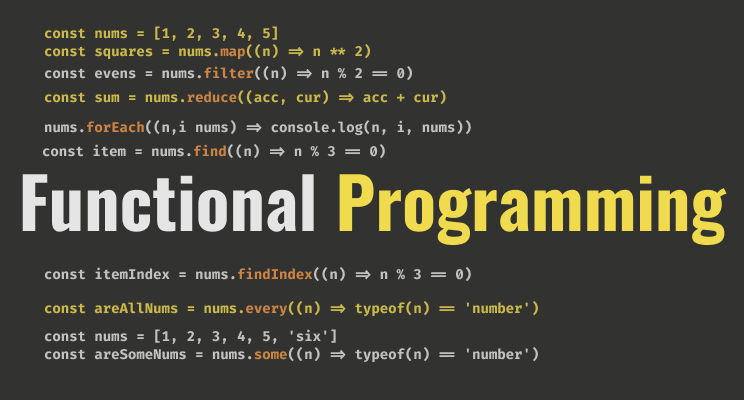
On GitHub, Asabeneh/Functional-Programming-in-JavaScript has picked up 127 stars, JavaScript. A complete summary of functional programming in JavaScript
Snapshot summary built from the project's own GitHub metadata — there's no written TopGit review yet. The page will update automatically when a full review is published.
WHY NO REVIEW YET
TopGit writes full reviews for the most-starred, most-requested repositories. This page is a snapshot until then — see the READ ME tab for the original README in full.
Support Asabeneh to create more educational materials
1. forEach
2. map
3. filter
4. reduce
5. find
6. findIndex
7. some
8. every
Exercise
More Materials
In this article, I will try to help you to have a very good understanding of the most common feature of JavaScript, functional programming.
Functional programming allows you to write shorter code, clean code, and also to solve complicated problems which might be difficult to solve in a traditional way.
For more JavaScript and other programming lessons and tutorials, you may check Washera YouTube channel.
In this article we will cover all JS functional programming methods:
forEach
map
filter
reduce
find
findIndex
some
every
1. forEach
We use forEach when we like to iterate through an array of items. The forEach is a higher-order function and it takes call-back as a parameter. The forEach method is used only with array and we use forEach if you are interested in each item or index or both.
// syntax in a normal or a function declaration

function callback(item, index, arr) {}
array.forEach(callback)

// or syntax in an arrow function
const callback = (item, i, arr) => {}
array.forEach(callback)
The call back function could be a function declaration or an arrow function.
If there is no much code inside the code block we can use an arrow function and we can write it without a curly bracket. The index and the array parameters are optional, we can omit them.
Let us see more examples. For instance if we want to sum an array of numbers we can use forEach or reduce. Let us see how we use forEach to sum all numbers in an array.
const numbers = [1, 2, 3, 4, 5]
let sum = 0
numbers.forEach((n) => sum += n)

console.log(sum) // 15
Let us move to the next functional programming method which is going to be a map.
2. map
We use the map method whenever we like to modify an array. We use the map method only with arrays and it always returns an array.
// syntax in a normal or a function declaration

function callback(item, i) {
return // code goes here
}

const modifiedArray = array.map(callback)

// or syntax in an arrow function

const callback = (item, i) => {
return // code goes here
}
const modifiedArray = array.map(callback)
Now, let us modify the countries array using the map method. The index is an optional parameter
// Using function declaration

const countries = ['Finland', 'Estonia', 'Sweden', 'Norway']

const newCountries = countries.map(function(country) {
return country.toUpperCase()
})

console.log(newCountries)

// map using an arrow function call back

const countries = ['Finland', 'Estonia', 'Sweden', 'Norway']
const newCountries = countries.map(country => country.toUpperCase())

console.log(newCountries) // ["FINLAND", "ESTONIA", "SWEDEN", "NORWAY"]
As you can see that map is very handy to modify an array and to get an array back. Now, let us create an array of the length of the countries from the countries array.
As you may understand from the literal meaning of filter, it filters out items based on some criteria. The filter method like forEach and map is used with an array and it returns an array of the filtered items.
For instance if we want to filter out countries containing a substring land from an array of countries. See the example below:
// syntax in a normal or a function declaration
function callback(item) {
  return // boolean
}

const filteredArray = array.filter(callback)

// or syntax in an arrow function

const callback = (item) => {
  return // boolean
}
const filteredArray = array.filter(callback)
Now, you know how to filter let us move on to the next functional programming, reduce.
4. reduce
Like forEach, map, and filter, reduce is also used with an array and it returns a single value. You can associate reduce with a blender. You put different fruits to a blend and you get a mix of fruit juice. The juice is the output from the reduction process.
We use the reduce method to sum all numbers in an array together, or to multiply items in an array or to concatenate items in an array. Let us see the following different example to make this explanation more clear.
// syntax in a normal or a function declaration

function callback(acc, cur) {
    return // code goes here
}

const reduced = array.reduce(callback, optionalInitialValue)

// or syntax in an arrow function

const reduced =  callback(acc, cur) => {
    return // code goes here
}
const reduced = array.reduce(callback)
The default initial value is 0. We can change the initial value if we want to change it.
For instance if we want to add all items in an array and if all the items are numbers we can use reduce.
If we are interested in the first occurrence of a certain item or element in an array we can use find method. Unlike map and filter, find just return the first occurrence of an item instead of an array.
// syntax in a normal or a function declaration

function callback(item) {
return // code goes here
}

const item = array.find(callback)

// or syntax in an arrow function

const reduced =  callback(item) => {
return // code goes here
}
const item = array.find(callback)
Let find the first even number and the first odd number in the numbers array.
Let us find the first country which has only six characters
const countries = ['Finland', 'Estonia', 'Sweden', 'Norway', 'Iceland']
const sixCharsCountry = countries.find((country) => country.length === 6)
console.log(sixCharsCountry) // Sweden
Let us find the first country in the array which has the letter 'o'
const countries = ['Finland', 'Estonia', 'Sweden', 'Norway', 'Iceland']
const index = countries.find((country) => country.includes('o'))
console.log(index // Estonia
6. findIndex
The findIndex method works like find but findIndex returns the index of the item. If we are interested in the index of a certain item or element in an array we can use findIndex. The findIndex return the index of the first occurrence of an item.
// syntax in a normal or a function declaration

function callback(item) {
return // code goes here
}

const index = array.findIndex(callback)

// or syntax in an arrow function

const reduced =  callback(item) => {
return // code goes here
}
const index = array.findIndex(callback)
Let us find the index of the first even number and the index of the first odd number in the numbers array.
Let us find the index of the first country in the array which has exactly six characters
const countries = ['Finland', 'Estonia', 'Sweden', 'Norway', 'Iceland']
const index = countries.findIndex((country) => country.length === 6)
console.log(index //2
Let us find the index of the first country in the array which has the letter 'o'.
const countries = ['Finland', 'Estonia', 'Sweden', 'Norway', 'Iceland']
const index = countries.findIndex((country) => country.includes('o'))
console.log(index // 1
Let us move on to the next functional programming, some.
7. some
The some method is used with array and return a boolean. If one or some of the items satisfy the criteria the result will be true else it will be false. Let us see it with an example.
In the following array some numbers are even and some are odd, so if I ask you a question, are there even numbers in the array then your answer will be yes. If I ask you also another question, are there odd numbers in the array then your answer will be yes. On the contrary, if I ask you, are all the numbers even or odd then your answer will be no because all the numbers are not even or odd.
The price of banana is 3 euros.
The price of mango is 6 euros.
The price of potato is unknown.
The price of avocado is 8 euros.
The price of coffee is 10 euros.
The price of tea is unknown.
Calculate the sum of all the prices using forEach
Create an array of prices using map and store it in a variable prices
Filter products with prices
Use method chaining to get the sum of the prices(map, filter, reduce)
Calculate the sum of all the prices using reduce only
Find the first product which doesn't have a price value
Find the index of the first product which does not have price value
Check if some products do not have a price value
Check if all the products have price value
Explain the difference between forEach, map, filter and reduce
Explain the difference between filter, find and findIndex
Explain the difference between some and every
More Materials
If you want to dive deep into JavaScript, you can give it a try to the 30DaysOfJavaScript challenge. This challenge will take quite long time to finish but you can get all you need about JavaScript
JavaScript
30DaysJavaScript challenge
JavaScript for Everyone
JavaScript Loops
Destructuring in JavaScript
React
React for Everyone
Python
30DaysOfPython
🎉 CONGRATULATIONS 🎉
Now, you know everything you need to know about JavaScript functional programming methods.
Does Asabeneh/Functional-Programming-in-JavaScript have a project website?
No homepage URL was recorded for Asabeneh/Functional-Programming-in-JavaScript in TopGit's last sync. The README tab above frequently contains screenshots and demo links, or check the repository description on GitHub.
Does Asabeneh/Functional-Programming-in-JavaScript have any tags?
TopGit's last sync did not record any GitHub topics for Asabeneh/Functional-Programming-in-JavaScript. GitHub topics appear in the right sidebar of a repository page; that's the authoritative place to check.
How active is development on Asabeneh/Functional-Programming-in-JavaScript?
The most recent commit recorded on Asabeneh/Functional-Programming-in-JavaScript was 3.1 years ago, based on the GitHub push timestamp. The repository has 27 forks — one of the better signals of community interest.
How many stars does Asabeneh/Functional-Programming-in-JavaScript have?
Asabeneh/Functional-Programming-in-JavaScript has 127 GitHub stars — refresh the page for the live number, or check github.com/Asabeneh/Functional-Programming-in-JavaScript. TopGit mirrors GitHub's count but does not claim minute-by-minute accuracy.
Is Asabeneh/Functional-Programming-in-JavaScript open source?
TopGit's metadata for Asabeneh/Functional-Programming-in-JavaScript does not record a license. Most public repositories on GitHub ARE open source, but the exact terms vary — verify by opening the LICENSE file directly.
Where do I read more about Asabeneh/Functional-Programming-in-JavaScript?
This TopGit page is a snapshot — the READ ME tab shows the project's own README content (links stripped, images preserved). The GitHub repository at github.com/Asabeneh/Functional-Programming-in-JavaScript is the definitive source.
Read full README in the tab above.
Still deciding about Functional-Programming-in-JavaScript?
One click hands the question to an AI along with this page — see what it says about Functional-Programming-in-JavaScript.
 /Functional-Programming-in-JavaScript