Snapshot of babysor/TTS: 6★, Python. 🐸💬 - a deep learning toolkit for Text-to-Speech, battle-tested in research and production
Snapshot summary built from the project's own GitHub metadata — there's no written TopGit review yet. The page will update automatically when a full review is published.
WHY NO REVIEW YET
TopGit writes full reviews for the most-starred, most-requested repositories. This page is a snapshot until then — see the READ ME tab for the original README in full.
📣 Clone your voice with a single click on 🐸Coqui.ai
📣 🐸Coqui Studio is launching soon!! Join our waiting list!!
🐸TTS is a library for advanced Text-to-Speech generation. It's built on the latest research, was designed to achieve the best trade-off among ease-of-training, speed and quality.
🐸TTS comes with pretrained models, tools for measuring dataset quality and already used in 20+ languages for products and research projects.
📰 Subscribe to 🐸Coqui.ai Newsletter
📢 English Voice Samples and SoundCloud playlist
📄 Text-to-Speech paper collection
💬 Where to ask questions
Please use our dedicated channels for questions and discussion. Help is much more valuable if it's shared publicly so that more people can benefit from it.
Type
Platforms
🚨 Bug Reports
GitHub Issue Tracker
🎁 Feature Requests & Ideas
GitHub Issue Tracker
👩💻 Usage Questions
GitHub Discussions
🗯 General Discussion
GitHub Discussions or Discord
🔗 Links and Resources
Type
Links
💼 Documentation
ReadTheDocs
💾 Installation
TTS/README.md
👩💻 Contributing
CONTRIBUTING.md
📌 Road Map
Main Development Plans
🚀 Released Models
TTS Releases and Experimental Models
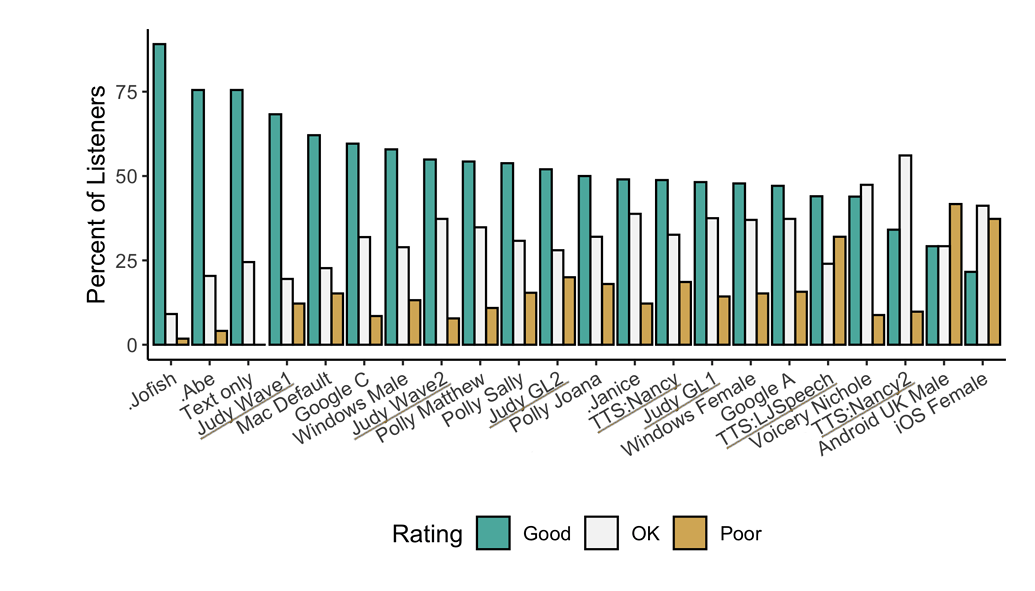
🥇 TTS Performance
Underlined "TTS*" and "Judy*" are 🐸TTS models
Features
High-performance Deep Learning models for Text2Speech tasks.
If you are on Ubuntu (Debian), you can also run following commands for installation.
$ make system-deps  # intended to be used on Ubuntu (Debian). Let us know if you have a different OS.
$ make install
If you are on Windows, 👑@GuyPaddock wrote installation instructions here.
Docker Image
You can also try TTS without install with the docker image.
Simply run the following command and you will be able to run TTS without installing it.
docker run --rm -it -p 5002:5002 --entrypoint /bin/bash ghcr.io/coqui-ai/tts-cpu
python3 TTS/server/server.py --list_models #To get the list of available models
python3 TTS/server/server.py --model_name tts_models/en/vctk/vits # To start a server
You can then enjoy the TTS server here
More details about the docker images (like GPU support) can be found here
Synthesizing speech by 🐸TTS
🐍 Python API
from TTS.api import TTS

# Running a multi-speaker and multi-lingual model

# List available 🐸TTS models and choose the first one
model_name = TTS.list_models()[0]
# Init TTS
tts = TTS(model_name)
# Run TTS
# ❗ Since this model is multi-speaker and multi-lingual, we must set the target speaker and the language
# Text to speech with a numpy output
wav = tts.tts("This is a test! This is also a test!!", speaker=tts.speakers[0], language=tts.languages[0])
# Text to speech to a file
tts.tts_to_file(text="Hello world!", speaker=tts.speakers[0], language=tts.languages[0], file_path="output.wav")

# Running a single speaker model

# Init TTS with the target model name
tts = TTS(model_name="tts_models/de/thorsten/tacotron2-DDC", progress_bar=False, gpu=False)
# Run TTS
tts.tts_to_file(text="Ich bin eine Testnachricht.", file_path=OUTPUT_PATH)
Command line tts
Single Speaker Models
List provided models:
$ tts --list_models
Get model info (for both tts_models and vocoder_models):
Query by type/name:
The model_info_by_name uses the name as it from the --list_models.
The most recent commit recorded on babysor/TTS was 3.8 years ago, based on the GitHub push timestamp. The repository has 0 forks — one of the better signals of community interest.
How many stars does babysor/TTS have?
babysor/TTS has 6 GitHub stars — refresh the page for the live number, or check github.com/babysor/TTS. TopGit mirrors GitHub's count but does not claim minute-by-minute accuracy.
Is babysor/TTS open source?
Yes — babysor/TTS ships under the MPL-2.0 license, which makes its source code freely readable (and, depending on license terms, forkable and reusable). Source: github.com/babysor/TTS.
What is babysor/TTS?
babysor/TTS (babysor/TTS) is a Python project on GitHub. From the project's own README: 🐸💬 - a deep learning toolkit for Text-to-Speech, battle-tested in research and production
Where do I read more about babysor/TTS?
This TopGit page is a snapshot — the READ ME tab shows the project's own README content (links stripped, images preserved). The GitHub repository at github.com/babysor/TTS is the definitive source.
Read full README in the tab above.
Still deciding about TTS?
One click hands the question to an AI along with this page — see what it says about TTS.
 /TTS
/TTS