5.4k GitHub stars and counting — benjamine/jsondiffpatch is a TypeScript project TopGit is tracking across repositories on the platform. Diff & patch JavaScript objects
Snapshot summary built from the project's own GitHub metadata — there's no written TopGit review yet. The page will update automatically when a full review is published.
WHY NO REVIEW YET
TopGit writes full reviews for the most-starred, most-requested repositories. This page is a snapshot until then — see the READ ME tab for the original README in full.
smart array diffing using LCS, IMPORTANT NOTE: to match objects inside an array you must provide an objectHash function (this is how objects are matched, otherwise a dumb match by position is used). For more details, check Array diff documentation
(optionally) text diffing of long strings powered by google-diff-match-patch (diff at character level)
reverse a delta, unpatch (eg. revert object to its original state using a delta)
multiple output formats:
pure JSON, low footprint delta format
visualdiff (html), see demo
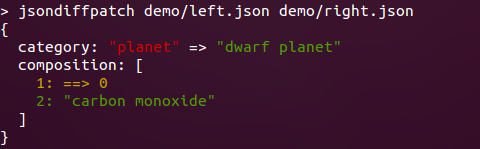
annotated JSON (html), to help explain the delta format with annotations
JSON Patch (RFC 6902), can generate patches, and also apply them
// sample data
const country = {
  name: 'Argentina',
  capital: 'Buenos Aires',
  independence: new Date(1816, 6, 9),
};

// clone country, using dateReviver for Date objects
const country2 = JSON.parse(JSON.stringify(country), jsondiffpatch.dateReviver);

// make some changes
country2.name = 'Republica Argentina';
country2.population = 41324992;
delete country2.capital;

const delta = jsondiffpatch.diff(country, country2);

assertSame(delta, {
  name: ['Argentina', 'Republica Argentina'], // old value, new value
  population: ['41324992'], // new value
  capital: ['Buenos Aires', 0, 0], // deleted
});

// patch original
jsondiffpatch.patch(country, delta);

// reverse diff
const reverseDelta = jsondiffpatch.reverse(delta);
// also country2 can be return to original value with: jsondiffpatch.unpatch(country2, delta);

const delta2 = jsondiffpatch.diff(country, country2);
assert(delta2 === undefined);
// undefined => no difference
Array diffing:
// sample data
const country = {
  name: 'Argentina',
  cities: [
    {
      name: 'Buenos Aires',
      population: 13028000,
    },
    {
      name: 'Cordoba',
      population: 1430023,
    },
    {
      name: 'Rosario',
      population: 1136286,
    },
    {
      name: 'Mendoza',
      population: 901126,
    },
    {
      name: 'San Miguel de Tucuman',
      population: 800000,
    },
  ],
};

// clone country
const country2 = JSON.parse(JSON.stringify(country));

// delete Cordoba
country.cities.splice(1, 1);

// add La Plata
country.cities.splice(4, 0, {
  name: 'La Plata',
});

// modify Rosario, and move it
const rosario = country.cities.splice(1, 1)[0];
rosario.population += 1234;
country.cities.push(rosario);

// create a configured instance, match objects by name
const diffpatcher = jsondiffpatch.create({
  objectHash: function (obj) {
    return obj.name;
  },
});

const delta = diffpatcher.diff(country, country2);

assertSame(delta, {
  cities: {
    _t: 'a', // indicates this node is an array (not an object)
    1: [
      // inserted at index 1
      {
        name: 'Cordoba',
        population: 1430023,
      },
    ],
    2: {
      // population modified at index 2 (Rosario)
      population: [1137520, 1136286],
    },
    _3: [
      // removed from index 3
      {
        name: 'La Plata',
      },
      0,
      0,
    ],
    _4: [
      // move from index 4 to index 2
      '',
      2,
      3,
    ],
  },
});
For more example cases (nested objects or arrays, long text diffs) check packages/jsondiffpatch/test/examples/
If you want to understand deltas, see delta format documentation
Installing
NPM
This works for node, or in browsers if you already do bundling on your app
npm install jsondiffpatch
import {* as jsondiffpatch} from 'jsondiffpatch';
const jsondiffpatchInstance = jsondiffpatch.create(options);
browser
In a browser, you can load a bundle using a tool like esm.sh or Skypack.
Options
import * as jsondiffpatch from 'jsondiffpatch';

// Only import if you want text diffs using diff-match-patch
import { diff_match_patch } from '@dmsnell/diff-match-patch';

const jsondiffpatchInstance = jsondiffpatch.create({
  // used to match objects when diffing arrays, by default only === operator is used
  objectHash: function (obj) {
    // this function is used only to when objects are not equal by ref
    return obj._id || obj.id;
  },
  arrays: {
    // default true, detect items moved inside the array (otherwise they will be registered as remove+add)
    detectMove: true,
    // default false, the value of items moved is not included in deltas
    includeValueOnMove: false,
  },
  textDiff: {
    // If using text diffs, it's required to pass in the diff-match-patch library in through this proprty.
    // Alternatively, you can import jsondiffpatch using `jsondiffpatch/with-text-diffs` to avoid having to pass in diff-match-patch through the options.
    diffMatchPatch: diff_match_patch,
    // default 60, minimum string length (left and right sides) to use text diff algorithm: google-diff-match-patch
    minLength: 60,
  },
  propertyFilter: function (name, context) {
    /*
       this optional function can be specified to ignore object properties (eg. volatile data)
        name: property name, present in either context.left or context.right objects
        context: the diff context (has context.left and context.right objects)
      */
    return name.slice(0, 1) !== '$';
  },
  cloneDiffValues: false /* default false. if true, values in the obtained delta will be cloned
      (using jsondiffpatch.clone by default), to ensure delta keeps no references to left or right objects. this becomes useful if you're diffing and patching the same objects multiple times without serializing deltas.
      instead of true, a function can be specified here to provide a custom clone(value).
      */
  omitRemovedValues: false /* if you don't need to unpatch (reverse deltas),
      "old"/"left" values (removed or replaced) are not included in the delta.
      you can set this to true to get more compact deltas.
      */,
});
diff(), patch() and reverse() functions are implemented using Pipes & Filters pattern, making it extremely customizable by adding or replacing filters on a pipe.
Check Plugins documentation for details.
Related Projects
jsondiffpatch.net (C#)
SystemTextJson.JsonDiffPatch
(C#)
Go JSON Diff (and Patch)
json-diff-patch (python)
jsondiffpatch-react, also check docs for usage in react
How active is development on benjamine/jsondiffpatch?
The most recent commit recorded on benjamine/jsondiffpatch was 13 days ago, based on the GitHub push timestamp. The repository has 497 forks — one of the better signals of community interest.
How many stars does benjamine/jsondiffpatch have?
benjamine/jsondiffpatch has 5.4k GitHub stars — refresh the page for the live number, or check github.com/benjamine/jsondiffpatch. TopGit mirrors GitHub's count but does not claim minute-by-minute accuracy.
Is benjamine/jsondiffpatch open source?
Yes — benjamine/jsondiffpatch ships under the MIT license, which makes its source code freely readable (and, depending on license terms, forkable and reusable). Source: github.com/benjamine/jsondiffpatch.
What topics is benjamine/jsondiffpatch associated with?
GitHub's repository topics for benjamine/jsondiffpatch: "delta", "diff", "diffing", "json", "jsondiffpatch", "patch", "text-diff". TopGit's editorial category is open-source.
Where can I see benjamine/jsondiffpatch in action?
The project maintains a homepage at https://jsondiffpatch.com. The README tab on this page also usually contains screenshots and a quickstart.
Where do I read more about benjamine/jsondiffpatch?
This TopGit page is a snapshot — the READ ME tab shows the project's own README content (links stripped, images preserved). The GitHub repository at github.com/benjamine/jsondiffpatch is the definitive source.
Read full README in the tab above.
Is jsondiffpatch worth your time?
ChatGPT, Claude and Perplexity can all read this page. Ask one of them what it makes of jsondiffpatch.

 /jsondiffpatch