As an open-source project, BurntSushi/erd has picked up 1.9k stars on GitHub (Haskell). Translates a plain text description of a relational database schema to a graphical entity-relationship diagram.
Snapshot summary built from the project's own GitHub metadata — there's no written TopGit review yet. The page will update automatically when a full review is published.
WHY NO REVIEW YET
TopGit writes full reviews for the most-starred, most-requested repositories. This page is a snapshot until then — see the READ ME tab for the original README in full.
This utility takes a plain text description of entities, their attributes and
the relationships between entities and produces a visual diagram modeling the
description. The visualization is produced by using Dot with GraphViz. There
are limited options for specifying color and font information. Also, erd can
output graphs in a variety of formats, including but not limited to: pdf, svg,
eps, png, jpg, plain text and dot.
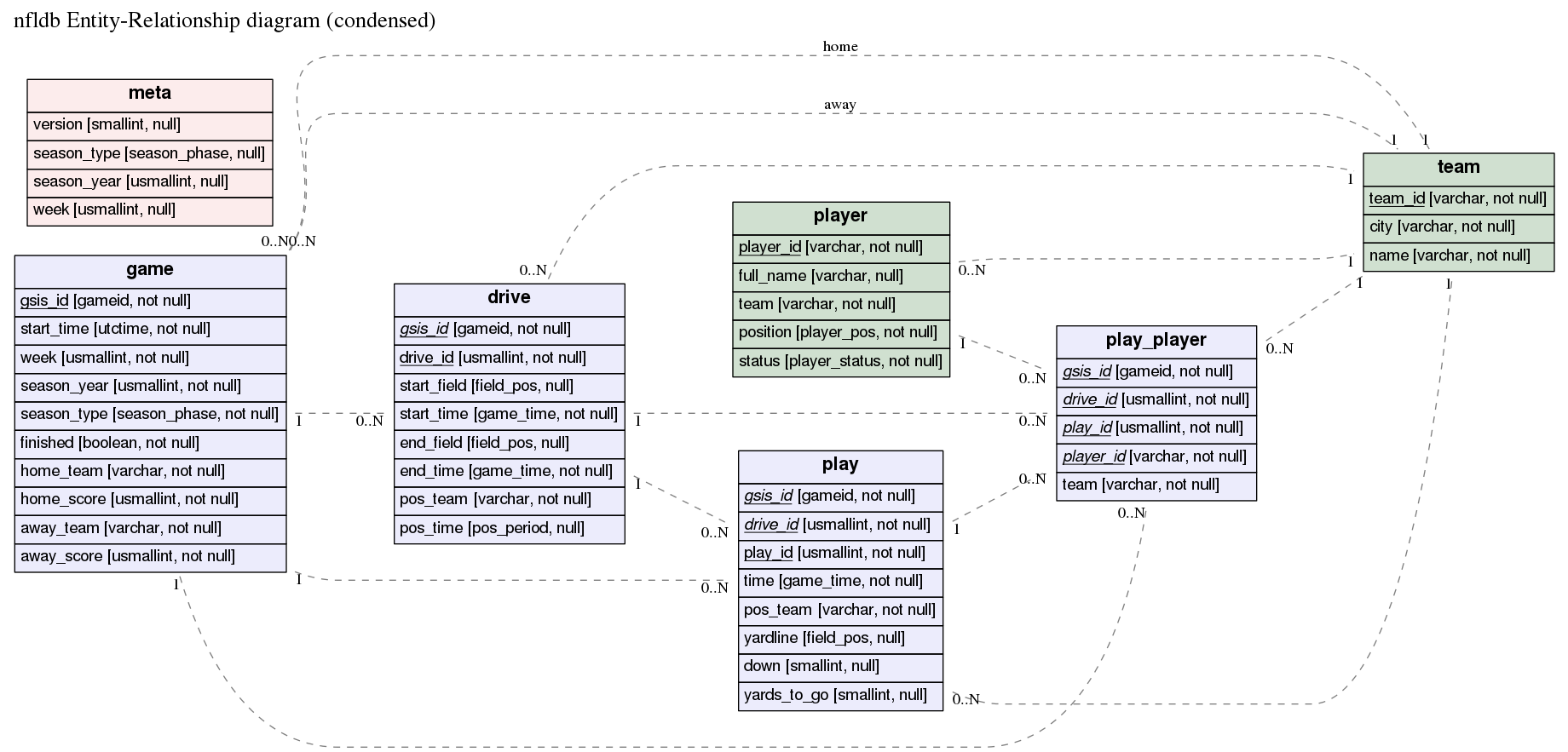
Here's an example of the output produced by erd (click on it for a larger PNG
version):
The corresponding er file is in the examples
directory.
Installation
erd requires GraphViz, and one of:
Stack
Haskell toolchain
All of these are available for Windows, Mac and Linux.
MacPorts
erd is available in MacPorts as a one-shot install (GraphViz will be set up correctly for you):
port install erd
Docker
docker run -i ghcr.io/burntsushi/erd:latest < examples/nfldb.er >| out.pdf
All available tags.
Local Docker build
An example command to use erd in a docker container, once this repository is successfully cloned.
erdtag="0.2.1.0"; cd erd && docker build -t erd:$erdtag . && docker run -it erd:$erdtag "--help"
Where:
you shall specify your erdtag, that will help identifying the docker image to be created;
instead of using --help invoke erd the way you need to i.e.:
docker run -i erd:$erdtag "--dot-entity" < examples/nfldb.er > out.pdf
Stack
Install the Stack build tool,
and build from source:
git clone git://github.com/BurntSushi/erd
cd erd
stack install
stack install will put the binary into Stack's standard binary
installation path. Unless you've overridden it, that's ~/.local/bin
on Unix and OS X, %APPDATA%\local\bin on Windows.
Haskell Platform
NB OSX users: for text formatting of keys (bold and italics) you may need to reinstall graphviz with pango support:
# OSX only
brew install graphviz
The issue 1636 explains what needs to be performed in details to find out whether pango support is enabled and how to make it happen in case it wasn't.
erd is on hackage, so you can install
it with cabal (which is included with the Haskell platform):
cabal new-install erd
Alternatively, you can clone this repository and build from source:
git clone git://github.com/BurntSushi/erd
cd erd
cabal new-configure
cabal new-build
# binary is now under ./dist-newstyle/build/
Usage information is available with erd --help.
Building statically linked executable
In case one wishes to have a statically linked erd as a result, this is
possible to have by executing build-static_by-nix.sh: which requires the
nix package manager to be installed on the building
machine. NixOS itself is not a requirement.
Quick example
Before describing the ER file, let's try making an ER diagram from a small
example:
$ curl 'https://raw.githubusercontent.com/BurntSushi/erd/master/examples/simple.er' > simple.er
$ cat simple.er
# Entities are declared in '[' ... ']'. All attributes after the entity header
# up until the end of the file (or the next entity declaration) correspond
# to this entity.
[Person]
*name
height
weight
`birth date`
+birth_place_id

[`Birth Place`]
*id
`birth city`
'birth state'
"birth country"

# Each relationship must be between exactly two entities, which need not
# be distinct. Each entity in the relationship has exactly one of four
# possible cardinalities:
#
# Cardinality    Syntax
# 0 or 1         ?
# exactly 1      1
# 0 or more      *
# 1 or more      +
Person *--1 `Birth Place`
$ erd -i simple.er -o simple.pdf
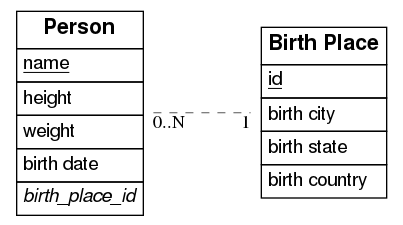
The PDF should now contain a graph that looks like this:
Available command-line options
Short
Long
Description
-c[FILE]
--config[=FILE]
Configuration file.
-i FILE
--input=FILE
When set, input will be read from the given file. Otherwise, stdin will be used.
-o FILE
--output=FILE
When set, output will be written to the given file. Otherwise, stdout will be used. If given and if --fmt is omitted, then the format will be guessed from the file extension.
-f FMT
--fmt=FMT
Force the output format to one of: bmp, dot, eps, gif, jpg, pdf, plain, png, ps, ps2, svg, tiff.
-e EDGE
--edge=EDGE
Select one type of edge: compound, noedge, ortho, poly, spline.
-d
--dot-entity
When set, output will consist of regular dot tables instead of HTML tables. Formatting will be disabled.
-p PATTERN
--edge-pattern=PATTERN
Select one of the edge patterns: dashed, dotted, solid.
-n NOTATION
--notation=NOTATION
Select a notation style for cardinalities of relations: ie, uml.
-h
--help
Show this usage message.
Formatting defined in configuration file
erd may be invoked using the -c or --config argument
without a provided configuration file it will try to read the file
~/.erd.yaml which is the path of the configuration file to store formatting
settings of any resulted graph. In case the file ~/.erd.yaml does not exists
erd will print the default content of this file to stdout which you can
inspect and/or redirect appropriately, e.g.: erd -c -i ./examples/nfldb.er -o ./nfldb.pdf 1 > ~/.erd.yaml .
with a provided configuration file erd will use that instead of ~/.erd.yaml.
For instance: erd -c./myconfig.yaml -i ./examples/nfldb.er -o ./nfldb.pdf
.
The configuration file in commented sections do contain the supported formatting
options, so you can use one of the listed ones.
The default content of the configuration file would be only shown when
~/.erd.yaml does not exist.
The er file format
The er format allows one to describe a relational schema in terms of its
entities (tables), attributes (columns) and relationships between entities (0
or 1, exactly 1, 0 or more and 1 or more).
Entities are declared inside [ and ]. For example, this declares the entity
Person with no attributes:
[Person]
Attributes for an entity are then listed after its corresponding entity's
declaration. Each attribute should be on its own line. The following adds the
name and height attributes to the Person entity:
[Person]
name
height
Entity names and attributes may contain spaces and mostly any character,
except ASCII control characters like carriage return and line feed,
if quoted with backticks, simple quotes or double quotes:
Any number of attributes may be declared as a primary key for its entity by
prefixing the attribute with a *. Similarly, an attribute may be declared
as a foreign key by prefixing the attribute with a +:
[Person]
*name
+birth_place_id
An attribute may be both a primary key and a foreign key by prefixing the
name with a * and a + in any order. Note that primary keys are underlined
while foreign keys are italicized.
Relationships can also be declared anywhere in an ER file. Every relationship
includes exactly two entities (the two entities may be the same, for
self-relationships). Each entity in a relationship must have exactly one of
four cardinalities:
Cardinality    Syntax
0 or 1         ?
exactly 1      1
0 or more      *
1 or more      +
So for example, the following defines a relationship between Person and
Birth Place that reads "every person has exactly one birth place":
Person *--1 `Birth Place`
And here's another example that can be read as, "every platinum album has one
or more artists, but not every artist has a platinum album":
Artist +--? PlatinumAlbums
Fonts, colors, labels, ...
The er format also has limited support for customizing the appearance of your
ER diagram. For example, the following will show the entity with a background
color of #ececfc and a font size of 20:
[Person] {bgcolor: "#ececfc", size: "20"}
name
height
weight
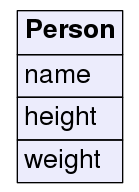
Which looks like:
Alternatively, you can specify the background color of every entity with a
special directive at the top of the file:
entity {bgcolor: "#ececfc", size: "20"}

[Person]
name
height
weight

[`Birth Place`]
place
There are three other directives: title, header and relationship. The
title directive allows one to specify a title for the graph and provide
options for formatting it. The header directive allows one to customize the
formatting of every entity header. And similarly for relationship. Note that
global options are overwritten by local options.
Note that directives must come before anything else in an ER file.
Here's an example depicting the first schema shown at the top of this README
(note that this is auto-generated by
nfldb-write-erd):
title {label: "nfldb Entity-Relationship diagram (condensed)", size: "20"}

# Entities

[player] {bgcolor: "#d0e0d0"}
  *player_id {label: "varchar, not null"}
  full_name {label: "varchar, null"}
  team {label: "varchar, not null"}
  position {label: "player_pos, not null"}
  status {label: "player_status, not null"}

[team] {bgcolor: "#d0e0d0"}
  *team_id {label: "varchar, not null"}
  city {label: "varchar, not null"}
  name {label: "varchar, not null"}

[game] {bgcolor: "#ececfc"}
  *gsis_id {label: "gameid, not null"}
  start_time {label: "utctime, not null"}
  week {label: "usmallint, not null"}
  season_year {label: "usmallint, not null"}
  season_type {label: "season_phase, not null"}
  finished {label: "boolean, not null"}
  home_team {label: "varchar, not null"}
  home_score {label: "usmallint, not null"}
  away_team {label: "varchar, not null"}
  away_score {label: "usmallint, not null"}

[drive] {bgcolor: "#ececfc"}
  *+gsis_id {label: "gameid, not null"}
  *drive_id {label: "usmallint, not null"}
  start_field {label: "field_pos, null"}
  start_time {label: "game_time, not null"}
  end_field {label: "field_pos, null"}
  end_time {label: "game_time, not null"}
  pos_team {label: "varchar, not null"}
  pos_time {label: "pos_period, null"}

[play] {bgcolor: "#ececfc"}
  *+gsis_id {label: "gameid, not null"}
  *+drive_id {label: "usmallint, not null"}
  *play_id {label: "usmallint, not null"}
  time {label: "game_time, not null"}
  pos_team {label: "varchar, not null"}
  yardline {label: "field_pos, null"}
  down {label: "smallint, null"}
  yards_to_go {label: "smallint, null"}

[play_player] {bgcolor: "#ececfc"}
  *+gsis_id {label: "gameid, not null"}
  *+drive_id {label: "usmallint, not null"}
  *+play_id {label: "usmallint, not null"}
  *+player_id {label: "varchar, not null"}
  team {label: "varchar, not null"}

[meta] {bgcolor: "#fcecec"}
  version {label: "smallint, null"}
  season_type {label: "season_phase, null"}
  season_year {label: "usmallint, null"}
  week {label: "usmallint, null"}

# Relationships

player      *--1 team
game        *--1 team {label: "home"}
game        *--1 team {label: "away"}
drive       *--1 team
play        *--1 team
play_player *--1 team

game        1--* drive
game        1--* play
game        1--* play_player

drive       1--* play
drive       1--* play_player

play        1--* play_player

player      1--* play_player
All formatting options
erd only exposes a subset of formatting options made available by GraphViz.
I'm not entirely opposed to expanding this list if there's a compelling reason
to do so, but I'd prefer to keep it small and simple.
Note that not all options are applicable on all items. For example, a title
cannot have a background color (it will just be ignored by GraphViz).
Colors can be specified in hexadecimal notation prefixed with a #, e.g.,
#3366ff or they may be written as their English
names.
label A plain text string used to label the item. For entity names and
attributes, a label is shown next to the name in square brackets. For
relationships, a label is drawn near the center of the edge. For the special
title directive, the label corresponds to the graph title.
color Specifies the font color. Valid everywhere.
bgcolor Specifies the background color. Only valid for entities and
attributes.
size Specifies the font size. Valid everywhere.
font Specifies the font. Valid everywhere. See this for information about fonts in GraphViz. TL;DR: Stick with one of the following:
Times-Roman, Helvetica or Courier.
border-color Border color. Only works for entities or attributes.
border Border size in pixels. Only works for entities and attributes.
Formatting options are always specified as key-value pairs in curly braces,
where the opening curly brace starts on the same line as the
entity/attribute/relationship/directive. The option name precedes a colon and
the option value comes after the colon in double quotes (even for integer
values). The value is then preceded by either a comma or an ending curly brace.
Also note that trailing commas are allowed and that options may be specified
over more than one line. For example, the following is a valid er file:
[Person]
  name {
    label: "string",
    color: "#3366ff", # i like bright blue
  }
  weight {
    label: "int",}
Philosophy
I don't intend for erd to have a large feature set with a lot of options for
customizing the appearance of ER diagrams. erd should produce diagrams that
are "good enough" from simple plain text descriptions without a lot of
complexity. erd will implicitly trust GraphViz to "do the right thing"
without a lot of fiddling with its options.
If you have more exotic needs, then I suggest that either erd is not the
right tool, or you could use erd to output an er file as a dot file.
You can then customize it further manually or using some other tool.
You can output a dot file using the --fmt option or by simply using it as
a file extension:
erd -i something.er -o something.dot
Similar software
The format of the er file is inspired by the file format used by the project
erwiz (which looks abandoned). The er
format is a bit more lightweight, but its general structure is similar.
Similar software that translates a plain text description of a relational
schema to a graphical visualization (the list may be incomplete and some of
the listed projects are no longer maintained):
No homepage URL was recorded for BurntSushi/erd in TopGit's last sync. The README tab above frequently contains screenshots and demo links, or check the repository description on GitHub.
Does BurntSushi/erd have any tags?
TopGit's last sync did not record any GitHub topics for BurntSushi/erd. GitHub topics appear in the right sidebar of a repository page; that's the authoritative place to check.
How active is development on BurntSushi/erd?
The most recent commit recorded on BurntSushi/erd was 2.1 years ago, based on the GitHub push timestamp. The repository has 153 forks — one of the better signals of community interest.
How many stars does BurntSushi/erd have?
BurntSushi/erd has 1.9k GitHub stars — refresh the page for the live number, or check github.com/BurntSushi/erd. TopGit mirrors GitHub's count but does not claim minute-by-minute accuracy.
What language is BurntSushi/erd written in?
BurntSushi/erd is written primarily in Haskell. GitHub's language field is based on the largest share of bytes in the default branch.
What license does BurntSushi/erd use?
BurntSushi/erd is released under the Unlicense license. Always verify the LICENSE file directly on GitHub for the authoritative terms — license strings can be edited out of sync with a project's actual stance.
Where do I read more about BurntSushi/erd?
This TopGit page is a snapshot — the READ ME tab shows the project's own README content (links stripped, images preserved). The GitHub repository at github.com/BurntSushi/erd is the definitive source.
Read full README in the tab above.
Is erd worth your time?
ChatGPT, Claude and Perplexity can all read this page. Ask one of them what it makes of erd.
 /erd
/erd