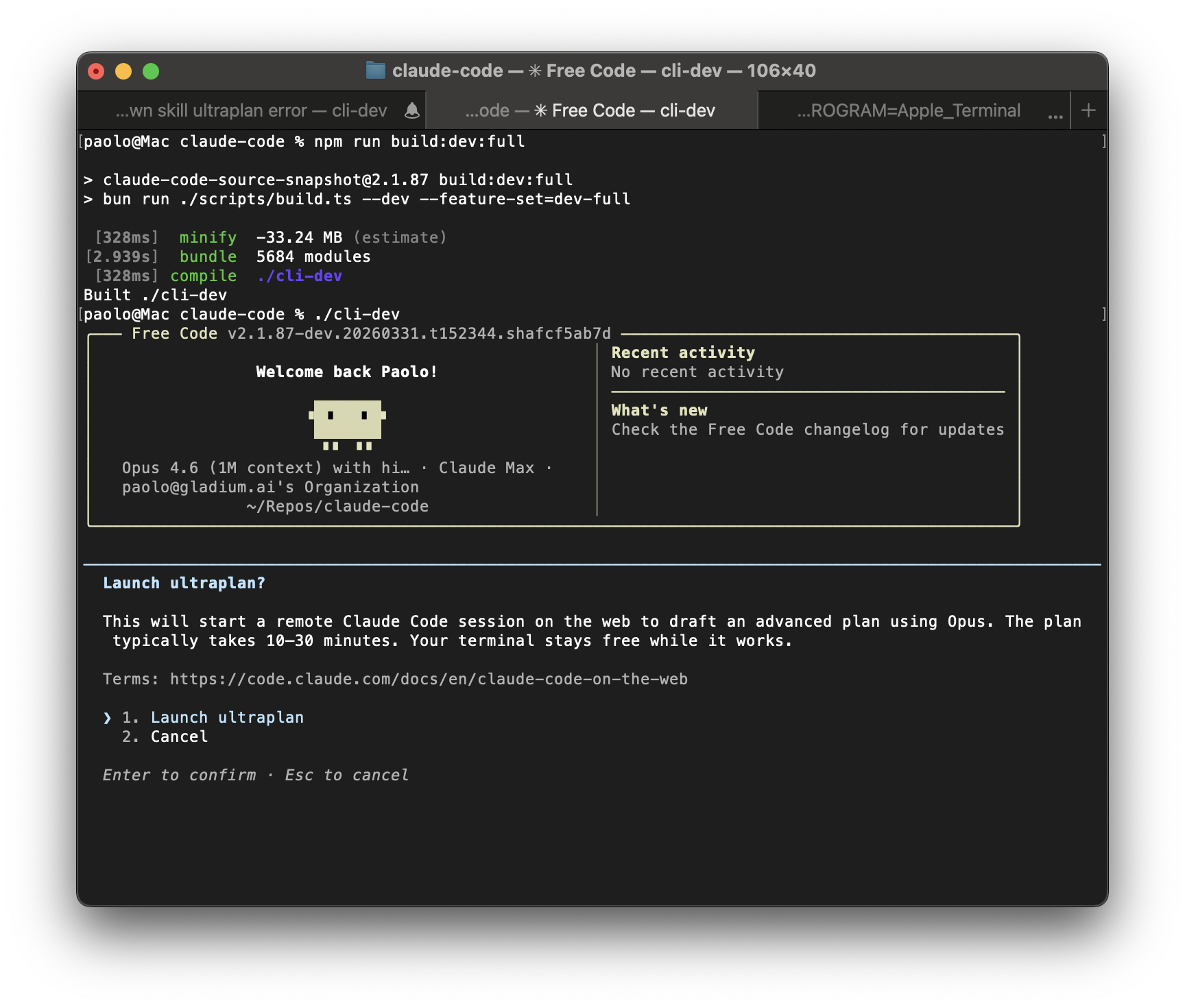
An open-source entry in TopGit's GitHub warehouse: code-yeongyu/free-code, 35 stars. The free build of Claude Code. All telemetry removed, security-prompt guardrails stripped, all experimental features enabled.
Snapshot summary built from the project's own GitHub metadata — there's no written TopGit review yet. The page will update automatically when a full review is published.
WHY NO REVIEW YET
TopGit writes full reviews for the most-starred, most-requested repositories. This page is a snapshot until then — see the READ ME tab for the original README in full.
Checks your system, installs Bun if needed, clones, builds with all features enabled, and puts free-code on your PATH. Then just export ANTHROPIC_API_KEY="sk-ant-..." and run free-code.
What is this
This is a clean, buildable fork of Anthropic's Claude Code CLI -- the terminal-native AI coding agent. The upstream source became publicly available on March 31, 2026 through a source map exposure in the npm distribution.
This fork applies three categories of changes on top of that snapshot:
1. Telemetry removed
The upstream binary phones home through OpenTelemetry/gRPC, GrowthBook analytics, Sentry error reporting, and custom event logging. In this build:
All outbound telemetry endpoints are dead-code-eliminated or stubbed
GrowthBook feature flag evaluation still works locally (needed for runtime feature gates) but does not report back
No crash reports, no usage analytics, no session fingerprinting
2. Security-prompt guardrails removed
Anthropic injects system-level instructions into every conversation that constrain Claude's behavior beyond what the model itself enforces. These include:
Hardcoded refusal patterns for certain categories of prompts
Injected "cyber risk" instruction blocks
Managed-settings security overlays pushed from Anthropic's servers
This build strips those injections. The model's own safety training still applies -- this just removes the extra layer of prompt-level restrictions that the CLI wraps around it.
3. Experimental features enabled
Claude Code ships with dozens of feature flags gated behind bun:bundle compile-time switches. Most are disabled in the public npm release. This build unlocks all 45+ flags that compile cleanly, including:
Feature
What it does
ULTRAPLAN
Remote multi-agent planning on Claude Code web (Opus-class)
ULTRATHINK
Deep thinking mode -- type "ultrathink" to boost reasoning effort
VOICE_MODE
Push-to-talk voice input and dictation
AGENT_TRIGGERS
Local cron/trigger tools for background automation
BRIDGE_MODE
IDE remote-control bridge (VS Code, JetBrains)
TOKEN_BUDGET
Token budget tracking and usage warnings
BUILTIN_EXPLORE_PLAN_AGENTS
Built-in explore/plan agent presets
VERIFICATION_AGENT
Verification agent for task validation
BASH_CLASSIFIER
Classifier-assisted bash permission decisions
EXTRACT_MEMORIES
Post-query automatic memory extraction
HISTORY_PICKER
Interactive prompt history picker
MESSAGE_ACTIONS
Message action entrypoints in the UI
QUICK_SEARCH
Prompt quick-search
SHOT_STATS
Shot-distribution stats
COMPACTION_REMINDERS
Smart reminders around context compaction
CACHED_MICROCOMPACT
Cached microcompact state through query flows
See FEATURES.md for the full audit of all 88 flags and their status.
This will check your system, install Bun if needed, clone the repo, build the binary with all experimental features enabled, and symlink it as free-code on your PATH.
After install, just run:
export ANTHROPIC_API_KEY="sk-ant-..."
free-code
Requirements
Bun >= 1.3.11
macOS or Linux (Windows via WSL)
An Anthropic API key (set ANTHROPIC_API_KEY in your environment)
# Install Bun if you don't have it
curl -fsSL https://bun.sh/install | bash
Build
# Clone the repo
git clone https://github.com/paoloanzn/claude-code.git
cd claude-code

# Install dependencies
bun install

# Standard build -- produces ./cli
bun run build

# Dev build -- dev version stamp, experimental GrowthBook key
bun run build:dev

# Dev build with ALL experimental features enabled -- produces ./cli-dev
bun run build:dev:full

# Compiled build (alternative output path) -- produces ./dist/cli
bun run compile
Build variants
Command
Output
Features
Notes
bun run build
./cli
VOICE_MODE only
Production-like binary
bun run build:dev
./cli-dev
VOICE_MODE only
Dev version stamp
bun run build:dev:full
./cli-dev
All 45+ experimental flags
The full unlock build
bun run compile
./dist/cli
VOICE_MODE only
Alternative output directory
Individual feature flags
You can enable specific flags without the full bundle:
# Enable just ultraplan and ultrathink
bun run ./scripts/build.ts --feature=ULTRAPLAN --feature=ULTRATHINK

# Enable a specific flag on top of the dev build
bun run ./scripts/build.ts --dev --feature=BRIDGE_MODE
Run
# Run the built binary directly
./cli

# Or the dev binary
./cli-dev

# Or run from source without compiling (slower startup)
bun run dev

# Set your API key
export ANTHROPIC_API_KEY="sk-ant-..."

# Or use Claude.ai OAuth
./cli /login
Quick test
# One-shot mode
./cli -p "what files are in this directory?"

# Interactive REPL (default)
./cli

# With specific model
./cli --model claude-sonnet-4-6-20250514
Project structure
scripts/
  build.ts              # Build script with feature flag system

src/
  entrypoints/cli.tsx   # CLI entrypoint
  commands.ts           # Command registry (slash commands)
  tools.ts              # Tool registry (agent tools)
  QueryEngine.ts        # LLM query engine
  screens/REPL.tsx      # Main interactive UI

  commands/             # /slash command implementations
  tools/                # Agent tool implementations (Bash, Read, Edit, etc.)
  components/           # Ink/React terminal UI components
  hooks/                # React hooks
  services/             # API client, MCP, OAuth, analytics
  state/                # App state store
  utils/                # Utilities
  skills/               # Skill system
  plugins/              # Plugin system
  bridge/               # IDE bridge
  voice/                # Voice input
  tasks/                # Background task management
Tech stack
Runtime
Bun
Language
TypeScript
Terminal UI
React + Ink
CLI parsing
Commander.js
Schema validation
Zod v4
Code search
ripgrep (bundled)
Protocols
MCP, LSP
API
Anthropic Messages API
IPFS Mirror
A full copy of this repository is permanently pinned on IPFS via Filecoin:
The original Claude Code source is the property of Anthropic. This fork exists because the source was publicly exposed through their npm distribution. Use at your own discretion.
TopGit's last sync did not record any GitHub topics for code-yeongyu/free-code. GitHub topics appear in the right sidebar of a repository page; that's the authoritative place to check.
How active is development on code-yeongyu/free-code?
The most recent commit recorded on code-yeongyu/free-code was 4 months ago, based on the GitHub push timestamp. The repository has 19 forks — one of the better signals of community interest.
Is code-yeongyu/free-code open source?
TopGit's metadata for code-yeongyu/free-code does not record a license. Most public repositories on GitHub ARE open source, but the exact terms vary — verify by opening the LICENSE file directly.
Where can I see code-yeongyu/free-code in action?
The project maintains a homepage at https://x.com/paoloanzn/status/2039022418698907949?s=20. The README tab on this page also usually contains screenshots and a quickstart.
Where do I read more about code-yeongyu/free-code?
This TopGit page is a snapshot — the READ ME tab shows the project's own README content (links stripped, images preserved). The GitHub repository at github.com/code-yeongyu/free-code is the definitive source.
Read full README in the tab above.
Still deciding about free-code?
One click hands the question to an AI along with this page — see what it says about free-code.
 /free-code