Indexed by TopGit from live GitHub metadata: DefinitelyTyped/focus-dt has 14 stars, written primarily in TypeScript. A simple command-line tool for running down PRs on DefinitelyTyped
Snapshot summary built from the project's own GitHub metadata — there's no written TopGit review yet. The page will update automatically when a full review is published.
WHY NO REVIEW YET
TopGit writes full reviews for the most-starred, most-requested repositories. This page is a snapshot until then — see the READ ME tab for the original README in full.
A simple command-line tool for running down PRs on DefinitelyTyped.
Installation
npm i -g focus-dt
Usage
focus-dt [options]
Options
Authentication options:
  --username  GitHub Username                                           [string]
  --token     GitHub Auth Token. Uses %GITHUB_API_TOKEN%,
              %FOCUS_DT_GITHUB_API_TOKEN%, or %AUTH_TOKEN% (in that order) if
              available                                                 [string]

Configuration options:
  --config   Loads settings from a JSON file
                   [string] [default: "C:\Users\rbuckton\.focus-dt\config.json"]
  --save     Saves settings to '%HOMEDIR%/.focus-dt/config.json' and exits
                                                                       [boolean]
  --save-to  Saves settings to the specified file and exits             [string]

Browser options:
  --chromePath  The path to the chromium-based browser executable to use
                (defaults to detecting the current system path for chrome)
                                                                        [string]
  --port        The remote debugging port to use to wait for the chrome tab to
                exit                                                    [number]
  --timeout     The number of milliseconds to wait for the debugger to attach to
                the chrome process (default: 10,000)                    [number]

Options:
  --help, -h     Show help                                             [boolean]
  --version      Show version number                                   [boolean]
  --skipped      Include previously skipped items                      [boolean]
  --needsReview  Include items from the 'Needs Maintainer Review' column of 'New
                 Pull Request Status Board'                            [boolean]
  --needsAction  Include items from the 'Needs Maintainer Action' column of 'New
                 Pull Request Status Board'                            [boolean]
  --oldest       Sort so that the least recently updated cards come first
                                                                       [boolean]
  --newest       Sort so that the most recently updated cards come first
                                                                       [boolean]
  --draft        Include 'Draft' PRs                                   [boolean]
  --wip          Include work-in-progress (WIP) PRs                    [boolean]
  --merge        Set the default merge option to one of 'merge', 'squash', or
                 'rebase'
                      [string] [choices: "merge", "squash", "rebase", undefined]
  --approve      Sets the approval option to one of 'manual', 'auto', 'always',
                 or 'only' (default 'manual'):
                 - 'manual' - Manually approve PRs in the CLI
                 - 'auto' - Approve PRs when merging if they have no other
                 approvers
                 - 'always' - Approve PRs when merging if you haven't already
                 approved
                 - 'only' - [DEPRECATED] Manually approve PRs in the CLI and
                 advance to the next item (disables merging)
                          [string] [choices: "manual", "auto", "always", "only"]
  --verbose, -v  Increases the log level                                 [count]
Token Acquisition
If a GitHub auth token is not provided then the script will look in your host environment for: GITHUB_API_TOKEN, FOCUS_DT_GITHUB_API_TOKEN and AUTH_TOKEN before asking for a token.
When asking for a token, focus-dt will use git credential fill to use your configured git credential helper.
UI
Console
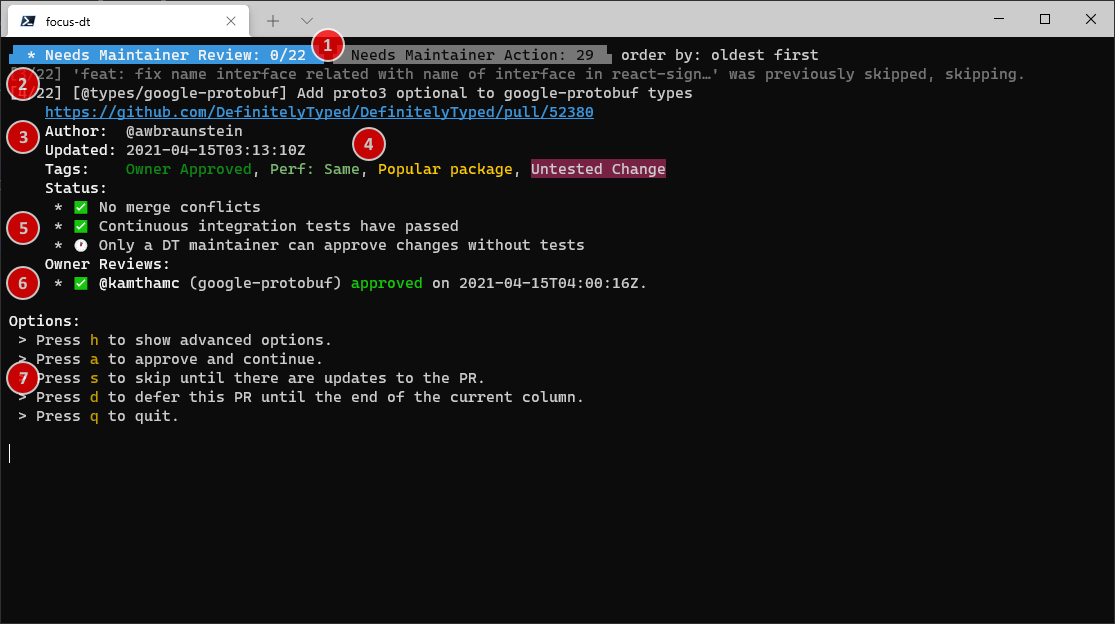
When you start focus-dt (and have been properly authenticated), you will see a screen like this:
These two tabs indicate the two primary columns in the Pull Request Status Board.
The active column is highlighted in blue.
The number to the right of the column indicates the number of pull request cards in the column
when focus-dt was started (or since the last refresh).
If the number is in the format x/y, x indicates the number of pull requests that you have either
merged or approved, while y indicates the total number of PRs in the column.
The current sort order is displayed to the right of the tabs.
This indicates an activity log since the last reviewed PR.
Gray lines indicate PRs that were skipped for some reason, either due to configuration, PR status, or
because you've explicitly skipped them until a change is made in the PR (such as when you have provided
review feedback and are waiting on the author).
The white line indicates the current PR to review.
The number [x/y] indicates the current PR in the column (x) and the number of PRs in the column
(y), to help keep track of progress.
This section indicates information about the PR including:
A link to the PR (this may or may not be clickable depending on your terminal).
The author of the PR
When the PR was last updated.
Tags assigned to the PR (see 4 for more information)
The PR's tags are listed here, with ansi colors matching the tag color on GitHub (if possible).
If present, this section indicates the PR status provided by @typescript-bot.
If owners or maintainers have already reviewed the PR, this section lists the review status
and whether the PR has been updated since the review was made (in which case it will be marked
[outdated])
This section indicates the key bindings used to interact with focus-dt
Chrome
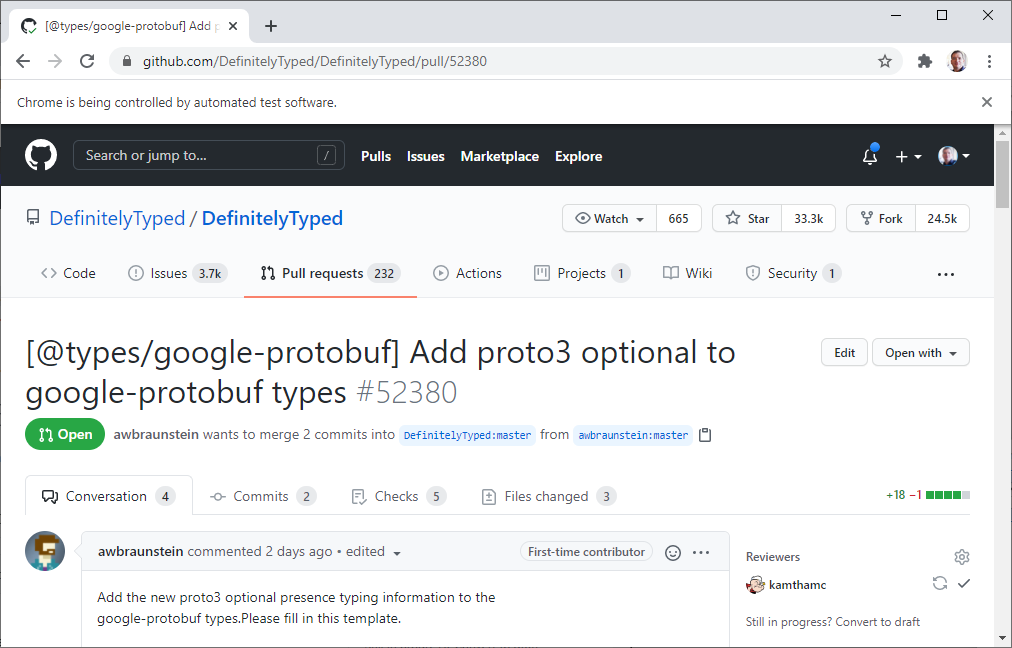
In addition, focus-dt will attempt to launch a Chrome window with UI automation with a debugger attached.
This lets focus-dt reuse the same Chrome tab as you move between PRs. Eventually it may also be used to
detect when you request changes to a PR to mark it as "skipped".
NOTE: focus-dt may fail to attach to Chrome if an instance was already running when focus-dt was
started. If that happens, focus-dt will likely crash. This is a known issue. Until it has been addressed,
it is best to ensure there are no Chrome instances running when focus-dt is started.
Keybindings
The default keybindings are:
h — Shows advanced options. These advanced keybindings are always available, but are generally
ommitted for brevity.
a — Approves the PR. If the PR supports author merging, the UI will advance to the next PR after
approval.
m — Merges the PR. Depending on configuration, this will approve the PR prior to merging. This
option is hidden if the PR supports author merging.
s — Skips this PR until the PR changes. This is often used after you have requested changes or
if you are waiting on the author. Skipped items will be reviewable again if you use the --skipped option
or if over a week has passed since the item was skipped.
d — Moves this PR to the end of the queue for the current column. Useful if you want to come back
to a review later without marking it as "skipped".
q — Quits focus-dt
Advanced keybindings (visible if you toggle the h option) include:
Does DefinitelyTyped/focus-dt have a project website?
No homepage URL was recorded for DefinitelyTyped/focus-dt in TopGit's last sync. The README tab above frequently contains screenshots and demo links, or check the repository description on GitHub.
Does DefinitelyTyped/focus-dt have any tags?
TopGit's last sync did not record any GitHub topics for DefinitelyTyped/focus-dt. GitHub topics appear in the right sidebar of a repository page; that's the authoritative place to check.
How active is development on DefinitelyTyped/focus-dt?
The most recent commit recorded on DefinitelyTyped/focus-dt was 1.4 years ago, based on the GitHub push timestamp. The repository has 9 forks — one of the better signals of community interest.
How many stars does DefinitelyTyped/focus-dt have?
DefinitelyTyped/focus-dt has 14 GitHub stars — refresh the page for the live number, or check github.com/DefinitelyTyped/focus-dt. TopGit mirrors GitHub's count but does not claim minute-by-minute accuracy.
What language is DefinitelyTyped/focus-dt written in?
DefinitelyTyped/focus-dt is written primarily in TypeScript. GitHub's language field is based on the largest share of bytes in the default branch.
What license does DefinitelyTyped/focus-dt use?
DefinitelyTyped/focus-dt is released under the Apache-2.0 license. Always verify the LICENSE file directly on GitHub for the authoritative terms — license strings can be edited out of sync with a project's actual stance.
Where do I read more about DefinitelyTyped/focus-dt?
This TopGit page is a snapshot — the READ ME tab shows the project's own README content (links stripped, images preserved). The GitHub repository at github.com/DefinitelyTyped/focus-dt is the definitive source.
Read full README in the tab above.
Still deciding about focus-dt?
One click hands the question to an AI along with this page — see what it says about focus-dt.
 /focus-dt