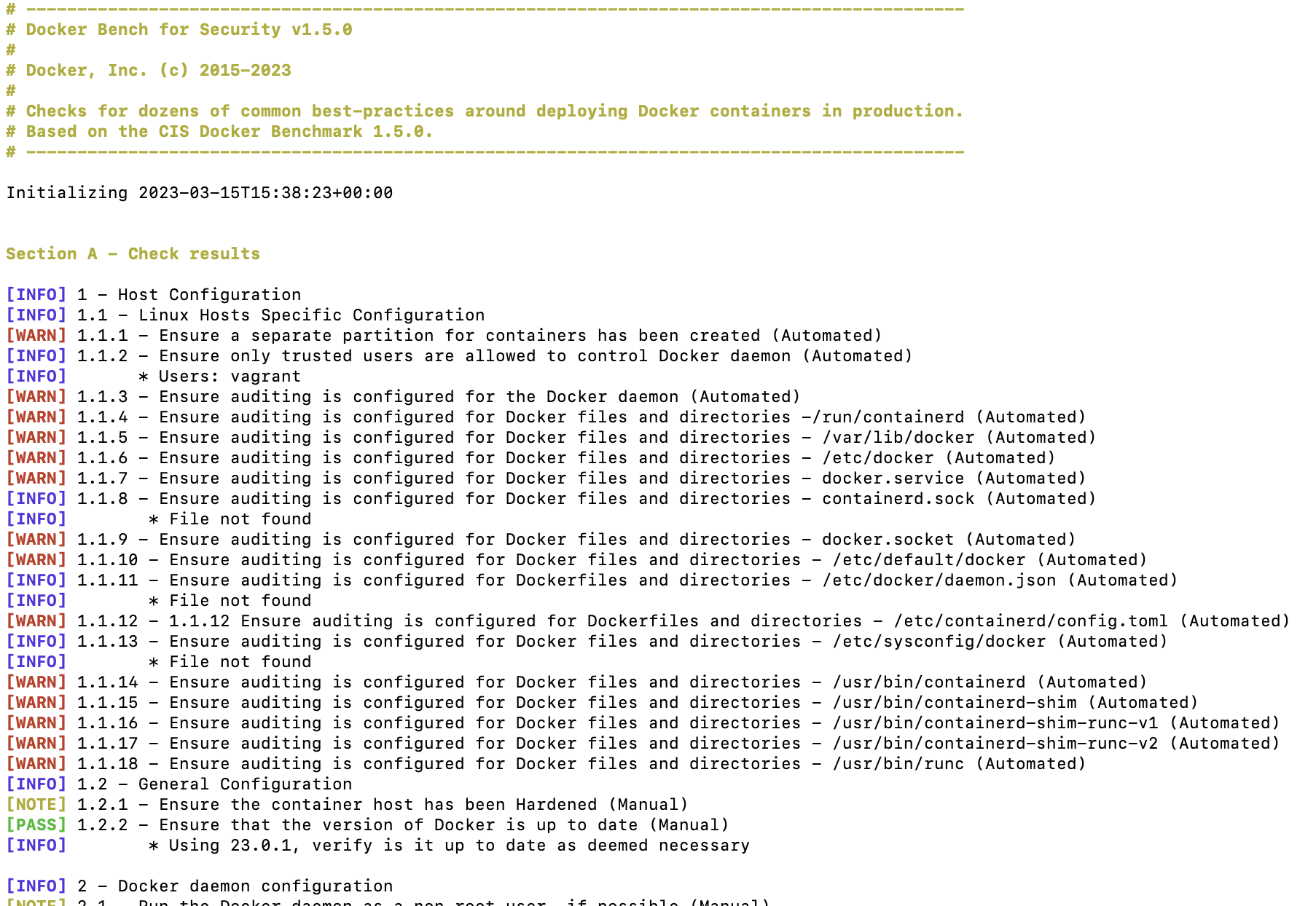
docker/docker-bench-security — an open-source project — sits at 9.7k GitHub stars. The Docker Bench for Security is a script that checks for dozens of common best-practices around deploying Docker containers in production.
Snapshot summary built from the project's own GitHub metadata — there's no written TopGit review yet. The page will update automatically when a full review is published.
WHY NO REVIEW YET
TopGit writes full reviews for the most-starred, most-requested repositories. This page is a snapshot until then — see the READ ME tab for the original README in full.
The Docker Bench for Security is a script that checks for dozens of common best-practices around deploying Docker containers in production. The tests are all automated, and are based on the CIS Docker Benchmark v1.6.0.
We are making this available as an open-source utility so the Docker community can have an easy way to self-assess their hosts and Docker containers against this benchmark.
Release
CIS
1.6.0
1.6.0
1.5.0
1.5.0
1.3.6
1.4.0
1.3.5
1.2.0
1.3.3
1.1.0
1.3.0
1.13.0
Running Docker Bench for Security
Run from your base host
You can simply run this script from your base host by running:
git clone https://github.com/docker/docker-bench-security.git
cd docker-bench-security
sudo sh docker-bench-security.sh
Note: jq is an optional but recommended dependency.
Run with Docker
Building Docker image
You have two options if you wish to build and run this container yourself:
Followed by an appropriate docker run command as stated below.
Use Docker Compose:
git clone https://github.com/docker/docker-bench-security.git
cd docker-bench-security
docker-compose run --rm docker-bench-security
Please note that the docker/docker-bench-security image is out-of-date and and a manual build is required. See #405 for more information.
Note that this container is being run with a lot of privilege -- sharing the host's filesystem, pid and network namespaces, due to portions of the benchmark applying to the running host.
The /etc/hostname file is missing on macOS, so it will need to be created first. Also, Docker Desktop on macOS doesn't have /usr/lib/systemd or the above Docker
binaries.
Docker bench requires Docker 1.13.0 or later in order to run.
Note that when distributions don't contain auditctl, the audit tests will check /etc/audit/audit.rules to see if a rule is present instead.
Docker Bench for Security options
  -b           optional  Do not print colors
  -h           optional  Print this help message
  -l FILE      optional  Log output in FILE, inside container if run using docker
  -u USERS     optional  Comma delimited list of trusted docker user(s)
  -c CHECK     optional  Comma delimited list of specific check(s) id
  -e CHECK     optional  Comma delimited list of specific check(s) id to exclude
  -i INCLUDE   optional  Comma delimited list of patterns within a container or image name to check
  -x EXCLUDE   optional  Comma delimited list of patterns within a container or image name to exclude from check
  -t LABEL     optional  Comma delimited list of labels within a container or image to check
  -n LIMIT     optional  In JSON output, when reporting lists of items (containers, images, etc.), limit the number of reported items to LIMIT. Default 0 (no limit).
  -p PRINT     optional  Disable the printing of remediation measures. Default: print remediation measures.
By default the Docker Bench for Security script will run all available CIS tests and produce
logs in the log folder from current directory, named docker-bench-security.log.json and
docker-bench-security.log.
If the docker container is used then the log files will be created inside the container in location /usr/local/bin/log/. If you wish to access them from the host after the container has been run you will need to mount a volume for storing them in.
The CIS based checks are named check_<section>_<number>, e.g. check_2_6 and community contributed checks are named check_c_<number>.
sh docker-bench-security.sh -c check_2_2 will only run check 2.2 Ensure the logging level is set to 'info'.
sh docker-bench-security.sh -e check_2_2 will run all available checks except 2.2 Ensure the logging level is set to 'info'.
sh docker-bench-security.sh -e docker_enterprise_configuration will run all available checks except the docker_enterprise_configuration group
sh docker-bench-security.sh -e docker_enterprise_configuration,check_2_2 will run all available checks except the docker_enterprise_configuration group and 2.2 Ensure the logging level is set to 'info'
sh docker-bench-security.sh -c container_images,container_runtime will run just the container_images and container_runtime checks
sh docker-bench-security.sh -c container_images -e check_4_5 will run just the container_images checks except 4.5 Ensure Content trust for Docker is Enabled
Note that when submitting checks, provide information why it is a reasonable test to add and please include some kind of official documentation verifying that information.
Does docker/docker-bench-security have a project website?
No homepage URL was recorded for docker/docker-bench-security in TopGit's last sync. The README tab above frequently contains screenshots and demo links, or check the repository description on GitHub.
Does docker/docker-bench-security have any tags?
TopGit's last sync did not record any GitHub topics for docker/docker-bench-security. GitHub topics appear in the right sidebar of a repository page; that's the authoritative place to check.
How active is development on docker/docker-bench-security?
The most recent commit recorded on docker/docker-bench-security was 5 months ago, based on the GitHub push timestamp. The repository has 1.0k forks — one of the better signals of community interest.
Is docker/docker-bench-security open source?
Yes — docker/docker-bench-security ships under the Apache-2.0 license, which makes its source code freely readable (and, depending on license terms, forkable and reusable). Source: github.com/docker/docker-bench-security.
What license does docker/docker-bench-security use?
docker/docker-bench-security is released under the Apache-2.0 license. Always verify the LICENSE file directly on GitHub for the authoritative terms — license strings can be edited out of sync with a project's actual stance.
Where do I read more about docker/docker-bench-security?
This TopGit page is a snapshot — the READ ME tab shows the project's own README content (links stripped, images preserved). The GitHub repository at github.com/docker/docker-bench-security is the definitive source.
Read full README in the tab above.
Curious whether docker-bench-security is right for you?
Let ChatGPT, Claude, or Perplexity look into it — click below and see what AI actually says about docker-bench-security.

 /docker-bench-security