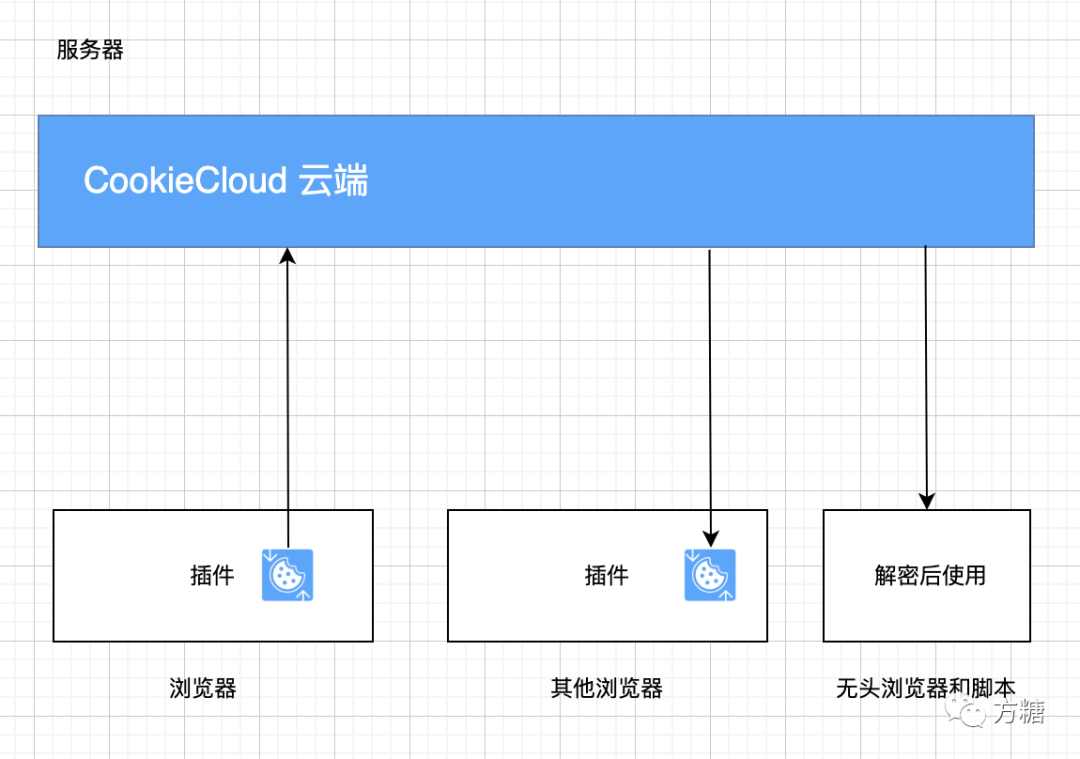
An open-source entry in TopGit's GitHub warehouse: easychen/CookieCloud, 3.1k stars, TypeScript. CookieCloud是一个和自架服务器同步浏览器Cookie和LocalStorage的小工具,支持端对端加密,可设定同步时间间隔。本仓库包含了插件和服务器端源码。CookieCloud is a small tool for synchronizing browser cookies and LocalStorage with a self-hosted server. It supports end-to-end encryption and allows for setting the synchronization interval. This repository contains both the plugin and the server-side source code
Snapshot summary built from the project's own GitHub metadata — there's no written TopGit review yet. The page will update automatically when a full review is published.
WHY NO REVIEW YET
TopGit writes full reviews for the most-starred, most-requested repositories. This page is a snapshot until then — see the READ ME tab for the original README in full.
CookieCloud is a small tool for syncing cookies with your self-hosted server, allowing you to synchronize browser cookies and local storage to your phone and cloud. It features built-in end-to-end encryption and allows you to set a synchronization interval.
Since version 0.3.0, the project has been rewritten using wxt. It now supports encryption algorithms with a fixed IV and supports more standard libraries for decryption. See the wxt branch for details.
The latest version now supports synchronization of local storage under the same domain name.
Telegram channel | Telegram group
⚠️ Breaking Change
Due to the high demand for local storage support, plugin version 0.1.5+ now also supports local storage in addition to cookies. This has resulted in a change to the encrypted text format (from a separate cookie object to { cookie_data, local_storage_data }).
Furthermore, to avoid conflicts in configuration synchronization, the configuration storage has been moved from remote to local. Users of previous versions will need to reconfigure their setup.
We apologize for any inconvenience this may cause 🙇🏻♂️
Official Tutorials
Video: Bilibili | YouTube - Please follow and subscribe 🥺
Tutorial: Juejin
FAQ
Currently, synchronization is only one-way, meaning one browser can upload while another downloads.
The browser extension officially supports Chrome and Edge. Other Chromium-based browsers might work but have not been tested. Use the source code cd extension && pnpm build --target=firefox-mv2 to compile a version for Firefox yourself. Be aware that Firefox's cookie format is different from Chrome's and they cannot be mixed.
Browser Plugin
Installation from store: Edge Store | Chrome Store (Note: Versions in the store might be delayed due to review processes)
Manual download and installation: See Release
Server Side
Official Test Server
For testing purposes only. Stability is not guaranteed. It is recommended to set up your own server to further enhance data security.
https://ccc.ft07.com
Third Party
Free server-side services provided by third parties are available for trial. Stability is determined by the third parties. We appreciate their sharing 👏
Some server-side versions might be outdated. If tests fail, try adding domain keywords before retrying.
http://45.138.70.177:8088 provided by LSRNB
http://45.145.231.148:8088 provided by shellingford37
http://nastool.cn:8088 provided by nastools
https://cookies.xm.mk provided by Xm798
https://cookie.xy213.cn provided by xuyan0213
https://cookie-cloud.vantis-space.com provided by vantis
https://cookiecloud.25wz.cn provided by wuquejs
https://cookiecloud.zhensnow.uk provided by YeTianXingShi
https://cookiecloud.ddsrem.com provided by DDSRem
https://cookiecloud.d0zingcat.xyz provided by d0zingcat
Self-hosting
Option One: Deploy through Docker, simple, recommended method
Supports architectures: linux/amd64, linux/arm64, etc.
Start with Docker Command
docker run -p=8088:8088 easychen/cookiecloud:latest
Default port 8088, image address easychen/cookiecloud
Specify API Directory - Optional Step, Can Be Skipped
Add the environment variable -e API_ROOT=/subdirectory must start with a slash to specify a subdirectory:
docker run -e API_ROOT=/cookie -p=8088:8088 easychen/cookiecloud:latest
How active is development on easychen/CookieCloud?
The most recent commit recorded on easychen/CookieCloud was 3 months ago, based on the GitHub push timestamp. The repository has 279 forks — one of the better signals of community interest.
How many stars does easychen/CookieCloud have?
easychen/CookieCloud has 3.1k GitHub stars — refresh the page for the live number, or check github.com/easychen/CookieCloud. TopGit mirrors GitHub's count but does not claim minute-by-minute accuracy.
Is easychen/CookieCloud open source?
Yes — easychen/CookieCloud ships under the GPL-3.0 license, which makes its source code freely readable (and, depending on license terms, forkable and reusable). Source: github.com/easychen/CookieCloud.
What is easychen/CookieCloud?
easychen/CookieCloud (easychen/CookieCloud) is a TypeScript project on GitHub. From the project's own README: CookieCloud是一个和自架服务器同步浏览器Cookie和LocalStorage的小工具,支持端对端加密,可设定同步时间间隔。本仓库包含了插件和服务器端源码。CookieCloud is a small tool for synchronizing browser cookies and LocalStorage with a self-hosted server. It supports end-to-end encryption and allows for setting the synchronization interval. This repository contains both the plugin and the server-side source code
Where do I read more about easychen/CookieCloud?
This TopGit page is a snapshot — the READ ME tab shows the project's own README content (links stripped, images preserved). The GitHub repository at github.com/easychen/CookieCloud is the definitive source.
Read full README in the tab above.
Curious whether CookieCloud is right for you?
Let ChatGPT, Claude, or Perplexity look into it — click below and see what AI actually says about CookieCloud.
 /CookieCloud