As an open-source project, emilk/loguru has picked up 1.9k stars on GitHub (C++). A lightweight C++ logging library
Snapshot summary built from the project's own GitHub metadata — there's no written TopGit review yet. The page will update automatically when a full review is published.
WHY NO REVIEW YET
TopGit writes full reviews for the most-starred, most-requested repositories. This page is a snapshot until then — see the READ ME tab for the original README in full.
Loguru: a lightweight and flexible C++ logging library.
At a glance
Documentation
Documentation can be found at https://emilk.github.io/loguru/index.html.
License
This software is in the public domain. Where that dedication is not recognized, you are granted a perpetual, irrevocable license to copy, modify and distribute it as you see fit.
Loguru is also available under The Unlicense.
That being said, I would appreciate credit!
If you find Loguru useful, tweet me at @ernerfeldt mail me at [email protected].
Why another logging library?
I have yet to come across a nice, light-weight logging library for C++ that does everything I want. So I made one!
In particular, I want logging that produces logs that are both human-readable and easily grep:ed. I also want to be able to hook into the logging process to print some of the more severe messages on-screen in my app (for dev-purposes).
Features:
Simple integration
Just two files: loguru.hpp and loguru.cpp.
Either build and link loguru.cpp or just #include <loguru.cpp> in one of your own .cpp files.
Small, simple library.
Small header with no #includes for fast compile times (see separate heading).
No dependencies.
Cross-platform
Flexible:
User can install callbacks for logging (e.g. to draw log messages on screen in a game).
User can install callbacks for fatal error (e.g. to pause an attached debugger or throw an exception).
Support multiple file outputs, either trunc or append:
e.g. a logfile with just the latest run at low verbosity (high readability).
e.g. a full logfile at highest verbosity which is appended to on every run.
Full featured:
Verbosity levels.
Supports assertions: CHECK_F(fp != nullptr, "Failed to open '%s'", filename)
Supports abort: ABORT_F("Something went wrong, debug value is %d", value).
After cleanup: some_function_name(std::vector<std::string> const&)
Stack traces are printed the right way:
Chronological order with the most relevant at the end.
(most) signals writes stack traces.
Fast:
When configured in unbuffered mode (loguru::g_flush_interval_ms = 0):
6-8 us when logging to stderr + file (rMBP + SSD + Clang).
About 25%-75% faster than GLOG on my MacBook Pro (Clang).
About the same as GLOG on my Linux Desktop (GCC).
With loguru::g_flush_interval_ms set to ~100 ms:
3-5 us when logging to stderr + file (rMBP + SSD + Clang).
About twice as fast as GLOG.
Drop-in replacement for most of GLOG (except for setup code).
Choose between using printf-style or std::cout-style formatting.
Compile-time checked printf-formating (on supported compilers).
Support for fmtlib formatting.
Add #define LOGURU_USE_FMTLIB 1, before including loguru.hpp
You also need to set up the fmtlib include directory for building as well as linking against fmtlib, alternatively use the FMT_HEADER_ONLY preprocessor definition.
Assertion failures are marked with noreturn for the benefit of the static analyzer and optimizer.
All logging also written to stderr.
With colors on supported terminals.
Thread-safe.
Can be configured to either:
Flush every loguru::g_flush_interval_ms in a background thread
Flushes output on each call so you won't miss anything even on hard crashes (and still faster than buffered GLOG!).
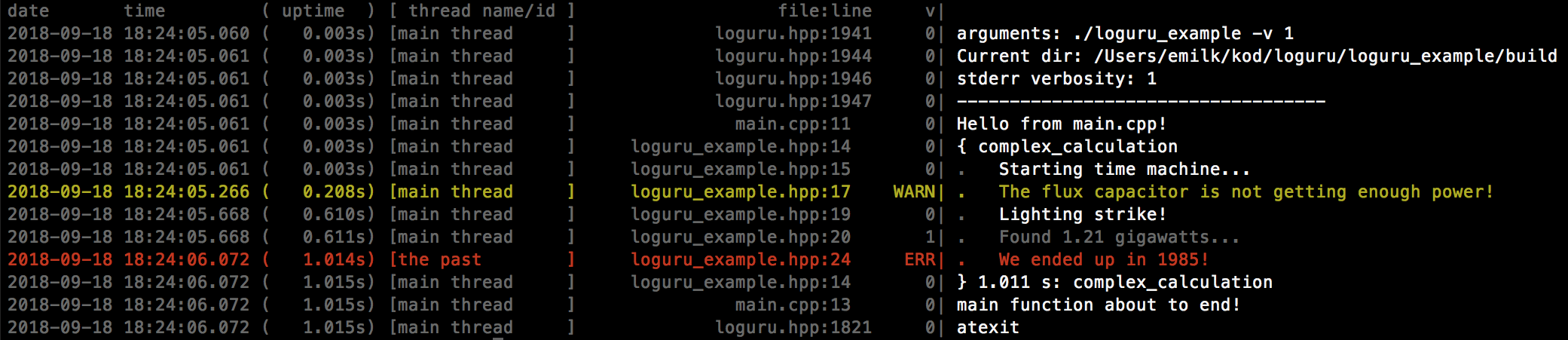
Prefixes each log line with:
Date and time to millisecond precision.
Application uptime to millisecond precision.
Thread name or id (you can set the name with loguru::set_thread_name).
File and line.
Log level.
Indentation (see Scopes).
Error context:
Catch the values of local variables and print them only on a crash (see Error context).
Scopes (see Scopes).
grep:able logs:
Each line has all the info you need (e.g. date).
You can easily filter out high verbosity levels after the fact.
Compiling
Just include <loguru.hpp> where you want to use Loguru.
Then either compile and link with loguru.cpp or in one .cpp file: #include <loguru.cpp>
Make sure you compile with -std=c++11 -lpthread -ldl on relevant environments.
CMake Instructions
Loguru can be added to an existing CMake project in three ways
add_subdirectory()
FetchContent()
find_package()
See CMake example for a demonstration.
Usage
#include <loguru.hpp>

…

// Optional, but useful to time-stamp the start of the log.
// Will also detect verbosity level on command line as -v.
loguru::init(argc, argv);

// Put every log message in "everything.log":
loguru::add_file("everything.log", loguru::Append, loguru::Verbosity_MAX);

// Only log INFO, WARNING, ERROR and FATAL to "latest_readable.log":
loguru::add_file("latest_readable.log", loguru::Truncate, loguru::Verbosity_INFO);

// Only show most relevant things on stderr:
loguru::g_stderr_verbosity = 1;

LOG_SCOPE_F(INFO, "Will indent all log messages within this scope.");
LOG_F(INFO, "I'm hungry for some %.3f!", 3.14159);
LOG_F(2, "Will only show if verbosity is 2 or higher");
VLOG_F(get_log_level(), "Use vlog for dynamic log level (integer in the range 0-9, inclusive)");
LOG_IF_F(ERROR, badness, "Will only show if badness happens");
auto fp = fopen(filename, "r");
CHECK_F(fp != nullptr, "Failed to open file '%s'", filename);
CHECK_GT_F(length, 0); // Will print the value of `length` on failure.
CHECK_EQ_F(a, b, "You can also supply a custom message, like to print something: %d", a + b);

// Each function also comes with a version prefixed with D for Debug:
DCHECK_F(expensive_check(x)); // Only checked #if !NDEBUG
DLOG_F(INFO, "Only written in debug-builds");

// Turn off writing to stderr:
loguru::g_stderr_verbosity = loguru::Verbosity_OFF;

// Turn off writing err/warn in red:
loguru::g_colorlogtostderr = false;

// Throw exceptions instead of aborting on CHECK fails:
loguru::set_fatal_handler([](const loguru::Message& message){
	throw std::runtime_error(std::string(message.prefix) + message.message);
});
If you prefer logging with streams:
#define LOGURU_WITH_STREAMS 1
#include <loguru.hpp>
...
LOG_S(INFO) << "Look at my custom object: " << a.cross(b);
CHECK_EQ_S(pi, 3.14) << "Maybe it is closer to " << M_PI;
For more info, see the official documentation.
Installing loguru (vcpkg)
Alternatively, you can build and install loguru using vcpkg dependency manager:
The loguru port in vcpkg is kept up to date by Microsoft team members and community contributors. If the version is out of date, please create an issue or pull request on the vcpkg repository.
Grep:able logs
# Only show warnings, errors and fatal messages:
cat logfile.txt | egrep "[^0-9]\|"

# Ignore verbosity-levels 4 and above:
cat logfile.txt | egrep "[^4-9]\|"

# Only show verbosity-level 6:
cat logfile.txt | egrep "6\|"

# Only show messages from the main thread:
cat logfile.txt | egrep "\[main thread     \]"
No includes in loguru.hpp
I abhor logging libraries that #include's everything from iostream to windows.h into every compilation unit in your project. Logging should be frequent in your source code, and thus as lightweight as possible. Loguru's header has no #includes. This means it will not slow down the compilation of your project.
In a test of a medium-sized project, including loguru.hpp instead of glog/logging.hpp everywhere gave about 10% speedup in compilation times.
Note, however, that this gives you the bare-bones version of Loguru with printf-style logging. If you want std::ostream style logging (or GLOG functionality) you need to #define LOGURU_WITH_STREAMS 1 before #include <loguru.hpp>, and that will make loguru.hpp include <sstream>. No away around it!
Scopes
The library supports scopes for indenting the log-file. Here's an example:
int main(int argc, char* argv[])
{
	loguru::init(argc, argv);
	LOG_SCOPE_FUNCTION(INFO);
	LOG_F(INFO, "Doing some stuff...");
	for (int i=0; i<2; ++i) {
		VLOG_SCOPE_F(1, "Iteration %d", i);
		auto result = some_expensive_operation();
		LOG_IF_F(WARNING, result == BAD, "Bad result");
	}
	LOG_F(INFO, "Time to go!");
	return 0;
}
This will output:
	     loguru.cpp:184      0| arguments:       ./loguru_test test -v1
	     loguru.cpp:185      0| Verbosity level: 1
	     loguru.cpp:186      0| -----------------------------------
	loguru_test.cpp:108      0| { int main_test(int, char **)
	loguru_test.cpp:109      0| .   Doing some stuff...
	loguru_test.cpp:111      1| .   { Iteration 0
	loguru_test.cpp:111      1| .   } 0.133 s: Iteration 0
	loguru_test.cpp:111      1| .   { Iteration 1
	loguru_test.cpp:113      0| .   .   Bad result
	loguru_test.cpp:111      1| .   } 0.134 s: Iteration 1
	loguru_test.cpp:115      0| .   Time to go!
	loguru_test.cpp:108      0| } 0.267 s: int main_test(int, char **)
ERROR_CONTEXT
You can also optionally log things ONLY if there is a crash. This is a very useful feature:
	void process_file(const char* filename)
	{
		ERROR_CONTEXT("filename", filename);
		parse_file(filename); // Only if this crashes will filename be logged.
	}
Streams vs printf
Some logging libraries only supports stream style logging, not printf-style. This means that what in Loguru is:
No homepage URL was recorded for emilk/loguru in TopGit's last sync. The README tab above frequently contains screenshots and demo links, or check the repository description on GitHub.
Does emilk/loguru have any tags?
TopGit's last sync did not record any GitHub topics for emilk/loguru. GitHub topics appear in the right sidebar of a repository page; that's the authoritative place to check.
How active is development on emilk/loguru?
The most recent commit recorded on emilk/loguru was 1 month ago, based on the GitHub push timestamp. The repository has 282 forks — one of the better signals of community interest.
Is emilk/loguru open source?
Yes — emilk/loguru ships under the Unlicense license, which makes its source code freely readable (and, depending on license terms, forkable and reusable). Source: github.com/emilk/loguru.
What license does emilk/loguru use?
emilk/loguru is released under the Unlicense license. Always verify the LICENSE file directly on GitHub for the authoritative terms — license strings can be edited out of sync with a project's actual stance.
Where do I read more about emilk/loguru?
This TopGit page is a snapshot — the READ ME tab shows the project's own README content (links stripped, images preserved). The GitHub repository at github.com/emilk/loguru is the definitive source.
Read full README in the tab above.
Still deciding about loguru?
One click hands the question to an AI along with this page — see what it says about loguru.
 /loguru