TopGit tracks fatih/subvim on GitHub. The project has 1.1k stars. Vim customized to be like SublimeText
Snapshot summary built from the project's own GitHub metadata — there's no written TopGit review yet. The page will update automatically when a full review is published.
WHY NO REVIEW YET
TopGit writes full reviews for the most-starred, most-requested repositories. This page is a snapshot until then — see the READ ME tab for the original README in full.
This Project is closed and not maintained anymore. I don't find any value in creating a Vim distribution any more. I believe using Vim with plugins and settings for your own need is much more scalable and better in long term. I will occasionally push changes when I have time but don't expect any maintenance or future contributions. Thanks everyone for using and supporting this project, feel free to fork and use it on your own.
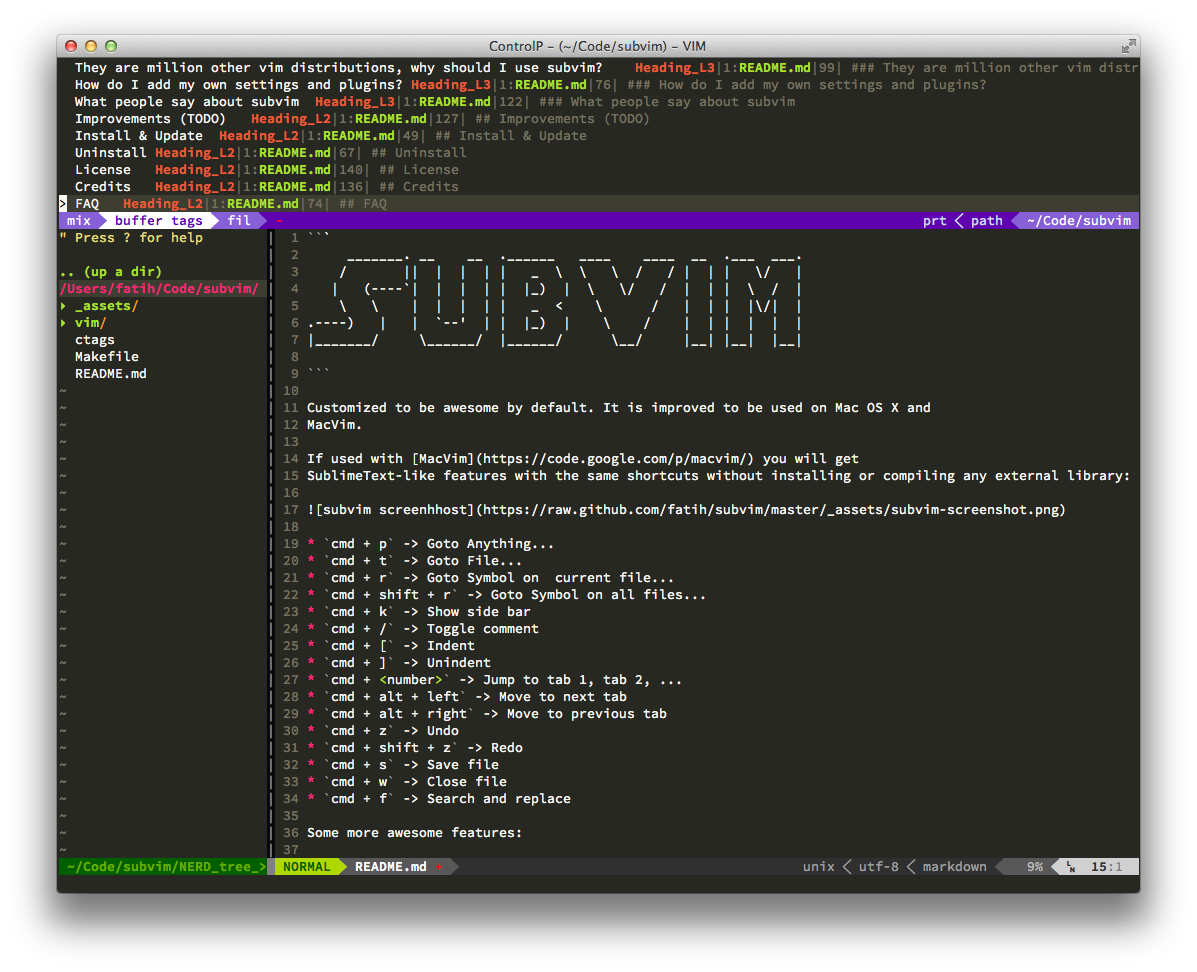
Customized to be awesome by default. It is improved to be used on Mac OS X and
MacVim. (note: Linux version is on the todo list, I'll work on it asap)
If used with MacVim you will get
SublimeText-like features with the same shortcuts without installing or compiling any external library:
cmd + p -> Goto Anything...
cmd + t -> Goto File...
cmd + r -> Goto Symbol on current file...
cmd + shift + r -> Goto Symbol on all files...
cmd + d -> Select words for multiple selection editing
cmd + k -> Show side bar
cmd + / -> Toggle comment
cmd + [ -> Indent
cmd + ] -> Unindent
cmd + <number> -> Jump to tab 1, tab 2, ...
cmd + alt + left -> Move to next tab
cmd + alt + right -> Move to previous tab
cmd + z -> Undo
cmd + shift + z -> Redo
cmd + n -> New File
cmd + shift + n -> New Window
cmd + s -> Save File
cmd + w -> Close File
cmd + f -> Search and replace
ctrl + tab -> Cycle through tabs
ctrl + shift + tab -> Cycle through tabs (backwards)
Some more awesome features:
SublimeText like colorscheme
Multiple Selections/Cursor feature. Use cmd+d for selecting words, cmd+u for undo, cmd+k for skipping words and esc to quit the multi cursor mode.
On the fly "Goto symbol, definition" feature.
41 languages, including Go, Rust,
Coffeescript, Objective-C and Markdown, are supported. No need to install external
plugins or binaries.
Full featured autocompletion via YCM. No need to compile the YCM plugin,
subvim has already pre-compiled binaries included.
Snippet system with over 40 languages and configurable
Restore latest state (tab, files) when quitting and restarting again.
Automatic closing of quotes, parenthesis, brackets and etc..
... many other fixes and improvements.
Install & Update
Be sure you are using the latest OS X 10.8 and MacVim. Currently only
these two options are supported. Just clone the repo and execute make:
git clone https://github.com/fatih/subvim.git
cd subvim
make
This will create symlinks from the subvim folder to ~/.vim, ~/.vimrc,
~/.gvimrc and ~/.ctags. Thus you can put the subvim folder in your
favorite place.
And finally you can always update it easily with:
git pull origin master
make
Uninstall
This will just remove the symlinks created previously:
cd subvim
make clean
FAQ
How do I add my own settings and plugins?
All custom settings are stored in the folder vim/custom/. You have to create
it for the first time.
For settings, add your custom vimrc settings to the file vim/custom/vimrc
(or vim/custom/gvimrc). An example file might be:
" ~/.vim/custom/vimrc ...my own custom settings
let mapleader = ","
set indent
set tabstop=4
For plugins, just clone your favorite plugin into vim/custom/.
Below is an example of installing vim-fugitive:
cd vim/custom
git clone git://github.com/tpope/vim-fugitive.git
That's it! subvim will automatically start your settings and plugins after you restart
vim again.
There are million other vim distributions, why should I use subvim?
subvim tries to be simple as possible. Only plugins that are worth and are
accepted to be usable are integrated (like autocomplete, autosave sessions,
etc..). It means you just start subvim and benefit from all the features
explained above. There is no binary compiling or installing extra stuff. All
these are integrated.
subvim has some very nice shortcuts that gives you the same
experience as using SublimeText. These shortcuts do not interfere with any
default vim shortcuts. It's aimed for a full Mac OS X experience. I'm
thinking about making subvim Linux compatible (gvim) in the future.
There are:
No custom shortcuts
No leader keybindings that breaks your stuff
No unnecessary plugins that makes your life harder than easier.
No automatic downloading of integrated plugins. Because what works will
always works. You always will get the same experience. That means if an
integrated plugin is not superior, it will replaced by superior ones.
What people say about subvim
romainl: we don't like your project much but we provide help anyway. That's the vim spirit. (#vim on freenode)
a friend: an awesome project, thank you!
addy osmani: So hot. If you're a hardcore Vim user that's been tempted by Sublime, Subvim
gives you SublimeText-like features including shortcuts, color scheme, support
for 41 languages, state, autocompletion via YMC and more, Great work +Fatih
Arslan!
Improvements (TODO)
Add Linux-compatible option
Autoload of vimrc settings (no need for restart anymore)
Make it always as simple as possible without breaking any plugins. Users
should custoimize and add plugins theirself.
Create a dedicated page to usage and shortcuts
Credits
All vim plugins authors. An extended list with authors and plugins will be created.
romainl, osse, rking, etc.. on #vim - freenode
License
Same as VIM license. For more info see :help license.
The most recent commit recorded on fatih/subvim was 12.5 years ago, based on the GitHub push timestamp. The repository has 65 forks — one of the better signals of community interest.
How many stars does fatih/subvim have?
fatih/subvim has 1.1k GitHub stars — refresh the page for the live number, or check github.com/fatih/subvim. TopGit mirrors GitHub's count but does not claim minute-by-minute accuracy.
Is fatih/subvim open source?
TopGit's metadata for fatih/subvim does not record a license. Most public repositories on GitHub ARE open source, but the exact terms vary — verify by opening the LICENSE file directly.
What is fatih/subvim?
fatih/subvim (fatih/subvim) is a C++ project on GitHub. From the project's own README: Vim customized to be like SublimeText
What language is fatih/subvim written in?
fatih/subvim is written primarily in C++. GitHub's language field is based on the largest share of bytes in the default branch.
Where do I read more about fatih/subvim?
This TopGit page is a snapshot — the READ ME tab shows the project's own README content (links stripped, images preserved). The GitHub repository at github.com/fatih/subvim is the definitive source.
Read full README in the tab above.
Want a second opinion on subvim?
Ask an AI that can read this page — one click and you get its take on subvim.

 /subvim