An open-source entry in TopGit's GitHub warehouse: getgrav/grav-skeleton-resume-site, 59 stars. Resume Skeleton for Grav
Snapshot summary built from the project's own GitHub metadata — there's no written TopGit review yet. The page will update automatically when a full review is published.
WHY NO REVIEW YET
TopGit writes full reviews for the most-starred, most-requested repositories. This page is a snapshot until then — see the READ ME tab for the original README in full.
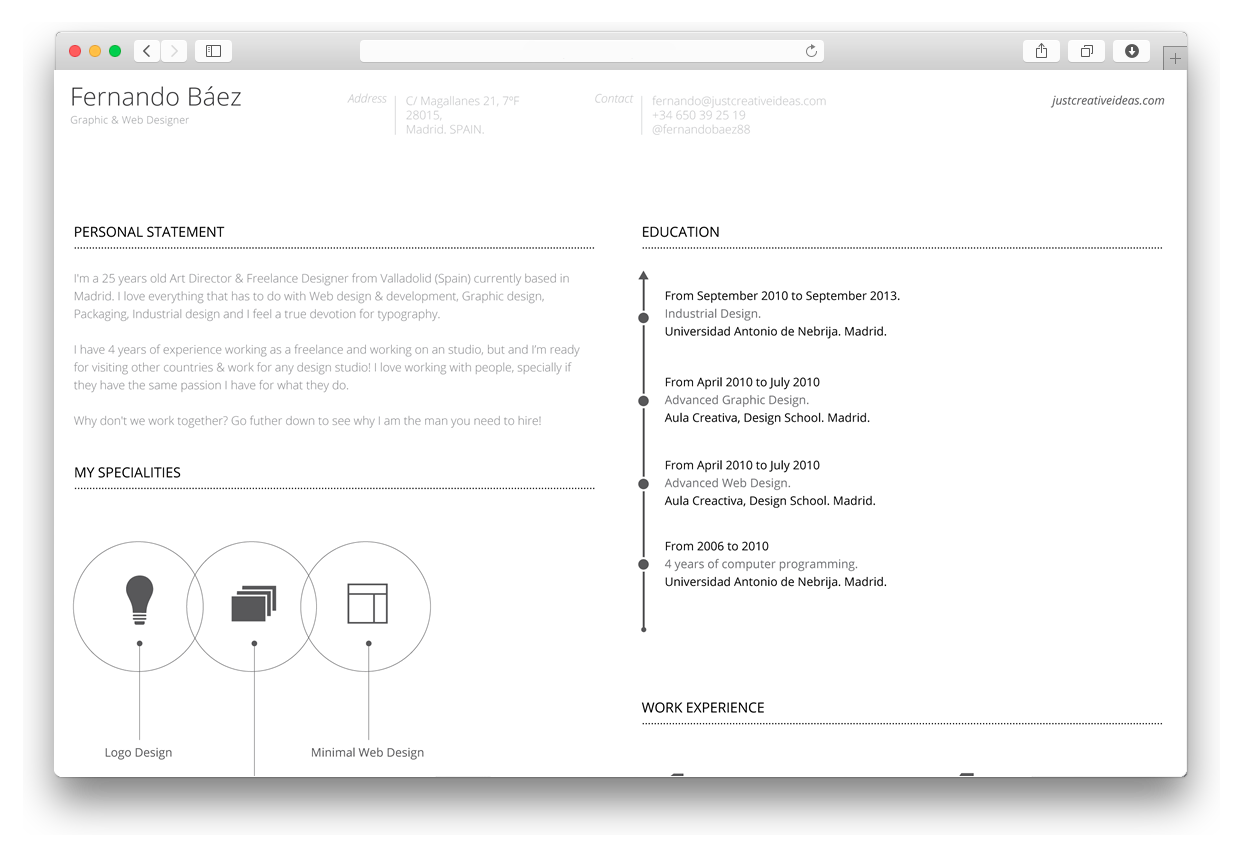
Resume by Fernando Báez is a Grav implementation of free PSD resume theme.
Features
Extraordinary resume theme, designed by Fernando Báez
Based on Foundation framework
Two-Column approach
Specialities layout with custom icons and descriptions
Design Skills layout with percentage grid
Language Skills layout with automatic pie charts
Education history special layout
Experience layout
Recognitions layout with SVG ribbon
Hobbies & Interests layout with custom icons and descriptions
Foundation Icon Fonts 3 (around 283 icons included)
Animate.css support in layouts. You can animate each separate element.
Fully responsive. Designed with mobile first approach.
Basic Setup for a new Grav site
The simplest way to install Resume theme for Grav is to download and install the Resume Skeleton package:
Download Resume Skeleton
Simply unzip the package into your web root folder.
Point your browser at the folder, job done!
TIP: Check out the general Grav installation instructions for more details on this process.
Existing Grav site
It is possible to install just the theme, but page content will need to reference the Resume theme's supported templates. It is strongly advised to at least install the Resume Skeleton package to see the theme's capabilities in action.
To install just the theme:
$ bin/gpm install resume
Layouts Configuration
Resume theme includes few creative layout templates. This layouts will help you to create perfect resume and to find a dream job :) Below, is a brief description of most important layouts, it's options and values.
Header
Header settings are located inside your skeleton in config/site.yaml. This file contains your basic contact informations. This content will be displayed in theme header.
Specialities
Specialities layout is designed to showcase your most important talents. It contains large icon inside ellipse and description. Example of specialities layout is located inside your skeleton in pages/left/my-specialities/special.md.
- icon: lightbulb
  text: Logo Design
  animation: fadeInDown
icon - select icon from around 300 included font icons. Icon list is available here.
text - description of your speciality.
animation - you can animate each element. Check available animations here.
Skills
Skills layout is designed to showcase your most important skills. To check example page, go to skeleton and open: pages/left/design-skills/skills.md.
- name: Adobe Photoshop
  level: 8
name - your skill name
level - skill level from 1-8. For example if you specify 5 that means theme will display 5 dark circles and 3 circles will be greyed out.
Language skills - pie charts
Language skills layout was made to easily display percentage data like language skills and other.
Example language skills page is located in skeleton, in: pages/left/language-skills/langskills.md.
- name: Spanish
  level_name: Mother Language
  level: 100
name - your pie chart name
level_name - pie chart description
level - percentage to display, ie: if you set that field to 50 then half of pie chart will be dark and half greyed out.
animation - you can animate each element. Check available animations here.
Education
This layout is designed to present your education history. Example page is located in skeleton, in: pages/right/education/education.md
- date: From September 2010 to September 2013.
  topic: Industrial Design.
  school: Universidad Antonio de Nebrija. Madrid.
date - describe time when you were studying
topic - provide description of your education
school - provide place of your education
Experience
Experience layout is designed to showcase your work experience. It's created with two columns approach. One for year, one for description. Example page is located in skeleton, in: pages/right/experience/experience.md
- date: From 2013 to 2014
  role: Art Director.
  company: Distrito 01 (d01 .es)
  years: 2
  animation: fadeIn
date - provide date
role - your role in company
company - company
years - years to showcase in first column with enlarged font
animation - you can animate each element. Check available animations here.
Recognitions
Recognitions layout is designed to showcase your awards and recognitions. On left there is SVG ribbon with achieved place and amount of finalists. On the right, informations about contest. Example page is located in skeleton, in: pages/right/recognitions/recognitions.md
- title: Remus Logo Design.
  desc: Internal contest. One of the three finalists.
  place: Universidad Antonio de Nebrija. Madrid
  position: 1-3
  animation: fadeIn
title - contest title
desc - contest description
place - place where contest took place
position - achieved position
animation - you can animate each element. Check available animations here.
Hobbies and Interests
Interests layout is designed to show your hobbies and interests. It's approach is simple. Circle with icon and description. Example page is located in skeleton, in: pages/right/hobbies-and-interests/interests.md
- icon: camera
  activity: Photography
  animation: fadeIn
icon - select icon from around 300 bundled font icons. List is available here.
activity - icon description
animation - you can animate each element. Check available animations here.
Footer
Footer and it's content is located inside partials directory. File name is footer.html.twig.
How active is development on getgrav/grav-skeleton-resume-site?
The most recent commit recorded on getgrav/grav-skeleton-resume-site was 22 days ago, based on the GitHub push timestamp. The repository has 17 forks — one of the better signals of community interest.
How many stars does getgrav/grav-skeleton-resume-site have?
getgrav/grav-skeleton-resume-site has 59 GitHub stars — refresh the page for the live number, or check github.com/getgrav/grav-skeleton-resume-site. TopGit mirrors GitHub's count but does not claim minute-by-minute accuracy.
Is getgrav/grav-skeleton-resume-site open source?
Yes — getgrav/grav-skeleton-resume-site ships under the MIT license, which makes its source code freely readable (and, depending on license terms, forkable and reusable). Source: github.com/getgrav/grav-skeleton-resume-site.
What topics is getgrav/grav-skeleton-resume-site associated with?
GitHub's repository topics for getgrav/grav-skeleton-resume-site: "grav", "grav-skeleton". TopGit's editorial category is open-source.
Where can I see getgrav/grav-skeleton-resume-site in action?
The project maintains a homepage at https://getgrav.org. The README tab on this page also usually contains screenshots and a quickstart.
Where do I read more about getgrav/grav-skeleton-resume-site?
This TopGit page is a snapshot — the READ ME tab shows the project's own README content (links stripped, images preserved). The GitHub repository at github.com/getgrav/grav-skeleton-resume-site is the definitive source.
Read full README in the tab above.
Want a second opinion on grav-skeleton-resume-site?
Ask an AI that can read this page — one click and you get its take on grav-skeleton-resume-site.

 /grav-skeleton-resume-site