getgrav/grav-theme-quark is an open-source project on GitHub with 73 stars, written primarily in SCSS.
Snapshot summary built from the project's own GitHub metadata — there's no written TopGit review yet. The page will update automatically when a full review is published.
WHY NO REVIEW YET
TopGit writes full reviews for the most-starred, most-requested repositories. This page is a snapshot until then — see the READ ME tab for the original README in full.
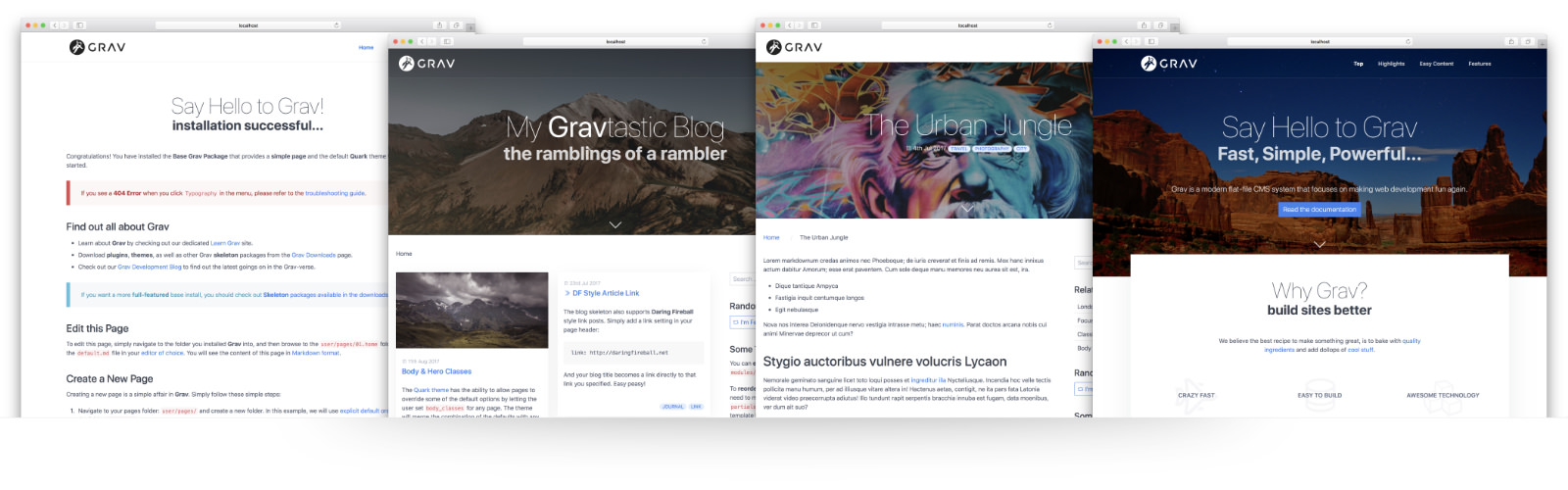
Quark is the new default theme for Grav CMS. This theme is built with the Spectre.css framework and provides a powerful base for developing your own themes. Quark uses functionality that is only available in Grav 1.4+, as such you cannot run Quark on earlier versions of Grav.
Features
Lightweight and minimal for optimal performance
Spectre CSS Framework
Fully responsive with full-page mobile navigation
SCSS based CSS source files for easy customization
Built-in support for on-page navigation
Multiple page template types
Fontawesome icon support
Supported Page Templates
Default view template default.md
Error view template error.md
Blog view template blog.md
Blog item view template item.md
Modular view templates: modular.md
Features Modular view template features.md
Hero Modular view template hero.md
Text Modular view template text.md
Note: Gallery Modular view template gallery.md only works in concert with premium plugin Lightbox Gallery
Installation
Installing the Quark theme can be done in one of two ways. Our GPM (Grav Package Manager) installation method enables you to quickly and easily install the theme with a simple terminal command, while the manual method enables you to do so via a zip file.
The theme by itself is useful, but you may have an easier time getting up and running by installing a skeleton. The Quark theme can be found in both the One-page and Blog Site which are self-contained repositories for a complete sites which include: sample content, configuration, theme, and plugins.
GPM Installation (Preferred)
The simplest way to install this theme is via the Grav Package Manager (GPM) through your system's Terminal (also called the command line). From the root of your Grav install type:
bin/gpm install quark
This will install the Quark theme into your /user/themes directory within Grav. Its files can be found under /your/site/grav/user/themes/quark.
Manual Installation
To install this theme, just download the zip version of this repository and unzip it under /your/site/grav/user/themes. Then, rename the folder to quark. You can find these files either on GitHub or via GetGrav.org.
You should now have all the theme files under
/your/site/grav/user/themes/quark
Default Options
Quark comes with a few default options that can be set site-wide. These options are:
enabled: true                 # Enable the theme
production-mode: true         # In production mode, only minified CSS is used. When disabled, nested CSS with sourcemaps are enabled
grid-size: grid-lg            # The max-width of the theme, options include: `grid-xl`, `grid-lg`, and `grid-md`
header-fixed: true            # Cause the header to be fixed at the top of the browser
header-animated: true         # Allows the fixed header to resize to a smaller header when scrolled
header-dark: false            # Inverts the text/logo to work better on dark backgrounds
header-transparent: false     # Allows the fixed header to be transparent over the page
sticky-footer: true           # Causes the footer to be sticky at the bottom of the page
blog-page: '/blog'            # The route to the blog listing page, useful for a blog style layout with sidebar
custom_logo:                  # A custom logo rather than the default (see below)
custom_logo_mobile:           # A custom logo to use for mobile navigation
To make modifications, you can copy the user/themes/quark/quark.yaml file to user/config/themes/ folder and modify, or you can use the admin plugin.
NOTE: Do not modify the user/themes/quark/quark.yaml file directly or your changes will be lost with any updates
Custom Logos
To add a custom logo, you should put the log into the user/themes/quark/images/logo folder. Standard image formats are support (.png,.jpg, .gif, .svg, etc.). Then reference the logo via the YAML like so:
Alternatively, you can you use the drag-n-drop "Custom Logo" field in the Quark theme options.
Page Overrides
Quark has the ability to allow pages to override some of the default options by letting the user set body_classes for any page. The theme will merge the combination of the defaults with any body_classes set. For example:
body_classes: "header-dark header-transparent"
On a particular page will ensure that page has those options enabled (assuming they are false by default).
Hero Options
The hero template allows some options to be set in the page frontmatter. This is used by the modular hero as well as the blog and item templates to provide a more dynamic header.
hero_classes: text-light title-h1h2 parallax overlay-dark-gradient hero-large
hero_image: road.jpg
hero_align: center
The hero_classes option allows a variety of hero classes to be set dynamically these include:
text-light | text-dark - Controls if the text should be light or dark depending on the content
title-h1h2 - Enforced a close matched h1/h2 title pairing
parallax - Enables a CSS-powered parallax effect
overlay-dark-gradient - Displays a transparent gradient which further darkens the underlying image
overlay-light-gradient - Displays a transparent gradient which further lightens the underlying image
overlay-dark - Displays a solid transparent overlay which further darkens the underlying image
overlay-light - Displays a solid transparent overlay which further darkens the underlying image
hero-fullscreen | hero-large | hero-medium | hero-small | hero-tiny - Size of the hero block
The hero_image should point to an image file in the current page folder.
Features Modular Options
The features modular template provides the ability to set a class on the features, as well as an array of feature items. For example:
class: offset-box
features:
    - header: Crazy Fast
      text: "Performance is not just an afterthought, we baked it in from the start!"
      icon: fighter-jet
    - header: Easy to build
      text: "Simple text files means Grav is trivial to install, and easy to maintain"
      icon: database
    - header: Awesome Technology
      text: "Grav employs best-in-class technologies such as Twig, Markdown & Yaml"
      icon: cubes
    - header: Super Flexible
      text: "From the ground up, with many plugin hooks, Grav is extremely extensible"
      icon: object-ungroup
    - header: Abundant Plugins
      text: "A vibrant developer community means over 200 themes available to download"
      icon: puzzle-piece
    - header: Free / Open Source
      text: "Grav is an open source project, so you can spend your money on other stuff"
      icon: money
Text Modular Options
The text box provides a single option to control if any image found in the page folder should be left or right aligned:
Does getgrav/grav-theme-quark have a project website?
No homepage URL was recorded for getgrav/grav-theme-quark in TopGit's last sync. The README tab above frequently contains screenshots and demo links, or check the repository description on GitHub.
Is getgrav/grav-theme-quark open source?
Yes — getgrav/grav-theme-quark ships under the MIT license, which makes its source code freely readable (and, depending on license terms, forkable and reusable). Source: github.com/getgrav/grav-theme-quark.
What is getgrav/grav-theme-quark?
getgrav/grav-theme-quark (getgrav/grav-theme-quark) is a SCSS project tracked by TopGit. The repository has 73 GitHub stars at the time of our last sync.
What license does getgrav/grav-theme-quark use?
getgrav/grav-theme-quark is released under the MIT license. Always verify the LICENSE file directly on GitHub for the authoritative terms — license strings can be edited out of sync with a project's actual stance.
Where do I read more about getgrav/grav-theme-quark?
This TopGit page is a snapshot — the READ ME tab shows the project's own README content (links stripped, images preserved). The GitHub repository at github.com/getgrav/grav-theme-quark is the definitive source.
Read full README in the tab above.
Want a second opinion on grav-theme-quark?
Ask an AI that can read this page — one click and you get its take on grav-theme-quark.

 /grav-theme-quark