google/osv-scanner is one of the open-source repositories TopGit tracks, currently at 11.5k stars, written primarily in Go. Vulnerability scanner written in Go which uses the data provided by https://osv.dev
Snapshot summary built from the project's own GitHub metadata — there's no written TopGit review yet. The page will update automatically when a full review is published.
WHY NO REVIEW YET
TopGit writes full reviews for the most-starred, most-requested repositories. This page is a snapshot until then — see the READ ME tab for the original README in full.
Use OSV-Scanner to find existing vulnerabilities affecting your project's dependencies.
OSV-Scanner provides an officially supported frontend to the OSV database and CLI interface to OSV-Scalibr that connects a project’s list of dependencies with the vulnerabilities that affect them.
OSV-Scanner supports a wide range of project types, package managers and features, including but not limited to:
Package Managers: npm, pip, yarn, maven, go modules, cargo, gem, composer, nuget and others.
Operating Systems: Detects vulnerabilities in OS packages on Linux systems.
Containers: Scans container images for vulnerabilities in their base images and included packages.
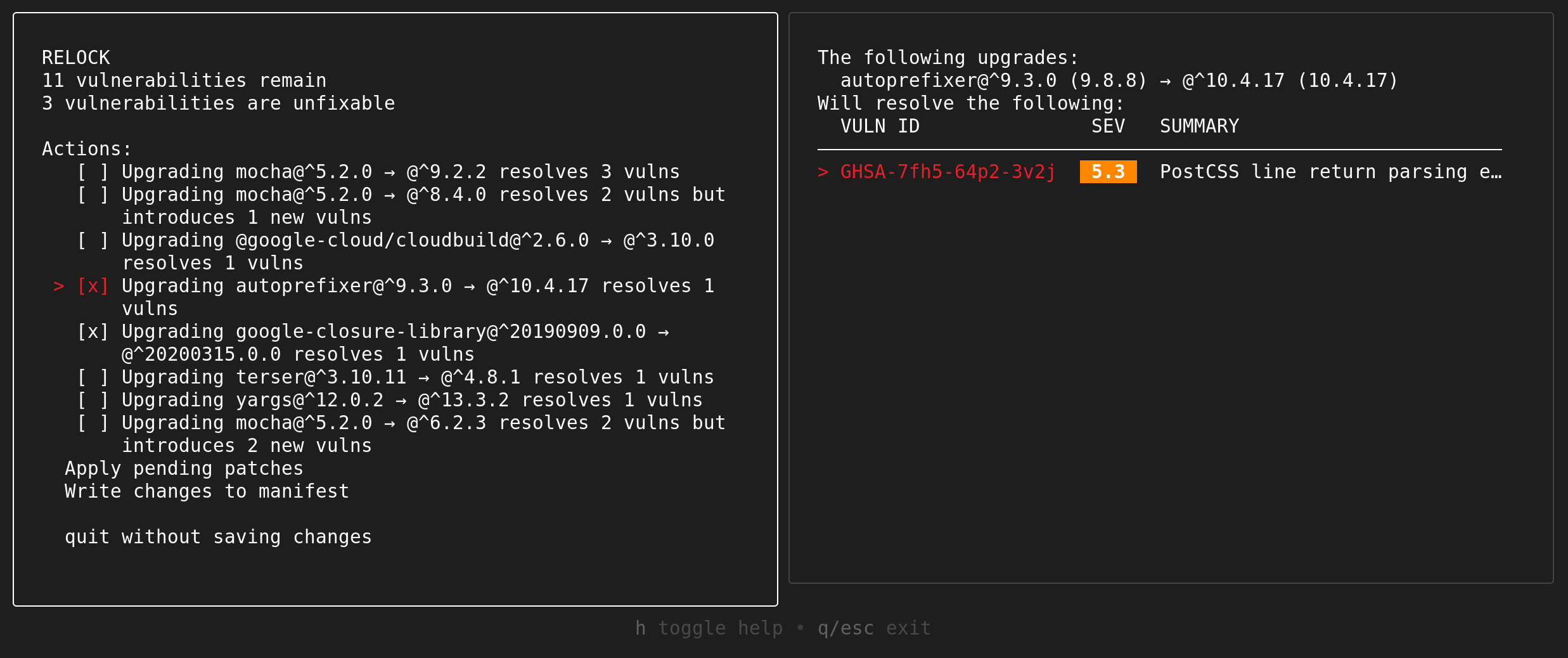
Guided Remediation: Provides recommendations for package version upgrades based on criteria such as dependency depth, minimum severity, fix strategy, and return on investment.
OSV-Scanner uses the extensible OSV-Scalibr library under the hood to provide this functionality. If a language or package manager is not supported currently, please file a feature request.
Underlying database
The underlying database, OSV.dev has several benefits in comparison with closed source advisory databases and scanners:
Covering most open source language and OS ecosystems (including Git), it’s comprehensive.
Each advisory comes from an open and authoritative source (e.g. GitHub Security Advisories, RustSec Advisory Database, Ubuntu security notices)
Anyone can suggest improvements to advisories, resulting in a very high quality database.
The OSV format unambiguously stores information about affected versions in a machine-readable format that precisely maps onto a developer’s list of packages
The above all results in accurate and actionable vulnerability notifications, which reduces the time needed to resolve them. Check out OSV.dev for more details!
Basic installation
To install OSV-Scanner, please refer to the installation section of our documentation. OSV-Scanner releases can be found on the releases page of the GitHub repository. The recommended method is to download a prebuilt binary for your platform. Alternatively, you can use
go install github.com/google/osv-scanner/v2/cmd/osv-scanner@latest to build it from source.
Key Features
For more information, please read our detailed documentation to learn how to use OSV-Scanner. For detailed information about each feature, click their titles in this README.
Please note: These are the instructions for the latest OSV-Scanner V2 beta. If you are using V1, checkout the V1 README and documentation instead.
Scanning a source directory
$ osv-scanner scan source -r /path/to/your/dir
This command will recursively scan the specified directory for any supported package files, such as package.json, go.mod, pom.xml, etc. and output any discovered vulnerabilities.
OSV-Scanner has the option of using call analysis to determine if a vulnerable function is actually being used in the project, resulting in fewer false positives, and actionable alerts.
OSV-Scanner can also detect vendored C/C++ code for vulnerability scanning. See here for details.
Supported Lockfiles
OSV-Scanner supports 11+ language ecosystems and 19+ lockfile types. To check if your ecosystem is covered, please check out our detailed documentation.
Container Scanning
OSV-Scanner also supports comprehensive, layer-aware scanning for container images to detect vulnerabilities in the following operating system packages and language-specific dependencies.
Distro Support
Language Artifacts Support
Alpine OS
Go
Debian
Java
Ubuntu
Node
Python
See the full documentation for details on support.
Usage:
$ osv-scanner scan image my-image-name:tag
License Scanning
Check your dependencies' licenses using deps.dev data. For a summary:
osv-scanner --licenses path/to/repository
To check against an allowed license list (SPDX format):
Scan your project against a local OSV database. No network connection is required after the initial database download. The database can also be manually downloaded.
[!WARNING]
Guided remediation (the fix command) can be risky when run on untrusted projects. It may trigger the package manager to execute scripts or follow external registries specified in the project. Please ensure you trust the source code and artifacts before proceeding.
OSV-Scanner provides guided remediation, a feature that suggests package version upgrades based on criteria such as dependency depth, minimum severity, fix strategy, and return on investment.
We currently support remediating vulnerabilities in the following files:
Ecosystem
File Format (Type)
Supported Remediation Strategies
npm
package-lock.json (lockfile)
in-place
npm
package.json (manifest)
relock
Maven
pom.xml (manifest)
override
This is available as a headless CLI command, as well as an interactive mode.
OSV-Scanner communicates with the following external services during operation:
OSV.dev API
The primary data source for vulnerability information. OSV-Scanner queries this API to check packages for known vulnerabilities and to identify vendored C/C++ dependencies. Data sent includes package names, versions, ecosystems, and file hashes. Use --offline mode to disable network requests and scan against a local database instead.
deps.dev API
Used for supplementary package information:
Dependency resolution: Resolves dependency graphs for vulnerability scanning and remediation
Container image scanning: Queries container image metadata for vulnerability detection
License scanning (--licenses flag): Retrieves license information for packages
Package deprecation: Checks if packages are deprecated
Data sent includes package names, versions, and ecosystems. No source code is transmitted.
Package Registries
When using native registry for dependency resolution (instead of deps.dev), OSV-Scanner may query:
Registry
URL
Used For
Maven Central
repo.maven.apache.org/maven2
Maven package metadata and POM files
npm Registry
registry.npmjs.org
npm package metadata
PyPI
pypi.org
Python package metadata
Contribute
Report Problems
If you have what looks like a bug, please use the GitHub issue tracking system. Before you file an issue, please search existing issues to see if your issue is already covered.
Contributing code to osv-scanner
See CONTRIBUTING.md for documentation on how to contribute code.
The most recent commit recorded on google/osv-scanner was 3 months ago, based on the GitHub push timestamp. The repository has 851 forks — one of the better signals of community interest.
Is google/osv-scanner open source?
Yes — google/osv-scanner ships under the Apache-2.0 license, which makes its source code freely readable (and, depending on license terms, forkable and reusable). Source: github.com/google/osv-scanner.
What license does google/osv-scanner use?
google/osv-scanner is released under the Apache-2.0 license. Always verify the LICENSE file directly on GitHub for the authoritative terms — license strings can be edited out of sync with a project's actual stance.
What topics is google/osv-scanner associated with?
GitHub's repository topics for google/osv-scanner: "scanner", "security-audit", "security-tools", "vulnerability-scanner". TopGit's editorial category is open-source.
Where can I see google/osv-scanner in action?
The project maintains a homepage at https://google.github.io/osv-scanner/. The README tab on this page also usually contains screenshots and a quickstart.
Where do I read more about google/osv-scanner?
This TopGit page is a snapshot — the READ ME tab shows the project's own README content (links stripped, images preserved). The GitHub repository at github.com/google/osv-scanner is the definitive source.
Read full README in the tab above.
Want a second opinion on osv-scanner?
Ask an AI that can read this page — one click and you get its take on osv-scanner.

 /osv-scanner