googlefonts/Inconsolata is tracked by TopGit as an open-source project, with 1.6k stars on GitHub, written primarily in Rust. Development repo of Inconsolata Fonts by Raph Levien
Snapshot summary built from the project's own GitHub metadata — there's no written TopGit review yet. The page will update automatically when a full review is published.
WHY NO REVIEW YET
TopGit writes full reviews for the most-starred, most-requested repositories. This page is a snapshot until then — see the READ ME tab for the original README in full.
Open-source monospace font for code listings, originally by @raphlinus
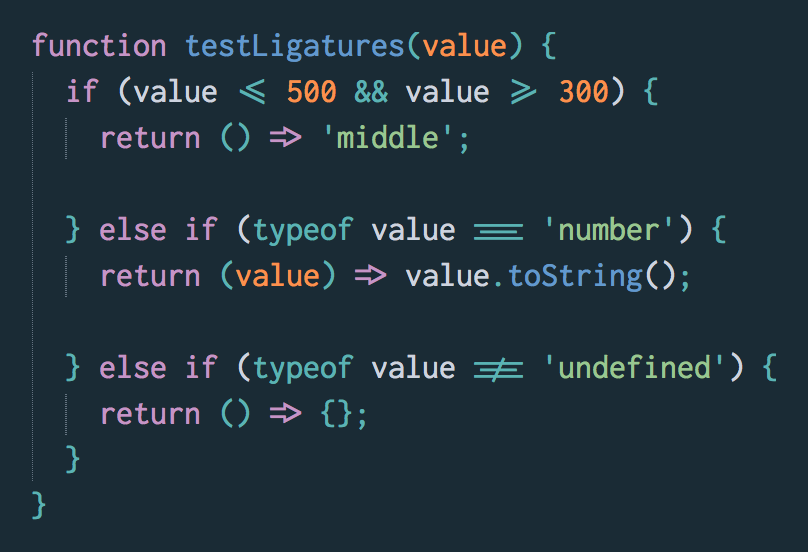
Ligatures
Inconsolata includes ligatures for a few JavaScript operators:
They are available in two families.
"Inconsolata" exposes the ligatures as dlig. These are disabled by default, and probably won't show up in your editor. You can enable them in CSS with this rule:
font-variant-ligatures: discretionary-ligatures;
"Ligconsolata" exposes the ligatures as liga. These are enabled by default. This is the family you should use in your text editor.
Note: the Ligconsolata variant has not yet been upgraded to version 3.000, as we're prioritizing the non-ligature variants.
Building the family
Family is built using Glyphs, fontmake and gftools post processing script. Tools are all python based.
To install all the Python tools into a virtualenv, do the following:
Minor design improvements (trademark corner spurs)
Further reading: Inconsolata expansion project thread on Google Fonts Discussions
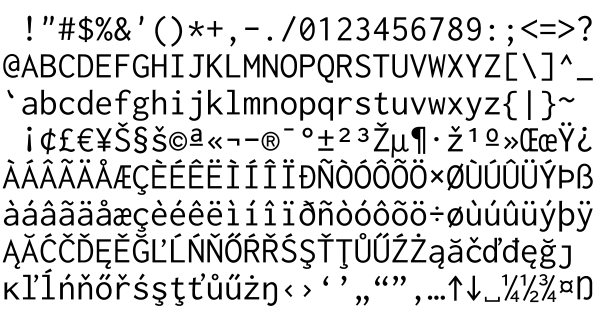
Supported glyphs sets:
GF Latin Pro
License
This Font Software is licensed under the SIL Open Font License, Version 1.1.
This license is copied below, and is also available with a FAQ at:
http://scripts.sil.org/OFL
Inconsolata Build Instructions
Inconsolata fonts can be built using either export from Glyphs or using fontmake. The font files committed to this repo are done using fontmake.
Source Files
Inconsolata source files are available in .glyphs format located in the /sources directory.
Adding ligatures
Follow the "Creating the ligature" section of the Glyphs ligatures tutorial.
Name your new glyph with the suffix .dlig, for instance bar_greater.dlig.
Open the Font Info panel.
Switch to the Features tab.
Click dlig in the sidebar.
Click the Update button at the bottom of the panel.
Switch to the Instances tab.
Update the Rename Glyphs value for "Ligconsolata Regular" to include a new line for your new glyph, for instance:
bar_greater.dlig=bar_greater.liga
Update the Rename Glyphs value for "Ligconsolata Bold".
Export the font, as explained below.
Exporting a variable font using fontmake
It's possible to export the project as a single variable font. It's just a bit tricky, because the font uses components with varying 2x2 components, triggering a bug which is present in both fontmake and Glyphs export. Thus, there's an inco_fix.py script in the sources directory that detects this case and decomposes just those components. Run that script before exporting. The script also decomposes corner components, which makes the resulting glyphs file suitable for fontmake export as well (fontmake currently has no support for corner components).
You can copy the script into the Scripts folder for Glyphs, which will make it available in the Script menu, or you can just copy it into the Macro Panel.
After running the script, the following fontmake invocation will generate a variable font:
This is the version in the fonts/ directory, as it is slightly smaller than the version generated by Glyphs.
We do not check the result of the inco_fix script into version control, as we want to preserve editability. It's entirely possible that a future version of fontmake (or Glyphs itself) will be able to handle the source file without running a script.
Exporting instances using fontmake
The source file contains 15 instances, including all weights of the normal (100) width, and also all masters. This is a reasonable complement for working on the font. Run the gen_instances.py script to generate a total of 72 instances; all combinations of the weights from 200 to 900, and widths 50, 70, 80, 90, 110, 120, 150, and 200.
There are two other instances for Ligconsolata, and fontmake will attempt to generate those, but the "Rename Glyphs" custom parameter doesn't seem to be respected by fontmake, so these won't have ligatures enabled. Use the Glyphs export instead (detailed below).
fontmake -g sources/Inconsolata-vf.glyphs -i -o ttf -a
These are the versions in the fonts/ directory.
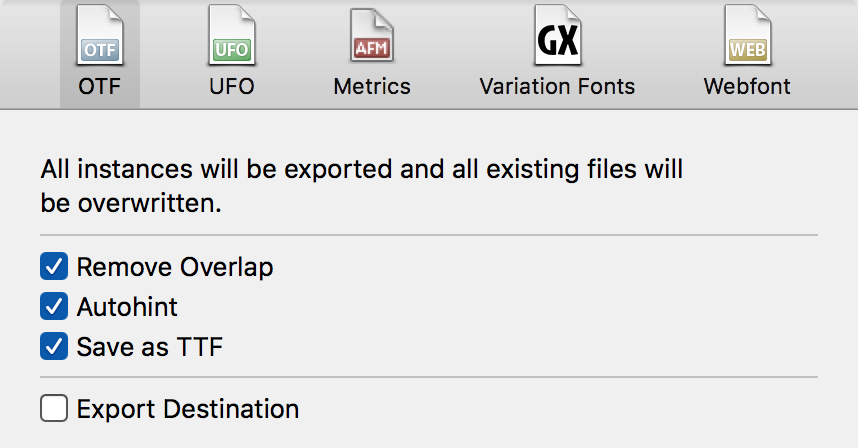
Font Export options (from Glyphs)
This is the preferred way to generate the Ligconsolata instances, but
TTF and OTF files should be exported into /fonts/ttf and /fonts/otf folders.
TTFs should be generated from Glyphs App with Autohint option checked. At the moment there is no custom build script required to produce font files, since default TTFautohinting options suffice.
OTFs should be generated with these options:
Remove Overlap
Autohint
Save as TTF
Export destination: $REPO_PATH/fonts/otf
Future work
In addition, we want to export a subset not including Vietnamese script coverage, to avoid over-large line spacing on older applications (such as terminals and text editors) that don't understand the "use typo metrics" flag (see https://github.com/googlefonts/Inconsolata/issues/35).
Glyphstool
The repository also contains some Rust code to manipulate Glyphs format masters, in the glyphstool subdirectory. This was used to apply global transforms (mostly as a starting point for the width work). Perhaps the most valuable aspect is that it contains a fairly complete set of line and box drawing primitives, inspired by [Source Code Pro] but with actually variable weight and width. It's not particularly polished or well documented, but is provided for completeness, and it's possible that it could be adapted to future tools that work with font data in the Glyphs format. The code is licensed under Apache 2.0 or MIT, in keeping with the Rust tradition.
How active is development on googlefonts/Inconsolata?
The most recent commit recorded on googlefonts/Inconsolata was 12 days ago, based on the GitHub push timestamp. The repository has 73 forks — one of the better signals of community interest.
How many stars does googlefonts/Inconsolata have?
googlefonts/Inconsolata has 1.6k GitHub stars — refresh the page for the live number, or check github.com/googlefonts/Inconsolata. TopGit mirrors GitHub's count but does not claim minute-by-minute accuracy.
Is googlefonts/Inconsolata open source?
Yes — googlefonts/Inconsolata ships under the OFL-1.1 license, which makes its source code freely readable (and, depending on license terms, forkable and reusable). Source: github.com/googlefonts/Inconsolata.
What is googlefonts/Inconsolata?
googlefonts/Inconsolata (googlefonts/Inconsolata) is a Rust project on GitHub. From the project's own README: Development repo of Inconsolata Fonts by Raph Levien
What language is googlefonts/Inconsolata written in?
googlefonts/Inconsolata is written primarily in Rust. GitHub's language field is based on the largest share of bytes in the default branch.
What license does googlefonts/Inconsolata use?
googlefonts/Inconsolata is released under the OFL-1.1 license. Always verify the LICENSE file directly on GitHub for the authoritative terms — license strings can be edited out of sync with a project's actual stance.
Where do I read more about googlefonts/Inconsolata?
This TopGit page is a snapshot — the READ ME tab shows the project's own README content (links stripped, images preserved). The GitHub repository at github.com/googlefonts/Inconsolata is the definitive source.
Read full README in the tab above.
Is Inconsolata worth your time?
ChatGPT, Claude and Perplexity can all read this page. Ask one of them what it makes of Inconsolata.

 /Inconsolata