140 GitHub stars and counting — grab/swift-leak-check is a Swift project TopGit is tracking across repositories on the platform.
Snapshot summary built from the project's own GitHub metadata — there's no written TopGit review yet. The page will update automatically when a full review is published.
WHY NO REVIEW YET
TopGit writes full reviews for the most-starred, most-requested repositories. This page is a snapshot until then — see the READ ME tab for the original README in full.
A framework, a command-line tool that can detect potential memory leak caused by strongly captured self in escaping closure
<img src=images/leakcheck_sample.png width=800/>
Example
Some examples of memory leak that are detected by the tool:
class X {
  private var handler: (() -> Void)!
  private var anotherHandler: (() -> Void)!

  func setup() {
    handler = {
      self.doSmth() // <- Leak
    }

    anotherHandler = { // Outer closure
      doSmth { [weak self] in // <- Leak
        // .....
      }
    }
  }
}
For first leak, self holds a strong reference to handler, and handler holds a strong reference to self, which completes a retain cycle.
For second leak, although self is captured weakly by the inner closure, but self is still implicitly captured strongly by the outer closure, which leaks to the same problem as the first leak
Usage
There're 2 ways to use this tool: the fastest way is to use the provided SwiftLeakChecker target and start detecting leaks in your code, or you can drop the SwiftLeakCheck framework in your code
and start building your own tool
SwiftLeakChecker
There is a SwiftLeakChecker target that you can run directly from XCode or as a command line.
To run from XCode:
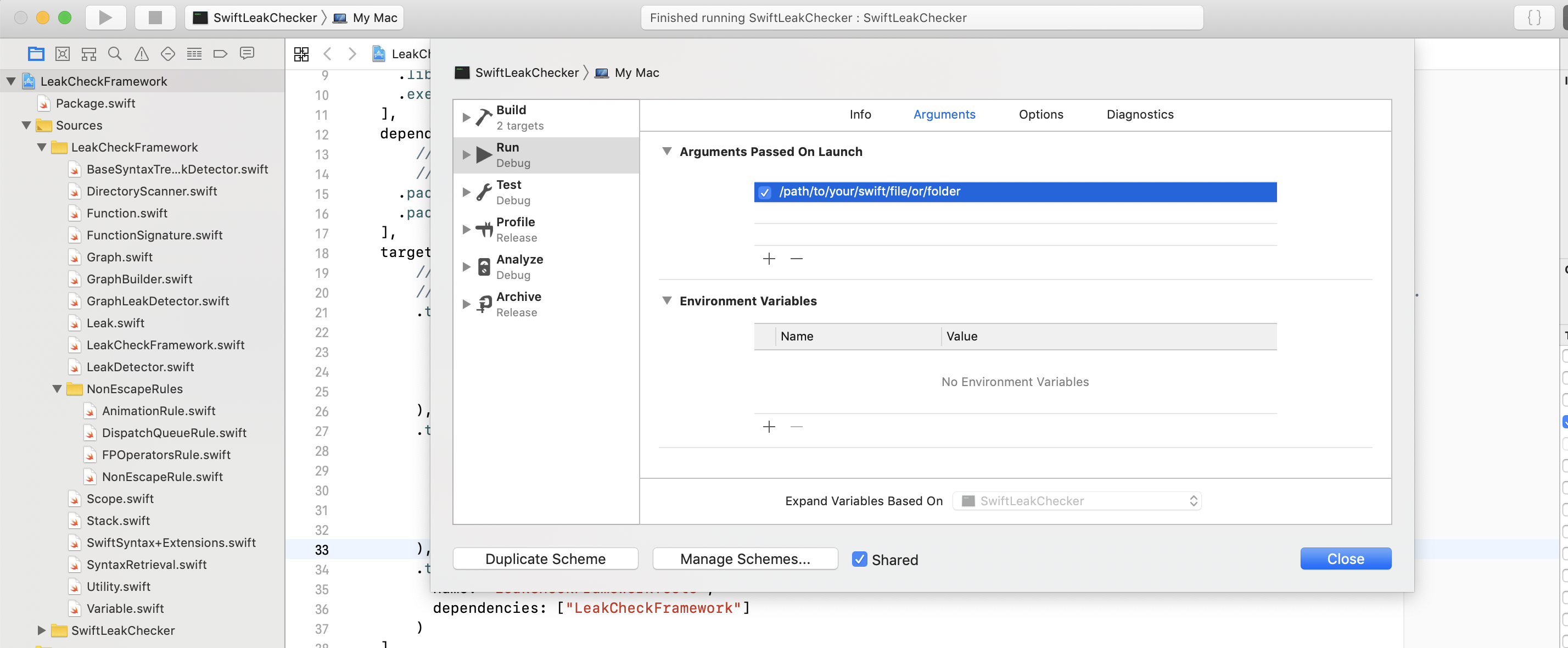
Edit the SwiftLeakChecker scheme and change the /path/to/your/swift/file/or/folder to an absolute path of a Swift file or directory. Then hit the Run button (or CMD+R)
The SwiftLeakChecker target is ready to be used as-is. But if you want to build your own tool, do more customisation etc.., then you can follow these steps.
Note: Xcode 11 or later or a Swift 5.2 toolchain or later with the Swift Package Manager is required.
Add this repository to the Package.swift manifest of your project:
import SwiftLeakCheck

let url = URL(fileURLWithPath: "absolute/path/to/your/swift/file/or/folder")
let detector = GraphLeakDetector()
let leaks = detector.detect(url)
leaks.forEach { leak in
  print("\(leak)")
}
Leak object
Each Leak object contains line, column and reason info.
{
  "line":41,
  "column":7,
  "reason":"`self` is strongly captured here, from a potentially escaped closure."
}
CI and Danger
The image on top shows a leak issue that was reported by our tool running on Gitlab CI. We use Danger to report the line and reason of every issue detected.
How it works
We use SourceKit to get the AST representation of the source file, then we travel the AST to detect for potential memory leak.
Currently we only check if self is captured strongly in an escaping closure, which is one specific case that causes memory leak
To do that, 3 things are checked:
1. Check if a reference captures self
block { [weak self] in
  guard let strongSelf = self else { return }
  let x = SomeClass()
  strongSelf.doSmth { [weak strongSelf] in
    guard let innerSelf = strongSelf else { return }
    x.doSomething()
  }
}
In this example, innerSelf captures self, because it is originated from strongSelf which is originated from self
x is also a reference but doesn't capture self
2. Check if a closure is non-escaping
We use as much information about the closure as possible to determine if it is non-escaping or not.
In the example below, block is non-escaping because it's not marked as @escaping and it's non-optional
strongSelf (in the inner closure) is defined from outside, and it captures self strongly
False-positive alarms
If we can't determine if a closure is escaping or non-escaping, we will just treat it as escaping.
It can happen when for eg, the closure is passed to a function that is defined in other source file.
To overcome that, you can define custom rules which have logic to classify a closure as escaping or non-escaping.
Non-escaping rules
By default, we already did most of the legworks trying to determine if a closure is non-escaping (See #2 of How it works section)
But in some cases, there's just not enough information in the source file.
For eg, we know that a closure passed to DispatchQueue.main.async will be executed and gone very soon, hence it's safe to treat it as non-escaping. But the DispatchQueue code is not defined in the current source file, thus we don't have any information about it.
The solution for this is to define a non-escaping rule. A non-escaping rule is a piece of code that takes in a closure expression and tells us whether the closure is non-escaping or not.
To define a non-escaping rule, extend from BaseNonEscapeRule and override func isNonEscape(arg: FunctionCallArgumentSyntax,....) -> Bool
Here's a rule that matches DispatchQueue.main.async or DispatchQueue.global(qos:).asyncAfter :
open class DispatchQueueRule: NonEscapeRule {

  open override isNonEscape(arg: FunctionCallArgumentSyntax?, funcCallExpr: FunctionCallExprSyntax,, graph: Graph) -> Bool {
    // Signature of `async` function
    let asyncSignature = FunctionSignature(name: "async", params: [
      FunctionParam(name: "execute", isClosure: true)
    ])

    // Predicate to match DispatchQueue.main
    let mainQueuePredicate = ExprSyntaxPredicate.memberAccess("main", base: ExprSyntaxPredicate.name("DispatchQueue"))

    let mainQueueAsyncPredicate = ExprSyntaxPredicate.funcCall(asyncSignature, base: mainQueuePredicate)
    if funcCallExpr.match(mainQueueAsyncPredicate) { // Matched DispatchQueue.main.async(...)
        return true
    }

    // Signature of `asyncAfter` function
    let asyncAfterSignature = FunctionSignature(name: "asyncAfter", params: [
      FunctionParam(name: "deadline"),
      FunctionParam(name: "execute", isClosure: true)
    ])

    // Predicate to match DispatchQueue.global(qos: ...) or DispatchQueue.global()
    let globalQueuePredicate = ExprSyntaxPredicate.funcCall(
      FunctionSignature(name: "global", params: [
        FunctionParam(name: "qos", canOmit: true)
        ]),
      base: ExprSyntaxPredicate.name("DispatchQueue")
    )

    let globalQueueAsyncAfterPredicate = ExprSyntaxPredicate.funcCall(asyncAfterSignature, base: globalQueuePredicate)
    if funcCallExpr.match(globalQueueAsyncAfterPredicate) {
        return true
    }

    // Doesn't match either function
    return false
  }
}
Here's another example of rule that matches UIView.animate(withDurations: animations:):
open class UIViewAnimationRule: BaseNonEscapeRule {
  open override func isNonEscape(arg: FunctionCallArgumentSyntax?, funcCallExpr: FunctionCallExprSyntax, graph: Graph) -> Bool {
    let signature = FunctionSignature(name: "animate", params: [
      FunctionParam(name: "withDuration"),
      FunctionParam(name: "animations", isClosure: true)
      ])

    let predicate = ExprSyntaxPredicate.funcCall(signature, base: ExprSyntaxPredicate.name("UIView"))
    return funcCallExpr.match(predicate)
  }
}
After creating the non-escaping rule, pass it to the leak detector:
let leakDetector = GraphLeakDetector(nonEscapingRules: [DispatchQueueRule(), UIViewAnimationRule()])
Predefined non-escaping rules
There're some ready-to-be-used non-escaping rules:
1. DispatchQueueRule
We know that a closure passed to DispatchQueue.main.async or its variations is escaping, but the closure will be executed very soon and destroyed after that. So even if it holds a strong reference to self, the reference
will be gone quickly. So it's actually ok to treat it as non-escaping
3. UIViewAnimationRule
UIView static animation functions. Similar to DispatchQueue, UIView animation closures are escaping but will be executed then destroyed quickly.
3. UIViewControllerAnimationRule
UIViewController's present/dismiss functions. Similar to UIView animation rule.
4. CollectionRules
Swift Collection map/flatMap/compactMap/sort/filter/forEach. All these Swift Collection functions take in a non-escaping closure
Write your own detector
In case you want to make your own detector instead of using the provided GraphLeakDetector, create a class that extends from BaseSyntaxTreeLeakDetector and override the function
class MyOwnLeakDetector: BaseSyntaxTreeLeakDetector {
  override func detect(_ sourceFileNode: SourceFileSyntax) -> [Leak] {
    // Your own implementation
  }
}

// Create an instance and start detecting leaks
let detector = MyOwnLeakDetector()
let url = URL(fileURLWithPath: "absolute/path/to/your/swift/file/or/folder")
let leaks = detector.detect(url)
Graph
Graph is the brain of the tool. It processes the AST and give valuable information, such as where a reference is defined, or if a closure is escaping or not.
You probably want to use it if you create your own detector:
let graph = GraphBuilder.buildGraph(node: sourceFileNode)
Note
To check a source file, we use only the AST of that file, and not any other source file. So if you call a function that is defined elsewhere, that information is not available.
For non-escaping closure, there's no need to use self.. This can help to prevent false-positive
License
This library is available as open-source under the terms of the MIT License.
Does grab/swift-leak-check have a project website?
No homepage URL was recorded for grab/swift-leak-check in TopGit's last sync. The README tab above frequently contains screenshots and demo links, or check the repository description on GitHub.
Does grab/swift-leak-check have any tags?
TopGit's last sync did not record any GitHub topics for grab/swift-leak-check. GitHub topics appear in the right sidebar of a repository page; that's the authoritative place to check.
How active is development on grab/swift-leak-check?
The most recent commit recorded on grab/swift-leak-check was 5.7 years ago, based on the GitHub push timestamp. The repository has 12 forks — one of the better signals of community interest.
How many stars does grab/swift-leak-check have?
grab/swift-leak-check has 140 GitHub stars — refresh the page for the live number, or check github.com/grab/swift-leak-check. TopGit mirrors GitHub's count but does not claim minute-by-minute accuracy.
What language is grab/swift-leak-check written in?
grab/swift-leak-check is written primarily in Swift. GitHub's language field is based on the largest share of bytes in the default branch.
What license does grab/swift-leak-check use?
grab/swift-leak-check is released under the MIT license. Always verify the LICENSE file directly on GitHub for the authoritative terms — license strings can be edited out of sync with a project's actual stance.
Where do I read more about grab/swift-leak-check?
This TopGit page is a snapshot — the READ ME tab shows the project's own README content (links stripped, images preserved). The GitHub repository at github.com/grab/swift-leak-check is the definitive source.
Read full README in the tab above.
Want a second opinion on swift-leak-check?
Ask an AI that can read this page — one click and you get its take on swift-leak-check.
 /swift-leak-check