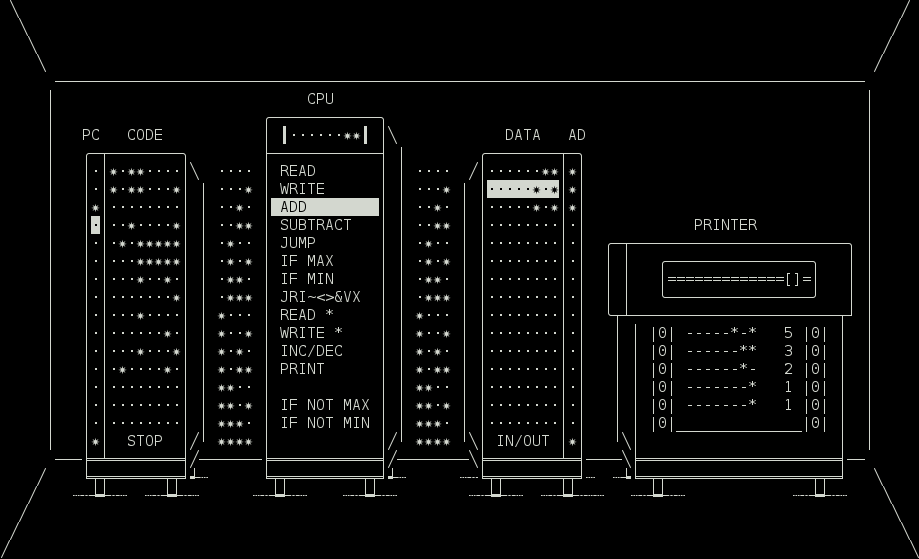
gto76/comp-m2 is tracked by TopGit as an open-source project, with 174 stars on GitHub, written primarily in C++. Comp Mark II – Simple 4-bit virtual computer
Snapshot summary built from the project's own GitHub metadata — there's no written TopGit review yet. The page will update automatically when a full review is published.
WHY NO REVIEW YET
TopGit writes full reviews for the most-starred, most-requested repositories. This page is a snapshot until then — see the READ ME tab for the original README in full.
Updated version of Comp – Simple 4-bit/1 Hz virtual computer for learning purposes
For quick start see HOW TO RUN
Overview
Processor has one 8 bit register.
Ram is separated in two address spaces; one for instructions, called CODE, and another for data, called DATA.
All instructions are 8 bits long.
Execution starts at the first address (0) of the CODE ram.
Execution stops when program reaches the last address (15) of the CODE ram.
Most of instructions consist of instruction code and address:
instruction code - 4 bits
  |  +-- address - 4 bits
  v  v
----***-  ->  READ 14  ->  Copy value stored at address 14 of DATA ram to register.
All addresses specified by instructions refer to DATA ram, except for addresses of Execution Control instructions (JUMP, IF MAX, IF MIN, ...). They refer to CODE part of ram.
Some instructions (JRI~<>&V) do not specify address. They operate on register (SHIFT L/R, NOT, ...) or between register and predefined DATA address (AND, OR, ...).
Whatever gets written to the last address is sent to the printer, or to stdout if program is running in a non-interactive mode.
When reading from the last address (15), we get a random byte value, or a single word from stdin, if program is running in non-interactive mode.
In this word every * is interpreted as true and all other characters as false. If word starts with a digit, it is then read as a number and converted appropriately.
Program will start in a non-interactive mode when any input is piped in, or any option is given. For instance echo | ./comp <file>
Programs can be saved with s key and loaded by passing their name as a parameter.
If more than one filename is passed, the computers will be chained together (stdin > comp-1 > comp-2 > ... > stdout).
If folder is passed, all files in that folder that have suffix .cm2 will be loaded in an alphabetical order.
Instruction set
Most of the instructions, together with the highlighted word that they use/modify, are pretty self-explainatory. Exception are instructions that start with -***, and are a part of JRI~<>&VX instruction cluster. They are:
J – JUMP_REG,
R – READ_REG,
I – INIT,
~ – NOT,
< – SHIFT_L,
> – SHIFT_R,
& – AND,
V – OR,
X – XOR.
(Use Shift–Left/Right Arrow to easily shift between them.)
Detailed descriptions of all instructions can be found HERE.
Keys
Space – Flip bit
Tab – Switch address space
Enter – Start/pause execution
Esc – Cancel execution
Delete, Backspace – Delete word or move following words up if empty
Insert, ] – Insert empty word and move following words down
s – Save ram to textfile named punchcard-<num>.cm2. To load it, start program with ./comp <file>
q – Save and quit
Detailed descriptions of all keys can be found HERE.
Options
--non-interactive, -n – Runs program without an interface. Output is sent to stdout instead of a printer. This option is not necessary if any other option is present, or if input is piped in.
--char-output, -c – Converts numbers to characters using ASCII standard when printing to stdout.
--filter, -f – Convert characters to numbers when reading from stdin, and numbers to characters when printing to stdout.
--game, -g – Same as filter, but reads characters directly from keyboard.
parse – Converts program to c++ code (other options may be specified).
compile – Compiles program to executable file, by converting it to c++ code and then running g++ compiler (other options from above may be specified). Only difference between compiled program and one run on the Comp Mark II is in execution speed.
How to run on…
Windows
Install Tiny Core Linux on VirtualBox using this instructions.
Run the UNIX commands.
UNIX
Make and g++ need to be installed first. On Ubuntu and Debian you can get them by running sudo apt-get install build-essential, on OS X they get installed automatically after running make.
$ git clone https://github.com/gto76/comp-m2.git
$ cd comp-m2
$ ./run
The most recent commit recorded on gto76/comp-m2 was 2.7 years ago, based on the GitHub push timestamp. The repository has 13 forks — one of the better signals of community interest.
How many stars does gto76/comp-m2 have?
gto76/comp-m2 has 174 GitHub stars — refresh the page for the live number, or check github.com/gto76/comp-m2. TopGit mirrors GitHub's count but does not claim minute-by-minute accuracy.
Is gto76/comp-m2 open source?
Yes — gto76/comp-m2 ships under the MIT license, which makes its source code freely readable (and, depending on license terms, forkable and reusable). Source: github.com/gto76/comp-m2.
What is gto76/comp-m2?
gto76/comp-m2 (gto76/comp-m2) is a C++ project on GitHub. From the project's own README: Comp Mark II – Simple 4-bit virtual computer
What language is gto76/comp-m2 written in?
gto76/comp-m2 is written primarily in C++. GitHub's language field is based on the largest share of bytes in the default branch.
What license does gto76/comp-m2 use?
gto76/comp-m2 is released under the MIT license. Always verify the LICENSE file directly on GitHub for the authoritative terms — license strings can be edited out of sync with a project's actual stance.
Where do I read more about gto76/comp-m2?
This TopGit page is a snapshot — the READ ME tab shows the project's own README content (links stripped, images preserved). The GitHub repository at github.com/gto76/comp-m2 is the definitive source.
Read full README in the tab above.
Still deciding about comp-m2?
One click hands the question to an AI along with this page — see what it says about comp-m2.

 /comp-m2