hundredrabbits/Orca is one of the open-source repositories TopGit tracks, currently at 5.1k stars, written primarily in JavaScript. Esoteric Programming Language
Snapshot summary built from the project's own GitHub metadata — there's no written TopGit review yet. The page will update automatically when a full review is published.
WHY NO REVIEW YET
TopGit writes full reviews for the most-starred, most-requested repositories. This page is a snapshot until then — see the READ ME tab for the original README in full.
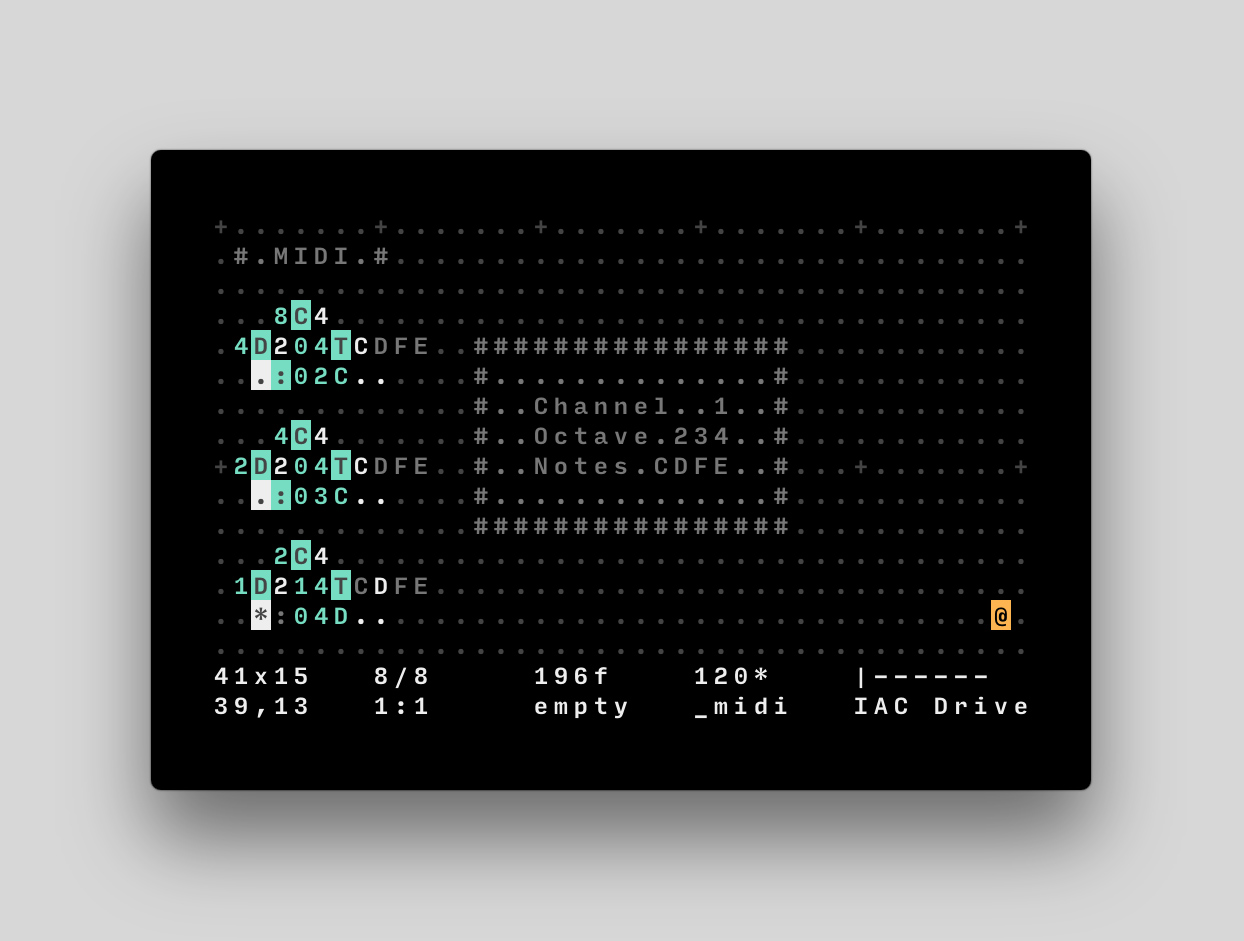
Orca is an esoteric programming language designed to quickly create procedural sequencers, in which every letter of the alphabet is an operation, where lowercase letters operate on bang, uppercase letters operate each frame.
This application is not a synthesizer, but a livecoding environment capable of sending MIDI, OSC & UDP to your audio/visual interfaces, like Ableton, Renoise, VCV Rack or SuperCollider.
If you need help, visit the chatroom, the mailing list, join the forum or watch a tutorial.
Download builds, available for Linux, Windows and OSX.
Use in your browser, requires webMidi.
Use in a terminal, written in C.
Use on small computers, written in assembly.
Use on the Monome Norns, written in Lua.
Install & Run
If you wish to use Orca inside of Electron, follow these steps:
git clone https://github.com/hundredrabbits/Orca.git
cd Orca/desktop/
npm install
npm start
Operators
To display the list of operators inside of Orca, use CmdOrCtrl+G.
!cc(channel knob value): Sends MIDI control change.
?pb(channel value): Sends MIDI pitch bench.
;udp: Sends UDP message.
=osc(path): Sends OSC message.
$self: Sends ORCA command.
MIDI
The MIDI operator : takes up to 5 inputs('channel, 'octave, 'note, velocity, length).
For example, :25C, is a C note, on the 5th octave, through the 3rd MIDI channel, :04c, is a C# note, on the 4th octave, through the 1st MIDI channel. Velocity is an optional value from 0(0/127) to g(127/127). Note length is the number of frames during which a note remains active. See it in action with midi.orca.
MIDI MONO
The MONO operator % takes up to 5 inputs('channel, 'octave, 'note, velocity, length).
This operator is very similar to the default Midi operator, but each new note will stop the previously playing note, would its length overlap with the new one. Making certain that only a single note is ever played at once, this is ideal for monophonic analog synthesisers that might struggle to dealing with chords and note overlaps.
MIDI CC
The MIDI CC operator ! takes 3 inputs('channel, 'knob, 'value).
It sends a value between 0-127, where the value is calculated as a ratio of 36, over a maximum of 127. For example, !008, is sending 28, or (8/36)*127 through the first channel, to the control mapped with id0. You can press enter, with the ! operator selected, to assign it to a controller. By default, the operator sends to CC64 and up, the offset can be changed with the command cc:0, to set the offset to 0.
MIDI PITCHBEND
The MIDI PB operator ? takes 3 inputs('channel, 'lsb, 'msb).
It sends two different values between 0-127, where the value is calculated as a ratio of 36, over a maximum of 127. For example, ?008, is sending an MSB of 28, or (8/36)*127 and an LSB of 0 through the first midi channel.
MIDI BANK SELECT / PROGRAM CHANGE
This is a command (see below) rather than an operator and it combines the MIDI program change and bank select functions.
The syntax is pg:channel;msb;lsb;program. Channel is 0-15, msb/lsb/program are 0-127, but program will automatically be translated to 1-128 by the MIDI driver. program typically corresponds to a "patch" selection on a synth. Note that msb may also be identified as "bank" and lsb as "sub" in some applications (like Ableton Live).
msb and lsb can be left blank if you only want to send a simple program change. For example, pg:0;;;63 will set the synth to patch number 64 (without changing the bank)
UDP
The UDP operator ; locks each consecutive eastwardly ports. For example, ;hello, will send the string "hello", on bang, to the port 49160 on localhost. In commander, use udp:7777 to select the custom UDP port 7777, and ip:127.0.0.12 to change the target IP. UDP is not available in the browser version of Orca.
You can use the listener.js to test UDP messages. See it in action with udp.orca.
OSC
The OSC operator = locks each consecutive eastwardly ports. The first character is used for the path, the following characters are sent as integers using the base36 Table. In commander, use osc:7777 to select the custom OSC port 7777, and ip:127.0.0.12 to change the target IP. OSC is not available in the browser version of Orca.
For example, =1abc will send 10, 11 and 12 to /1, via the port 49162 on localhost; =a123 will send 1, 2 and 3, to the path /a. You can use the listener.js to test OSC messages. See it in action with osc.orca or try it with SonicPi.
Advanced Controls
Some of Orca's features can be controlled externally via UDP though port 49160, or via its own command-line interface. To activate the command-line prompt, press CmdOrCtrl+K. The prompt can also be used to inject patterns or change settings.
Project Mode
You can quickly inject orca files into the currently active file, by using the command-line prompt — Allowing you to navigate across multiple files like you would a project. Press CmdOrCtrl+L to load multiple orca files, then press CmdOrCtrl+B and type the name of a loaded .orca file to inject it.
Default Ports
UDP Input
OSC Input
UDP Output
OSC Output
49160
None
49161
49162
Commands
All commands have a shorthand equivalent to their first two characters, for example, write can also be called using wr. You can see the full list of commands here.
play Plays program.
stop Stops program.
run Runs current frame.
bpm:140 Sets bpm speed to 140.
apm:160 Animates bpm speed to 160.
frame:0 Sets the frame value to 0.
skip:2 Adds 2, to the current frame value.
rewind:2 Removes 2, to the current frame value.
color:f00;0f0;00f Colorizes the interface.
find:aV Sends cursor to string aV.
select:3;4;5;6 Move cursor to position 3,4, and select size 5:6(optional).
inject:pattern;12;34 Inject the local file pattern.orca, at 12,34(optional).
write:H;12;34 Writes glyph H, at 12,34(optional).
time Prints the time, in minutes seconds, since 0f.
midi:1;2 Set Midi output device to #1, and input device to #2.
udp:1234;5678 Set UDP output port to 1234, and input port to 5678.
osc:1234 Set OSC output port to 1234.
Base36 Table
Orca operates on a base of 36 increments. Operators using numeric values will typically also operate on letters and convert them into values as per the following table. For instance Do will bang every 24th frame.
0
1
2
3
4
5
6
7
8
9
A
B
0
1
2
3
4
5
6
7
8
9
10
11
C
D
E
F
G
H
I
J
K
L
M
N
12
13
14
15
16
17
18
19
20
21
22
23
O
P
Q
R
S
T
U
V
W
X
Y
Z
24
25
26
27
28
29
30
31
32
33
34
35
Transpose Table
The midi operator interprets any letter above the chromatic scale as a transpose value, for instance 3H, is equivalent to 4A.
0
1
2
3
4
5
6
7
8
9
A
B
_
_
_
_
_
_
_
_
_
_
A0
B0
C
D
E
F
G
H
I
J
K
L
M
N
C0
D0
E0
F0
G0
A0
B0
C1
D1
E1
F1
G1
O
P
Q
R
S
T
U
V
W
X
Y
Z
A1
B1
C2
D2
E2
F2
G2
A2
B2
C3
D3
E3
Companion Applications
Pilot, a companion synth tool.
Aioi, a companion to send complex OSC messages.
Estra, a companion sampler tool.
Gull, a companion sampler, slicer and synth tool.
Sonic Pi, a livecoding environment.
Remora, a ESP32 Led controller firmware.
Links
Overview Video
Orca Podcast
Ableton & Unity3D
Japanese Tutorial
German Tutorial
French Tutorial
Examples & Templates
Extras
This application supports the Ecosystem Theme.
Download and share your patches on PatchStorage.
Support this project through Patreon.
See the License file for license rights and limitations (MIT).
The most recent commit recorded on hundredrabbits/Orca was 9 months ago, based on the GitHub push timestamp. The repository has 252 forks — one of the better signals of community interest.
How many stars does hundredrabbits/Orca have?
hundredrabbits/Orca has 5.1k GitHub stars — refresh the page for the live number, or check github.com/hundredrabbits/Orca. TopGit mirrors GitHub's count but does not claim minute-by-minute accuracy.
What language is hundredrabbits/Orca written in?
hundredrabbits/Orca is written primarily in JavaScript. GitHub's language field is based on the largest share of bytes in the default branch.
What license does hundredrabbits/Orca use?
hundredrabbits/Orca is released under the MIT license. Always verify the LICENSE file directly on GitHub for the authoritative terms — license strings can be edited out of sync with a project's actual stance.
What topics is hundredrabbits/Orca associated with?
GitHub's repository topics for hundredrabbits/Orca: "esoteric-language", "livecoding", "midi", "osc", "programming-language", "udp". TopGit's editorial category is open-source.
Where can I see hundredrabbits/Orca in action?
The project maintains a homepage at https://100r.co/site/orca.html. The README tab on this page also usually contains screenshots and a quickstart.
Where do I read more about hundredrabbits/Orca?
This TopGit page is a snapshot — the READ ME tab shows the project's own README content (links stripped, images preserved). The GitHub repository at github.com/hundredrabbits/Orca is the definitive source.
Read full README in the tab above.
Want a second opinion on Orca?
Ask an AI that can read this page — one click and you get its take on Orca.
 /Orca
/Orca