As an open-source project, ipython-contrib/jupyter_contrib_nbextensions has picked up 5.3k stars on GitHub (JavaScript). A collection of various notebook extensions for Jupyter
Snapshot summary built from the project's own GitHub metadata — there's no written TopGit review yet. The page will update automatically when a full review is published.
WHY NO REVIEW YET
TopGit writes full reviews for the most-starred, most-requested repositories. This page is a snapshot until then — see the READ ME tab for the original README in full.
This repository contains a collection of extensions that add functionality to
the Jupyter notebook.
These extensions are mostly written in Javascript and will be loaded locally in
your browser.
The IPython-contrib repository is maintained independently by a group of users
and developers and not officially related to the IPython development team.
The maturity of the provided extensions varies, so please
create an issue
at the project's
github repository
if you encounter any problems.
IPython/Jupyter version support
For Jupyter version 4 or 5, use the master branch of the repository.
Most nbextensions have been updated to work with both Jupyter 4.x and 5.x, but occasionally things get missed, or the Jupyter API changes in a minor version update, so if anything doesn't work as you'd expect/hope, please do check the issues, or open a new one as necessary!
This repo is pretty much all in the main master branch, although there remain vestigial branches for IPython notebook versions 2.x and 3.x.
JupyterLab
Due to major differences between the Jupyter Notebook and JupyterLab, the extensions in this
repository will not work in JupyterLab. You will find a list of alternative extensions for
JupyterLab on jupyterlab-contrib.
Documentation
Documentation for all maintained extensions can be found at
jupyter-contrib-nbextensions.readthedocs.io
All extensions that are maintained and active
have at least a yaml file to allow them being configured using the
jupyter_nbextensions_configurator
server extension, which is installed as a dependency of this package.
Most also have a markdown readme file for documentation.
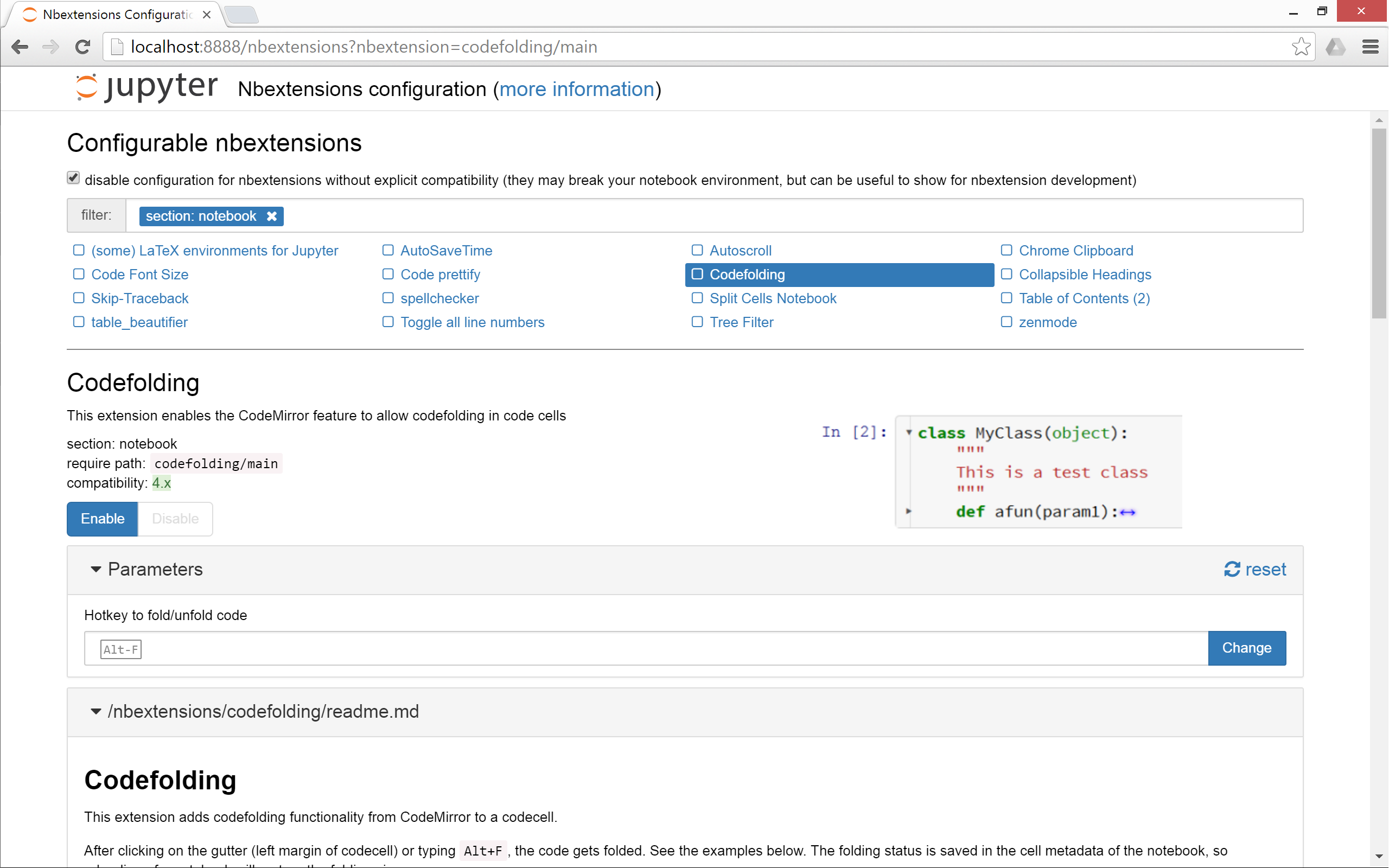
The jupyter_nbextensions_configurator server extension shows an nbextensions
tab on the main notebook dashboard (file tree page) from which you can see each
nbextension's markdown readme, and configure its options.
To view documentation without installing, you can check the list at
jupyter-contrib-nbextensions.readthedocs.io/en/latest/nbextensions.html,
or browse the nbextensions
directory to read markdown readmes on github at
github.com/ipython-contrib/jupyter_contrib_nbextensions/tree/master/src/jupyter_contrib_nbextensions/nbextensions.
Some extensions are not documented. We encourage you to add documentation for them.
Installation
To install the jupyter_contrib_nbextensions notebook extensions, three steps
are required. First, the Python pip package needs to be installed. Then, the
notebook extensions themselves need to be copied to the Jupyter data directory.
Finally, the installed notebook extensions can be enabled, either by using
built-in Jupyter commands, or more conveniently by using the
jupyter_nbextensions_configurator
server extension, which is installed as a dependency of this repo.
The Python package installation step is necessary to allow painless
installation of the nbextensions together with additional items like nbconvert
templates, pre-/postprocessors, and exporters.
1. Install the python package
PIP
All of the nbextensions in this repo are provided as parts of a python package,
which is installable in the usual manner using pip or the setup.py script.
To install the current version from PyPi, simply type
pip install jupyter_contrib_nbextensions
Alternatively, you can install directly from the current master branch of the
repository
This also automatically installs the Javascript and CSS files
(using jupyter contrib nbextension install --sys-prefix), therefore
the second installation step below can be skipped.
Installation from cloned Repo
You can also install from a cloned repo, which can be useful for development.
You can clone the repo using
This step copies the nbextensions' javascript and css files into the jupyter
server's search directory, and edits some jupyter config files.
A jupyter subcommand is provided for the purpose:
jupyter contrib nbextension install --user
The command does two things: installs nbextension files, and edits nbconvert
config files. The first part is essentially a wrapper around the
notebook-provided jupyter nbextension install, and copies relevant javascript
and css files to the appropriate jupyter data directory.
The second part edits the config files jupyter_nbconvert_config.jsonand
jupyter_notebook_config.json as noted below in the options.
The command can take most of the same options as the jupyter-provided versions,
including
--user to install into the user's home jupyter directories
--system to perform installation into system-wide jupyter directories
--sys-prefix to install into python's sys.prefix, useful for instance in
virtual environments, such as with conda
--symlink to symlink the nbextensions rather than copying each file
(recommended on non-Windows platforms).
--debug, for more-verbose output
In addition, two further option flags are provided to perform either only the
config-editing operations, or only the file-copy operations:
--only-files to install nbextension files without editing any config files
--only-config to edit the config files without copying/symlinking any
nbextension files. This edits the following files in the applicable jupyter
config directory:
jupyter_nbconvert_config.json to use some of the classes provided
in the python module jupyter_contrib_nbextensions.nbconvert_support
jupyter_notebook_config.json to enable the serverextension
jupyter_nbextensions_configurator.
Finally, the --perform-running-check option flag is provided in order to
prevent the installation from proceeding if a notebook server appears to be
currently running
(by default, the install will still be performed, even if a notebook server
appears to be running).
An analogous uninstall command is also provided, to remove all of the
nbextension files from the jupyter directories.
3. Enabling/Disabling extensions
To use an nbextension, you'll also need to enable it, which tells the notebook
interface to load it. To do this, you can use a Jupyter subcommand:
Alternatively, and more conveniently, you can use the
jupyter_nbextensions_configurator
server extension, which is installed as a dependency of this repo, and can be
used to enable and disable the individual nbextensions, as well as configure
their options. You can then open the nbextensions tab on the tree
(dashboard/file browser) notebook page to configure nbextensions.
You will have access there to a dashboard where extensions can be
enabled/disabled via checkboxes.
Additionally, a short documentation for each extension is displayed, and
configuration options are presented.
4. More complex setups
For complex or customized installation scenarios, please look at the
documentation for installing notebook extensions, server extensions, nbconvert
pre/postprocessors and templates on the Jupyter homepage.
Most nbextensions here should work fine with JupyterHub (because JupyterHub spawns
regular notebook servers for each individual user), but won't work with JupyterLab
(because the Javascript framework of JupyterLab is different from the notebook's, and
is still rapidly changing under active development).
See also installing Jupyter
Notebook extension structure
Most of the nbextensions are stored in the repository each as a separate subdirectory of
src/jupyter_contrib_nbextensions/nbextensions.
Each notebook extension typically has its own directory named after the extension, containing:
thisextension/thisextension.js - javascript implementing the nbextension
thisextension/thisextension.yml - file describing the nbextension to the jupyter_nbextensions_configurator server extension
thisextension/thisextension.css - optional CSS file, which may be loaded by the javascript
thisextension/README.md - readme file describing the nbextension in markdown format
A few (jupyter_highlight_selected_word, jupyter_latex_envs), exist as separate packages on pypi, which are included as dependencies of this package.
For further details, see the documentation at jupyter-contrib-nbextensions.readthedocs.io.
Contributing
To learn how to setup a development environment and for contribution guidelines, see CONTRIBUTING.md.
Does ipython-contrib/jupyter_contrib_nbextensions have any tags?
TopGit's last sync did not record any GitHub topics for ipython-contrib/jupyter_contrib_nbextensions. GitHub topics appear in the right sidebar of a repository page; that's the authoritative place to check.
How active is development on ipython-contrib/jupyter_contrib_nbextensions?
The most recent commit recorded on ipython-contrib/jupyter_contrib_nbextensions was 2.4 years ago, based on the GitHub push timestamp. The repository has 791 forks — one of the better signals of community interest.
How many stars does ipython-contrib/jupyter_contrib_nbextensions have?
ipython-contrib/jupyter_contrib_nbextensions has 5.3k GitHub stars — refresh the page for the live number, or check github.com/ipython-contrib/jupyter_contrib_nbextensions. TopGit mirrors GitHub's count but does not claim minute-by-minute accuracy.
What is ipython-contrib/jupyter_contrib_nbextensions?
ipython-contrib/jupyter_contrib_nbextensions (ipython-contrib/jupyter_contrib_nbextensions) is a JavaScript project on GitHub. From the project's own README: A collection of various notebook extensions for Jupyter
What language is ipython-contrib/jupyter_contrib_nbextensions written in?
ipython-contrib/jupyter_contrib_nbextensions is written primarily in JavaScript. GitHub's language field is based on the largest share of bytes in the default branch.
Read full README in the tab above.
Want a second opinion on jupyter_contrib_nbextensions?
Ask an AI that can read this page — one click and you get its take on jupyter_contrib_nbextensions.

 /jupyter_contrib_nbextensions