Snapshot of isl-org/FastGlobalRegistration: 554★, C++. Fast Global Registration
Snapshot summary built from the project's own GitHub metadata — there's no written TopGit review yet. The page will update automatically when a full review is published.
WHY NO REVIEW YET
TopGit writes full reviews for the most-starred, most-requested repositories. This page is a snapshot until then — see the READ ME tab for the original README in full.
This project will no longer be maintained by Intel.
Intel has ceased development and contributions including, but not limited to, maintenance, bug fixes, new releases, or updates, to this project.
Intel no longer accepts patches to this project.
If you have an ongoing need to use this project, are interested in independently developing it, or would like to maintain patches for the open source software community, please create your own fork of this project.
Fast Global Registration
Introduction
This is an open source C++ implementation based on the technique presented in
the following paper (download):
Fast Global Registration
Qian-Yi Zhou, Jaesik Park, and Vladlen Koltun
ECCV 2016
The source code and dataset are published under the MIT license. See LICENSE for details. In general, you can use them for any purpose with proper attribution. If you do something interesting with the code, we'll be happy to know about it. Feel free to contact us.
We include two external libraries (Eigen and flann) in the codebase for easy compilation. Both of them are under a BSD-style license. See source/External/README.txt for details.
Current version is 1.02 (CHANGELOG).
Compilation
FastGlobalRegistration is compiled using CMake. All dependencies are included in the codebase.
Ubuntu
The compilation has been tested on Ubuntu 16.04 (gcc 5.4) and Ubuntu 15.10 (gcc 4.9).
> mkdir build
> cd build
> cmake ../source/
> make
OS X
The compilation has been tested with El Capitan (Clang or Xcode) and Sierra (Clang or Xcode). Follow the instructions in the Ubuntu section to compile from console with Clang. If you want to use Xcode.
> mkdir build-xcode
> cd build-xcode
> cmake -G Xcode ../source/
> open FastGlobalRegistration.xcodeproj/
Windows
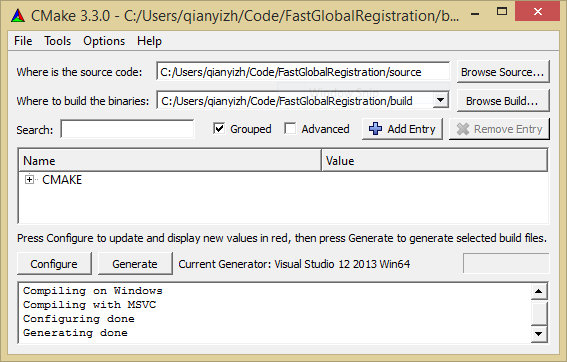
The compilation has been tested with Windows 8 and 10, Visual Studio 2013 and 2015. You can use the CMake GUI as follows. Click Configure and choose the correct Visual Studio version, then click Generate. Open the solution file with Visual Studio, change the build type to Release, then rebuild the ALL_BUILD target.
Running FastGlobalRegistration
The FastGlobalRegistration program takes three parameters: a file storing the features of the target point cloud, a file storing the features of the source point cloud, and an output file that contains a transformation in .log trajectory file format.
We have provided a synthetic dataset in the dataset folder. For example, you can run the program from console.
Evaluation program will write RMSE in output_eval.txt. The error in the Table 1 shows half of average RMSE.
Creating input
The input files are binary files storing the features of the point clouds. Each file starts with a 4-byte integer indicating the number of points, denoted as N; followed by a 4-byte integer indicating the dimensionality of the feature vector, denoted as K. Then N points are stored sequentially with each point represented as (3+K) floats. The (3+K) floats are the x,y,z coordinates and a K-vector representing the feature vector associated with the point. In the data provided in the repository, we use FPFH feature with K=33.
If you are familiar with PCL, the following code creates such a binary feature file of FPFH feature.
// Assume a point cloud with normal is given as
// pcl::PointCloud<pcl::PointNormal>::Ptr object

pcl::FPFHEstimationOMP<pcl::PointNormal, pcl::PointNormal, pcl::FPFHSignature33> fest;
pcl::PointCloud<pcl::FPFHSignature33>::Ptr object_features(new pcl::PointCloud<pcl::FPFHSignature33>());
fest.setRadiusSearch(feature_radius_);
fest.setInputCloud(object);
fest.setInputNormals(object);
fest.compute(*object_features);

FILE* fid = fopen("features.bin", "wb");
int nV = object->size(), nDim = 33;
fwrite(&nV, sizeof(int), 1, fid);
fwrite(&nDim, sizeof(int), 1, fid);
for (int v = 0; v < nV; v++) {
    const pcl::PointNormal &pt = object->points[v];
    float xyz[3] = {pt.x, pt.y, pt.z};
    fwrite(xyz, sizeof(float), 3, fid);
    const pcl::FPFHSignature33 &feature = object_features->points[v];
    fwrite(feature.histogram, sizeof(float), 33, fid);
}
fclose(fid);
Tuning parameters
The relevant parameters are defined in app.h as macros.
#define DIV_FACTOR			1.4		// Division factor used for graduated non-convexity
#define USE_ABSOLUTE_SCALE	0		// Measure distance in absolute scale (1) or in scale relative to the diameter of the model (0)
#define MAX_CORR_DIST		0.025	// Maximum correspondence distance (also see comment of USE_ABSOLUTE_SCALE)
#define ITERATION_NUMBER	64		// Maximum number of iteration
#define TUPLE_SCALE			0.95	// Similarity measure used for tuples of feature points.
#define TUPLE_MAX_CNT		1000	// Maximum tuple numbers.
We measure distance relative to the diameter_of_model if USE_ABSOLUTE_SCALE is set to 0. It is our default setting for synthetic data. For real world data which you know the absolute scale, change USE_ABSOLUTE_SCALE to 1 and define MAX_CORR_DIST accordingly.
MAX_CORR_DIST determines when the optimization will stop. In general, MAX_CORR_DIST (USE_ABSOLUTE_SCALE=1) or MAX_CORR_DIST * diameter_of_model (USE_ABSOLUTE_SCALE=0) should be set close to the threshold used to determine if a point pair is a match in global space. If you don't know how to set it, start with the default value 0.025. Decreasing this parameter sometimes results in tighter alignment.
TUPLE_MAX_CNT trades off between speed and accuracy. Increasing it will make the optimization slower but the result can be more accurate.
Matlab binding
FastGlobalRegistration has a Matlab binding courtesy of Jordi Pont-Tuset. It can be used seamlessly with the compilation tool chains mentioned above. Follow instructions provided by CMake if you need to make additional configuration for MATLAB_ROOT environment variable. To use the Matlab binding, execute fgr_demo.m from source/Matlab.
Using Open3D
This repository is maintained for providing standard alone FastGlobalRegistration application reproducing the results in the published paper. Open3D has end-to-end implementation used for FastGlobalRegistration - including point cloud I/O, feature extraction, and FastGlobalRegistration module in one place. For more details, please follow this tutorial.
Troubleshooting
If you encounter issues with FGR, please check troubleshooting.md
Does isl-org/FastGlobalRegistration have a project website?
No homepage URL was recorded for isl-org/FastGlobalRegistration in TopGit's last sync. The README tab above frequently contains screenshots and demo links, or check the repository description on GitHub.
Is isl-org/FastGlobalRegistration open source?
TopGit's metadata for isl-org/FastGlobalRegistration does not record a license. Most public repositories on GitHub ARE open source, but the exact terms vary — verify by opening the LICENSE file directly.
What is isl-org/FastGlobalRegistration?
isl-org/FastGlobalRegistration (isl-org/FastGlobalRegistration) is a C++ project on GitHub. From the project's own README: Fast Global Registration
Where do I read more about isl-org/FastGlobalRegistration?
This TopGit page is a snapshot — the READ ME tab shows the project's own README content (links stripped, images preserved). The GitHub repository at github.com/isl-org/FastGlobalRegistration is the definitive source.
Read full README in the tab above.
Is FastGlobalRegistration worth your time?
ChatGPT, Claude and Perplexity can all read this page. Ask one of them what it makes of FastGlobalRegistration.
 /FastGlobalRegistration