janpaepke/ScrollMagic — 15.0k★ on GitHub (TypeScript). The javascript library for magical scroll interactions.
Snapshot summary built from the project's own GitHub metadata — there's no written TopGit review yet. The page will update automatically when a full review is published.
WHY NO REVIEW YET
TopGit writes full reviews for the most-starred, most-requested repositories. This page is a snapshot until then — see the READ ME tab for the original README in full.
The lightweight library for magical scroll interactions
Looking for ScrollMagic v2? The legacy version is on the v2-stable branch.
ScrollMagic tells you where an element is relative to the viewport as the user scrolls — and fires events when that changes.
It's a convenience wrapper around IntersectionObserver and ResizeObserver that handles the performance pitfalls and counter-intuitive edge cases for you.
Not an animation library – unless you want it to be
By itself, ScrollMagic doesn't animate anything. It provides precise scroll-position data and events — what you do with them is up to you. If you're looking for a ready-made scroll animation solution, check out GSAP ScrollTrigger, Motion, or anime.js.
For pure CSS-driven scroll animations, see native scroll-driven animations (not yet supported in all browsers). ScrollMagic complements them by providing cross-browser support, event callbacks, progress values, and state management that the native API doesn't cover.
ScrollMagic is a general-purpose, framework-agnostic, zero-dependency foundation for scroll-driven UX — what you do with it is entirely up to you: class toggles, animations, lazy loading, parallax, scroll-linked video, behavioural tracking, or anything else.
Why ScrollMagic?
Tiny footprint, zero dependencies
Free to use (open source)
Optimized for performance (shared observers, batched rAF, single-frame updates)
Built for modern browsers, mobile compatible
Native TypeScript support
SSR safe
Works with any scroll container (window or custom element)
Horizontal and vertical scrolling
Plugin system for extensibility
Framework agnostic — works with React, Vue, vanilla JS, anything
Installation
npm install scrollmagic@next
Quick Start
import ScrollMagic from 'scrollmagic';

new ScrollMagic({ element: '#my-element' })
	.on('enter', () => console.log('visible!'))
	.on('leave', () => console.log('gone!'))
	.on('progress', e => console.log(`${(e.target.progress * 100).toFixed(0)}%`));
How It Works
ScrollMagic uses two sets of bounds to define the active range:
Container bounds — a zone on the scroll container, defined by containerStart and containerEnd
Element bounds — a zone on the tracked element, defined by elementStart and elementEnd
Progress goes from 0 to 1 as the element bounds pass through the container bounds. Events fire on enter, leave, and progress change.
Contain and Intersect
The two most common configurations are contain and intersect. They differ in where the container bounds are positioned:
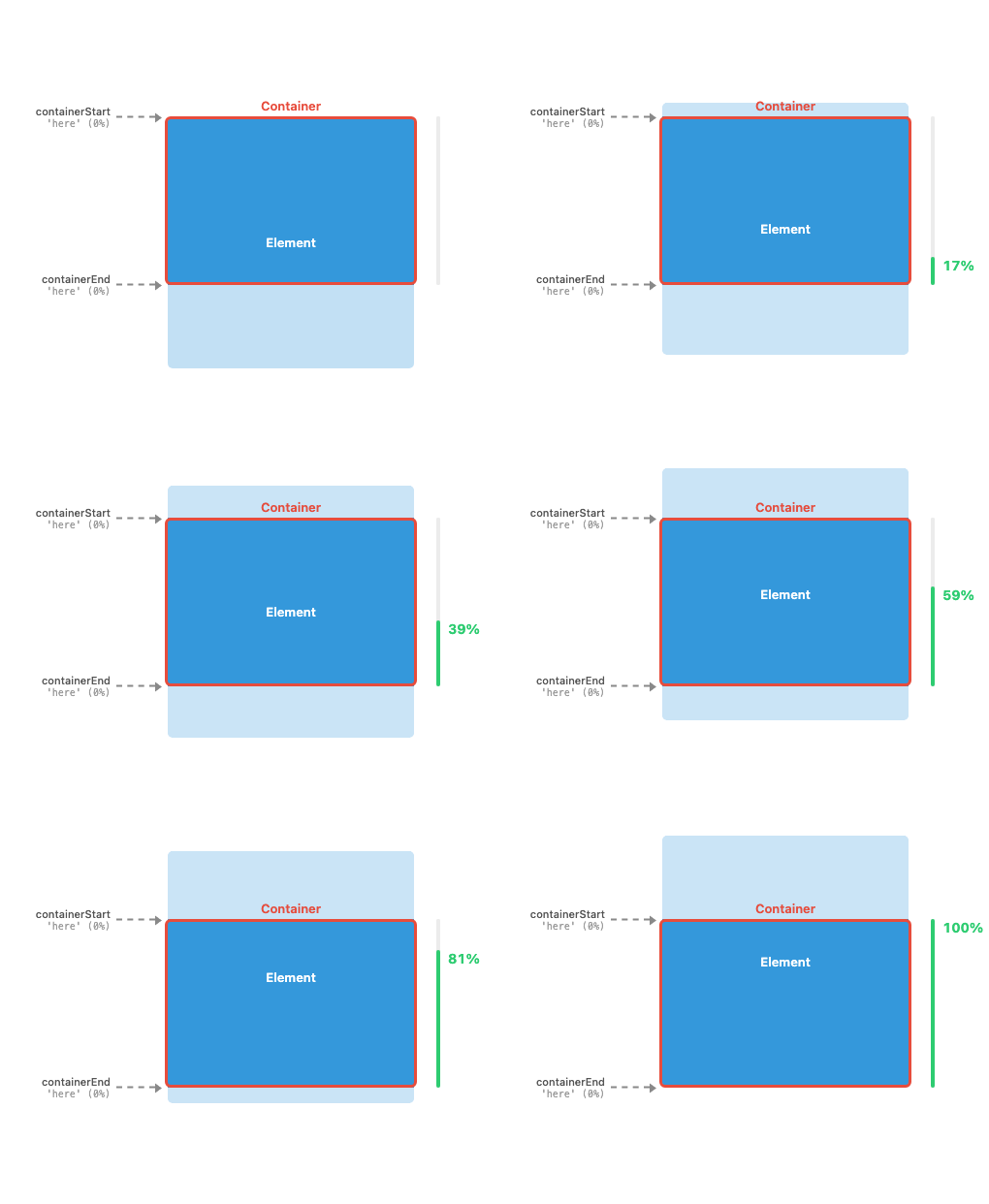
Contain (default when element is null)
The container bounds match the viewport edges — containerStart and containerEnd are both at 'here' (0%). Progress goes from 0 to 1 while one fully contains the other: either the element is fully visible inside the viewport, or the element fully covers the viewport.
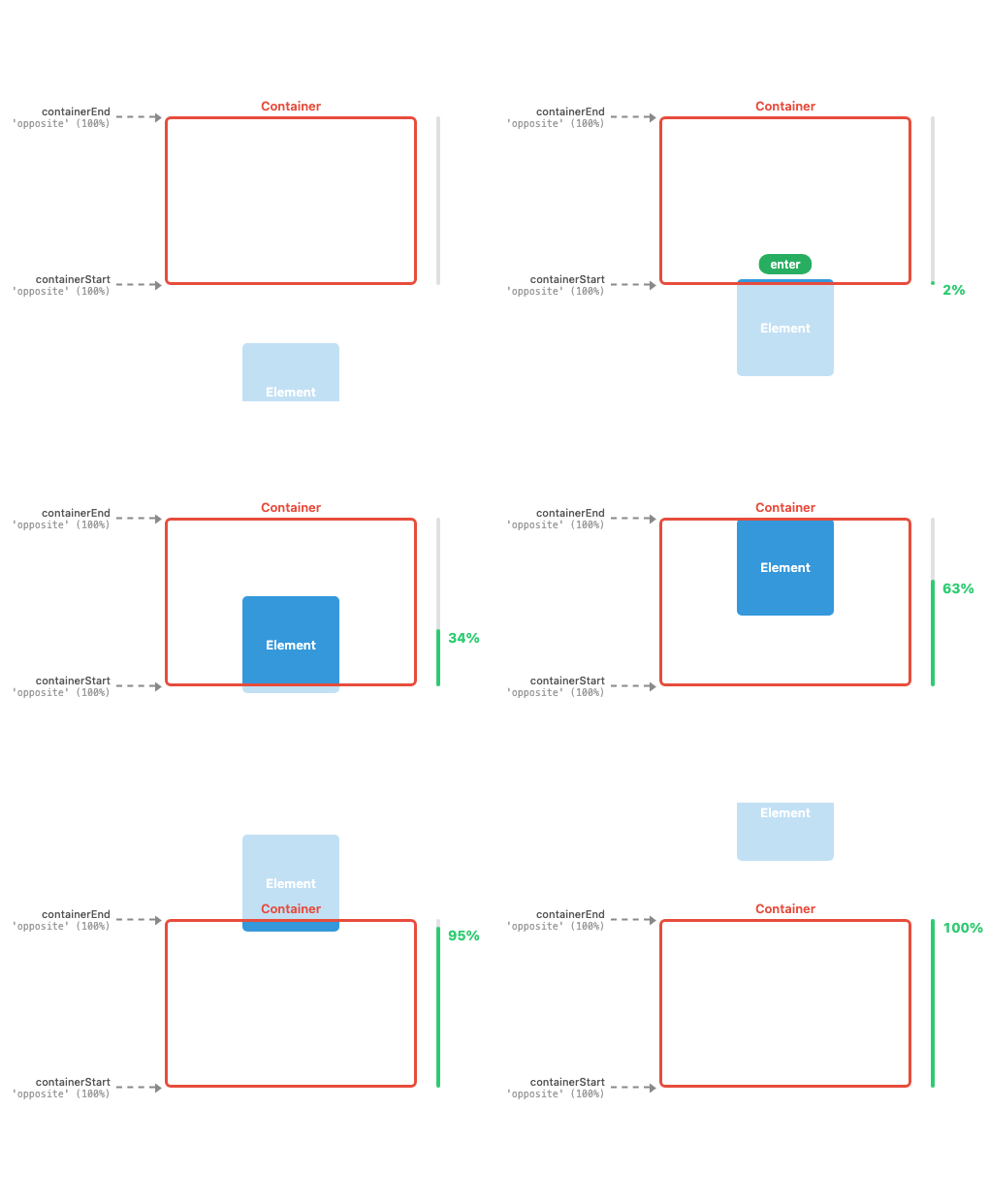
The container bounds span the full viewport — containerStart and containerEnd are at 'opposite' edges (100%). Progress goes from 0 to 1 while the element intersects with the viewport: starting when its leading edge enters and ending when its trailing edge leaves.
Typical uses: enter/leave animations, lazy loading, class toggles, visibility tracking.
Not just defaults
While contain and intersect are the inferred defaults, you can also configure them explicitly — for example setting containerStart: 0, containerEnd: 0 on an instance that has an element to get contain behaviour, or mixing container and element insets for custom tracking zones. The two configurations are useful mental models, not rigid modes.
Native scroll-driven animation ranges
If you're familiar with CSS scroll-driven animations, here's how the native view() timeline ranges map to ScrollMagic configurations:
containerStart: 'opposite', containerEnd: 0 — container zone collapses to the trailing edge
exit
containerStart: 0, containerEnd: 'opposite' — container zone collapses to the leading edge
The native entry-crossing and exit-crossing ranges are equivalent to entry and exit above — the distinction only applies when subdividing a single native timeline, not when defining standalone tracking ranges.
Options
All options are optional. They can be passed to the constructor and updated at any time via setters or .modify().
Option
Type
Default
Description
element
Element | string | null
first child of container
The tracked element (or CSS selector). Selectors match only the first element — create one instance per element to track multiple.
elementStart
number | string | function
0
Start inset on the element.
elementEnd
number | string | function
0
End inset on the element.
container
Window | Element | string | null
window
The scroll container (or CSS selector). Selectors use the first match.
containerStart
number | string | function | null
inferred (see below)
Start inset on the scroll container.
containerEnd
number | string | function | null
inferred (see below)
End inset on the scroll container.
vertical
boolean
true
Scroll axis. true = vertical, false = horizontal.
Inset values work like CSS top/bottom: positive values offset inward from the respective edge in the tracked direction. Accepted value types:
Numbers — pixel values (e.g. 50)
Strings — percentage or pixel strings (e.g. '50%', '20px'), relative to the parent size (scroll container for container options, element for element options)
Named positions — 'here' (0%), 'center' (50%), 'opposite' (100%)
Functions — (size) => number for dynamic computation
null means infer: For element, container, containerStart, or containerEnd, setting it to null resets them to their inferred default.
For containerStart/containerEnd the inferred values depend on element:
element is null → defaults to contain: the element is inferred as the first child of the container (for window this is document.body), container offsets are 'here' (0%), mapping progress to overall scroll position.
element is not null → defaults to intersect: container offsets are 'opposite' (100%), tracking the element as it scrolls through the full viewport.
Events
Subscribe with .on(), .off(), or .subscribe() (returns an unsubscribe function). Pass { once: true } to auto-remove the listener after its first invocation. Calling .off() or the unsubscribe function after the listener has already been removed (e.g. after a once listener fires) is a safe no-op.
Event
When
enter
Element enters the active zone (progress leaves 0 or 1)
leave
Element leaves the active zone (progress reaches 0 or 1)
progress
Progress value changes while in the active zone
Every event provides:
event.target; // the ScrollMagic instance (access all properties, e.g. event.target.progress, event.target.element)
event.type; // 'enter' | 'leave' | 'progress'
event.direction; // 'forward' | 'reverse'
event.location; // 'start' | 'inside' | 'end'
Examples
// Intersect (default): active while any part of the element
// is visible in the viewport
new ScrollMagic({
	element: '#a',
});

// Intersect with narrowed container zone:
// active while the element passes through the center line
new ScrollMagic({
	element: '#b',
	containerStart: 'center',
	containerEnd: 'center',
});

// Same as above, but with element offsets:
// starts 50px before the element, ends 100px after it
new ScrollMagic({
	element: '#c',
	containerStart: 'center',
	containerEnd: 'center',
	elementStart: -50,
	elementEnd: -100,
});

// Fixed scroll distance of 150px, regardless of element height.
// elementEnd receives the element's size and offsets from
// the bottom — (size - 150) leaves only 150px of track.
new ScrollMagic({
	element: '#d',
	containerStart: 'center',
	containerEnd: 'center',
	elementEnd: size => size - 150,
});

// Contain: active only while the element is fully visible
// (element insets pushed to opposite edges = full element height)
new ScrollMagic({
	element: '#e',
	elementStart: 'opposite', // same as '100%'
	elementEnd: 'opposite', // same as '100%'
});

// Contain (default when no element): track overall scroll progress
new ScrollMagic();
API
const sm = new ScrollMagic(options);

// Event listeners
sm.on(type, callback); // add listener, returns instance (chainable)
sm.on(type, callback, { once: true }); // listener auto-removes after first invocation
sm.off(type, callback); // remove listener, returns instance (chainable)
sm.subscribe(type, callback); // add listener, returns unsubscribe function
sm.subscribe(type, callback, { once: true }); // both auto-removes and returns unsubscribe

// Modify options after creation
sm.modify({ containerStart: 'center' });

// All options can also be directly read and written
const elem = sm.element; // get the tracked element
sm.containerStart = 'center'; // set individual options

// Read-only getters
sm.progress; // 0–1, how far through the active zone
sm.activeRange; // { start, end } container scroll positions where tracking is active
sm.scrollVelocity; // px/s along tracked axis, 0 when idle
sm.resolvedBounds; // { element, container } cached layout bounds

// Refresh — recalculate bounds after external layout changes
sm.refresh();

// Pause / resume tracking without destroying
sm.disable(); // disconnects all observers, freezes progress
sm.enable(); // reconnects observers, recalculates from current state
sm.disabled; // read-only, true when disabled or destroyed

// Lifecycle
sm.destroy();

// Static
ScrollMagic.defaultOptions({ vertical: false }); // get/set defaults for new instances
ScrollMagic.refreshAll(); // refresh every active instance
ScrollMagic.destroyAll(); // destroy every active instance
When to use refresh()
ScrollMagic automatically tracks element size changes (via ResizeObserver) and scroll position changes. But some layout changes are invisible to these observers — they change an element's position without changing its size or triggering a scroll event.
// After changing a style that affects position
element.style.marginTop = '100px';
sm.refresh();

// After fonts finish loading (affects text reflow)
document.fonts.ready.then(() => ScrollMagic.refreshAll());

// After a framework re-render that changes layout
onRouteChange(() => ScrollMagic.refreshAll());
Note that refresh() is only needed if you want bounds to update before the next scroll event. If the user keeps scrolling, element positions are re-read on every scroll frame anyway. refresh() matters when layout changes while tracking is active and the scroll position stays the same — e.g. toggling a class or injecting content without any scrolling.
refresh() is asynchronous — it schedules recalculation for the next animation frame and returns immediately. Multiple refresh() calls within the same frame are batched automatically.
Plugins
ScrollMagic has a plugin system for extending instance behaviour.
janpaepke/ScrollMagic has 15.0k GitHub stars — refresh the page for the live number, or check github.com/janpaepke/ScrollMagic. TopGit mirrors GitHub's count but does not claim minute-by-minute accuracy.
Is janpaepke/ScrollMagic open source?
Yes — janpaepke/ScrollMagic ships under the MIT license, which makes its source code freely readable (and, depending on license terms, forkable and reusable). Source: github.com/janpaepke/ScrollMagic.
What is janpaepke/ScrollMagic?
janpaepke/ScrollMagic (janpaepke/ScrollMagic) is a TypeScript project on GitHub. From the project's own README: The javascript library for magical scroll interactions.
Where can I see janpaepke/ScrollMagic in action?
The project maintains a homepage at http://ScrollMagic.io. The README tab on this page also usually contains screenshots and a quickstart.
Where do I read more about janpaepke/ScrollMagic?
This TopGit page is a snapshot — the READ ME tab shows the project's own README content (links stripped, images preserved). The GitHub repository at github.com/janpaepke/ScrollMagic is the definitive source.
Read full README in the tab above.
Curious whether ScrollMagic is right for you?
Let ChatGPT, Claude, or Perplexity look into it — click below and see what AI actually says about ScrollMagic.

 /ScrollMagic